
saco Bosch SMV40C30GB Dishwasher


Operating Instructions - Dishwasher Bosch SMV40C30GB
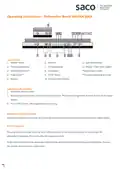
Control Panel
1. ON/OFF switch
2. Timer programming*
3. Additional options**
4. Programme**
5. Button <
6. Button >
11. Salt refill indicator
7. Cleaning display
8. Dry display
12. Display “Check water supply”
*Depending on model
9. START button
10. Rinse aid refill indicator
**Number depending on model
Switching on the appliance
1. Switch the ON/OFF switch
2. Rotate programme selector to the required programme. The expected programme duration flashes on the digital
display.
3. Press START button. The programme starts running.
Remaining running time display
When the programme is selected, the remaining running time of the programme is indicated on the digital display.
End of programme
The programme has ended when the value 0:00 is indicated on the numerical display. To save energy, the
dishwasher is switched off 1 minute after the programme ends.
At the end of the programme please open the door fully and not partially when emptying the dishwasher. Remove
the utensils when they have cooled down.


| General | Details |
|---|---|
| Name | saco Bosch SMV40C30GB Dishwasher |
| Make | saco |
| Language | English |
| Filetype | PDF (Download) |
| File size | 0.78 MB |
 (1 votes, average: 5.00 out of 5)
 Loading...

saco DIF 04B1 Merlin House Dishwasher

saco Dishwasher Whirlpool G2P DWI

saco Bosch SMV40C30GB Dishwasher Overview
Summary of Contents
- Page 1: Operating instructions - Dishwasher Bosch SMV40C30GB Control panel includes ON/OFF switch, timer programming, additional options, and programme selection. Switching on the appliance involves switching the ON/OFF switch and rotating the programme selector. Pressing the START button initiates the selected programme. The remaining running time of the programme is displayed digitally. The programme ends when 0:00 is indicated on the display. The dishwasher automatically switches off 1 minute after the programme ends to save energy. At the end of the programme, open the door fully when emptying the dishwasher. Remove utensils only after they have cooled down.
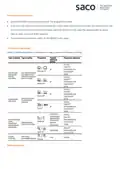
- Page 2: Interrupting the programme Switch off ON/OFF switch, the LEDs go out. The programme is saved. If the door was opened on an appliance which has a warm water connection or is heated, first leave the door ajar for several minutes and then close. To continue the programme, switch on the ON/OFF switch again. Overview of programmes Select a suitable programme according to the type of utensils and degree of soiling.
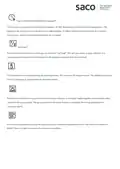
- Page 3: Express Wash/Speed Perfect/VarioSpeed function reduces running time by approximately 20-50% depending on the selected rinse programme. The change in running time is indicated on the digital display. To obtain optimum cleaning results at a reduced running time, water and energy consumption are increased. Half Load option saves water, energy, and time when washing a few items. It is recommended to use less detergent for a half load compared to a full load. Increased temperature during the cleaning process enhances hygiene, ideal for items like chopping boards and baby bottles. The mixed load option allows washing very soiled pots and pans with normally soiled utensils. Spray pressure in the lower basket is intensified, and rinsing temperature is slightly increased. An increased temperature during the final rinse and extended drying phase improve drying for plastic parts. There is a slight increase in energy consumption with these options.

BOSCH SMD8YCX01G Fully- Dishwasher

FISHER PAYKEL DD60DCX9 Dishwasher

IKEA RENGOERA Dishwasher

FISHER AND PAYKEL DD60STX6HI1 Tall Dishwasher

BOSCH SHP65CM2WH Dishwasher

FISHER PAYKEL DD24SCTX9N Sanitize Dishwasher

ASKO D5233 Dishwasher

GAGGENAU DF481100 Dishwasher

FISHER PAYKEL DD60DDFX9 Double Sanitise DishDrawer Dishwasher

NEFF S257ECX21E Dishwasher