
BOSCH SHE3AEM2N Dishwasher






Dishwasher
SHE3AEM2N
[en-us] Use and Care Manual


| General | Details |
|---|---|
| Name | BOSCH SHE3AEM2N Dishwasher |
| Make | Bosch |
| Language | English |
| Filetype | PDF (Download) |
| File size | 2.56 MB |
 (1 votes, average: 5.00 out of 5)
 Loading...

BOSCH SMV6ZCX49E-39 Dishwasher

BOSCH SMI4HVS33E Dishwasher

BOSCH SRV2HKX39G Dishwasher

BOSCH SGS4HAW40G Dishwasher

BOSCH SGH4HVX32G Dishwasher

BOSCH SMS4ECI26E Dishwasher

BOSCH SMS6EDI02G Free-Standing Dishwasher

BOSCH SMS6EDW02G Free-Standing Dishwasher

BOSCH SMV4HTX27G Dishwasher

BOSCH SMV4HCX48E Dishwasher

BOSCH SHE3AEM2N Dishwasher Overview
Summary of Contents
- Page 1: Dishwasher SHE3AEM2N Use and Care Manual
- Page 2: IMPORTANT SAFETY INSTRUCTIONS Safety definitions General information Intended use Restrictive use Grounding instructions Safe use Risk to children State of California Proposition 65 Warning Basic Operation Protection against unintentional operation Switching on the appliance Setting a cycle Setting options Setting the time delay Starting the wash cycle Activating the button lock Deactivating the button lock Interrupting the wash cycle Terminating the wash cycle Switching off the appliance Preventing material damage Environmental protection and energy-saving Saving energy AquaSensor Familiarizing yourself with your appliance Appliance Controls Dishwasher Cycles Energy Guide Favorite Features Upper rack Lower rack Silverware Basket Cup shelf Cleaning and maintenance Cleaning the tub Cleaning agent Tips on appliance care Filter system Cleaning the spray arms Before using for the first time Initial use Rinse aid system Rinse aid Setting the amount of rinse aid Switching off the amount of rinse aid Troubleshooting Transportation, storage and disposal Removing the appliance Vacation and storage Transporting the appliance Disposal of your old appliance Detergent The correct detergents Incompatible detergents Information on detergent Adding detergent Detergent table Customer Service Model number (E-Nr.), production number (FD) and consecutive numbering (Z-Nr.) Technical specifications Information regarding free and open source software
- Page 3: Statement of limited product warranty. What this warranty covers and who it applies to. How long the warranty lasts. Extended warranty. Repair/replace as your exclusive remedy. Out of warranty product. Warranty exclusions. Obtaining warranty service. Product information.
- Page 4: IMPORTANT SAFETY INSTRUCTIONS Always use caution when opening the door during or following a wash cycle as hot water or steam may escape. Under certain conditions, hydrogen gas may be produced in a hot water system that has not been used for two weeks or more. To avoid floor damage and possible mold growth, do not allow wet areas to remain around or under the dishwasher. Before using a dishwasher that is connected to a hot water system that has been unused for two weeks or longer, turn on all hot water faucets and let the water flow from each for several minutes. It is highly recommended for the end user to become familiar with the procedure to shut off the incoming water supply and the procedure to shut off the incoming power supply. To avoid risk of electric shock, only use the appliance in enclosed residential space according to the installation manual. Do not allow children to play in or on the dishwasher. When loading items to be washed, locate sharp items so they are not likely to damage the door seal. Do not wash plastic items unless they are marked dishwasher safe or the equivalent. This product may contain a chemical known to the State of California, which can cause cancer or reproductive harm.
- Page 5: Preventing material damage Harsh chemicals such as bleach-based products can damage your dishwasher. Do not use harsh chemicals such as bleach-based products to clean your dishwasher. Certain cleaning products may damage the appliance. Do not use a steam cleaner. So as not to scratch the finish on the appliance, do not use sponges with a rough surface or abrasive cleaning agents. Do not use stainless steel polish on an anti-fingerprint finish or a black stainless finish. When the program ends, let the appliance cool down a bit before opening the door. Protect against freezing to avoid possible damage to the fill valve. Damage caused by freezing is not covered by the warranty. Saving energy If you follow these instructions, your appliance will use less power and water. The Normal program is energy-efficient and environmentally friendly. The AquaSensor is an optical measuring device which measures the turbidity of the washing water. You can save water with the AquaSensor. If the soiling level is high, the washing water is drained off and replaced with fresh water. If the soiling level is lower, the washing water is used in the next rinse, reducing water consumption. In the Auto cycles, the temperature and run time are additionally adjusted to the level of soiling.
- Page 6: Familiarizing yourself with your appliance Detergent dispenser: Add detergent to the detergent dispenser. Lower rack: The lower spray arm washes the dishware in the lower rack. If the dishware has not been washed properly, clean the spray arms.
- Page 7: Familiarizing yourself with your appliance Detergent tab collecting tray During the wash cycle, detergent tabs automatically drop out of the detergent dispenser into the tab collecting tray, where they can dissolve fully. Upper spray arm The upper spray arm washes the dishware in the upper rack. If the dishware has not been washed properly, clean the spray arms. Dispenser for rinse aid Rinse aid is added to the dispenser for rinse aid. You will need this data to contact customer service. You can use the control panel to configure all functions of your appliance and to obtain information about the operating status. If you press for approx. 3 seconds, you can open the basic settings. Switching on the appliance Terminating the wash cycle.
- Page 8: Familiarizing yourself with your appliance The displays show the remaining time of the wash cycle. Starting the wash cycle Rinse aid refill indicator Rinse aid system The indicator lights up at the end of the program Sanitize. Once the wash cycle has ended, the display lights up.
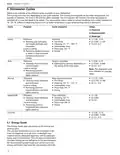
- Page 9: Dishwasher cycles overview includes different cycles available on the dishwasher. The running time may vary depending on the selected cycle, water temperature, quantity of dishware, and level of dirt. Consumption values relate to normal conditions and a water hardness of 16 - 20 °E. Heavy cycle is for washing pots, pans, and non-fragile dishware with a running time of 1:40 - 2:10. Auto cycle optimizes cleaning based on the soiling of the rinse water, with a running time of 2:05 - 2:15. Normal cycle is designed for mixed dishware and has a running time of 2:15 - 2:20. Speed 60® cycle is time-optimized for lightly dried-on food remnants, with a running time of 1:00. Energy Guide label is based on the Normal soil sensing cycle. The unit was tested without rinse aid and with a single dose of detergent. Dish loads should have the rack position set as per energy certification test recommendations.
- Page 10: Highest position is recommended for daily use to wash a full load of normally soiled dishes. Only sanitizing cycles have been designed to meet the requirements for soil removal and sanitation efficacy. There is no intention to imply that all cycles on a certified machine have passed the sanitization performance test. An overview of the possible features of your appliance and how to use them can be found here. Arrange cups, glasses, and small tableware items in the upper rack. With the favorite function, you can save a combination of a cycle and an option via the Home Connect app. You can use the Home Connect app to download additional cycles and options. An overview of the different options available on your dishwasher is provided. For better drying results, the final rinse temperature is increased and the drying phase extended. To ensure a higher hygiene status, the temperature is increased and maintained for an extra-long period.
- Page 11: Before using for the first time, arrange the silverware in the silverware basket, ensuring that the items are not nestled together and with the sharp points down. Before the first use, or after a factory reset, you will need to configure the settings. The sharp points and edges of knives and other sharp utensils can cause serious injury. Load knives and other sharp utensils with edges down. Connect your appliance to a mobile device to conveniently change all settings using the Home Connect® app. Add rinse aid before starting the appliance. Switch on the appliance and set the amount of rinse aid. Start the program with the highest cleaning temperature without dishware to remove any marks from water or other residues. For optimum drying results, use rinse aid intended for household dishwashers. If the rinse aid refill indicator lights up, fill the dispenser with rinse aid.
- Page 12: Add rinse aid up to the max mark. If rinse aid spills out, remove it from the tub. Spilled rinse aid can cause excessive frothing during the wash cycle. To store the setting, press the button for 3 seconds. If there are streaks or water spots on dishware, change the amount of rinse aid. Find out which detergents are suitable for your appliance. Only use detergents that are made for dishwashers, either basic or combination detergents. For the best washing and drying results, use a separate detergent, then add rinse aid separately. Modern, powerful detergents mainly use a low-alkaline formulation with enzymes. Powder detergent is recommended for shorter cycles.
- Page 13: Detergent should be added to the dry detergent dispenser. Liquid detergent works faster and is recommended for shorter cycles without a pre-rinse. Only choose a cycle without PreRinse and do not use the Delay Start option. If using tablets, one is enough and should be inserted in a horizontal position. Do not use a detergent not designated for dishwasher use or that contains chlorine. Liquid hand soap can cause increased frothing and damage the appliance. Detergents marked as ecological may contain lower levels of active agents, reducing cleaning effectiveness. Adjust the rinse aid and water softening system settings according to the detergent in use. The detergent dispenser will open automatically at the optimum time during the cycle. Use tablets with enhanced drying results for better performance.
- Page 14: Dishware Loading dishware correctly optimizes the dishwashing result and prevents damage to both dishware and the appliance. Only wash dishware that is suitable for dishwashers. Decorated glassware and parts made of aluminum or silver may fade or discolor with dishwashing. Avoid loading the dishwasher with paper products, plastic bags, or anything other than normal, dishwasher-safe dishware. Only put glasses and china in the dishwasher if they are labeled dishwasher-safe. Using the appliance allows you to save energy and water compared to doing dishes by hand. For better washing and drying results, position items with curves or recesses at an angle so water can run off. Do not put dishes in the dishwasher if they are not labeled dishwasher-safe. Remove large remnants of food from dishware before loading. Arrange silverware with the points and sharp edges facing down to avoid injury.
- Page 15: Dishware Upper rack Removing dishware Dishes can be very hot immediately after the cycle ends. Open the door slightly and allow dishes to cool for a few minutes before unloading. To prevent water dripping onto dishware, unload it starting at the bottom and working up. Check the washing tank and accessories for soiling and clean if necessary. Recommended loading patterns. Additional loading patterns for 10 place settings.
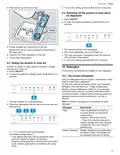
- Page 16: Basic operation Switching on the appliance requires a short touch. The cycle and option last selected will be set by default. The buttons are touch sensitive and need a quick, gentle touch. The appliance will automatically switch off after 10 minutes of inactivity. Setting a cycle involves selecting a suitable program by pressing the cycle button repeatedly. The cycle is set when the LED flashes. Options can be set to complete the chosen wash program, depending on the selected program. The time delay for the wash cycle can be adjusted via the Home Connect® app. The wash cycle has ended when no displays on the controls are lit. The appliance has a built-in feature to prevent unintentional operation, especially by children.
- Page 17: Basic operation Activating the button lock prevents the appliance from being operated accidentally or incorrectly while running. Press for approx. 3 seconds to activate the button lock, which will be automatically deactivated at the end of the cycle. The button lock remains activated with a power failure. Deactivating the button lock requires pressing for approx. 3 seconds. Interrupting the wash cycle involves pressing On/Off, which saves the program and switches off the appliance. To resume the wash cycle, press On/Off followed by the appropriate button. Terminating the wash cycle requires cancelling it first by pressing for approx. 4 seconds. All displays light up when the cycle is cancelled, and residual water is pumped out. The cycle ends after approx. 1 minute once the displays are off. Caution is advised when opening the door during or after a wash cycle due to potential hot water or steam escape.
- Page 18: Basic settings allow you to configure your appliance to meet your needs. The basic settings depend on the features of your appliance. You can set or switch off the amount of rinse aid to be dispensed. Intensive drying can be switched on or off for each operation, which may slightly increase run time. Adjust the signal volume with a scale of 4 levels. You can switch the wireless network connection on or off. The basic setting is not available until the appliance is connected with the Home Connect® app. You can restore changed settings to the factory settings. Connect your appliance to a mobile device to conveniently change all settings using the Home Connect® app. To open the appliance settings, press a button for 3 seconds.
- Page 19: To open the appliance settings, press the button for 3 seconds. The refill indicator for rinse aid flashes. Press the button repeatedly until the Rinse Aid and Sanitize LEDs flash. The factory setting is level 2. To store the setting, press the button for 3 seconds. If the LED is not lit up, Wi-Fi is switched off. This appliance is network-capable. Connecting your appliance to a mobile device lets you control its functions via the Home Connect® app. The Home Connect® services are not available in every country. The availability of the Home Connect® function depends on the availability of Home Connect® services in your country.
- Page 20: Home Connect® requires setting up a connection to the WLAN home network and the Home Connect® app. The Home Connect® app allows you to start the appliance remotely with your mobile device. Follow the instructions in the Home Connect® app for the registration process. You can change settings using the Home Connect® app. The appliance must be connected to your WLAN home network and the Home Connect® app. Remote Diagnostics allows Customer Service to access your appliance if requested and if available in your country. You can update the appliance software through the Home Connect® app for optimization and troubleshooting. Data protection information is provided regarding the types of data transmitted during initial registration. Home Connect® settings can be adapted to your needs and are found in the basic settings of your appliance. Ensure that the appliance door is closed during the setup process.
- Page 21: Cleaning and maintenance The filter system removes coarse soiling from the dishwashing cycle. This initial registration prepares the Home Connect® functions for use and is only required when you want to use the Home Connect® functions for the first time. Please note that the Home Connect® functions can be utilized only with the Home Connect® app. To keep your appliance working efficiently for a long time, it is important to clean and maintain it carefully. Using detergents containing chlorine may result in harm to health. Never use detergents containing chlorine. Check the filters for residues after each dishwashing cycle. Only use suitable cleaning agents to clean your appliance. Follow the tips on appliance care to make sure your appliance functions properly at all times. Regularly wipe the door seals, the front of the dishwasher, and the control panel using a damp cloth and dishwashing liquid.
- Page 22: Cleaning and maintenance Pull the micro filter downward and off. Cleaning the spray arms Limescale and soiling in the dishwashing water may block the nozzles and bearings on the spray arms. Clean the spray arms regularly. Unscrew the upper spray arm and pull down to remove. Press the locking catches together and take the coarse filter upward and out. Pull up the lower spray arm to remove. Clean the filter elements under running water. Carefully remove the rim of debris between the coarse filter and the fine filter. Put the filter system back together. Ensure that the locking catches on the coarse filter click into position. Check the outlet nozzles on the spray arms for blockages under running water and remove any foreign objects.
- Page 23: Troubleshooting You can eliminate minor issues on your appliance yourself. Please read the information on eliminating issues before contacting Customer Service. This may avoid unnecessary repair costs. Four vertical LEDs (i.e. the cycle duration indicators and the clean indicator) all light up at the same time. Not an appliance error. Garbage disposal is still plugged or the drain hose is kinked. Check that the garbage disposal plug is removed and that the drain hose is not kinked. Not an appliance error. The drain pump cover is loose or a foreign object is blocking the pump. Secure the cover of the drain pump so it clicks into place or clean the drain pump. Filters in the water connection of the supply or AquaStop hose are blocked. Switch off the appliance and pull out the power cord plug. Turn off the water faucet and unscrew the water connection. Remove the filter from the supply hose and clean the filter.
- Page 24: Troubleshooting Four vertical LEDs are all flashing. There is a technical issue. Dishware is not dry. No rinse aid used or dosage set too low. Cycle or cycle option has no drying phase, or drying phase is too short. Select a wash cycle with drying. Water collects in recesses of dishware or silverware. Position dishware at an angle where possible. Silverware is not dry. Silverware not arranged properly in the silverware basket or silverware drawer. Appliance interior still wet after wash cycle. Not an error. Condensation drying creates water droplets in the tub.
- Page 25: Troubleshooting Food remnants on dishware may occur if dishware is placed too close together or the rack is overfilled. Arrange dishware with sufficient space in between to ensure spray jets reach all surfaces. Avoid points of contact to allow for proper spray arm rotation. If the spray arm rotation is blocked, rearrange dishware to prevent obstruction. Blocked spray arm nozzles can be resolved by cleaning the spray arms. Dirty filters require cleaning to maintain performance. Filters must be inserted correctly and engaged properly to function. Selecting a wash cycle that is too light may not effectively clean stubborn remnants. Tall narrow containers should not be positioned at steep angles or in corner areas to ensure adequate rinsing. To prevent detergent residue, ensure the detergent dispenser lid is not blocked by dishware.
- Page 26: Troubleshooting Issue Wipeable or water-soluble coatings may have detergent residue that cannot generally be removed with chemicals. Change your detergent and scrub the appliance by hand. Stubborn white coatings on dishware may also be due to detergent residue. Increase the amount of detergent used or select a more intensive wash program. Tea residue or lipstick marks on dishware may occur if the dishwashing temperature is too low. Use a suitable detergent and follow the manufacturer's instructions for the amount to be used. Colored coatings inside the appliance may be due to substances in vegetables or tap water. Clean the appliance with mechanical cleaning or a machine cleaning product. Plastic parts inside the appliance may become discolored over time but this will not impair functioning. Removable streaks on glasses and silverware may be due to the amount of rinse aid being set too high.
- Page 27: Troubleshooting There are removable streaks on glasses, glassware with a metallic appearance, and silverware. Items of dishware are blocking the dispenser lid. Do not place dishware or fragrance dispensers in the tab collecting tray. Dishware has been precleaned too intensively. Only remove large remnants of food and do not pre-rinse dishware. Irreversible clouding of glassware can occur. Use dishwasher-proof glasses. Avoid a lengthy steam phase after the wash cycle ends. Check that the spray arms are not blocked and can rotate freely. Add rinse aid to the dispenser when dry.
- Page 28: Troubleshooting All LEDs light up or flash. Electronics have detected a fault. Press the main switch button for approx. 4 seconds. The appliance is reset and restarted. If the problem occurs again, switch off the appliance and unplug the power plug or switch off the circuit breaker. Water is left in the appliance at the end of the program. The filter system or area under the filters is blocked. Clean the filters and drain pump. Appliance cannot be switched on or operated. Software update is taking place. Wait until the software update has finished. Appliance does not start. The breaker has tripped. Check the relevant breaker and ensure the power cord is properly inserted. Appliance door is not closed properly. Close the appliance door. Appliance stops during the cycle. Power and/or water supply has been interrupted. Check the power supply and water supply. Upper rack is pressing against the inner door. Check whether the rear panel is being pressed in and arrange the dishware properly. Appliance door cannot be closed. The door lock has been activated. Close the appliance door with greater force.
- Page 29: Troubleshooting Appliance door cannot be closed. Check whether the appliance has been installed properly. Lid on the detergent dispenser cannot be closed. Detergent dispenser or lid are blocked by sticky detergent residue. Filling valves making knocking noises. Caused by the domestic installation. No fault present in the appliance. Noise level varies. The noise level can vary, depending on what kind of dishes are loaded. Spray arm is striking dishes. Arrange dishware so the spray arms do not strike dishware. Clean drain pump. Large food remnants or foreign objects can block the drain pump. Use caution when removing parts for cleaning. There may be some sharp debris, such as glass fragments. Disconnect the appliance from the power supply. Remove the upper and lower rack.
- Page 30: Transportation, storage and disposal To avoid damage to the appliance, empty it before transporting. Always transport the dishwasher upright to prevent residual water getting into the machine's controls. Disconnect the appliance from the power supply before removing it. Environmentally sound disposal allows valuable raw materials to be recycled. Avoid a risk of entrapment upon disposal by unplugging the appliance and cutting the power cord. Preparing your unit for vacation includes turning off the main valve and water supply. If your dishwasher will be unused for an extended period in freezing temperatures, have it winterized by an authorized service provider. With any warranty repair, the appliance will be repaired using genuine replacement parts. Detailed information on the warranty period and terms can be found in the Statement of Limited Product Warranty. For assistance with connecting to Home Connect, view the provided instructions.
- Page 31: Customer service information is provided. The model number (E-Nr.), production number (FD), and consecutive numbering (Z-Nr.) can be found on the appliance's rating plate. The rating plate is located inside the appliance door. It is recommended to note your appliance's details and the customer service telephone number for quick reference.
- Page 32: Statement of limited product warranty 5 year limited warranty on dish racks: BSH will replace the upper or lower dish rack if the rack proves defective in materials or workmanship. Lifetime warranty against stainless steel rust through: BSH will repair or replace your dishwasher if the inner liner should rust through. BSH will repair or replace the stainless steel door if the door should rust through. Bosch is under no obligation to provide concessions once this warranty has expired. During this warranty period, Bosch will repair your product without charge if it proves to have been manufactured with a defect in materials or workmanship. Bosch will replace your product if reasonable attempts to repair it have been made without success. Bosch highly recommends that you do not attempt to repair the product yourself or use a non-authorized service provider. The warranty coverage excludes all defects or damage that are not the direct fault of Bosch. Use of the product in anything other than its normal, customary and intended manner will void the warranty. Bosch will not have any liability for damage to surrounding property, including cabinetry, floors, and ceilings.
- Page 33: Register your appliance to enjoy customized benefits. Simply create a MyBosch account, then register your appliance. You'll find a variety of customized information in MyBosch such as discounts for filters, cleaners, accessories & parts. Easy access to manuals & appliance specifications. Easy access to parts lists. Customized offer for the Bosch Appliance Service Plan. No matter what, no matter when: Bosch is here to support you. We’re here to assist with usage instructions, cleaning tips, accessories & parts, troubleshooting, and repairs. Find online resources such as FAQs, how-to-videos, manuals, warranties and authorized Bosch services. Please have your Model Number (E-Nr) ready when contacting us.

Whirlpool W0I D741A S Fully Dishwasher

SIEMENS SN25EI56CE Dishwasher

BOSCH SMS4HMW00G Dishwasher

BOSCH SMS2HMI03E Dishwasher

FISHER and PAYKEL DW60FC2X3 Contemporary Dishwasher

ARDESTO DWMB-V609SMHT3 Dishwasher

NEFF S195HCX02G Fully Dishwasher

FISHER AND PAYKEL DD60D2NX9 Double Dishwasher

Whirlpool WDT740SALB Dishwasher

BOSCH SBD6ECX00E Dishwasher