
Home > Electrolux > Electrolux EEG62310L Dishwasher
Electrolux EEG62310L Dishwasher
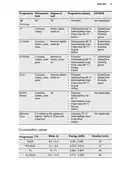
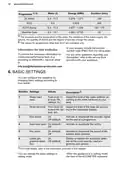
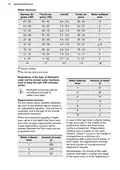


16
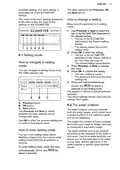
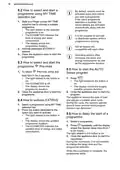
8.2 How to select and start a
programme using MY TIME
selection bar
1. Slide your finger across MY TIME
selection bar to choose a suitable
programme.
By default, options must be
activated every time before
you start a programme.
If the latest programme
selection is enabled, the
saved options are activated
automatically along with the
programme.
•
The light related to the selected
programme is on.
•
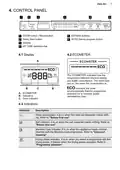
The ECOMETER indicates the
level of energy and water
consumption.
It is not possible to activate
or deactivate options while a
programme is running.
•
The display shows the
programme duration.
Not all options are
compatible with each other.
2. Activate applicable EXTRAS if
desired.
3. Close the appliance door to start the
programme.
Activating options often
increases the water and
energy consumption as well
as the programme duration.
8.3 How to select and start the
programme
Pre-rinse
8.5 How to start the AUTO
Sense program
1. To select
Pre-rinse, press and
for 3 seconds.
hold
•
The light related to the button is
on.
1. Press
.
•
The light related to the button is
on.
•
•
The ECOMETER is off.
The display shows the
programme duration.
•
The display shows the longest
possible program duration.
2. Close the appliance door to start the
2. Close the appliance door to start the
program.
programme.
The appliance senses the type of load
and adjusts a suitable wash cycle.
During the cycle, the sensors operate
several times and the initial program
duration can decrease.
8.4 How to activate EXTRAS
1. Select a programme using MY TIME
selection bar.
2. Press the button dedicated to the
option you want to activate.
8.6 How to delay the start of a
programme
1. Select a programme.
•
•
•
The light related to the button is
on.
The display shows the updated
programme duration.
2. Press
repeatedly until the display
The ECOMETER indicates the
updated level of energy and water
consumption.
shows the desired delay time (from 1
to 24 hours).
The light related to the button is on.
3. Close the appliance door to start the
countdown.
During the countdown, it is not possible
to change the delay time and the
programme selection.
When the countdown is complete, the
programme starts.

| General | Details |
|---|---|
| Name | Electrolux EEG62310L Dishwasher |
| Make | Electrolux |
| Language | English |
| Filetype | PDF (Download) |
| File size | 0.95 MB |
 (1 votes, average: 5.00 out of 5)
 Loading...

Electrolux ESS87300UX Dishwasher

Electrolux EES48401L Dishwasher

Electrolux EFF9392SXA Dishwasher

Electrolux ESZ89400UX 800 SprayZone Dishwasher

Electrolux ESL2500RO Dishwasher

Electrolux KECA7400W Builtin Dishwasher

Electrolux TAPPAN Dishwasher

Electrolux KESC7320L Dishwasher

Electrolux EEC87400W Sliding Door Dishwasher

Electrolux EFC3862MS UltimateCare 300 Compact Dishwasher

INDESIT FDUD4212 Dishwasher

Hotpoint H7F HP33 UK Dishwasher

MORA IM6465S Dishwasher

kogan KABNCHTPDWA Benchtop Dishwasher

BOSCH SX75ZX07CE Dishwasher

FISHER PAYKEL DD60ST4NX9 Single Dishwasher
FISHER PAYKEL DD60SCX9 DishDrawer Dishwasher

BOSCH SMH4ECX28E Dishwasher

SIEMENS SN61IX12TG Dishwasher

Electrolux ESF6768KXA Dishwasher