
Home > Electrolux > Electrolux EEG62310L Dishwasher
Electrolux EEG62310L Dishwasher


EEG62310L
EN
Dishwasher
User Manual


| General | Details |
|---|---|
| Name | Electrolux EEG62310L Dishwasher |
| Make | Electrolux |
| Language | English |
| Filetype | PDF (Download) |
| File size | 0.95 MB |
 (1 votes, average: 5.00 out of 5)
 Loading...

Electrolux ESS87300UX Dishwasher

Electrolux EES48401L Dishwasher

Electrolux EFF9392SXA Dishwasher

Electrolux ESZ89400UX 800 SprayZone Dishwasher

Electrolux ESL2500RO Dishwasher

Electrolux KECA7400W Builtin Dishwasher

Electrolux TAPPAN Dishwasher

Electrolux KESC7320L Dishwasher

Electrolux EEC87400W Sliding Door Dishwasher

Electrolux EFC3862MS UltimateCare 300 Compact Dishwasher
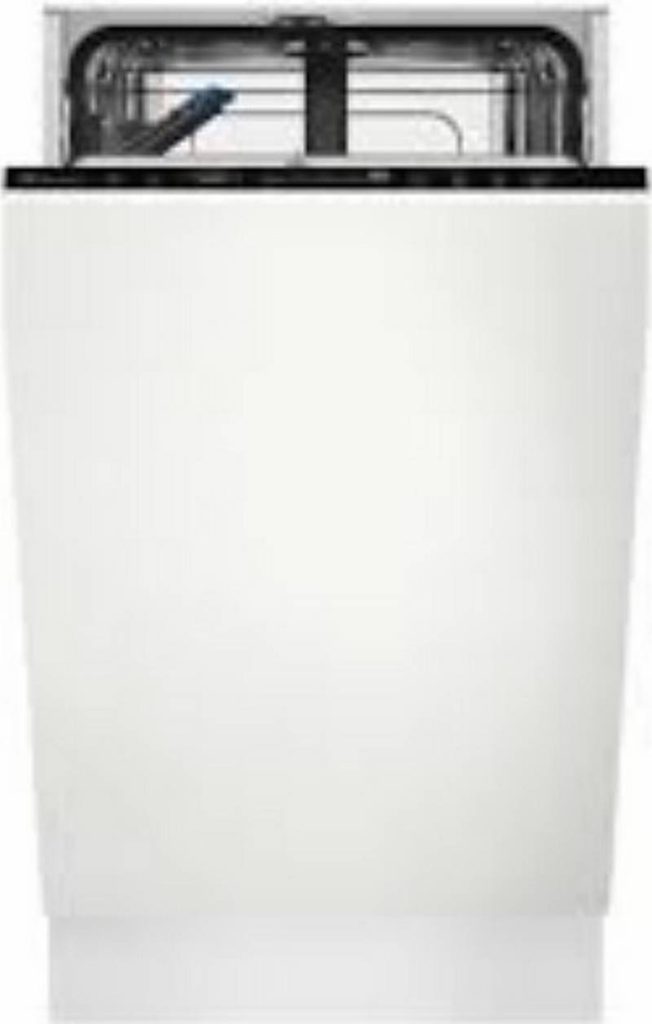
Electrolux EEG62310L Dishwasher Overview
Summary of Contents
- Page 1: Dishwasher User manual
- Page 2: SAFETY INFORMATION Before the installation and use of the appliance, carefully read the supplied instructions. SAFETY INSTRUCTIONS PRODUCT DESCRIPTION CONTROL PANEL PROGRAMME SELECTION BASIC SETTINGS BEFORE FIRST USE DAILY USE HINTS AND TIPS CARE AND CLEANING TROUBLESHOOTING TECHNICAL INFORMATION ENVIRONMENTAL CONCERNS Thank you for purchasing an Electrolux appliance. You’ve chosen a product that brings with it decades of professional experience and innovation. Always use original spare parts. When contacting our Authorised Service Centre, ensure that you have the following data available: Model, PNC, Serial Number.
- Page 3: responsible for any injuries or damage that are the result of incorrect installation or usage. Always keep the instructions in a safe and accessible location for future reference. Children and vulnerable people safety This appliance can be used by children aged from 8 years and above and persons with reduced physical, sensory or mental capabilities or lack of experience and knowledge if they have been given supervision or instruction concerning the use of the appliance in a safe way and understand the hazards involved. Children between 3 and 8 years of age and persons with very extensive and complex disabilities shall be kept away from the appliance unless continuously supervised. Children of less than 3 years of age should be kept away from the appliance unless continuously supervised. Children should be supervised to ensure that they do not play with the appliance. Keep detergents away from children. Keep children and pets away from the appliance when the door is open. Children shall not carry out cleaning and user maintenance of the appliance without supervision. General Safety This appliance is intended to be used in household and similar applications such as farm houses; staff kitchen areas in shops, offices and other working environments; by clients in hotels, motels, bed & breakfast and other residential type environments.
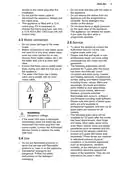
- Page 4: Do not drink and play with the water in the appliance. Do not remove the dishes from the appliance until the programme is complete. The appliance can release hot steam if you open the door while a programme operates. To repair the appliance contact the Authorised Service Centre. Self-repair or non-professional repair can have safety consequences and might void the guarantee. Ensure that there are no visible water leaks during and after the first use of the appliance. The water inlet hose has a safety valve and a sheath with an inner mains cable. If the water inlet hose is damaged, immediately close the water tap and disconnect the mains plug. Dishwasher detergents are dangerous. Follow the safety instructions on the detergent packaging.
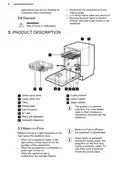
- Page 5: Disposal Risk of injury or suffocation. Product description The graphic is a general overview. For more details, refer to other chapters or documents provided with the appliance. Beam-on-Floor Beam-on-Floor is a light displayed on the floor below the appliance door. Beam-on-Floor is off when the appliance is deactivated. When AirDry is activated during the drying phase, the projection on the floor may not be completely visible. When the programme starts, a red light comes on and stays on for the duration of the programme. When the programme is completed, a green light comes on. When the appliance has a malfunction, the red light flashes. Disconnect the appliance from the mains supply. Cut off the mains cable and discard it.
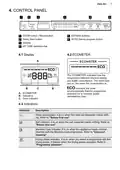
- Page 6: Control panel On/Off button / Reset button Delay Start button Display Extras buttons Auto Sense program button My Time selection bar Ecometer indicates how the programme selection impacts energy and water consumption. Rinse aid indicator indicates when the rinse aid dispenser needs refilling. Salt indicator indicates when the salt container needs refilling.
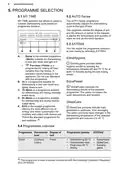
- Page 7: Programme selection includes various options for dishwashing cycles. My Time selection bar allows selection based on programme duration. AUTO Sense programme adjusts the cycle according to load type and soil degree. Extras can be activated to customize programme selection. Quick is a short programme suitable for lightly soiled dishes. ExtraHygiene ensures better hygiene by maintaining high temperatures during rinsing. Pre-rinse programme rinses off food remains without detergent. ExtraPower enhances dishwashing results by increasing wash temperature and duration. ECO programme offers efficient energy and water use for normally soiled items. GlassCare protects delicate glassware from damage during washing.
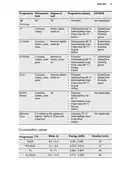
- Page 8: Programme Dishwasher Degree of Extras Programme phases Prewash Dishwashing 60 °C Intermediate rinse Final rinse 50 °C AirDry ExtraPower GlassCare ExtraHygiene Machine Care
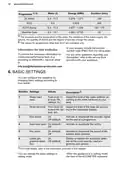
- Page 9: Programme details include water usage, energy consumption, and duration for various settings. The pressure, temperature, mains supply variations, options, quantity of dishes, and degree of soil can affect the values. Values for programmes other than ECO are indicative only. To receive information for conducting performance tests, contact the appropriate email. Basic settings can be configured according to user needs. Water hardness can be adjusted from level 1L to 10L, with a default of 5L. Rinse aid level can be adjusted from level 0A to 8A, with a default of 5A. The end sound can be activated or deactivated for programme completion. Auto door open feature can be activated or deactivated, with the default setting being on. Key tones can be turned on or off, with the default setting being on.
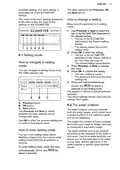
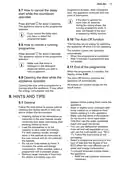
- Page 10: How to change a setting Make sure the appliance is in setting mode. Use Previous or Next to select the bar of the ECOMETER dedicated to the desired setting. The display shows the current setting value. Press OK to enter the setting. The new setting is saved. Press and hold simultaneously to exit setting mode. The saved settings remain valid until you change them again. The water softener removes minerals from the water supply. The water softener should be adjusted according to the hardness of the water in your area.
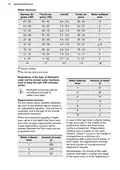
- Page 11: Water hardness levels are categorized in various units such as German degrees, French degrees, and Clarke degrees. The water softener level is crucial for maintaining the dishwasher's efficiency. It is advised not to use salt at certain water hardness levels. Setting the proper water hardness level is necessary to keep the salt refill indicator active. Multi-tabs containing salt are not effective enough to soften hard water. The resin of the softener device needs to be regenerated regularly for correct operation. The regeneration process is automatic and part of normal dishwasher operation. A new regeneration process will be initiated after a prescribed quantity of water has been used. Regeneration initiation does not impact cycle duration unless it occurs in the middle of a program. If regeneration occurs at the end of a program with a short drying phase, it may prolong the total duration by an additional 5 minutes.
- Page 12: The next programme increases total water consumption by an additional 4 litres and total energy consumption by an additional 2 Wh. Acoustic signals sound when a malfunction of the appliance occurs and cannot be deactivated. AirDry improves drying results by automatically opening the appliance door during the drying phase. All consumption values are determined in line with currently applicable standards under specific laboratory conditions. AirDry is automatically activated with all programmes other than Pre-rinse. The rinse aid helps to dry dishes without streaks and stains and is automatically released during the hot rinse phase. When the rinse aid chamber is empty, the rinse aid indicator notifies to refill it. For best drying performance, always use rinse aid and keep the rinse aid indicator active. If children have access to the appliance, it is advised to deactivate AirDry due to safety concerns. You can activate an acoustic signal that sounds when the programme is completed.
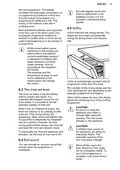
- Page 13: The latest programme that was completed before the appliance deactivation is saved. The buttons on the control panel make a click sound when you press them. When the latest programme selection is disabled, the default programme is ECO. Make sure that the current level of the water softener agrees with the hardness of the water supply. Fill the salt container. Fill the rinse aid dispenser. Start the programme Quick to remove any residuals from the manufacturing process. Use rough salt designed for dishwashers only. Water and salt can come out of the salt container when you fill it. The salt is used to recharge the resin in the water softener and to assure good washing results in daily use.
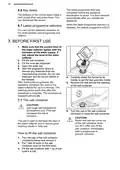
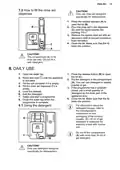
- Page 14: How to fill the rinse aid dispenser Only use rinse aid designed specifically for dishwashers. Pour the rinse aid in the dispenser until the liquid reaches the marking FILL. Remove the spilled rinse aid with an absorbent cloth to prevent excessive foam formation. The compartment is for rinse aid only. Do not fill it with detergent. DAILY USE Open the water tap. Put the detergent in the compartment. You can use detergent in tablets, powder or gel. Fill the salt container if it is empty. For information about the detergent dosage, refer to the manufacturer's instructions on the packaging of the product. Only use detergent designed specifically for dishwashers.
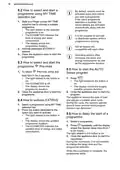
- Page 15: How to select and start a programme using MY TIME selection bar Slide your finger across MY TIME selection bar to choose a suitable programme. By default, options must be activated every time before you start a programme. The light related to the selected programme is on. The ECOMETER indicates the level of energy and water consumption. It is not possible to activate or deactivate options while a programme is running. Activate applicable EXTRAS if desired. Close the appliance door to start the programme. How to start the AUTO Sense program The appliance senses the type of load and adjusts a suitable wash cycle.
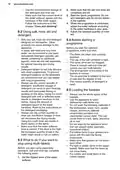
- Page 16: programme duration. After closing the door, the appliance continues from the point of interruption. How to cancel the delay start while the countdown operates. If the door is opened for more than 30 seconds during the drying phase, the running programme ends. The Auto Off function saves energy by switching the appliance off when it is not operating. The function comes into operation automatically. When the programme is completed, the display shows 0:00. Opening the door while a programme is running stops the appliance. It may affect the energy consumption. Follow the hints below to ensure optimal cleaning and drying results in daily use and to protect the environment. Soak or slightly scour cookware with firmly cooked-on or baked-on food before washing it in the appliance. Washing dishes in the dishwasher as instructed in the user manual usually consumes less water and energy than washing dishes by hand. Load the dishwasher to its full capacity to save water and energy. For best cleaning results, arrange items in the baskets as instructed in the user manual. Select a programme according to the type of load and the degree of soil. ECO offers the most efficient use of water and energy consumption.
- Page 17: Use the recommended dosage of detergent and rinse aid. Make sure that the salt and rinse aid containers are full. Start the Quick programme without detergent or dishes. Adjust the water softener according to local water hardness. Only use dishwasher-specific salt, rinse aid, and detergent. In hard water areas, use basic dishwasher detergent, rinse aid, and salt separately. Ensure the filters are clean and correctly installed before starting a programme. Use the whole space of the baskets and only wash dishwasher-safe items. Do not wash items that can absorb water in the dishwasher. Set the highest level of the water softener before switching to separate detergent use.
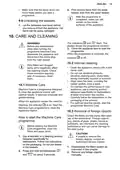
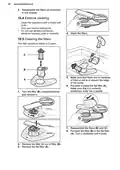
- Page 18: Reassemble the filters as instructed in this chapter. Clean the appliance with a moist soft cloth. Only use neutral detergents. Do not use abrasive products, abrasive cleaning pads or solvents. The filter system is made of 3 parts. Make sure that there are no residues of food or soil in or around the edge of the sump. Put back in place the flat filter (A). Reassemble the filters (B) and (C). Put back the filter (B) in the flat filter (A). Turn the filter (B) counterclockwise and remove it.
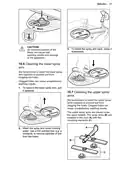
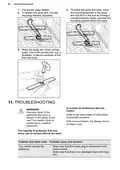
- Page 19: Caution regarding the installation of the spray arm. Incorrect positioning of the filters can lead to poor washing results and damage to the appliance. Regular cleaning of the lower spray arm is recommended to prevent clogging. Clogged holes in the spray arm can result in unsatisfactory washing results. Instructions for removing the lower spray arm include pulling it upwards. Regular cleaning of the upper spray arms is also advised to avoid clogging. The upper spray arms are located under the upper basket. Cleaning involves washing the spray arm under running water. A thin pointed tool can be used to remove particles from the holes. The spray arms are installed in the duct with mounting elements.
- Page 20: Pull out the upper basket. To detach the spray arm, turn the mounting element clockwise. To install the spray arm back, insert the mounting element in the spray arm and fix it in the duct by turning it counterclockwise. Wash the spray arm under running water. Use a thin pointed tool, e.g. a toothpick, to remove particles of soil from the holes. Improper repair of the appliance may pose a danger to the safety of the user. Any repairs must be performed by qualified personnel. Refer to the below table for information on possible problems. With some problems, the display shows an alarm code. Make sure that the mains plug is connected to the mains socket.
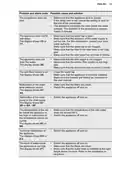
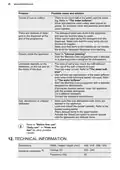
- Page 21: Problem and alarm code Possible cause and solution The programme does not start. Make sure that the appliance door is closed. If the delay start is set, cancel the setting or wait for the end of the countdown. The appliance recharges the resin inside the water softener. The appliance does not fill with water. Make sure that the water tap is open. Make sure that the pressure of the water supply is not too low. Make sure that the water tap is not clogged. Make sure that the filter in the inlet hose is not clogged. Make sure that the inlet hose has no kinks or bends. The appliance does not drain the water. Make sure that the sink spigot is not clogged. Make sure that the interior filter system is not clogged. Make sure that the drain hose has no kinks or bends. The anti-flood device is on. Malfunction of the water level detection sensor. Make sure that the filters are clean. Switch the appliance off and on. Malfunction of the wash pump or the drain pump. Switch the appliance off and on. Make sure that the temperature of the inlet water does not exceed 60°C. Technical malfunction of the appliance. Switch the appliance off and on. The level of water inside the appliance is too high. Make sure that the filters are clean. Make sure that the outlet hose is installed at the right height above the floor.
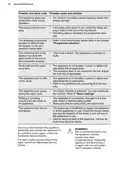
- Page 22: Problem and alarm code Possible cause and solution The appliance stops and starts more times during operation. It is normal. It provides optimal cleaning results and energy savings. The programme lasts too long. If the delay start option is set, cancel the delay setting or wait for the end of the countdown. Activating options increases the programme duration. The displayed programme duration is different than the duration in the consumption values table. Refer to the consumption values table in the chapter Programme selection. The remaining time in the display increases and skips nearly to the end of the programme duration. This is not a defect. The appliance is working correctly. Small leak from the appliance door. The appliance is not levelled. Loosen or tighten the adjustable feet (if applicable). The appliance door is difficult to close. The appliance is not levelled. Loosen or tighten the adjustable feet (if applicable). Parts of the tableware are protruding from the baskets. The appliance door opens during the wash cycle. The AirDry function is activated. You can deactivate the function. Rattling or knocking sounds from the inside of the appliance. The tableware is not properly arranged in the baskets. Refer to basket loading leaflet. The appliance trips the circuit-beaker. The amperage is insufficient to supply simultaneously all the appliances in use. Check the socket amperage and the capacity of the meter or turn off one of the appliances in use. For alarm codes not described in the table, contact an Authorised Service Centre.
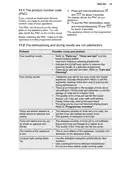
- Page 23: The product number code (PNC) can be displayed by pressing and holding specific buttons for about 3 seconds. The PNC is necessary when contacting an Authorised Service Centre. The PNC can be found on the rating plate on the appliance door and on the control panel. For poor washing results, refer to Daily use, Hints and tips, and the basket loading leaflet. Using a more intensive washing programme or activating the ExtraPower option can improve washing results. To improve drying performance, activate the AirDry function to automatically open the door. Ensure there is sufficient rinse aid and adjust the dosage if necessary. Plastic items may require towel drying, and some programmes may not include a drying phase. Whitish streaks or bluish layers on dishes may indicate an issue with rinse aid dosage or detergent quantity. Unusual foam during washing may be resolved by using detergent specifically designed for dishwashers.
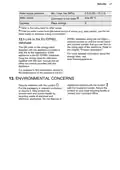
- Page 24: Traces of rust on cutlery may be caused by too much salt in the water used for washing. Silver and stainless steel cutlery should not be placed together. Residues of detergent in the dispenser can occur if the detergent tablet is stuck or if the spray arms are blocked. Odours inside the appliance can be addressed by starting the Machine Care programme with a descaler. Limescale deposits on tableware may indicate low salt levels or hard tap water. Using salt and setting regeneration of the water softener is recommended even with multi-functional tablets. Dull or chipped tableware can result from washing non-dishwasher-safe items. Delicate items should be placed in the upper basket and the GlassCare option activated for special care. Technical information includes dimensions of 446 mm width, 818-898 mm height, and 550 mm depth. The appliance operates at a voltage of 220-240 V and a frequency of 50 Hz.
- Page 25: Water supply pressure Min. / max. bar (MPa) 0.5 (0.05) / 10 (1.0) Max 60 °C Cold water or hot water Capacity 9 Refer to the rating plate for other values. Use the hot water supply to decrease energy consumption. The QR code on the energy label provides a web link to the registration of this appliance. Keep the energy label for reference together with the user manual. Return the product to your local recycling facility or contact your municipal office. Help protect the environment and human health by recycling waste of electrical and electronic appliances.
- Page 26: Page 26

BOSCH SMV4EB804E Dishwasher

BOSCH SBH4HB802E-46 Dishwasher

BOSCH SHX78CM4N 24 Dishwasher

BOSCH SMV4HCX58E-39 Dishwasher
BOSCH Benchmark Series Dishwasher

BOSCH SHX5AEM4N 24 Dishwasher

Miele G7788SCViXXL Dishwasher
BOSCH SMS4HAW48E-24 Dishwasher

SIEMENS SN65Z802BE Dishwasher

AUDIBAX Haze 1500 Pro Fully Integrated Dishwasher