
SIEMENS SN63HX42VE Dishwasher


en
Before using for the first time, read the instruction manual and the safety information it contains.
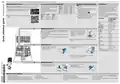
Setting up Home Connect
Overview of water hardness settings
Setting the water softening sys-
tem
Programmes
You can find an overview of the
water hardness values that can
be selected here.
A table of country-specific units
can be found in the instruction
manual.
The programme data has been meas-
ured in the laboratory according to
European standard EN 60436.
The consumption figures depend on
the programme and additional func-
tion selected.
The runtime will change if the rinse
aid system is switched off or rinse aid
needs to be added.
Medium
Medium
Medium
Hard
Hard
Hard
1.5 - 1.8
1.9 - 2.1
2.2 - 2.9
3.0 - 3.7
3.8 - 5.4
5.5 - 8.9
H02
H03
H04
H05
H06
H07
Tip: Connect your appliance to a mobile device. You can con-
veniently change all settings using the Home Connect app.
1. Press
.
2. To open the basic settings, press
for 3 seconds.
a The display shows Hxx.
1. Install the Home Connect app on your mo-
bile device and follow the instructions.
a The display shows
.
3. Press
repeatedly until the right
Hardness mmol/l
range
Setting
value
water hardness has been set.
4. To save the settings, press
for 3 seconds.
2. Scan the QR code with the Home Connect
app.
Soft
Soft
0 - 1.1
1.2 - 1.4
H00
H01
Programme
1) Duration [h:min]
2) Energy [kWh]
3) Water [l]
1) 2:05 - 2:15
2) 1,350 - 1,400
3) 10,5 - 13,5
1) 1:40 - 2:45
2) 0,850 - 1,450
3) 7,0 - 15,5
1) 3:45
Intensive 70°
Auto 45-65°
Eco 50°
Adding special salt
To avoid damage to the appliance, only add special
salt to the dispenser for special salt just before the
programme starts.
1. Unscrew the lid of the dispenser for special salt
and remove.
2. On initial start-up: Fill the dispenser right up with
water.
3. Add the special salt to the
dispenser. The water in the
dispenser is displaced and
forced out. Never add de-
tergent.
2) 0,937
3) 9,5
1) 1:00
2) 1,200
Speed 65°
Speed 45°
Machine Care
Favourite
3) 10,0
1) 0:29 1
4. Place the lid back on the dispenser and turn to
close.
2) 0,750
3) 10,0
1) 2:10
2) 1,350
3) 15,1
Adding rinse aid
1) 0:15 - 0:15
2) 0,050 - 0,050
3) 4,0 - 4,0
1. Press the catch on the lid
2. Add rinse aid up to the
max mark.
of the dispenser for rinse
aid
and lift
.
1
half standard load
3. Close the lid of the dispenser for rinse aid.
a The lid clicks into position.
Adding detergent
1. Add the detergent to the
dry detergent dispenser.
2. Close the lid of the deter-
gent dispenser.
a The lid clicks into position.
How to use your appliance
1. Load the tableware.
tate freely.
2. Add detergent.
3. Switch on the appliance
4. Select the programme.
5. Start the programme
6. Remove the tableware at the end of the pro-
gramme.
7. To cancel the programme, press
for
Only clean tableware that is suitable for dish-
washers. Remove large remnants of food from
the tableware. Check that the spray arms can ro-
approx. 4 seconds.
.
The programme is cancelled and ends after ap-
prox. 1 minute.
.


| General | Details |
|---|---|
| Name | SIEMENS SN63HX42VE Dishwasher |
| Make | SIEMENS |
| Language | English |
| Filetype | PDF (Download) |
| File size | 0.44 MB |
 (1 votes, average: 5.00 out of 5)
 Loading...

SIEMENS SN73HX15VE Dishwasher

SIEMENS SN85TX00CE Dishwasher

SIEMENS iQ500 Dishwasher

SIEMENS SR93EX24MG Dishwasher

SIEMENS SN95Z802CE Dishwasher

SIEMENS SN55HS01MI Dishwasher

SIEMENS SN13EW78CS Dishwasher

SIEMENS SN15ZS80CS Dishwasher

SIEMENS SN67ZX86DM Dishwasher

SIEMENS SN13ES79CS Undercounter Dishwasher

SIEMENS SN63HX42VE Dishwasher Overview
Summary of Contents
- Page 1: Before using for the first time, read the instruction manual and the safety information it contains. Setting up Home Connect Overview of water hardness settings You can find an overview of the water hardness values that can be selected here. The programme data has been measured in the laboratory according to European standard EN 60436. The consumption figures depend on the programme and additional function selected. Tip: Connect your appliance to a mobile device. You can conveniently change all settings using the Home Connect app. To avoid damage to the appliance, only add special salt to the dispenser for special salt just before the programme starts. Adding rinse aid involves pressing the catch on the lid and adding rinse aid up to the max mark. How to use your appliance includes loading the tableware, adding detergent, and selecting the programme. Only clean tableware that is suitable for dishwashers.
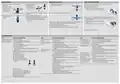
- Page 2: Cleaning filters involves checking for residue after each wash, removing the filter system, and cleaning the filter elements under running water. For cleaning spray arms, ensure to check the outlet nozzles for blockages and insert the spray arms securely after cleaning. The wastewater pump should be cleaned by removing any remnants of food and ensuring the pump cover is secured properly. Troubleshooting includes identifying faults such as blocked filters, kinked supply hoses, and issues with the rinse aid system. Common causes for issues include soiled filters, blocked spray arms, and insufficient water supply. To resolve problems, clean the filters, ensure the water tap is turned on, and arrange tableware with sufficient space. If electronics detect a fault, reset the appliance and check for blockages in the spray arms. Ensure filters are inserted correctly and engaged to avoid issues during operation. Selecting a more intensive washing program may be necessary if the current program is too weak. Always restore the power supply and check for leaks after maintenance.

NEFF S155HVX00G Integrated Dishwasher

SHARP SDW6767HS Slide In Smart Dishwasher

COOKOLOGY CBID601 Dishwasher

FISHER AND PAYKEL DD24DDFTX9 N Contemporary Tall Dishwasher

Haier HDW13F0B1 Dishwasher

BOSCH SME26EX00E Dishwasher

FISHER AND PAYKEL DD60DI9 Dishwasher

FISHER PAYKEL DW24U2I1 Drop Down Dishwasher

GRUNDIG GSV Dishwasher

Gorenje Voll-I GV 64x B Dishwasher