
aspes ALV1047 Dishwasher












Save Power Mode
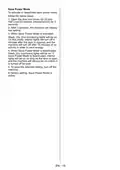
To activate or deactivate save power mode,
follow the below steps:
1. Open the door and press Up (2) and
Half Load (4) buttons simultaneously for 3
seconds.
2. After 3 seconds, the machine will display
last setting.
3. When Save Power Mode is activated,
Wash, Dry, End monitoring lights will be on.
On this mode, interior lights will turn off 4
minutes after the door is opened, and the
machine will turn off after 15 minutes of no
activity in order to save energy.
4. When Save Power Mode is deactivated
Wash, Dry monitoring lights will be on. If
Save Power Mode is deactivated, interior
lights will be on as long as the door is open,
and the machine will always be on unless it
is turned off by user.
5. To save the selected setting, turn off the
machine.
In factory setting, Save Power Mode is
active.
EN - 19

| General | Details |
|---|---|
| Name | aspes ALV1047 Dishwasher |
| Make | aspes |
| Language | English |
| Filetype | PDF (Download) |
| File size | 1.25 MB |
 (1 votes, average: 5.00 out of 5)
 Loading...

aspes AJI12600E Dishwasher

aspes AJ14600BD Dishwasher


ARTUSI ADWFI700 Dishwasher

BOSCH SMV4HVX03E Dishwasher

FISHER AND PAYKEL DD60STX6HI1 Tall Dishwasher

smeg DF344BW Sommario Dishwasher

Hotpoint 869991662940 Dishwasher

DAEWOO DA1D5SI0ES Dishwasher

BOSCH SMP4ECS71S Dishwasher

ASKO DFI7602MMXXL Dishwasher

BOSCH SPS4HMI49G Free Standing Dishwasher

FISHER and PAYKEL DD24DTX6I1 Tall Dishwasher