
Bellini BDWM48B Dishwasher







USING YOUR DISHWASHER
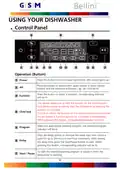
Control Panel
2
8
5
1
3
4
9 10
13 11
9
12 6
7
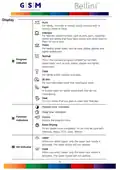
Operation (Button)
Press this button to turn on your dishwasher, the screen lights up.
1
Power
Press the button to select either upper basket or lower basket
loaded, and the response indicators (
2
Alt
) will be lit.
Press the button to select a function, corresponding indicator
will be lit.
3
4
Function
This option allows you to lock the buttons on the control panel -
so children cannot accidently start the dishwasher by pressing the
buttons on the panel.
Child lock
To lock or unlock the buttons on the control panel, press and hold
the Alt button + Function button for 3 seconds simultaneously.
When pressing this button, corresponding indicator will be lit.
Select the appropriate washing program, the selected program
indicator will be lit.
Program
Delay
5
6
7
Press the Delay button to increase the delay start time. Delay a
cycle for up to 24 hours in one-hour increments. After setting
the delay time, press the Start/Pause button to start. When
pressing this button, corresponding indicator will be lit.
To start the selected washing program or pause it when the
dishwasher is working.
Start / Pause
4

| General | Details |
|---|---|
| Name | Bellini BDWM48B Dishwasher |
| Make | Bellini |
| Language | English |
| Filetype | PDF (Download) |
| File size | 0.71 MB |
 (1 votes, average: 5.00 out of 5)
 Loading...

Bellini BDW504 Series 45cm and Dishwasher

bellini BDW96W, BDW96X Series 45cm Dishwasher


AEG FSS64907Z 60 Cm Dishwasher

Maidaid Halcyon C652 Range Commercial Tray/Dishwasher

FISHER AND PAYKEL DD60D4HNX9 Dishwasher

BOSCH 9001379115 Undercounter Dishwasher

FISHER PAYKEL DW60UT4I2 Tall Dishwasher

TOSHIBA DWS-22AMY(K) Dishwasher

Porter Charles DWTPC5FC Dishwasher

Whirlpool W2IHKD526A Fully Integrated Dishwasher

BOSCH SMS46KW02E Dishwasher

Hotpoint HFC 3C26 WCUK Dishwasher