
BOSCH 800 Series Dishwasher
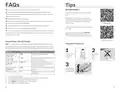


FAQs
Tips
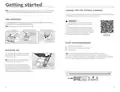
MAINTENANCE
Q: Why is food remaining on dishes after I run the cycle?
A: It is possible the dishes do not have adequate clearance between them.
Also, be sure nothing is blocking spray arm and that the filter is clean. Select an
intensive cleaning cycle.
Clean surfaces with damp cloth and mild
soap.
NOTICE: Do not use abrasives or bleach
based cleaners. Do not use stainless steel
cleaner on black stainless or anti-finger
print surfaces.
Q: Why does the cycle run a long time?
A: Sensors in the dishwasher automatically increase the cycle time to ensure a
good wash when heavy soil is detected.
Cleaning filter
A: Incoming water may not be hot enough and dishwasher has to heat it.
Clean the filter 3-12 times a year, depending
on usage.
Q: Why is E:XX (X can be any number) displayed?
A: This is an error code. For example E:22 indicates there is water in the sump
because the filter is blocked or needs cleaning. See the Use and Care Manual
for a list of error codes.
It is also recommended to run Machine
Care program to keep the tub clean. It is
accessible through the Home Connect app.
Cleaning spray arm
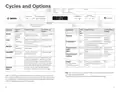
ADJUSTING THE SETTINGS
Tip: The simplest way to change the settings is with the Home ConnectTM app.
FOR BEST RESULTS
Listed below are some of the most used settings. To see all the settings, refer to
the full online manual or go to Dishwasher » Settings in the Home Connect app.
1
2
Setting
Factory setting Description
Use rinse aid
for better
drying.
Scrape off
food,
• Water hardness
•:‹‹ - •:‹ˆ
•:‹‹
Setting the water hardness.
but do not
rinse.
§-Rinse Aid
§:‹‹-§:‹‡
§:‹†
Dispenses the amount of rinse aid,
which affects drying.
š-Intensive drying
š:‹‹-š:‹‚
š:‹‹/ off
Improved drying for glasses and
plastic, by increasing the tempera-
ture and cycle length.
3
rack as needed
for large items.
›:‹ƒ
›-Buzzer signal
›:‹‹-›:‹„
The volume of the signal for the end
of cycle.
Adjust upper
PUSH
§“
§“-Factory reset
Restores the factory settings on the
dishwasher.
1. Press the On/Off button.
2. Hold down button A (see pages 6-7) to access the settings menu.
3. Press A repeatedly to select the desired setting.
4. Press Start to change the value of the setting.
5. Press A button to save the setting.
8
9

| General | Details |
|---|---|
| Name | BOSCH 800 Series Dishwasher |
| Make | Bosch |
| Language | English |
| Filetype | PDF (Download) |
| File size | 1.9 MB |
 (1 votes, average: 5.00 out of 5)
 Loading...

BOSCH SMV6ZCX49E-39 Dishwasher

BOSCH SMI4HVS33E Dishwasher

BOSCH SRV2HKX39G Dishwasher

BOSCH SGS4HAW40G Dishwasher

BOSCH SGH4HVX32G Dishwasher

BOSCH SMS4ECI26E Dishwasher

BOSCH SMS6EDI02G Free-Standing Dishwasher

BOSCH SMS6EDW02G Free-Standing Dishwasher

BOSCH SMV4HTX27G Dishwasher

BOSCH SMV4HCX48E Dishwasher


BOMANN GSP 7418 Household Dishwasher

JOCEL JLLI023124 Dishwasher

BOSCH SHP78CM4N 800 Series Dishwasher

BOSCH SMV6ZCX01G Dishwasher

FISHER PAYKEL DD24DTX6I1 Sanitize Integrated Dishwasher

BOSCH SHX4AEF5N Smart Dishwasher

FISHER PAYKEL DD24DTX6PX1 Tall

Miele 12 668 900 – 00 Dishwasher

FISHER PAYKEL DD24SV2T9N Sanitize Tall Dishwasher

Electronic LG DFB512FP Dishwasher