
BOSCH SHS53CM5N Dishwasher






Basic Operationꢀen-us
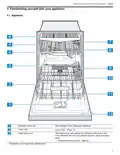
Third rack
12.4ꢀSetting options
You can set options to complete the chosen wash
program.
Note: The available options depend on which program is
selected.
▶ Press the button for the relevant option.
a The option is set and the option button flashes.
12.5ꢀSetting the time delay
You can delay the start of the wash cycle via the
Home Connect® app.
▶ Open the Home Connect® app and select the
appliance.
In the settings, you can use the time delay function to
delay the start of the wash cycle.
12.6ꢀStarting the wash cycle
B
p
12ꢀBasic Operation
▶ Press
.
B
p
a While the wash cycle is running, a spot of light is
projected onto the floor below the appliance door. This
light will not be visible if the appliance is installed at eye
level with the cabinet front fitted flush.
a The wash cycle has ended when no displays on the
controls are lit.
12.1ꢀProtection against unintentional
operation
Your dishwasher has a built in feature to help prevent
unintentional operation, e.g. by children. After starting the
appliance, the door has to be closed within 4 seconds,
otherwise the operation will be paused. If this occurs,
follow the steps below to restart your dishwasher.
a The wash cycle has ended when the spot of light is no
longer visible on the floor.
Notes
1. For top button controls: Press
and close the door.
¡ If you want to add more dishware while the appliance is
running, do not use the collecting tray as a handle for
the upper rack. You might touch the partially dissolved
tablet.
¡ You can only change a cycle in progress if you can
cancel it first.
¡ To save energy, the appliance switches off
automatically 10 minutes after the end of the wash
cycle. If you open the appliance door immediately after
the wash cycle has ended, the appliance will switch off
after 4 seconds.
2. For front button controls: Close the door and press
a The wash cycle will resume.
.
Notes
Unintentional operation is activated when:
– Pressing Start to begin a wash cycle
– Setting Delay time and pressing Start
– Opening the door while Delay time is active
– Opening the door during a wash cycle.
¡
¡ This feature cannot be deactivated.
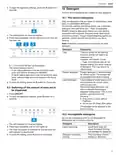
12.2ꢀSwitching on the appliance
▶ Touch
with a short 1 second touch.
12.7ꢀInterrupting the wash cycle
The cycle last selected and the option last selected will
be set by default.
1. Press On/Off.
The buttons on the appliance are touch sensitive and
only require a quick, gentle touch.
If you do not perform any actions on the appliance for
10 minutes, it will automatically switch off.
The program is saved and the appliance switches off.
2. Press On/Off.
3. Press
to resume the wash cycle.
12.8ꢀTerminating the wash cycle
12.3ꢀSetting a cycle
To end a cycle early or to switch from one that has already
started, you will need to cancel it first.
To adjust the wash cycle to the soiling level of the
dishware, select a suitable program.
▶ Press the right cycle button.
▶ Press
for approx. 4 seconds.
a All displays light up.
a As soon as the displays are off, the residual water is
pumped out.
a The cycle is set and the cycle button flashes.
19

| General | Details |
|---|---|
| Name | BOSCH SHS53CM5N Dishwasher |
| Make | Bosch |
| Language | English |
| Filetype | PDF (Download) |
| File size | 2.65 MB |
 (1 votes, average: 5.00 out of 5)
 Loading...

BOSCH SMV6ZCX49E-39 Dishwasher

BOSCH SMI4HVS33E Dishwasher

BOSCH SRV2HKX39G Dishwasher

BOSCH SGS4HAW40G Dishwasher

BOSCH SGH4HVX32G Dishwasher

BOSCH SMS4ECI26E Dishwasher

BOSCH SMV4HTX27G Dishwasher

BOSCH SMV4HCX48E Dishwasher

BOSCH SPV4XMX28E Dishwasher

BOSCH SMS6EDI02G Free-Standing Dishwasher

BOSCH SHX3AR Dishwasher

FISHER and PAYKEL DD24DCTX9 Sanitize Dishwasher

KitchenAid KDTF924PPS Flush Cabinet Dishwasher

SHARP SDW6506JS Dishwasher

Magic Chef MCSDW8TCST Dishwasher

COVE DW2450 Dishwasher

INVENTUM VVW6035AW Dishwasher

FISHER PAYKEL DD24SHTI9 N Integrated Single Dishwasher

BOSCH SHV9PCM3N 24 Custom Panel Dishwasher

AEG FSB64907Z Dishwasher