
Home > Frigidaire > FRIGIDAIRE GDSH4715AF Dishwasher
FRIGIDAIRE GDSH4715AF Dishwasher



Dishwasher
use & care
Introduction.......................................................2
Care and Cleaning ........................................19
Saving Energy ................................................ 21
Normal Operating Sounds ....................... 22
Troubleshooting............................................ 23
Limited Warranty ......................................... 27
Important Safety information.....................3
Features..............................................................5
Controls and Settings....................................6
Operating Instructions................................10
117839870 (March 2023)
Frigidaire.ca Canada 1-800-265-8352


| General | Details |
|---|---|
| Name | FRIGIDAIRE GDSH4715AF Dishwasher |
| Make | Frigidaire |
| Language | English |
| Filetype | PDF (Download) |
| File size | 6.26 MB |
 (1 votes, average: 5.00 out of 5)
 Loading...

FRIGIDAIRE GDPH4525SS Dishwasher

FRIGIDAIRE GDPP4517A Gallery Series Dishwasher

FRIGIDAIRE FDPC4314AS Dishwasher

FRIGIDAIRE GDPH4515AF Gallery Dishwasher

FRIGIDAIRE FFBD2406NB Full Console Dishwasher

FRIGIDAIRE GDPH4525AF Gallery Dishwasher

FRIGIDAIRE FDHP4336AS 24 Tall Tub Dishwasher

FRIGIDAIRE FDHP4336AS Dishwasher

FRIGIDAIRE FDSR4501AP Panel Ready Dishwasher

FRIGIDAIRE FFBD1821MS Dishwasher

FRIGIDAIRE GDSH4715AF Dishwasher Overview
Summary of Contents
- Page 1: Dishwasher use & care Introduction Care and cleaning Saving energy Normal operating sounds Troubleshooting Limited warranty Important safety information Features Controls and settings Operating instructions
- Page 2: Welcome to our family. The filters will need to be cleaned to maximize wash performance during the life of your dishwasher. This manual is your resource for the use and care of your product. Please read it before using your appliance. If something doesn’t seem right, the troubleshooting section will help you with common issues. This dishwasher does not sound like most dishwashers - it’s quieter. Your Direct Feed Wash System dishwasher uses energy efficient motors for the wash and drain portions of the cycle you select. The dishwasher is programmed to remember your last cycle so you do not have to reset each time. Several factors are important to washing dishware, which is why energy efficient units run long cycles. Not all cycles and options are available on all models.
- Page 3: IMPORTANT SAFETY INFORMATION Store dishwasher detergent and rinse agents out of the reach of children. If the dishwasher drains into a food disposer, make sure disposer is completely empty before running dishwasher. Do not wash plastic items unless marked: “Dishwasher Safe” or equivalent. Use your dishwasher only as instructed in this Use and Care Manual. NSF certified residential dishwashers are not intended for licensed food establishments. Dishwasher must be electrically grounded. Do not tamper with controls. Hydrogen gas may be produced in a hot water system that has not been used for 2 weeks or more. Do not operate dishwasher unless all enclosure panels are in their proper place. Repairs should be done by a qualified technician.
- Page 4: IMPORTANT SAFETY INFORMATION Child Safety Destroy or recycle the carton, plastic bags, and any exterior wrapping material immediately after the dishwasher is unpacked. Children should never use these items to play. To reduce the risk of fire, electrical shock or injury when using your dishwasher, follow the previous basic precautions. DO NOT store or use gasoline, or other flammable liquids in the vicinity of this or any other appliance. Please read all instructions before using this appliance. This is the safety alert symbol. It is used to alert of potential personal injury hazards. Remove all staples from the carton. Staples can cause severe cuts and also destroy finishes if they come in contact with other appliances or furniture. DANGER indicates an imminently hazardous situation which, if not avoided, will result in death or serious injury. WARNING indicates a potentially hazardous situation which, if not avoided, could result in death or serious injury. CAUTION indicates a potentially hazardous situation which, if not avoided, may result in minor or moderate injury. IMPORTANT indicates installation, operation or maintenance information which is important but not hazard-related.
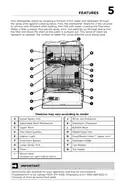
- Page 5: Your dishwasher cleans by spraying a mixture of hot water and detergent through the spray arms against soiled surfaces. The dishwasher drains for a few seconds to remove soils dropped while loading, then fills with water covering the filter area. Water is pumped through the spray arms, and soil particles go through and across the filter and down the drain as the water is pumped out. This series of steps are repeated as needed, and the number of water fills varies with the cycle being used. Features may vary according to model. Upper spray arm, adjustable rack mechanism, upper rack, rinse aid dispenser, detergent dispenser, bottom rack, flex wash system, interior light, middle spray arm, smartboost clean spray arm, stemware holder, cup shelves, silverware basket, lower spray arm, and filters are key components. Accessories are available for your appliance.
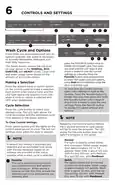
- Page 6: Controls and settings Wash cycle and options Cycle times are approximate and vary by options selected. Hot water is necessary to activate dishwasher detergent and melt fatty food soils. The Smart Sensor checks the soil level on your dishes in the Normal, Eco, Sanitize, and Heavy cycles. Cycle time and water usage varies based on the amount of soil on the dishes. Press the favorite button once to initiate the program save, then press and hold until the LED stays lit and a tone is heard to save the current settings as a favorite. Press the desired cycle or option button on the control panel to make a selection. Each button press plays a tone, and the LED light above the selection turns on when a cycle or option is selected and off when deselected. Press the cycle button to select your desired cycle. The LED light above the cycle illuminates and the estimated cycle time appears in the status window. To clear current settings: releasing the favorite button before the 3 second window to save passes will fail to save the program. Normal: For light to heavily soiled dishes and silverware. Water usage ranges from approximately 3.0 to 7.4 gallons. Wash time is about 125 min. Quick: For lightly soiled and pre-rinsed dishes and silverware. Water usage is approximately 4.5 gallons. Wash time is about 30 min with the Air Dry setting.
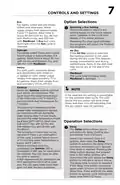
- Page 7: Controls and settings provide various options for dishwashing cycles. Eco cycle is for lightly soiled dishes, using approximately 4.3 to 7.7 gallons of water with a wash time of about 86 to 229 minutes depending on the dry setting. Selecting a dry setting can be done by touching and sliding, with updates displayed in the status window. Delicate cycle is suitable for lightly soiled china and crystal, using about 4.9 gallons of water with a wash time of 95 to 136 minutes. Heavy cycle is designed for pots and pans with dried-on soils, using approximately 7.1 to 8.1 gallons of water with a wash time of 170 to 214 minutes. Sanitize cycle heats water to 157°F for 7 minutes to sanitize dishes and glassware. If a selected dry setting is unavailable, the LED will blink and turn off, indicating the dry option was not selected. The Delay option allows starting the dishwasher from 1-12 hours later, with the delay time displayed in the status window. The Sanitize LED indicates if NSF requirements for sanitization are met after the cycle completes. If requirements are not met, the LED will be off at cycle end and will blink twice after the door is opened.
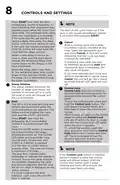
- Page 8: Controls and settings Press start and close the door immediately (within 4 seconds). A tone indicating that countdown has started sounds while the close door LEDs blink. If the cycle was not yet started, to cancel a delay time press the delay button until the time returns to zero. Both a running cycle and a delay countdown can be canceled at any time. Open the dishwasher door and press cancel. The status window indicates the number of delay start hours, the number of minutes left in a cycle, the level of rinse aid dosage, and the cycle prompts. Control lock locks the controls to avoid accidental button presses. To lock the control panel, press and hold the control lock button. The LEDs of the selected cycle and options are illuminated when the cycle and options are selected. Press start and close the dishwasher door immediately (within 4 seconds) to start the cycle. The blue floor indicator light illuminates to indicate the washer is running. If a cycle is paused the floor indicator light stays on until the door is opened.
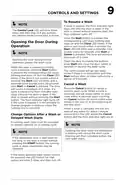
- Page 9: Controls and settings To resume a wash If the cycle is paused, the floor indicator light stays on until the door is open. The control lock LED will blink three times and then stay lit if any buttons are pressed while control lock is active. Opening the door during normal operation pauses the wash cycle. When the door is opened, a running cycle is paused. If the door is not closed within 4 seconds, the Start LED will blink, and a reminder tone sounds every 30 seconds. The control panel will go into sleep mode if there is no interaction for a period of 5 minutes. Cancel a wash Press the Cancel button to cancel a running wash cycle. When a wash is canceled, the tub drains either on door close or at the beginning of the next wash. If the newly selected wash option cannot be selected, the LED button for that option will blink 3 times and then turn off.
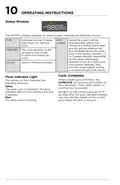
- Page 10: Operating instructions The STATUS window indicates the number of delay start hours for the selected cycle. Selecting a wash setting automatically selects the default dry setting. Each wash and dry setting displays Eco feedback above the wash time in the display window. The cycle duration or the remaining time is shown in H:MIN format. Level of rinse aid dosage is indicated by L0–L6. When a wash cycle is finished, the COMPLETE LED and the white beam on the floor illuminate. The wash cycle is complete when the floor indicator light turns off after the door is opened. The wash cycle is running when the blue light is on. All lights on the control panel go off 15 seconds after the door has been opened. Last run settings display on the control panel when the door is opened.
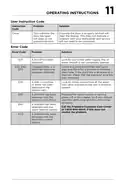
- Page 11: Operating instructions provide essential guidance for users. The user instruction code helps identify specific problems and solutions. An open or improperly latched door will trigger a display alert. Ensuring the door is properly latched will clear the display. Error code E10 indicates a low fill has been detected. Check for a pinched water supply line or ensure the water shutoff is fully opened. Error codes E20, E40, and EF0 suggest clogged filters or a restricted drain line. Cleaning both filters and the sump area is necessary to resolve these issues. Error code E30 indicates a leak or overflow detected in the bottom pan. Loose connections at the water inlet valve should be inspected for proper leveling.
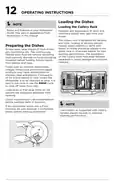
- Page 12: Loading the dishes involves specific guidelines for optimal performance. The cutlery rack is designed for flatware and most cooking or serving utensils. Heavily soiled utensils should be placed in the upper rack or silverware basket for best washing performance. Separators on the cutlery racks help keep flatware separated to avoid damage and improve cleaning. Scrape away large pieces of food before loading dishes. Burned-on foods should be loosened prior to loading. Empty liquids from glasses and cups before placing them in the dishwasher. Certain foods may cause discoloration of stainless steel and plastics if left for a long time. It is best to pre-rinse or use the rinse cycle for food soils unless the dishwasher will be operated immediately. Load racks so that large items do not obstruct the detergent dispenser from opening.
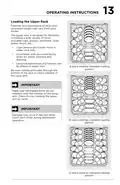
- Page 13: Loading the upper rack The upper rack is designed for flexibility in loading a wide variety of items including cups, glasses, stemware, small plates, bowls, etc. Load glasses and plastic items in upper rack only. Load items with open end facing down for better cleaning and draining. Long-handled knives and utensils can be placed in upper rack. Be sure nothing protrudes through the bottom of the rack to block rotation of the spray arm. Make sure the loaded items do not interfere with the rotation of the spray arm. Damage may occur if delicate items touch each other during dishwasher operation.
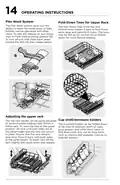
- Page 14: Operating instructions Flex Wash system The Flex Wash system allows washing of baby bottles, narrow glassware, and other items. To activate the feature, turn the clips upward; to deactivate, slide them back down. Fold-down tines in the top and bottom racks facilitate loading of large and hard-to-fit items. The tines can be left up for normal use or folded down for flexible loading. Adjusting the upper rack The top rack height can be adjusted to accommodate taller dishes. To raise the rack, lift until both sides are at the same height. To lower the rack, lift slightly then push down and release. The cup shelf holder can be folded down for two levels of cups or long items. Fold up to load tall glasses.
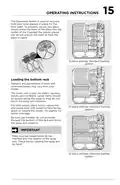
- Page 15: Operating instructions The stemware holder is used to securely hold your wine glasses in place for the best wash. To properly secure your glass, simply press the stem of the glass into the center of the Cupshelf; the plastic pieces will secure around the stem to hold the glass in place. The lower rack is best for plates, saucers, bowls, and cookware. Large items should be placed along the edge so they do not block the spray arm rotation. For best results, place bowls, casseroles, and sauce pans with soiled surface facing down or toward the center. Tilt slightly for better drainage. Be sure pan handles do not protrude through the bottom of the rack and block the spray arm rotation. Make sure the loaded items do not interfere with the rotation of the spray arm. Check this by rotating the spray arm by hand.
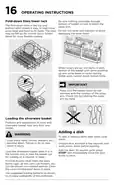
- Page 16: Operating instructions Be sure nothing protrudes through the bottom of the basket or rack to block the spray arm. The fold-down tines in the top and bottom racks make it easy to load extra large and hard-to-fit items. Do not mix silver and stainless to avoid damaging the silver finish. When covers are up, mix items in each section of the basket with some pointing up and some down to avoid nesting. Make sure the loaded items do not interfere with the rotation of the spray arm. Features and appearance of racks and silverware basket may vary from your model. Load sharp items (knives, skewers, etc.) pointing down to avoid injury. Unlatch the door and wait a few seconds until wash action stops before opening. Load the silverware basket while it is in the bottom rack or take the basket out for loading on a counter or table. Use suggested loading patterns to increase washability of the silverware.
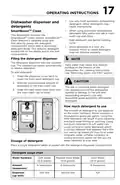
- Page 17: Operating instructions Use only fresh automatic dishwashing detergent. Other detergents may cause oversudsing. This dishwasher includes the SmartBoost Clean system, which features a separate spray arm that aids in dissolving detergent faster. Add detergent just before starting the cycle and store it in a cool, dry location. The detergent dispenser has one covered cup that opens automatically to release detergent. Hard water may cause lime deposit buildup on the interior of the dishwasher. The amount of detergent to use depends on the water hardness, measured in grains per gallon. Using too little detergent can result in poor cleaning and hard water filming or spotting. Using too much detergent in soft water can cause etching to glassware. Your local water company can provide information on the water hardness in your area. Place a single detergent tablet or packet into the detergent dispenser compartment.
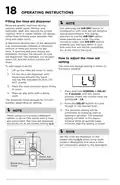
- Page 18: Filling the rinse aid dispenser Rinse aid greatly improves drying, reduces water spots, filming, and lubricates wash arm bearing for proper rotation. Not selecting the AIR DRY option in combination with rinse aid will enhance drying performance. A dispenser automatically releases a measured amount of rinse aid during the last rinse. If spotting and poor drying are problems, increase the amount of rinse aid dispensed. The rinse aid dosage setting is shown in the status window. To add liquid rinse aid, lift up the rinse aid cover to open. The dispenser holds enough for 11 to 66 washes, depending on setting. When using multi-product detergent tablets or All-In-One packs with a rinse aid component, the rinse aid dispenser should be set at the lowest setting (L1). Set the rinse aid dispenser to the lowest setting (L1) when using multi-product detergents that have a rinse aid component added to the detergent.
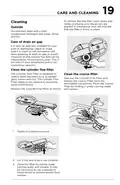
- Page 19: Care and cleaning To replace the fine filter, press down and rotate clockwise until the arrows are aligned. Occasionally wipe the outside with a mild nonabrasive detergent and water. Rinse and dry. If a drain air gap was installed, check to make sure it is clean for proper drainage. The Cylinder Fine Filter collects big items and needs to be cleaned to maximize wash performance. Take out the Cylinder Fine Filter and remove the Coarse Filter from the dishwasher tub bottom. Flush the Coarse Filter by holding it under running water and replace. Remove the Cylinder Fine Filter by rotating it counterclockwise and lifting it out. Clean the filter by rinsing under running water and replace. It may be necessary to use a sponge or bottle brush to remove excess food residue.
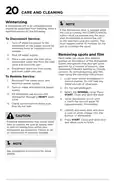
- Page 20: Care and cleaning instructions are provided for the dishwasher. A dishwasher left in an unheated place should be protected from freezing. If the dishwasher door is opened while the unit is running, the START/CANCEL button must be pressed and the door shut immediately to return the unit to the selected cycle. To disconnect service, turn off electrical power to the dishwasher at the supply source. Shut off the water supply and drain the water lines to prevent buildup. Hard water can cause lime deposits, leading to spots and film on dishes and glasses. To remove buildup, follow specific cleaning instructions. To restore service, load clean dishes without metal utensils and reconnect water and power supplies. Run the dishwasher through a HEAVY wash cycle without adding detergent. Pour white vinegar into the bottom of the dishwasher to help with cleaning.
- Page 21: Saving energy Energy use DishSense technology The yellow energy guide label indicates annual energy consumption and comparisons to other models. Energy use is based on the normal cycle response to tests simulating average use with eight place settings. Actual energy and water use depend on the selected cycle and options. DishSense technology senses soil levels to adjust the cycle automatically, preventing energy waste. The sensor is calibrated at the end of each cycle to ensure a clean load. For the first cycle after power is applied, the sensor cannot determine soil load, resulting in higher energy use. The unit features an in-line water heating element, ensuring uniform temperatures throughout the dishwasher. Users can select the AIR DRY option to save energy or choose heated dry options for drier dishes. More energy is used when more water and heat are applied during a cycle.
- Page 22: Normal operating sounds include energy efficient motors for washing and draining. Each cycle involves a series of water fills and drains. You may hear the drain motor at the beginning of each cycle. The splashing of water occurs as it enters the tub and the spray arms rotate. The wash motor pulsates throughout the cycle to vary water pressure. Normal operating lights indicate selected cycles and options. Buttons light up with an LED that turns white when selected. Deselected buttons turn off when the control lock is active.
- Page 23: Troubleshooting Water pressure must be between 20 and 120 psi for the dishwasher to function properly. Low water pressure may occur when other appliances are in use, affecting wash performance. Hot water entering the dishwasher should be at least 120°F (49°C) for optimal results. If power becomes abnormal, the START LED will go out and a red “power” message will display. To check water temperature, run the hot water faucet nearest to the dishwasher for several minutes. If the water temperature is below 120°F, adjust the hot water heater thermostat. When power is restored, the control panel lights up for 3 seconds and displays the previous wash settings. The dishwasher temporarily stops during periods of abnormal voltage. To resume a wash cycle after a power outage, open the door and press START. Touch any button except START or CANCEL to acknowledge a power alert without resuming a wash.
- Page 24: Troubleshooting Dishes not dry By selecting Heat Dry, High Temp Wash or Sanitize options, this will improve drying. Make sure the rinse aid dispenser is filled. Check the incoming water temperature. Be sure it is at least 120°F (49°C). Check for proper loading—avoid nesting items. Before calling for service, review this list. It may save you both time and expense. Choose another cycle for longer washing time. Check water hardness. For extremely hard water, it may be necessary to install a water softener. Avoid overloading and improper loading. Use fresh detergent. Old detergent is ineffective.
- Page 25: troubleshooting Assure the water supply is turned on. Load with care and do not overload. Check that the overfill protector moves up and down freely. Place delicate items in the top rack. Detergent may be old. Discard and use fresh detergent. Water vapor escapes from the vent during the drying part of the cycle. This is normal. Iron deposits in water can cause a yellow or brown film. Normal sounds include water fill, water circulation, and motor sounds. Water left in the tub bottom after the cycle is complete is not normal. Using too much detergent, especially in soft or softened water, causes damage that looks like a film but cannot be removed.
- Page 26: Troubleshooting There will be a “new” smell when first installed. This is normal. Check to see that the dishwasher is level. Check to see if unit is draining properly. Avoid oversudsing by using the correct amount of detergent designed for automatic dishwashers. Washing large amounts of dishware with tomato-based soil can cause a pink/orange appearance. Check to see if circuit breaker is tripped or if a fuse is blown. Make sure water supply is turned on. If the dishwasher door is opened while the unit is running, the START/CANCEL pad must be pressed and the door shut immediately. Hard water can cause lime deposit buildup on the interior of the dishwasher. Soiled dishes left in dishwasher too long can create an odor.
- Page 27: Your appliance is covered by a one year limited warranty. Electrolux will pay all costs for repairing or replacing any parts of this appliance that prove to be defective in materials or workmanship. This warranty does not cover products with original serial numbers that have been removed or altered. It also excludes products transferred from the original owner or removed outside the USA or Canada. Rust on the interior or exterior of the unit is not covered. Products purchased “as-is” are not covered by this warranty. Food loss due to any refrigerator or freezer failures is excluded. Products used in a commercial setting are not covered. Service calls that do not involve malfunction or defects in materials or workmanship are not included. Service calls to correct the installation of your appliance are excluded. Customer’s sole and exclusive remedy under this limited warranty shall be product repair or replacement. Claims based on implied warranties are limited to one year or the shortest period allowed by law. This warranty only applies in the USA and Canada. Obligations for service and parts under this warranty must be performed by Electrolux or an authorized service company.
- Page 28: Welcome home. Our home is your home. Visit us if you need help with owner support, accessories, service, or registration. See your registration card for more information.

KKT KOLBE DW616FS Dishwasher

BOSCH SMV6HCX2FR Dishwasher

BOSCH SPS4EMI61E Dishwasher

SAMSUNG DW60R2014 Wide 12 Place Dishwasher

SIEMENS SN55ZS02BD Dishwasher

FISHER and PAYKEL DW60UC2X2 Contemporary Built under Dishwasher

BOSCH SMI2HTS02G Dishwasher

BOSCH SHX88CL5N Dishwasher

SIEMENS SN93E805CE Dishwasher

TOMADO TDW6001W Dishwasher