
Haier HDW13F0S1 Dishwasher







NZ AU
Before first use
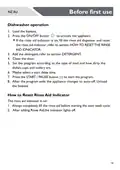
Dishwasher operation
1. Load the baskets.
2. Press the ON/OFF button
to activate the appliance.
If the rinse aid indicator is on, fill the rinse aid dispenser and reset
the rinse aid indicator,refer to section HOWTO RESETTHE RINSE
AID IDNICATOR.
3. Add the detergent; refer to section DETERGENT.
4. Close the door.
5. Set the program according to the type of load and how dirty the
dishes, cups and cutlery are.
6. Maybe select a start delay time.
7. Press the START / PAUSE button
to start the program.
8. After the program ends the appliance changes to auto-off. Unload
the baskets.
How to Reset Rinse Aid Indicator
The rinse aid indicator is on:
1. Always completely fill the rinse aid before starting the next wash cycle.
2. After adding Rinse Aid,the indicator lights off.
18

| General | Details |
|---|---|
| Name | Haier HDW13F0S1 Dishwasher |
| Make | Haier |
| Language | English |
| Filetype | PDF (Download) |
| File size | 5.91 MB |
 (1 votes, average: 5.00 out of 5)
 Loading...

Haier HDW13V1S1 Dishwasher

Haier HDW15V3S1 Satina Dishwasher

Haier HDW10F1S1 300 Series Compact Dishwasher

Haier HDW15V2B2 Dishwasher

Haier HDW13G1W Dishwasher

Haier HDW15V2S1 Dishwasher

Haier HDW13G1X Dishwasher

Haier HDW10F1S1 Compact Dishwasher

Haier HDW13F0W1 Hygiene Dishwasher

Haier HDW13F0B1 Dishwasher


IKEA 304.756.24 FINPUTSAD Integrated Dishwasher

LG Electronics LDTH7972S 23.75 in. in PrintProof Smart Dishwasher

BOSCH SMS6ECI11E-01 Free-standing Dishwasher

NEFF S155HVX00G Integrated Dishwasher

BOSCH SMV4HCX20E Dishwasher

indesit 15B1 S Dishwasher

FISHER PAYKEL DD24STI9N Dishwasher

BOSCH SBH8TB800E/41 Dishwasher

KitchenAid KDFE104KWH Two Rack Dishwasher

BOSCH SPS4HMW49G Dishwasher