
BOSCH SPS2IKW01G Dishwasher













enꢀBasic operation
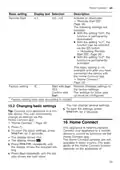
14.2ꢁSetting a programme
14.5ꢁStarting the programme
To adjust the washing programme to
the soiling level of the tableware, se-
lect a suitable programme.
▶ Press
.
a The programme has ended when
the display shows "0h:00m".
Requirement: The appliance door is
closed.
Notes
¡ If you want to add more tableware
while the appliance is running, do
not use the tablet collecting tray as
a handle for the top basket. You
might touch the partially dissolved
tablet.
▶ Press the programme button re-
peatedly until the right programme
has been selected.
a The programme is set and the LED
flashes.
¡ You can only change a pro-
gramme when running if you can-
cel it.
a The remaining running time of the
programme appears on the dis-
play.
14.3ꢁSetting additional func-
tions
¡ The appliance switches off auto-
matically 1 minute after the end of
the programme to save energy. If
you open the appliance door im-
mediately after the programme has
ended, the appliance will switch off
after 4 seconds.
You can set additional functions to
complete the washing programme
selected.
Note: The additional functions which
can be used depend on the pro-
gramme selected.
▶ Press the button for the relevant
additional function.
a The additional function is set and
the additional function button
flashes.
14.6ꢁActivating button lock
The button lock prevents the appli-
ance from being operated accident-
ally or incorrectly while running.
▶ Press
for approx. 3 seconds.
a The button lock is activated and
will be automatically deactivated at
the end of the programme.
a When the appliance is operated,
flashes on the display.
a The button lock remains activated
with a power failure.
14.4ꢁSetting timer program-
ming
You can delay the start of the pro-
gramme by up to 24 hours.
1. Press
.
a "h:01" appears in the display.
14.7ꢁDeactivate button lock
2. Use
to set the required start
.
time for the programme.
▶ Press
for approx. 3 seconds.
3. Press
a This activates timer programming.
Tip: To deactivate timer program-
ming, press
repeatedly until "h:00"
appears in the display.
32

| General | Details |
|---|---|
| Name | BOSCH SPS2IKW01G Dishwasher |
| Make | Bosch |
| Language | English |
| Filetype | PDF (Download) |
| File size | 4.18 MB |
 (1 votes, average: 5.00 out of 5)
 Loading...

BOSCH SMV6ZCX49E-39 Dishwasher

BOSCH SMI4HVS33E Dishwasher

BOSCH SRV2HKX39G Dishwasher

BOSCH SGS4HAW40G Dishwasher

BOSCH SGH4HVX32G Dishwasher

BOSCH SMS4ECI26E Dishwasher

BOSCH SMS6EDI02G Free-Standing Dishwasher

BOSCH SMS6EDW02G Free-Standing Dishwasher

BOSCH SMV4HTX27G Dishwasher

BOSCH SMV4HCX48E Dishwasher


BOSCH SMS6ECC51E Dishwasher

FOTILE SD2F-P6 3 In 1 Sink Dishwasher

Whirlpool D2I HD526 A Integrated Dishwasher
BOSCH SGS4HAW40G Dishwasher

BOSCH SMI2ITB33E Dishwasher

FISHER and PAYKEL DD60DDFHX9 Dishwasher

KitchenAid w11323304 Dishwasher

dacor EDWH24S Dishwasher

FOTILE SD2F-P5 3-in-1 In Sink Dishwasher

Hotpoint HSFC 3T127 C Dishwasher