
CAFE CDD220P2WS1 Energy Star Smart Drawer Dishwasher
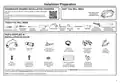


Installation Preparation
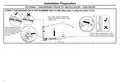
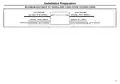
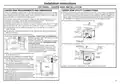
OPTIONAL - HARDWIRING PRIOR TO INSTALLATION
2
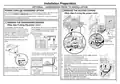
POWER CORD OR HARDWIRED OPTION
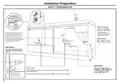
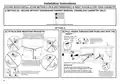
REMOVE THE ACCESS COVERS
We recommend the use of the power cord. If using the power cord option, skip steps 1-5 and
(
)
Skip step if using the power cord.
proceed to the PRODUCT DIMENSIONS section of this Installation Instructions.
If however you elect to hardwire the dishwasher drawer, follow steps 1-5 and then continue
with the rest of the Installation Instructions.
3
1
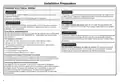
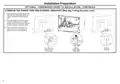
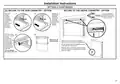
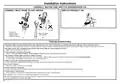
REMOVE THE DISHWASHER DRAWER
(
)
1
Skip step if using the power cord.
1
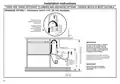
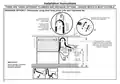
In preparation of removing the
Lift the drawer off its runners and carefully
place it upright on the covered sturdy box
you had previously positioned nearby.
dishwasher drawer, so as to not strain
its rear connectors, place a sturdy box
near the installation site to rest the
drawer on after it is removed. Cover the
box with a towel to provide a protective
surface for the drawer to rest on.
1
Remove drawer*
Place on covered
sturdy box
3
2
Electronics
module
Terminal
5
Pull the dishwasher drawer out until it
stops.
block cover
4
Harness cover
Push drawer
runners back
in on both
sides
4
1
1
1
1
*Do not move or rest the drawer too far to
prevent strain on its rear connectors.
1
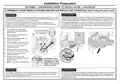
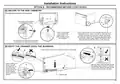
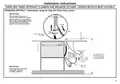
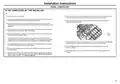
With a flat-bladed screwdriver, press in both clips and
pull to slide out the access cover.
2
4” (100 mm)
2
3
Unscrew the electronics module cover.
Carefully pull out the electronics module and rest on the
chassis base out of the way.
With a screwdriver, unclip the plastic harness cover and
hinge open.
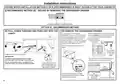
Slide the terminal block cover sideways to unlock and
hinge open to access the terminal block.
NOTE: Only unscrew the white and black terminals
two turns. They are fork terminals and do not
require the screws to be removed. The green wire
requires the screw be removed. It is a ring terminal.
Remove the center Ground screw.
Rear
Connectors
4
5
6
Press the release tabs in on both
sides and push them back to release
drawer from its runners.
5
White
Black
Drawer resting
on covered
sturdy box
Green
6
Unscrew the black, white and green wires.
5

| General | Details |
|---|---|
| Name | CAFE CDD220P2WS1 Energy Star Smart Drawer Dishwasher |
| Make | Cafe |
| Language | English |
| Filetype | PDF (Download) |
| File size | 3.61 MB |
 (1 votes, average: 5.00 out of 5)
 Loading...

CAFE CDD220P2WS1 Smart Drawer Dishwasher

CAFE CDD220P4WW2 Smart Drawer Dishwasher


BOSCH SMS6ECC00E Dishwasher

Gaggenau DF271101F Fully Concealed Dishwasher

FISHER PAYKEL DD24SAX9N Dishwasher

Gaggenau DF481101F Dishwasher

Fisher and Paykel DD24DV2T9_N Dishwasher

FISHER AND PAYKEL DD60D4ZB9 Contemporary Dishwasher

SAMSUNG DW90F89 Dishwasher

FISHER AND PAYKEL DW60UT4I2 Dishwasher

BOSCH SMU6ECS12E Dishwasher

BOSCH SHPM65W55N Dishwasher