
Di LUSSO DW269SS Dishwasher







USING YOUR DISHWASHER
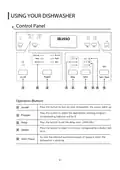
Control Panel
1
6
2
7
3
4
9
8
5
Operation (Button)
Press this button to turn on your dishwasher, the screen lights up.
1
Press this button to select the appropriate washing program,
corresponding indicator will be lit.
Program
Delay
2
3
4
Press the button to set the delay time. (3h/6h/9h)
Press the button to select a function, corresponding indicator will
be lit.
Option
To start the selected washing program or pause it when the
dishwasher is working.
5
Start / Pause
4

| General | Details |
|---|---|
| Name | Di LUSSO DW269SS Dishwasher |
| Make | Di LUSSO |
| Language | English |
| Filetype | PDF (Download) |
| File size | 3.43 MB |
 (1 votes, average: 5.00 out of 5)
 Loading...


omega OFI101X Dishwasher

AEG FSE64637P Dishwasher

IKEA AA-2412057-2-1 RÅGLANDA Dishwasher

Westinghouse WSF6608XB Dishwasher

BOSCH SMS4EMI06G Dishwasher

Miele PFD 100 SmartBiz Free-Standing Dishwasher

GE APPLIANCES DT605PSMSS with Plastic Interior Dishwasher

BEKO 150 0086 0100_AA Dishwasher

FISHER AND PAYKEL DD24STX6I1 Tall Dishwasher

Gaggenau DF481101F Dishwasher