
Home > Electrolux > Electrolux EFF1460VSA 300 Dishwasher
Electrolux EFF1460VSA 300 Dishwasher






position, then turn it to select a program.
Extra features can be activated with the
newly selected program.
7 THE CONTROL PANEL
NOTE: Simultaneously press the "+"
and "-" buttons for 3 seconds to activate/
deactivate the Child Lock. When it is first
activated, “CL” will show on the Remaining
Time Indicator for 2 seconds. When it is
deactivated, “CL” will flash twice.
Rotate the Program Selection Knob (4)
to switch on the machine and select a
suitable program for your dishes. When
the Program Selection Knob is in the 'Off'
position, the machine will not operate.
NOTE: When there is insufficient
dishwasher salt, the Salt Lack Warning
Indicator (5) will illuminate to indicate the
salt chamber needs filling.
Press the Start/Pause button (3) to start the
selected program. The Start/Pause light will
switch off and the Wash light will illuminate.
If the door of your machine is opened
during washing, the Start/Pause light
will flash and the Wash light will remain
illuminated.
NOTE: When there is insufficient rinse
aid, the Rinse Aid Lack Warning Indicator
(6) will illuminate, indicating the rinse aid
chamber needs filling.
The Wash, Rinse, Dry and End lights (7)
on the Control Panel indicate the status of
the program in operation. The machine will
remain silent for 40 to 50 minutes while the
Drying light is on.
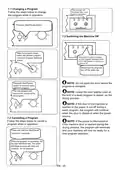
Delaying a Program
Before a program starts, press the "+" or "-"
button on the Remaining Time Indicator to
delay the start time of a program for 1 hour
up to 19 hours. To change the delay time,
first press the Start/Pause button, then
use the "+" and "-" buttons to select a new
delay time. To activate the new delay time,
press the Start/Pause button. To cancel the
delay time, use the "+" and "-" buttons to
set the time to '0'.
The Remaining Time Indicator (1) shows
the duration of the selected program
and the time remaining of the program in
operation.
NOTE: Press the Half Load button
(2) to shorten the duration of the selected
program, and therefore reduce the energy
and water consumption.
NOTE: If the Program Selection Knob
is turned to the 'Off' position after the delay
time has been selected and the program
started, the remaining delay time is stored.
When the knob is turned to a new program,
the remaining delay time will resume.
NOTE: If an extra feature has been
used, such as Delay or Half Load (1, 2),
on the most recent wash program, this
feature will remain active on the next
selected program. To cancel this feature
on the newly selected wash program, turn
the Program Selection Knob to the 'Off'
EN - 19

| General | Details |
|---|---|
| Name | Electrolux EFF1460VSA 300 Dishwasher |
| Make | Electrolux |
| Language | English |
| Filetype | PDF (Download) |
| File size | 0.78 MB |
 (1 votes, average: 5.00 out of 5)
 Loading...

Electrolux ESS87300UX Dishwasher

Electrolux EES48401L Dishwasher

Electrolux EFF9392SXA Dishwasher

Electrolux ESZ89400UX 800 SprayZone Dishwasher

Electrolux ESL2500RO Dishwasher

Electrolux KECA7400W Builtin Dishwasher

Electrolux TAPPAN Dishwasher

Electrolux KESC7320L Dishwasher

Electrolux EEC87400W Sliding Door Dishwasher

Electrolux EFC3862MS UltimateCare 300 Compact Dishwasher


CANDY CDIH 2L952-80 Dishwasher

BOSH SMD8YCX03G Dishwasher

FRIGIDAIRE GALLERY GDPP4517AD Dishwasher

Lockeliving Dishwasher

Pelgrim GVW250XL Dishwasher

BOSCH SHS53CD2N Scoop Handle Dishwasher

BOSH SX73HX42VE Dishwasher

saco DIF 04B1 Merlin House Dishwasher

FORTE F24DWS450PR Dishwasher

Electrolux ESA47205SX Dishwasher