
Haier HDW13V1W1 Dishwasher











User Manual
Dishwasher
HDW13V1W1
HDW13V1S1
HDW13V1G1


| General | Details |
|---|---|
| Name | Haier HDW13V1W1 Dishwasher |
| Make | Haier |
| Language | English |
| Filetype | PDF (Download) |
| File size | 2.45 MB |
 (1 votes, average: 5.00 out of 5)
 Loading...

Haier HDW13V1S1 Dishwasher

Haier HDW15V3S1 Satina Dishwasher

Haier HDW10F1S1 300 Series Compact Dishwasher

Haier HDW15V2B2 Dishwasher

Haier HDW13G1W Dishwasher

Haier HDW15V2S1 Dishwasher

Haier HDW13G1X Dishwasher

Haier HDW10F1S1 Compact Dishwasher

Haier HDW13F0W1 Hygiene Dishwasher

Haier HDW13F0B1 Dishwasher

Haier HDW13V1W1 Dishwasher Overview
Summary of Contents
- Page 1: User manual for the dishwasher models HDW13V1W1, HDW13V1S1, and HDW13V1G1.
- Page 2: Thank you for purchasing a Haier product. Please read these instructions carefully before using this appliance. The instructions contain important information which will help you get the best out of the appliance and ensure safe and proper installation, use and maintenance. Keep this manual in a convenient place so you can always refer to it for the safe and proper use of the appliance. If you sell the appliance, give it away, or leave it behind when you move house, make sure you also pass on this manual. Help protect the environment and human health. Do not dispose appliances marked with this symbol with the household waste. Disconnect the appliance from the mains supply. Cut off the mains cable and dispose of it. Remove the door catch to prevent children and pets from getting closed in the appliance.
- Page 3: Safety Product description Control panel Programs Daily use Care and cleaning Troubleshooting Economic and environmental use Installation Technical data Customer service
- Page 4: Safety Intended use The appliance is designed for domestic use inside the house. It is not intended for commercial or industrial use. Standards and directives This product meets the requirements of all applicable EC directives with the corresponding harmonised standards, which provide for CE marking. Before switching on the appliance for the first time Make sure all packaging is removed and is kept out of children’s reach. Make sure that the electrical information on the rating plate agrees with the power supply. Use a separate earthed socket for the power supply. The appliance must be earthed. Make sure the plug is easily accessible. Make sure only the delivered electric cable and hose set are used. Hold the plug and not the electric cable when unplugging the power supply. Make sure not to damage the electric cable and the plug. If damaged, have it replaced by an electrician. Do not install or use the appliance where the temperature is below 5 °C.
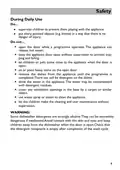
- Page 5: Safety During daily use Do supervise children to prevent them playing with the appliance. Do put sharp pointed objects in a way that there is no danger of injury. Do not open the door while a programme operates. Do not keep the appliance door open without supervision to prevent tripping and falling. Do not let children or pets come close to the appliance when the door is open. Do not sit or place heavy items on the open door. Do not remove the dishes from the appliance until the programme is completed. Do not drink the water in the appliance as it may be contaminated with detergent residues. Do not cover any ventilation openings in the base by a carpet or similar object. WARNING: Some dishwasher detergents are strongly alkaline and can be extremely dangerous if swallowed.
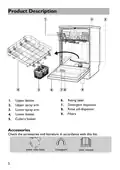
- Page 6: Product description Detergent dispenser Upper basket Upper spray arm Lower spray arm Lower basket Rinse aid dispenser Filters Cutlery basket Accessories
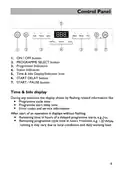
- Page 7: Control panel features include the ON/OFF button, programme select button, and various indicators. The time and info display shows programme cycle time, start delay time, error codes, and service information. The START/PAUSE button allows for pausing the programme. Remaining time for delayed programme starts and cycle time is also displayed. The working load may affect the running time of the programme.
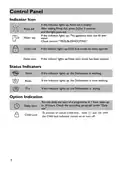
- Page 8: Control panel Indicator icon If the indicator lights up, rinse aid is empty. After adding rinse aid, press for 3 seconds and the light goes out. If the indicator lights up, child lock mode has been opened. If the indicator lights up, delay start mode has been opened. If the indicator lights up, the dishwasher is washing. If the indicator lights up, the dishwasher is rinse washing. If the indicator lights up, the dishwasher is drying. You can delay the start of a programme in 1 hour steps up to 24 hours.
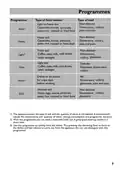
- Page 9: Programmes Non-delicate: Dinnerware, cutlery, pots and pans Light to heavy soil: Casseroles, sauces, pasta, rice, roasted or fried food, potatoes Heavy soil: Dinnerware, pots and pans, casseroles, sauces, rice, cutlery, pasta Fresh soil: Coffee, cake, milk Delicate: Glassware, cutlery, dinnerware Dishes to be stored for a few days before washing Normal soil: Soups, eggs, sauces, potatoes, pasta, rice, roasted or fried food The appliance senses the type of soil and the quantity of items in the baskets. It automatically adjusts the temperature and quantity of water, energy consumption and programme duration. Use this programme to quickly rinse the dishes.
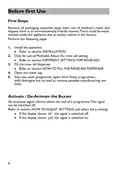
- Page 10: First steps involve removing all packaging materials and disposing of them responsibly. There may be water residue inside the appliance from factory quality checks. Install the appliance as detailed in the installation section. Adjust the rinse aid setting if using multitabs, referring to the appropriate section. Fill the rinse aid dispenser as instructed in the relevant section. Open the water tap before starting any wash program. Run a wash program with detergent but no load to eliminate manufacturing residues. An acoustic signal indicates the end of a program and can be turned off. Refer to the section on adjusting settings to manage the buzzer signal. The display indicates whether the buzzer signal is switched on or off.
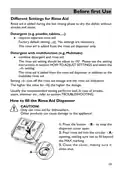
- Page 11: Different settings for rinse aid Rinse aid is added during the last rinsing phase to dry the dishes without streaks and stains. Detergent requires separate rinse aid. Factory default setting: No settings are necessary. The rinse aid is added from the rinse aid dispenser only. Detergent with multifunction combines detergent and rinse aid. The rinse aid setting should be adjusted according to the instructions in the manual. The rinse aid is added from the rinse aid dispenser in addition to the multitabs rinse aid. The higher the value for the rinse aid setting, the higher the dosage. Usually, the recommended setting performs well; refer to troubleshooting for issues. Only use rinse aid for dishwashers; other products can cause damage to the appliance.
- Page 12: How to adjust settings To adjust the rinse aid level, the appliance must be switched off. Press and hold the appropriate buttons to change the rinse aid setting in steps. To exit the rinse aid menu, press and hold the designated button. Activate or deactivate the buzzer while the appliance is switched off. The display shows the current rinse aid setting and allows scrolling to the buzzer menu. The display will indicate whether the buzzer is on or off. To toggle between buzzer settings, press the designated button. Child lock disables all buttons on the dishwasher. If any buttons are pressed while child lock is activated, the indicator will flash. To activate or cancel child lock, press and hold the appropriate buttons for 3 seconds.
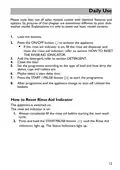
- Page 13: Daily use Please note that not all sales models come with identical features and options. Load the baskets. Press the ON/OFF button to activate the appliance. If the rinse aid indicator is on, fill the rinse aid dispenser and reset the rinse aid indicator. Add the detergent. Close the door. Set the programme according to the type of load and how dirty the dishes, cups, and cutlery are. Press the START/PAUSE button to start the programme. After programme end, the appliance changes to auto off. Unload the baskets. How to reset rinse aid indicator. Always completely fill the rinse aid before starting the next wash cycle.
- Page 14: Daily use Load the baskets With delicate glasses and porcelain make sure they are labelled dishwasher-proof. Do not put in the appliance items made of wood, horn, aluminium, pewter and copper. Only use the appliance to wash items that are dishwasher-safe. Remove remaining food from the items. Soften burned food on the items before washing. Put hollow items (cups, glasses and pans) with the opening down. Make sure that cutlery and dishes do not bond together and there is a gap between each item. Put small items in the cutlery basket. Make sure that the spray arms can move freely before you start a programme.
- Page 15: Daily use The upper basket is designed to hold items like glasses, cups, saucers, plates, small bowls, and shallow pans. You can adjust the height of the upper basket to create more space for tall items in the lower basket. Place small items on the foldable cup holder. Place sharp and pointed items with the blade pointing downward into the knife rack, to keep them out of harm's way. Before you adjust its height, make sure the basket is empty. Turn the front safety stops on either side outwards. Slide the empty basket out of the runners. Reinsert the higher or lower set of rollers in the runners and slide the basket all the way back in. Turn the front safety stops inwards.
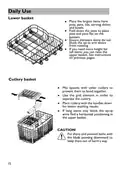
- Page 16: Daily use Lower basket Place the largest items here: pots, pans, lids, serving dishes, and bowls. Fold down the tines to place pots and pans flat on the bottom. Ensure dishware items do not block the spray arm above from rotating. If you need more height for tall items, you can raise the upper basket. Cutlery basket Mix spoons with other cutlery to prevent them from bonding together. Use the grid element in order to separate the cutlery. Place cutlery with the handles down for better washing results. Put sharp and pointed items with the blade pointing downward to keep them out of harm’s way.
- Page 17: Daily use of detergent is essential for optimal dishwasher performance. Use only a dedicated dishwasher detergent and follow the related instructions and dosage on its package. Press the button on the left of the dispenser to open the cover. Add detergent into the appropriate compartment(s), referring to recommended quantities for powdered detergent. Remove any excess detergent from the edges of the dispenser before closing the cover. The detergent will automatically be released into the dishwasher during the wash programme. Multitabs detergent tablets may include agents for water softening and rinse aid. Adjust the softener and rinse aid setting according to the instructions provided. Detergent tablets may not dissolve fully with short programmes, leading to poor washing results. If switching back to non-multifunction detergent, save 3 to 5 tablets and adjust settings accordingly.
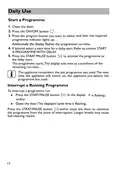
- Page 18: Daily use instructions include starting a programme and interrupting a running programme. To start a programme, close the door and press the ON/OFF button. Select the desired programme by pressing the program button. The programme indicator lights up once selected. If desired, select a start time for a delay start. Press the START/PAUSE button to activate the programme or the delay start. The display will show a countdown of the remaining run-time. The appliance remembers the last programme used for the next operation. To interrupt a programme, press the START/PAUSE button. You can continue the programme by pressing the START/PAUSE button again or closing the door.
- Page 19: Daily use Start a programme with delay Set a start time by the following procedure in order to delay a programme. Set a programme. Press the reservation button until the display flashes the required delay time (from 1 to 24 hours). Press the start/pause button. The display shows the countdown of the start delay. When the countdown is completed, the programme starts. Cancel a delayed start. When the current reservation time is displayed for 24h, press the reservation button again to cancel the reservation. The display flashes with the duration time for the set programme.
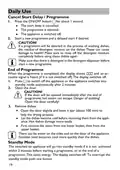
- Page 20: Daily use instructions include canceling start delay and program. Press the ON/OFF button for about 1 second to cancel the start delay and abort the program. Ensure to rinse off detergent residues completely before using the dishes again to avoid health risks. At the end of the program, an acoustic signal is heard, and the display shows completion. The appliance can be switched off manually or will enter standby mode automatically after 2 minutes. Open the door carefully after the program ends to avoid hot steam and scalding. For optimal drying, leave the door ajar after opening. Remove dishes starting from the lower basket to the upper basket. Be cautious of water on the sides and door of the appliance. Standby mode activates if the appliance is not used within 2 minutes, saving energy.
- Page 21: Care and cleaning Inspect and clean your appliance at regular intervals. Care and cleaning the filters. Ensure proper washing results and avoid serious damage to the appliance. If any filter is removed, make sure that no solid object of any size is left beyond these filters.
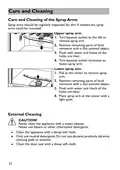
- Page 22: Care and cleaning of the spray arms should be regularly inspected for dirt. Upper spray arm can be removed by turning the bayonet socket to the left. Flush the spray arms with water and check that all holes are clear. The lower spray arm can be removed by pulling at the center. Never clean the appliance with a steam cleaner. Only use neutral detergents for cleaning. Do not use abrasive products or cleaning pads. Clean the appliance with a damp soft cloth. Remove food remnants with a thin pointed object. Clean the door seal with a damp soft cloth.
- Page 23: Troubleshooting In case of a problem, please check all shown possibilities and follow below instructions before you contact an after sales service. Before maintenance, deactivate the appliance and disconnect the mains plug from the mains socket. The appliance does not start, or it stops during operation. Possible causes include the appliance door being open, delay start being set, mains plug not connected, fuse in the house circuit being damaged, or rinse aid dispenser being empty. Close the appliance door and refer to displayed time. Connect the mains plug. Replace the fuse. Refill rinse aid until full. Press and hold the START/PAUSE button for 3 seconds after the rinse aid indicator is lighted.
- Page 24: Troubleshooting Error codes on the display Possible causes and solutions for various problems are provided. Acoustic alarm indicates that the water tap is closed; open the water tap. If the error is resolved, switch off the appliance and restart the program. The water inlet hose may have a kink or bend; ensure the hose is positioned correctly. In case of aqua-stop system activation, the hose must be replaced. Clean the filter at the inlet hose connections at the tap and the rear of the appliance. If filters are clogged, scoop out as much water as possible and continue the program by pressing the START/PAUSE button. Ensure that the drain water connection and piping are correct and not blocked. If the fault persists, contact customer care. In case of leaks, close the water tap, disconnect the appliance from the power supply, and contact service.
- Page 25: Troubleshooting Washing results are not satisfactory The dishes are not clean. Filters are clogged. Spray arms are clogged. Programme was not applicable for the type of load and food remnants. Incorrect position of the items in the baskets. Spray arms could not turn freely. No detergent or insufficient quantity of detergent in the dispenser. The wash cycle was interrupted by a long break. Whitish streaks, stains or bluish layers on glasses and dishes.
- Page 26: Troubleshooting Dry water drop stains on glasses and dishes may be caused by low rinse aid dosage. Increase the released quantity of rinse aid. The dishes are wet due to the programme having no drying phase or a low temperature drying phase. Open the door slightly to help the drying process. Wet and matte dishes may indicate an empty rinse aid dispenser. Refill rinse aid and reset the rinse aid indicator. It is not recommended to pre-rinse the dishes under running water. Select washing programmes by type and degree of contamination of the dishes. Select the economy mode programme ECO for normally soiled items. The most economical use occurs with full loading. Only use the manufacturer’s recommended detergent or rinse aid dosages.
- Page 27: Installation WARNING! Free standing installation Install the appliance on solid ground. Adjust accurately all feet. Only with a correct level the appliance door closes and seals correctly. Installation under worktop The dimensions of the recess should at least agree with the dimensions in the manual. Put the appliance adjacent to the slot. Make sure that all connections (water, drain water, power) are neatly positioned and connected. Optional: Remove the worktop of the appliance. Install the appliance carefully into the recess. WARNING! If used as free standing appliance again, the worktop must be remounted.
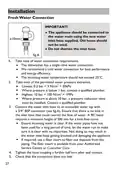
- Page 28: Installation The appliance should be connected to the water main using the new water inlet hose supplied. Old hoses should not be used. Do not shorten the inlet hose. The dishwasher has a single valve water connection. We recommend a cold water connection for best performance and energy efficiency. The incoming water temperature should not exceed 25°C. Lowest water pressure: 0.3 bar = 3 N/cm² = 30kPa. Where pressure is below 1 bar, contact a qualified plumber. Highest water pressure: 10 bar = 100 N/cm² = 1MPa. Where pressure is above 10 bar, a pressure reduction valve must be installed. Connect the water inlet hose to an accessible water tap with a 3/4” BSP connector. Ensure that there is no kink in the inlet hose that could restrict the flow of water. Ensure incoming water is clear. If the water pipes have not been used for a long period of time, let the water run to make sure it is clear with no impurities. If required, use a filter insert to filter out deposits from the piping. Tighten the hose coupling a further half turn after seal contact. Check that the connection does not leak.
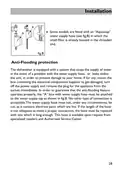
- Page 29: Installation Some models are fitted with an “Aquastop” water supply hose. The dishwasher is equipped with a system that stops the supply of water in the event of a problem with the water supply hose or leaks within the unit. This system is designed to prevent damage to your home. If the box containing the electrical components gets damaged, turn off the power supply and remove the plug from the socket immediately. To ensure the anti-flooding feature operates properly, the water supply hose must be attached to the water supply tap as shown in the manual. No other type of connection is acceptable. The water supply hose must not be cut, as it contains live electrical parts. If the hose is not long enough, it must be replaced with a longer one. Replacement hoses are available from specialized retailers and Authorized Service Centers.
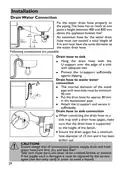
- Page 30: Installation Fix the water drain hose properly to the piping. The hose has to reach at one point a height between 400 and 850 mm above the appliance bottom line. An extension hose for the water drain hose must not exceed a total length of 4 m and must have the same diameter as the water drain hose. Drain hose to sink: Hang the drain hose with the U-support over the edge of a sink with adequate size. The internal diameter of the stand pipe with vent-hole must be minimum 40 mm. Put the drain hose for approx 80 mm in the wastewater pipe. When connecting the drain hose to a sink trap with a drain hose spigot, make sure that the drain hose is supported to the height of the bench. Ensure the drain spigot has a minimum hole diameter of 15 mm and it has been drilled out. Ensure always that all connections (power supply, drain and fresh water hose) are firm, dry and leak free. Take care these parts are never to be crushed, kinked, or twisted. If the supply cord is damaged, it must be replaced by the service agent in order to avoid a hazard.
- Page 31: Technical data includes important specifications for the dishwasher. Check the electrical data on the rating label located on the left-hand side of the dishwasher's stainless steel inner door. The supplier's name or trade mark is Haier. The supplier's model identifier is HDW13V1. The rated capacity is 13 standard place settings. Mains water pressure ranges from 0.03-1 MPa. The power voltage is 220-240 V at 50Hz. The maximum current intensity is 10 A. The total absorbed power is between 1720-2050 W. Available colors include white, stainless steel, and silver.
- Page 32: Customer service is recommended along with the use of original spare parts. Troubleshooting information can be found through local dealers or the Service & Support area online. To contact service, have specific data available. Information can be found on the rating plate at the door. Model and serial number details are required for service inquiries.
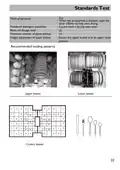
- Page 33: Standards test Eco Wash programme When the programme is finished, open the door 100mm to help with drying Powdered detergent quantities Rinse aid dosage level Maximum number of place settings Height adjustment of upper basket Recommended loading patterns Cutlery basket

FISHER PAYKEL DD60D4ZB9 Dishwasher

Midea MDF18A1AWW Dishwasher

BOSCH SMV4ECX21E-38 Dishwasher

Whirlpool 400011716396 Dishwasher

BOSCH SMV6ZCX10E-39 Slim Fully Integrated Dishwasher

GAGGENAU DF264100 Dishwasher

GE APPLIANCES GDT670SGV Interior Dishwasher with Hidden Controls

BOSCH SMI46CS01E-29 Semi- Dishwasher

BOSCH SMS6ZCW10E Dishwasher

BOSCH SMS4HCI19E Dishwasher