
MORRIS TTS-55065D Tabletop Dishwasher













USING YOUR DISHWASHER
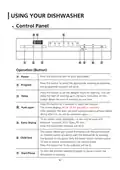
Control Panel
8 9
9
1
2
3
4
5
6
7
Operation (Button)
Press this button to turn on your dishwasher.
1
Power
Press this button to select the appropriate washing programme,
the programme indicator will be lit.
2
Program
Press this button to set the delayed hours for washing. You can
delay the start of washing up to 24 hours. One press on this
button delays the start of washing by one hour.
Delay
3
4
Press this button for 3 seconds to select the function.
The screen displays AO or AF for selected or conceled.
After washing, the door will open automatically to achieve better
drying effect.(It can not be used with rapid )
Auto open
To dry dishes more completely. ( It can only be used with
Intensive, Universal, ECO, Glass, 90 min )
Extra Drying
Child lock
5
6
Press this button,the indicator will be lit.
This option allows you to lock the buttons on the control panel,
so children cannot accidently start the dishwasher by pressing
the buttons on the panel. Only the Power button remains active.
To lock or unlock the buttons on the control panel.
Press this button for 3s,the indicator will be lit.
To start the selected washing program or pause it when the
dishwasher is working.
7
Start/Pause
4

| General | Details |
|---|---|
| Name | MORRIS TTS-55065D Tabletop Dishwasher |
| Make | MORRIS |
| Language | English |
| Filetype | PDF (Download) |
| File size | 1.88 MB |
 (1 votes, average: 5.00 out of 5)
 Loading...


Airmsen ZMW-DUHC01 Dishwasher

RANGEMASTER RDWP6015-I54 Integrated Dishwasher

GE APPLIANCES JGP3030DLWW 30 Gas Cooktop with Dishwasher

IKEA SBE8596Z0E DISKAD Dishwasher
BOSCH SMI4EVS08E Dishwasher

FISHER PAYKEL DD60D2NB9 Dishwasher

IKEA KALLBODA Dishwasher

FISHER AND PAYKEL DD24SHTI9 N Dish Drawer Dishwasher

BOSCH 100 Series Plus Smart Hybrid Tub Dishwasher

BOSCH SMS6EMI65M Dishwasher