
AEG FSK52617Z Dishwasher






EN User Manual
FSK52617Z
Dishwasher
USER
MANUAL


| General | Details |
|---|---|
| Name | AEG FSK52617Z Dishwasher |
| Make | AEG |
| Language | English |
| Filetype | PDF (Download) |
| File size | 0.84 MB |
 (1 votes, average: 5.00 out of 5)
 Loading...

AEG FSK76748P Dishwasher

AEG FSK53617Za Dishwasher

AEG FSK74747P Dishwasher

AEG FSE73507P Dishwasher

AEG GS60AIM Dishwasher

AEG FSB73427Z Dishwasher

AEG FSE74737P Quickselect Dishwasher

AEG FFB73727PM Dishwasher

AEG F8642FI Tall Tub Dishwasher

AEG FFE83800PM Dishwasher

AEG FSK52617Z Dishwasher Overview
Summary of Contents
- Page 1: User manual for the FSK52617Z dishwasher.
- Page 2: SAFETY INFORMATION SAFETY INSTRUCTIONS INSTALLATION PRODUCT DESCRIPTION CONTROL PANEL PROGRAMME SELECTION BASIC SETTINGS BEFORE FIRST USE DAILY USE HINTS AND TIPS Thank you for choosing this AEG product. We have created it to give you impeccable performance for many years, with innovative technologies that help make life simpler. Please spend a few minutes reading to get the very best from it. Always use original spare parts. When contacting our Authorised Service Centre, ensure that you have the following data available: Model, PNC, Serial Number. Warning / Caution-Safety information General information and tips Environmental information
- Page 3: responsible for any injuries or damage that are the result of incorrect installation or usage. Always keep the instructions in a safe and accessible location for future reference. Children and vulnerable people safety This appliance can be used by children aged from 8 years and above and persons with reduced physical, sensory or mental capabilities or lack of experience and knowledge if they have been given supervision or instruction concerning the use of the appliance in a safe way and understand the hazards involved. Children between 3 and 8 years of age and persons with very extensive and complex disabilities shall be kept away from the appliance unless continuously supervised. Children of less than 3 years of age should be kept away from the appliance unless continuously supervised. Children should be supervised to ensure that they do not play with the appliance. Keep detergents away from children. Keep children and pets away from the appliance when the door is open. Children shall not carry out cleaning and user maintenance of the appliance without supervision. General Safety This appliance is for cleaning household-type dishes and tableware only. This appliance is designed for single household domestic use in an indoor environment. This appliance may be used in offices, hotel guest rooms, bed & breakfast guest rooms, farm guest houses and other similar accommodation where such use does not exceed (average) domestic usage levels. Do not change the specification of this appliance.
- Page 4: - The operating water pressure must be between 0.05 (0.5) / 1 (10) MPa (bar). - Follow the maximum number of 13 place settings. - The appliance door should not be left in an open position to avoid a tripping hazard. - If the supply cord is damaged, it must be replaced by qualified personnel to avoid a hazard. - Knives and other utensils with sharp points must be loaded with their points down or placed horizontally. - Before any maintenance operation, deactivate the appliance and disconnect the mains plug. - Do not use high pressure water sprays and/or steam to clean the appliance. - The appliance must be connected to the water mains using new supplied hose-sets. - Do not use the appliance before installing it in the built-in structure for safety. - Only a qualified person must install this appliance.
- Page 5: Do not use multi-plug adapters and extension cables. Make sure not to cause damage to the mains plug and to the mains cable. Connect the mains plug to the mains socket only at the end of the installation. Do not pull the mains cable to disconnect the appliance. This appliance is fitted with a 13 A mains plug. Do not put flammable products or items that are wet with flammable products in, near or on the appliance. Do not drink and play with the water in the appliance. Ensure that there are no visible water leaks during and after the first use of the appliance. To repair the appliance contact the Authorised Service Centre. Without electrical power, the water protection system is not active.
- Page 6: Spare parts are available for 10 years after the model has been discontinued, including door hinges, seals, spray arms, drain filters, interior racks, and plastic peripherals. Some spare parts are only available to professional repairers, and not all parts are relevant for all models. The lamps inside the product are designed to withstand extreme physical conditions in household appliances. Disconnect the appliance from the mains supply before disposal. Cut off the mains cable and discard it to prevent injury or suffocation. Remove the door catch to prevent children and pets from getting closed in the appliance. Refer to safety chapters before installation. For detailed installation information, see the installation instructions supplied with the appliance. Ensure plastic covers are locked in position after installation to maintain functionality and prevent injury. Contact the Authorized Service Centre for replacement of damaged plastic covers.
- Page 7: Product description includes various components such as the upper spray arm, lower spray arm, filters, rating plate, salt container, air vent, cutlery basket, lower basket, and upper basket. The graphic provides a general overview, with more details available in other chapters or documents. A green light indicates that the programme is completed. Beam-on-Floor is a light displayed on the floor below the appliance door. A red light flashes when the appliance has a malfunction. A red light comes on at the start of the programme and stays on for its duration. Beam-on-Floor is off when the appliance is deactivated.
- Page 8: When AirDry is activated during the drying phase, the projection on the floor may not be completely visible. To see if the cycle is finished, check the control panel. The control panel includes an On/Off button, Delay start button, Display, Option buttons, AUTO Sense program button, and MY TIME program selection bar. The ECOMETER indicates how the programme selection impacts energy and water consumption. The more bars are on, the lower the consumption is. The ECOMETER indicates the most environmentally friendly programme selection for a normally soiled dishwashing load. The rinse aid indicator is on when the rinse aid dispenser needs refilling. The salt indicator is on when the salt container needs refilling.
- Page 9: Machine Care indicator is on when the appliance needs internal cleaning with the Machine Care programme. Drying phase indicator is on when you select a programme with the drying phase and flashes when the drying phase operates. MY TIME selection bar allows selecting a suitable dishwashing cycle based on programme duration. AUTO Sense programme automatically adjusts the dishwashing cycle to the type of load by sensing the degree of soil and the amount of dishes. Quick is the shortest programme (30min) suitable for dishwashing a load with fresh and light soil. ExtraPower improves the dishwashing results of the selected programme by increasing the wash temperature and duration. 1h programme is suitable for dishwashing a load with fresh and lightly dried-on soil. 1h 30min programme is suitable for dishwashing and drying normally soiled items. 2h 40min programme is suitable for dishwashing and drying heavily soiled items. GlassCare prevents delicate loads, particularly glassware, from damage by reducing temperature changes during the dishwashing cycle.
- Page 10: Programmes overview Dishwasher degree of programme phases Crockery, cutlery Fresh, lightly dried-on Dishwashing 50 °C Intermediate rinse Final rinse 45 °C ExtraPower GlassCare AirDry Crockery, normal Dishwashing 60 °C Drying Prewash ECO AUTO Sense Machine care Cleaning 70 °C Automatic door opening during the drying phase.
- Page 11: Consumption values include water, energy, and duration for various programmes. The pressure and temperature of water, mains supply variations, options, quantity of dishes, and degree of soil can change the values. Values for programmes other than ECO are indicative only. You can configure the appliance by changing basic settings according to your needs. Adjust the level of the water softener according to the water hardness in your area. Activate or deactivate the rinse aid indicator. Activate or deactivate the acoustic signal for the end of a programme. Activate or deactivate the AirDry feature. Enable or disable the sound of the buttons when pressed. Enable or disable the automatic selection of the most recently used programme and options.
- Page 12: You can change the basic settings in setting mode. To enter setting mode, press and hold Previous and Next simultaneously for about 3 seconds. When the appliance is in setting mode, the bars of the ECOMETER represent available settings. The order of the basic settings presented in the table is also the order of the settings on the ECOMETER. Use Previous or Next to select the bar of the ECOMETER dedicated to the desired setting. Press OK to enter the setting. You can navigate in setting mode using MY TIME selection bar. The water softener removes minerals from the water supply, which would have a negative effect on the washing results and on the appliance. The water softener should be adjusted according to the hardness of the water in your area. You cannot enter setting mode while the programme is running.
- Page 13: Water hardness levels are categorized in degrees (°dH), degrees (°fH), mmol/l, mg/l (ppm), and Clarke degrees. The water softener level ranges from 1 to 50, indicating varying degrees of hardness. Factory setting should not use salt at certain hardness levels. Setting the proper water hardness level is essential to keep the salt refill indicator active. Multi-tabs containing salt are not effective enough to soften hard water. The resin of the softener device needs to be regenerated regularly for correct operation. Regeneration is automatic and part of normal dishwasher operation. A new regeneration process is initiated after a prescribed quantity of water has been used. Regeneration may occur in the middle of a program or at the end of a program with a short drying phase. Regeneration can prolong the total duration of a program by an additional 5 minutes.
- Page 14: Acoustic signals sound when a malfunction of the appliance occurs and cannot be deactivated. AirDry improves the drying results by automatically opening the appliance door during the drying phase. Each performed softener rinse may prolong the programme duration by another 5 minutes. All consumption values are determined in line with applicable standards under laboratory conditions. AirDry is automatically activated with all programmes, and its duration varies depending on the selected programme and options. The rinse aid helps to dry the dishes without streaks and stains and is automatically released during the final rinse. When the rinse aid chamber is empty, the rinse aid indicator turns on. For best drying performance, always use rinse aid, even if multi-tablets are used. CAUTION: Do not try to close the appliance door within 2 minutes after automatic opening to avoid damage. CAUTION: If children have access to the appliance, it is advised to deactivate AirDry due to safety concerns.
- Page 15: The latest programme that was completed before the appliance deactivation is saved. The buttons on the control panel make a click sound when you press them. When the latest programme selection is disabled, the default programme is ECO. You can set the automatic selection of the most recently used programme and options. Make sure that the current level of the water softener agrees with the hardness of the water supply. Fill the salt container. Fill the rinse aid dispenser. Start the programme Quick to remove any residuals from the manufacturing process. Use only regeneration salt for dishwashers. The salt is used to recharge the resin in the water softener and to assure good washing results in daily use.
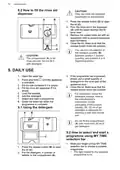
- Page 16: How to fill the rinse aid dispenser Only use rinse aid designed specifically for dishwashers. Press the release button to open the lid. Pour the rinse aid in the dispenser until the liquid reaches the fill level 'max'. Remove the spilled rinse aid with an absorbent cloth to prevent excessive foam formation. Close the lid and ensure the release button locks into position. The compartment is for rinse aid only. Do not fill it with detergent. Daily use Open the water tap. Put a small quantity of detergent on the inner part of the appliance door if the programme has a prewash phase. Fill the salt container if it is empty. Fill the rinse aid dispenser if it is empty. Load the baskets and add the detergent. Select and start a programme. Close the water tap when the programme is complete. How to select and start a programme using MY TIME selection bar Slide your finger across MY TIME selection bar to choose a suitable programme. The light related to the selected programme is on.
- Page 17: The ECOMETER indicates the level of energy and water consumption. The appliance senses the type of load and adjusts a suitable wash cycle. During the cycle, the sensors operate several times and the initial program duration can decrease. The display shows the programme duration. To delay the start of a programme, select a programme and press repeatedly until the display shows the desired delay time. Close the appliance door to start the countdown. By default, options must be activated every time before you start a programme. If the latest programme selection is enabled, the saved options are activated automatically along with the programme. Opening the door while a programme is running stops the appliance. It may affect the energy consumption and the programme duration. Make sure that there is detergent in the detergent dispenser before you start a new programme.
- Page 18: When the programme is completed, the display shows 0:00. The Auto Off function switches the appliance off automatically. This function saves energy by switching the appliance off when it is not operating. Select a programme according to the type of load and the degree of soil. ECO offers the most efficient use of water and energy consumption. Washing dishes in the dishwasher usually consumes less water and energy than washing dishes by hand. Load the dishwasher to its full capacity to save water and energy. Do not pre-rinse dishes by hand as it increases water and energy consumption. Only use salt, rinse aid and detergent designed for dishwashers. Detergent tablets do not fully dissolve with short programmes.
- Page 19: Detergent can result in poor cleaning results and hard-water filming or spotting on the items. The arrangement of the items in the baskets is correct. The programme is suitable to the type of load and the degree of soil. Always use the correct quantity of rinse aid. Using too much rinse aid results in bluish layers on the items. Always use the whole space of the baskets. Do not wash the following materials in the dishwasher: wood, horn, pewter, copper, aluminium, delicate ornamented porcelain and unprotected carbon steel. Make sure that the spray arms can move freely before you start a programme. Let the tableware cool down before you remove it from the appliance. The filters are clean and correctly installed.
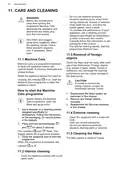
- Page 20: Care and cleaning Do not use abrasive products, abrasive cleaning pads, sharp tools, strong chemicals, scourer or solvents. Wipe clean the door, including the rubber gasket, once a week. Before any maintenance other than running the programme Machine Care, deactivate the appliance and disconnect the mains plug from the main socket. To maintain the performance of your appliance, use a cleaning product designed specifically for dishwashers at least once every two months. Check the filters and the sump after each use of the dishwasher. Foreign objects decrease the cleaning performance and can cause damage to the drain pump. Machine Care is a programme designed to clean the appliance interior with optimal results. Start the Machine Care programme to clean the appliance interior when the indicator is on. Clean the appliance with a moist soft cloth and only use neutral detergents. The filter system is made of 3 parts.
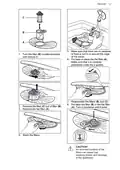
- Page 21: Make sure that there are no residues of food or soil in or around the edge of the sump. Put back in place the flat filter (A). Make sure that it is correctly positioned under the 2 guides. Turn the filter (B) counterclockwise and remove it. Reassemble the filters (B) and (C). Put back the filter (B) in the flat filter (A). Turn it clockwise until it locks. Remove the filter (C) out of filter (B). Remove the flat filter (A). Wash the filters. An incorrect position of the filters can cause bad washing results and damage to the appliance.
- Page 22: To install the spray arm back, press it downwards. We recommend to clean the lower spray arm regularly to prevent soil from clogging the holes. Clogged holes can cause unsatisfactory washing results. To remove the lower spray arm, pull it upwards. Do not remove the upper spray arm. If the openings in the spray arm are clogged, remove the remaining particles of soil with a thin pointed object, e.g. a toothpick. Wash the spray arm under running water. Improper repair of the appliance may pose a danger to the safety of the user. Any repairs must be performed by qualified personnel. Refer to the below table for information on possible problems.
- Page 23: Problem and alarm code Possible cause and solution You cannot activate the appliance. Make sure that the mains plug is connected to the mains socket. The programme does not start. Make sure that the appliance door is closed. The appliance does not fill with water. Make sure that the water tap is open. The appliance does not drain the water. Make sure that the sink spigot is not clogged. Malfunction of the wash pump or the drain pump.
- Page 24: Problem and alarm code The level of water inside the appliance is too high. The display shows iF1. Switch the appliance off and on. Make sure that the filters are clean. Make sure that the outlet hose is installed at the right height above the floor. The appliance stops and starts more times during operation. It is normal. It provides optimal cleaning results and energy savings. The programme lasts too long. If the delay start option is set, cancel the delay setting or wait for the end of the countdown. The appliance door is difficult to close. The appliance is not levelled. Loosen or tighten the adjustable feet (if applicable).
- Page 25: The PNC can be found on the rating plate on the appliance door. You can also check the PNC on the control panel. Before checking the PNC, make sure the appliance is in the programme selection. We do not recommend using the appliance until the problem has been completely fixed. Unplug the appliance and do not plug it in again until you are certain that it operates correctly. The dishwashing and drying results are not satisfactory. Refer to Daily use, Hints and tips, and the basket loading leaflet for poor washing results. Activate the function AirDry to set the automatic opening of the door and to improve the drying performance. Always use rinse aid, even with multi-tablets. The interior of the appliance is wet; this is not a defect of the appliance.
- Page 26: Unusual foam during washing may be caused by using the wrong detergent. Traces of rust on cutlery can occur due to too much salt in the water or mixing silver and stainless steel items. Residues of detergent in the dispenser may result from a stuck tablet or blocked spray arms. Odours inside the appliance can be addressed by internal cleaning and using a descaler. Limescale deposits on tableware and inside the appliance may indicate low salt levels or hard tap water. Dull, discoloured, or chipped tableware may result from washing non-dishwasher-safe items or improper loading. Careful loading and unloading of the basket is essential to prevent damage to items. Delicate items should be placed in the upper basket, and the GlassCare option should be activated for glassware. Refer to specific sections for further guidance on cleaning and maintenance.
- Page 27: Technical information includes dimensions, voltage, electrical connection, frequency, water supply pressure, and capacity. The dimensions are 596 mm width, 818 - 898 mm height, and 550 mm depth. The voltage is 220 - 240 V. The frequency is 50 Hz. The water supply pressure ranges from a minimum of 0.05 MPa (0.5 bar) to a maximum of 1 MPa (10 bar). The appliance has a capacity of 13 place settings. For energy efficiency, consider using hot water from alternative energy sources. The QR code on the energy label links to the EU EPREL database for appliance registration. Keep the energy label and user manual for reference. Recycle the appliance and packaging to protect the environment and human health.
- Page 28: Page 28

baridi DH224 Mini Tabletop Dishwasher

BOSCH SHE3AR76UC Ascenta 24 Front Dishwasher

Midea MDC17P2BWW Dishwasher

BOSCH SMI2HTB02G Dishwasher

FISHER PAYKEL DW24UT4I2 Dishwasher

FRIGIDAIRE FFCD2413US Dishwasher

Mueller DW-1800 Series 18 Inch Dishwasher
BOSCH SHE4AEM2N Dishwasher

FISHER PAYKEL DD24SCTB9_N Tall Dishwasher

FISHER AND PAYKEL DD24DTX6PX1 Double Dishwasher