
ARTUSI ADW5008X Dishwasher


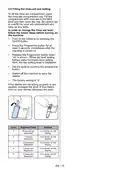


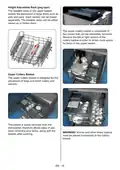
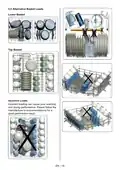








10.
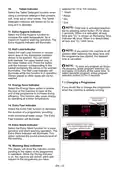
Tablet Indicator
selected for 15 to 100 minutes.
* Wash
* Rinse
* Dry
Select the Tablet Detergent function when
using a combined detergent that contains
salt, rinse aid or other extras. The Tablet
Detergent Indicator will remain on for as
long as it is selected.
* End
NOTE:
Child lock is activated/deactiva-
ted by pressing select button (7) for about
3 seconds. When it is activated, all leds
blink and “CL” is shown on Remaning Time
Indicator (4) once. When it is deactivated,
all leds and “CL” blink twice.
11. Extra Hygiene Indicator
Select the Extra Hygiene function to
increase the wash temperature, for a
maximum hygiene washing operation. The
Extra Hygiene Indicator will illuminate.
12. Half Load Indicator
NOTE:
If you switch the machine to off
Select the Half Load function to choose
which area of the dishwasher contains
dishes to be washed. You can select
both baskets, the upper basket only, or
the lower basket only. Press the button
until the indicator corresponding to the
basket containing the dishes to be washed
illuminates. The Half Load Indicator will
illuminate while this function is in operation.
Dishes placed in other areas will not be
washed.
position after selecting the delay time and
the programme has started, the delayed
time is cancelled.
NOTE:
To save any program as favou-
rite program, press program selection (2)
and delay (3) buttons at the same time. To
select favourite program, press program
selection button (2) for 3 seconds.
7.1 Changing a Programme
13. Energy Save Indicator
If you would like to change the programme
when the machine is already running.
Select the Energy Save option to enable
the door of the machine to open at the
end of the programme to increase drying
efficiency. This function also saves energy
by operating at a lower temperature.
Press the Start/
Pause button.
14. Extra Fast Indicator
Select the Extra Fast function to decrease
the duration of a programme, providing
more economical water usage. The Extra
Fast Indicator will illuminate.
After the programme stops, select
your desired programme via the
programme selection button.
15. Extra Silent Indicator
Select the Extra Silent function for a more
sensitive and silent washing operation. The
Extra Silent Indicator will illuminate. This
option reduces the sound pressure level of
the washing.
16. Washing Step Indicators
The display will show the indicator corres-
ponding to the status of the programme
in operation. While the Drying indicator
is on, the machine will remain silent with
respect to the programme you have
EN - 22

| General | Details |
|---|---|
| Name | ARTUSI ADW5008X Dishwasher |
| Make | ARTUSI |
| Language | English |
| Filetype | PDF (Download) |
| File size | 2.07 MB |
 (1 votes, average: 5.00 out of 5)
 Loading...

ARTUSI ADW4001X Dishwasher

ARTUSI ADWFI700 Dishwasher

ARTUSI ADW5001X Dishwasher


BOSCH SHV88C73N Custom Panel Dishwasher

FISHER and PAYKEL DW24U2I1 Dishwasher

BOSCH SMI4HBS19E Dishwasher

LG LD-2130-1-W-S-M-H Dishwasher

FISHER PAYKEL DD60DDFHB9 Double Dishwasher

FISHER PAYKEL DW24UNT2X2 Dishwasher

SUMMIT CK55ADASINKL Dishwasher

BOSCH SMV4HDX58E-39 Dishwasher
beko BDFN15430G Electrical Household Dishwasher

Miele G7788SCViXXL Dishwasher