
BUFFALO DK775 Digital Pass Through Dishwasher












Operation
Control Panel
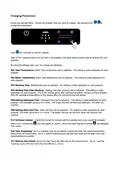
Before starting the appliance, familiarise operators with the control buttons and signal itemson the front panel.
In addition operators should be familiar with the location of power and water cut-off switches.
Starting the Appliance
Make sure that the electricity, water and drain installations are complete. Wait for the “On/Off switch” on the
front panel to light, then keep it pressed for 3 seconds. The LCD screen will switch on
The machine will start to take water automatically. Heating starts automatically when the set amount of
water has entered the boiler

| General | Details |
|---|---|
| Name | BUFFALO DK775 Digital Pass Through Dishwasher |
| Make | BUFFALO |
| Language | English |
| Filetype | PDF (Download) |
| File size | 0.46 MB |
 (1 votes, average: 5.00 out of 5)
 Loading...

BUFFALO DK775,DN975 Dishwasher

BUFFALO DK775 Dishwasher


FISHER AND PAYKEL DD60ST4NX9 Single DishDrawer Dishwasher

BOSCH SMS6EMI65M Free Standing Dishwasher

FISHER AND PAYKEL DD60SDFHTX9 Tall Single DishDrawer Dishwasher

GAGGENAU DF481100F 400 Series Dishwasher

FISHER PAYKEL DD60STX6HI1 FP BI Integrated Single DishDrawer Dishwasher

BOSCH SMV6HVX01I Integrated Dishwasher

ASKO D5233 Dishwasher

AEG FSK83828P Fully Integrated Connected Comfortlift Dishwasher

FISHER PAYKEL DD24STX6PX1 Dishwasher

GAGGENAU 8001221619 C Fully Integrated Dishwasher