
AEG FSK83828P Fully Integrated Connected Comfortlift Dishwasher












aeg.com/register
EN User Manual | Dishwasher
FSK83828P
aeg.com\register


| General | Details |
|---|---|
| Name | AEG FSK83828P Fully Integrated Connected Comfortlift Dishwasher |
| Make | AEG |
| Language | English |
| Filetype | PDF (Download) |
| File size | 1.27 MB |
 (1 votes, average: 5.00 out of 5)
 Loading...

AEG FSK76748P Dishwasher

AEG FSK53617Za Dishwasher

AEG FSK74747P Dishwasher

AEG FSE73507P Dishwasher

AEG GS60AIM Dishwasher

AEG FSB73427Z Dishwasher

AEG FSE74737P Quickselect Dishwasher

AEG FFB73727PM Dishwasher

AEG F8642FI Tall Tub Dishwasher

AEG FFE83800PM Dishwasher

AEG FSK83828P Fully Integrated Connected Comfortlift Dishwasher Overview
Summary of Contents
- Page 1: User manual for the dishwasher FSK83828P.
- Page 2: Welcome to AEG! Thank you for choosing our appliance. Contents Safety information Safety instructions Installation Product description Control panel Programme selection Basic settings Wireless connection Before first use Daily use Hints and tips Care and cleaning Troubleshooting Technical information Environmental concerns
- Page 3: Safety information is crucial before installation and use of the appliance. The manufacturer is not responsible for injuries or damage from incorrect installation or usage. Always keep the instructions in a safe and accessible location for future reference. Children aged 8 and above can use the appliance with supervision or instruction. Children between 3 and 8 years should be kept away from the appliance unless supervised. Children under 3 years should also be kept away unless continuously supervised. Supervise children to ensure they do not play with the appliance. Keep detergents away from children. Keep children and pets away from the appliance when the door is open. Children should not carry out cleaning and maintenance without supervision.
- Page 4: Do not change the specification of this appliance. The operating water pressure must be between 0.5 and 10 bar. Follow the maximum number of 14 place settings. If the supply cord is damaged, it must be replaced by qualified persons. Knives and other utensils with sharp points must be loaded with their points down. Do not leave the appliance with the open door unattended. Before any maintenance operation, deactivate the appliance and disconnect the mains plug. Do not use high pressure water sprays and/or steam to clean the appliance. The appliance is to be connected to the water mains using the new supplied hose-sets. Do not install or use the appliance where the temperature is less than 0 °C.
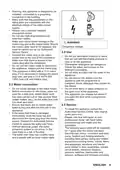
- Page 5: Warning: this appliance is designed to be installed/connected to a grounding connection in the building. Make sure that the parameters on the rating plate are compatible with the electrical ratings of the mains power supply. Always use a correctly installed shockproof socket. Do not use multi-plug adapters and extension cables. Connect the mains plug to the mains socket only at the end of the installation. Do not put flammable products or items that are wet with flammable products in, near or on the appliance. Dishwasher detergents are dangerous. Follow the safety instructions on the detergent packaging. Do not drink and play with the water in the appliance. To repair the appliance contact the Authorised Service Centre. Use original spare parts only. If the water inlet hose is damaged, immediately close the water tap and disconnect the mains plug from the mains socket.
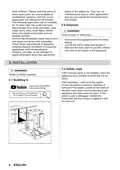
- Page 6: Reset software. Some spare parts are only available to professional repairers, and not all spare parts are relevant for all models. Spare parts will be available for 10 years after the model has been discontinued: door hinge and seals, other seals, spray arms, drain filters, interior racks, and plastic peripherals such as baskets and lids. Lamps inside this product are intended to withstand extreme physical conditions in household appliances and are not suitable for household room illumination. Disconnect the appliance from the mains supply. Cut off the mains cable and discard it. Remove the door catch to prevent children and pets from getting closed in the appliance. If the furniture panel is not installed, open the appliance door carefully to avoid the risk of injury. After installation, make sure the plastic covers are locked in position. Damage or removal of the plastic covers on the sides of the door may impact the functionality of the appliance and may cause an injury. If the plastic cover is damaged, contact the Authorized Service Centre to replace it with a new one.
- Page 7: Page 7
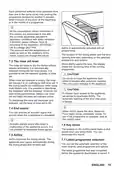
- Page 8: Product description Ceiling spray arm Upper spray arm Lower spray arm Filters Rating plate Salt container Air vent Detergent dispenser ComfortLift basket Trigger handle The rating plate has a QR code that can be used in two ways. The Beam-on-Floor is a light that is displayed on the floor below the appliance door. A red light comes on when a programme starts and remains on for the duration of the programme. A green light comes on when the programme is complete. The red light flashes when the appliance has a malfunction. Scan the QR code with the scanner in My AEG Kitchen app to pair the dishwasher with your mobile device. The Beam-on-Floor is off when the appliance is deactivated.
- Page 9: Control panel On/Off button / Reset button Delay start button / Remote start button Display Option buttons (EXTRAS) AUTO Sense program button MY TIME program selection bar The ECOMETER indicates how the programme selection impacts energy and water consumption. The more bars are on, the lower the consumption is. Rinse aid indicator. It is on when the rinse aid dispenser needs refilling.
- Page 10: Programme selection allows adjustment of temperature, water quantity, and wash duration. MY TIME selection bar helps choose a dishwashing cycle based on programme duration. EXTRAS can be activated to customize programme selection. ExtraSilent reduces noise by operating the wash pump at a lower speed, extending programme duration. Quick is the shortest programme (30 min) for lightly soiled dishes. ExtraPower enhances dishwashing results by increasing wash temperature and duration. 1h 30min is suitable for normally soiled items. 2h 40min is designed for heavily soiled items. GlassCare protects delicate glassware by moderating temperature changes and reducing it to 45 °C. ECO is the longest programme, optimizing energy and water use for normally soiled crockery and cutlery.
- Page 11: Programmes overview Programme Dishwasher Crockery, cutlery Dishwashing 50 °C Intermediate rinse Final rinse 45 °C AirDry ExtraPower GlassCare ExtraHygiene Machine Care
- Page 12: Consumption values for water, energy, and duration are provided for various programmes. The pressure, temperature, mains supply variations, options, quantity of dishes, and degree of soil can affect the values. Values for programmes other than ECO are indicative only. Basic settings can be configured according to user needs. Water hardness can be adjusted based on local water conditions. Rinse aid level should be adjusted according to necessary dosage. The acoustic signal for the end of a programme can be activated or deactivated. AirDry can be activated or deactivated with the auto door open feature. The sound of button presses can be turned on or off. Automatic selection of the most recently used programme can be enabled or disabled.
- Page 13: You can change the basic settings in setting mode. When the appliance is in setting mode, the bars of the ECOMETER represent available settings. Make sure the appliance is in setting mode. Use Previous or Next to select the bar of the ECOMETER dedicated to the desired setting. Press OK to enter the setting. Press Previous or Next to change the value. The new setting is saved. You can navigate in setting mode using MY TIME selection bar. The water softener removes minerals from the water supply, which would have a negative effect on the washing results and on the appliance. The water softener should be adjusted according to the hardness of the water in your area.
- Page 14: Water hardness Water softener Factory setting. Do not use salt at this level. Set the proper water hardness level to keep the salt refill indicator active. Multi-tabs containing salt are not effective enough to soften hard water. For the correct water softener operation, the resin of the softener device needs to be regenerated regularly. Regeneration initiation has no impact on the cycle duration, unless it occurs in the middle of a programme. When the prescribed quantity of water has been used since the previous regeneration process, a new regeneration process will be initiated. Rinsing of the water softener may begin in the same cycle or at the beginning of the next programme.
- Page 15: Each performed softener rinse may prolong the programme duration by another 5 minutes. All the consumption values mentioned are determined in line with the currently applicable standard in laboratory conditions. AirDry is automatically activated with all programmes. The rinse aid helps to dry the dishes without streaks and stains and is automatically released during the hot rinse phase. When the rinse aid chamber is empty, the rinse aid indicator is on notifying to refill rinse aid. If children have access to the appliance, it is advised to deactivate AirDry due to safety concerns. You can activate an acoustic signal that sounds when the programme is completed. The buttons on the control panel make a click sound when pressed, which can be deactivated. AirDry improves the drying results by automatically opening the appliance door during the drying phase. You can set the automatic selection of the most recently used programme and options.
- Page 16: Wireless connection allows you to connect your dishwasher to the home wireless network and link it to mobile devices in My AEG Kitchen app. This functionality enables remote control and monitoring of your dishwasher. To connect your dishwasher, enter the home network credentials in My AEG Kitchen app when prompted. If credentials are not entered, the dishwasher cancels the procedure and returns to the programme selection. The app is available for download from the app store and is compatible with iOS and Android operating systems. If the connection is successful, the indicator is steady and the letters AP are off. To deactivate the wireless connection, press and hold specific buttons simultaneously for 2 seconds. To activate the wireless connection, press and hold specific buttons simultaneously for 2 seconds. The display will show On for a few seconds during activation. Refer to Daily use to activate the remote start.
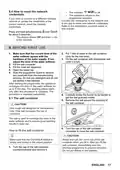
- Page 17: How to reset the network credentials If you want to connect to a different wireless network or update the credentials of the current network, reset the network credentials. The appliance returns to the programme selection. Connect the dishwasher to the network and to the app to enter new network credentials. Before first use Make sure that the current level of the water softener agrees with the hardness of the water supply. Put 1 litre of water in the salt container (only for the first time). Fill the salt container with dishwasher salt (until it is full). Start the programme Quick to remove any residuals from the manufacturing process. Use rough salt designed for dishwashers only. The salt is used to recharge the resin in the water softener and to assure good washing results in daily use. Make sure that the ComfortLift basket is empty and locked in the raised position. After you fill the salt container, immediately start the shortest programme to prevent corrosion.
- Page 18: How to fill the rinse aid dispenser Only use rinse aid designed specifically for dishwashers. Fill the dispenser until the rinse aid reaches the marking MAX. Remove the spilled rinse aid with an absorbent cloth to prevent excessive foam formation. Close the lid and make sure that it locks into position. Fill the rinse aid dispenser when the indicator is clear. The compartment is for rinse aid only. Do not fill it with detergent. Daily use Open the water tap. Make sure that items do not stick out of the basket frame as it can cause damage. The ComfortLift mechanism allows to lift the lower rack up and put it down to load and unload dishes easily.
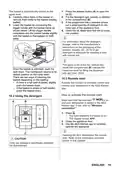
- Page 19: The basket is automatically locked on the upper level. Press the release button to open the lid. Carefully place items in the basket or remove them. Put the detergent in the compartment. If the programme has a prewash phase, put a small quantity of detergent on the inner part of the appliance door. Close the lid and make sure that it locks into position. Lower the basket by connecting the trigger handle with the basket frame. For information about the detergent dosage, refer to the manufacturer's instructions. Activate the remote start function to remotely control and monitor your dishwasher in My AEG Kitchen app. Only use detergent specifically designed for dishwashers.
- Page 20: How to deactivate the remote start Press until the display shows 0h. The light related to the button is off. The appliance returns to the programme selection. Activating options often increases the water and energy consumption as well as the programme duration. How to select and start a programme using MY TIME selection bar Slide your finger across MY TIME selection bar to choose a suitable programme. How to start the AUTO Sense program The appliance senses the type of load and adjusts a suitable wash cycle. During the cycle, the sensors operate several times and the initial program duration can decrease. How to activate EXTRAS Select a programme using MY TIME selection bar. Press the button dedicated to the option you want to activate. How to delay the start of a programme Select a programme. Double press the button. Press repeatedly until the display shows the desired delay time (from 1 to 24 hours). Close the appliance door to start the countdown. How to cancel the delay start while the countdown operates Press and hold for about 3 seconds. The appliance returns to the programme selection.
- Page 21: If you cancel the delay start, you have to select the programme again. Opening the door while the appliance operates may affect the energy consumption and the programme duration. Press and hold to cancel a running programme. If the door is opened for more than 30 seconds during the drying phase, the running programme ends. Make sure that there is detergent in the detergent dispenser before you start a new programme. The Auto Off function saves energy by switching the appliance off when it is not operating. Opening the door while a programme is running pauses the wash cycle. When the programme is complete, the display shows 0:00. Opening the door while the remote start is activated deactivates this function. Do not pre-rinse dishes by hand; it increases water and energy consumption.
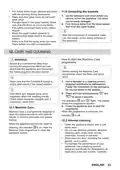
- Page 22: Make sure that items in the baskets do not touch or cover each other for effective washing. You can use dishwasher detergent, rinse aid, and salt separately or multi-tablets. Select a programme according to the type of load and the degree of soil, with ECO being the most efficient. To prevent limescale buildup, ensure the water softener level is correct. Before stopping the use of multi-tablets, set the highest level of the water softener. Only use products designed for dishwashers to avoid damage. Ensure the filters are clean and correctly installed before starting a programme. The arrangement of items in the baskets should be correct for optimal cleaning. Always use the correct quantity of detergent to avoid poor cleaning results. Do not wash items made of wood, horn, aluminium, pewter, or copper in the appliance.
- Page 23: Put hollow items with the opening facing downwards. Make sure that glass items do not touch each other. Put light items in the upper basket and ensure they do not move freely. Put cutlery and small items in the cutlery drawer. Move the upper basket upwards to accommodate large items in the lower basket. Make sure that the spray arms can move freely before starting a programme. Let the tableware cool down before removing it from the appliance. Before any maintenance, deactivate the appliance and disconnect the mains plug. Use a descaler or a cleaning product designed specifically for dishwashers. Machine Care is a programme designed to clean the appliance interior with optimal results.
- Page 24: Follow the instructions on the packaging of the product. For optimal cleaning results, start the programme Machine Care. Check the filters and the sump after each use of the dishwasher. Foreign objects decrease the cleaning performance and can cause damage to the drain pump. If unable to remove the foreign objects, contact an Authorised Service Centre. Clean the appliance with a moist soft cloth. Only use neutral detergents. The filter system is made of 3 parts. Make sure that there are no residues of food or soil in or around the edge of the sump. Put back in place the flat filter and make sure that it is correctly positioned under the guides.
- Page 25: Wash the spray arm under running water. Use a thin pointed tool, e.g. a toothpick, to remove particles of soil from the holes. Reassemble the filters (B) and (C). Put back the filter (B) in the flat filter (A). Turn it clockwise until it locks. An incorrect position of the filters can cause bad washing results and damage to the appliance. We recommend to clean the lower spray arm regularly to prevent soil from clogging the holes. Clogged holes can cause unsatisfactory washing results. We recommend to clean the upper spray arm regularly to prevent soil from clogging the holes. Pull out the upper basket.
- Page 26: To detach the spray arm from the basket, press the spray arm upwards and simultaneously turn it clockwise. Clogged holes can cause unsatisfactory washing results. The ceiling spray arm is placed on the ceiling of the appliance. Wash the spray arm under running water. Use a thin pointed tool, e.g. a toothpick, to remove particles of soil from the holes. To install the spray arm back, press the spray arm upwards and simultaneously turn it counterclockwise until it locks into place. Move the upper basket to the lowest level to reach the spray arm more easily. Run the water through the holes to wash soil particles away from the inside. We recommend to clean the ceiling spray arm regularly to prevent soil from clogging.
- Page 27: To install the spray arm, insert the mounting element in the spray arm and fix it in the delivery tube by turning it clockwise. Install the cutlery drawer on the sliding rails and block the stoppers. Refer to the below table for information on possible problems. Improper repair of the appliance may pose a danger to the safety of the user. Any repairs must be performed by qualified personnel. With some problems, the display shows an alarm code. The majority of problems that may occur can be solved without the need to contact an Authorised Service Centre. Make sure that the mains plug is connected to the mains socket. Make sure that the appliance door is closed. Make sure that the water tap is open.
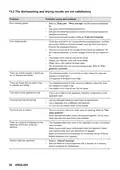
- Page 28: Problem and alarm code Possible cause and solution The anti-flood device is on. The display shows i30. Close the water tap. Make sure that the appliance is correctly installed. Malfunction of the water level detection sensor. The display shows i41 - i44. Make sure that the filters are clean. Switch the appliance off and on. The display shows i51 - i59 or i5A - i5F. The temperature of the water inside the appliance is too high or malfunction of the temperature sensor occurred. Make sure that the temperature of the inlet water does not exceed 60°C. The display shows iC0 or iC3. The level of water inside the appliance is too high. Switch the appliance off and on. Make sure that the outlet hose is installed at the right height above the floor. Network unit error. Contact an Authorised Service Centre. The appliance stops and starts more times during operation. It is normal. It provides optimal cleaning results and energy savings. The programme lasts too long. If the delay start option is set, cancel the delay setting or wait for the end of the countdown. Activating options increases the programme duration. The displayed programme duration is different than the duration in the consumption values table. Refer to the consumption values table in the chapter Programme selection. Small leak from the appliance door. The appliance is not levelled. Loosen or tighten the adjustable feet. The appliance door is difficult to close. Parts of the tableware are protruding from the baskets.
- Page 29: Problem and alarm code Possible cause and solution Rattling or knocking sounds from the inside of the appliance may be due to improper arrangement of tableware in the baskets. Make sure that the spray arms can rotate freely. The appliance trips the circuit breaker if the amperage is insufficient to supply all appliances in use. Contact an Authorised Service Centre for internal electrical faults. If the display shows PF, the power supply is out of the operating range. The appliance switches off during operation due to a complete power outage. The display shows upd when the appliance downloads and installs firmware updates automatically. The firmware update does not change the appliance performance declaration values. For alarm codes not described in the table, contact an Authorised Service Centre. You need to provide the product number code (PNC) of your appliance when contacting an Authorised Service Centre.
- Page 30: The dishwashing and drying results are not satisfactory. Poor washing results may be due to improper loading or insufficient washing intensity. Activate the ExtraPower option to improve washing results. Clean spray arm jets and filter for better performance. Poor drying results can occur if tableware is left too long inside the appliance. Activate the AirDry function to enhance drying performance. Ensure there is sufficient rinse aid and adjust the dosage if necessary. Whitish streaks or bluish layers on dishes may indicate excessive rinse aid. Residues of detergent in the dispenser can result from blockages or improper loading. Odours inside the appliance can be addressed by internal cleaning and using a descaler.
- Page 31: Limescale deposits on the tableware, on the tub and on the inside of the door. The level of salt is low, check the refill indicator. The cap of the salt container is loose. Your tap water is hard. Refer to The water softener. Use salt and set regeneration of the water softener even when multi-functional tablets are used. Start the Machine Care programme with a descaler designed for dishwashers. Dull, discoloured or chipped tableware. Make sure that only dishwasher-safe items are washed in the appliance. Load and unload the basket carefully. Activating wireless connection is not successful.
- Page 32: The app cannot connect to the dishwasher. There is a trouble with the wireless network signal. Check your wireless network and router. Restart the router. Check if your mobile device is connected to the network. New router was installed or router configuration was changed. Configure the dishwasher and mobile device again. Contact your wireless service provider if there are further problems with the wireless network. The app cannot connect to the dishwasher through any network other than your home wireless network. The connection to the cloud is lost. Wait for the connection to be restored. The wireless signal is disrupted by a microwave appliance placed near the dishwasher. The wireless network signal is weak. Move router as close to the dishwasher as possible or consider purchasing a wireless range extender. Refer to the rating plate for other values.
- Page 33: Keep the energy label for reference together with the user manual and all other documents provided with this appliance. For more detailed information about the energy label, visit the relevant website. Appliances marked with the recycling symbol should be recycled properly. Return the product to your local recycling facility or contact your municipal office. Recycle packaging materials in relevant containers. Help protect the environment and human health by recycling waste of electrical and electronic appliances. Do not dispose of appliances in household waste.
- Page 34: My AEG Kitchen app The software in this product contains components that are based on free and open source software. AEG gratefully acknowledges the contributions of the open software and robotics communities to the development project. To access the source code of these free and open source software components whose license conditions require publishing, and to see their full copyright information and applicable license terms, please visit the specified repository.

smeg DI262D Dishwasher

Whirlpool 3C26 Dishwasher

PandC VE-DWVFI Tall Tub Dishwasher

FISHER PAYKEL DD60ST4HZB9 Dishwasher

Hotpoint H7F HP33 UK Dishwasher

BOSCH SMS6HVI00I Free-Standing Dishwasher

BOSCH SMS4EKW06E Smart Dishwasher

IKEA 9001774318 Dishwasher

BOSCH SHP65CM2WH Dishwasher

BOSCH SMH4EVX08E Dishwasher