
CAFE CDD220P2WS1 Smart Drawer Dishwasher






Installation Preparation
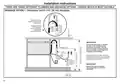
OPTIONAL - HARD WIRING PRIOR TO INSTALLATION
2
POWER CORD OR HARDWIRE OPTION
REMOVE THE ACCESS COVER AND REMOVE THE
We recommend the use of the power cord. If using the power cord option, skip steps 1-4 and
(
)
POWER CORD Skip step if using the power cord.
proceed to the PRODUCT DIMENSIONS section of this Installation Instructions.
If however you elect to hardwire the dishwasher drawer, follow steps 1-4 and then continue
with the rest of the Installation Instructions.
3
1
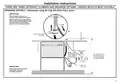
REMOVE THE DISHWASHER DRAWER
(
)
Skip step if using the power cord.
1
Clip
In preparation of removing the
Lift the drawer off its runners and carefully
place it upright on the covered sturdy box
you had previously positioned nearby.
dishwasher drawer, so as to not strain
its rear connectors, place a sturdy box
near the installation site to rest the
drawer on after it is removed. Cover the
box with a towel to provide a protective
surface for the drawer to rest on.
1
Clip
Remove drawer*
Place on covered
sturdy box
3
2
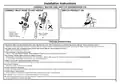
Access cover
Electronics
module
Terminal
5
1
With a flat-bladed screwdriver, push
in the clips and slide out the access
cover.
Unscrew the electronics module
cover.
Carefully pull out the electronics
module and rest on the chassis base
out of the way.
With a screwdriver, unclip the plastic
harness cover and hinge open.
Slide the terminal block cover
sideways to unlock and hinge open
to access the terminal block.
Unscrew the Live, Neutral and
Ground wires as shown.
NOTE: Only unscrew the live and
neutral terminals 2 turns. They are
fork terminals and do not require the
screws to be removed. The ground
requires the screw be removed. It is
a ring terminal. Remove the center
ground screw.
Pull the dishwasher drawer out until it
stops.
block cover
4
2
3
Harness cover
Push drawer
runners back
in on both
sides
4
1
Remove existing
power cord
4
5
*Do not move or rest the drawer too far to
prevent strain on its rear connectors.
7
6
2
4” (100 mm)
6
Rear
Connectors
Press the release tabs in on both
sides and push them back to release
drawer from its runners.
5
Drawer resting
on covered
sturdy box
7
7
Unscrew the three screws on the
base as shown and remove the cord
from the product.
5

| General | Details |
|---|---|
| Name | CAFE CDD220P2WS1 Smart Drawer Dishwasher |
| Make | Cafe |
| Language | English |
| Filetype | PDF (Download) |
| File size | 3.1 MB |
 (1 votes, average: 5.00 out of 5)
 Loading...

CAFE CDD220P2WS1 Energy Star Smart Drawer Dishwasher

CAFE CDD220P4WW2 Smart Drawer Dishwasher


Haier HDW15F1S1 Dishwasher

Adexa WST5A6WTWL Commercial Mini Dishwasher

LG XD3A25UNS Dishwasher

ATAG VA8214LU Dishwasher

BOSCH SMS4HDW52G Dishwasher

Gaggenau DF481101F Dishwasher

BOSCH SMS2ITI04E 60 cm Free-standing Dishwasher

BOSCH SMS4EKI62T Dishwasher

FISHER and PAYKEL ADDD24SPX Dishwasher

Fisher Paykel DW60UT4I2 Built Under Dishwasher