
DAEWOO DA1D5SI0ES Dishwasher





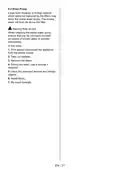


time is cancelled.
7. THE CONTROL PANEL
1
9
8
4
10
7
4. Remaining Time Indicator
Programme flow can be monitored via the
Wash, Rinse, Dry, End indicators (10) and
Remaining Time Indicator.
6
5
2
3
5. Tablet Button
Press the Tablet button to activate the
Tablet option when using combined
detergent that contains salt and rinse aid.
Tablet indicator (5.1) will be on.
2.1
6.1 3.1 5.1
1. On/Off Button
2. Program Selection Button
2.1. Program Indicators
3. Delay Button
6. Half Load Button
Thanks to the half load function in your
machine, you can shorten the durations of
the programmes that you have selected and
reduce the energy and water consumption
by using half load electricity and water.
Half Load indicator (6.1) will be on.
3.1. Delay Indicator
4. Remaining Time Indicator
5. Tablet Button
5.1. Tablet Indicator
6. Half Load Button
6.1. Half Load Indicator
7. Start/Pause Button
8. Rinse Aid Indicator
9. Salt Indicator
10. Washing Step Indicators
a- Washing Step Indicator
b- Rinse Step Indicator
c- Drying Step Indicator
d- End Step Indicator
7. Start/Pause Button
Press the Start/Pause button to start the
selected programme. The wash led turns on
and the Remaining Time Indicator shows
the programme duration. It also indicates
the remaining time during the programme
flow. If you open the door of your machine
when the programme is running the
duration of the programme pauses, and
related washing step indicator blinks.
1. On/Off Button
Switch the machine on by pressing the
On/Off button.
8. Rinse Aid Indicator
When the rinse aid level is low, the rinse
aid lack warning indicator turns on and you
should fill the rinse aid chamber.
2. Program Selection Button
Select a suitable programme by pressing
Program Selection button. The selected
program indicator (2.1) will be on. For the
details of the programs refer to section
Program Table.
9. Salt Indicator
When there is insufficient softening salt, the
salt lack warning indicator turns on and you
should fill up the salt chamber.
3. Delay Button
You can delay the start time of the
programme for 1-2...24 hours by pressing
the Delay button before the programme
starts. To activate the delay time, press
Start/Pause button (7). The delay indicator
(3.1) will be on. If you want to
change the delay time, first press the Start/
Pause button (7) and then the delay button
to select a new delay time. To activate the
new delay time, press the Start/Pause
button (7) again. To cancel the delay, you
need to switch to 0 hour by pressing the
Delay button.
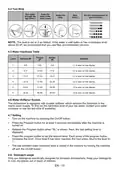
10. Washing Step Indicators
You can monitor the programme flow with
the Washing Step Indicators on the control
panel. While the Dry indicator is on, the
machine remains silent for about 15-50
minutes with respect to the flow of the prog-
ram you have selected.
•
•
•
•
Wash
Rinse
Dry
End
If you switch off the machine after selecting
and activating the delay time, the delayed
EN - 17

| General | Details |
|---|---|
| Name | DAEWOO DA1D5SI0ES Dishwasher |
| Make | Daewoo |
| Language | English |
| Filetype | PDF (Download) |
| File size | 0.79 MB |
 (1 votes, average: 5.00 out of 5)
 Loading...

DAEWOO DA1E6FW0ES Dishwasher


caple DI631 Dishwasher

BOSCH SHS53CD2N Scoop Handle Dishwasher

IKEA AA-2360858-2-1 RENGÖRA Dishwasher

BOSCH SMI6ECS00E Dishwasher

BOSCH SHS53C Dishwasher

BOSCH SBT6TB801E-46 Dishwasher

BOSCH SMH4ECX10E/01 Fully Dishwasher

BOSCH SN23HI65MM Dishwasher

gorenje 642D65 Dishwasher

Whirlpool X803KE Dishwasher