
Home > FISHER and PAYKEL > Fisher and Paykel DD60DCHX9 Dishdrawer Dishwasher
Fisher and Paykel DD60DCHX9 Dishdrawer Dishwasher


QUICK START GUIDE
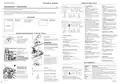
CONTROLS AND DISPLAY
Single models
E Keylock
Start / Delay Start
Press
D
DISHDRAWERTM DISHWASHER
Keylock disables all the buttons –
helpful when cleaning the
dishwasher.
To activate: press and hold
together until you hear one tone.
The keylock indicator
on.
To cancel: press and hold
together until you hear another
tone and the keylock indicator stops
flashing and goes out
to start the wash.
EU
F
To pause:
Press
indicator
again. The wash stage
and (Double
J
H
I
Keep this document handy for easy reference.
and
M
models) will flash.
K
L
O
O
O
O
For detailed information on the features of your dishwasher, see your ‘User guide’.
Before using your dishwasher, make sure you read the full ‘User guide’, with special attention to the ‘Safety and warnings’ section.
For contact information or if you require service, assistance or replacement parts, see the end of this document or your ‘Service &
warranty’ booklet.
will come
Wait for the 3 short and one long
tone before opening the drawer.
Forcing it open mid cycle may cause
damage or injury.
If the drawer is not restarted within
7 minutes it will tone intermittently
until it is restarted.
and
O
E
YOUR MODEL
C
D
A
B
Childlock
Childlock disables all the buttons
and locks the drawer closed,
preventing unauthorized use by
children.
To Delay start
1 Press and hold
Double model
DD60DCHX9
Note: each drawer can
run independently of
the other drawer.
Single model
DD60SCHX9
untilꢀK appears
Double models
on the display, then release. You are
now in Delay start mode.
F
To activate: press and hold
together until you hear a second
and
2 Press
until the display shows the
number of hours you want to delay
the start of a wash by (1 to 12 hours).
Note: If you scroll past 12 hours
the dishwasher will exit Delay start
mode. To re-enter delay start follow
step 1 above.
J
H
I
M
G
tone. The keylock indicator
come on.
To cancel: press and hold
will
and
O
K
L
together until you hear another
tone and the keylock indicator stops
flashing and goes out.
O
The wash will start once the delay
time is over, provided the drawer is
closed.
E
Wash program indicators
These show which program is
selected.
F
A
B
C
D
DD24 models only
OPERATING INSTRUCTIONS - STARTING A WASH
If the drawer is opened after delay
start has been set (for example if
you need to load more dishes), delay
start will be paused after the drawer
is closed.
G
Drawer indicator (Double models only)
White: drawer is running and selected.
Dim: drawer is running but not
selected.
Controls Description
1
2
4
Discard scraps
Add detergent
Off/On
A
Powdered
Detergent
Scrape large food particles
off (e.g. bones, fruit stones)
and remove any foreign
objects (e.g. toothpicks,
strings, paper).
Fill the detergent dispenser (A) with
powdered detergent and close the
dispenser door.
To restart delay start:
Close the drawer.
Flashing: drawer is paused
Opening the drawer will automatically
turn the dishwasher on.
O
O
O
Single models:
Double models:
will flash.
and will flash.
H
Display
Single models:
Press
O
O
Time remaining (minutes)
Fault code numbers
(see ‘If there is a fault’ in User guide).
A
to turn the dishdrawer on or off.
IMPORTANT!
Do not place liquid detergent or
tablets in the detergent dispenser.
Press
to resume.
Double models:
Press
Cancel wash / Cancel Delay start
O
O
to turn the dishdrawer on.
I
Wash stage indicators
(See ‘During and after the wash
cycle’).
Press and hold
off.
to turn the dishdrawer
Single models:
Press
If using a tablet or gel pouch, place
it in the cutlery basket (B) or at the
edge of the base rack
Tablet or Gel Pouch
to cancel a wash that has
already started or to cancel the
Delay start setting.
Load dishes carefully
B
Drawer selector (Double models only)
Press to scroll between drawers.
J
Keylock/Childlock indicator
If lit: keylock or childlock is
activated.
(see user guide for details)
To help with wash
performance,
Double models:
Press and hold
B
C
Wash selector
Press to scroll through wash
program options.
to cancel a wash
arrange dishes so they are
evenly spaced and not
nesting.
that has already started or to cancel
the delay start setting.
Delayed start indicator
If lit: delayed start is set.
K
L
Check rinse aid
O
Wash modifiers selector
Press to scroll through the wash
modifier options.
Note: Not all modifiers are available for all
wash programs.
If there is any water in the drawer, it
will automatically drain before the
dishwasher turns off.
IMPORTANT!
Salt indicator
(Water softener models only)
If lit: salt reservoir is empty.
Accommodates plates up to
a max height of 280mm (11”)
for standard tubs or 310mm
(12 1/4”) for tall tubs.
If the indicator on its plug (C) glows
bright red, refill the rinse aid
Rinse aid
dispenser (D) with liquid rinse aid.
Make sure you then refit the rinse
aid plug back into its original
position, by rotating the plug back
into an upright position.
M
Wash modifiers indictors
If lit: wash modifier is selected.
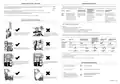
WASH PROGRAMS
C
D
3
Double models interface shown
PROGRAM
DESCRIPTION
Check spray arm(s) are
mounted correctly and
can rotate fully around
Wash program indicators
These show which program is selected.
Heavy
Heavily soiled pots, pans and dishes.
Select wash
5
Medium
Dishes that are quite heavily soiled or food soils that have
been left to dry overnight.
Power the dishwasher on
then select wash program
Check the spray arm is
mounted correctly by
physically rotating it
around with your hand.
(default setting)
.
Eco
Normally soiled dishes for optimum water and energy
usage. The US/Canada Energy Guide is based on this cycle.
Start wash or set Delay start
6
Fast
Lightly soiled dishes.
Before a wash, ensure there
are no items blocking the
spray arm(s) from rotating.
To start wash:
Close the drawer and press
Delicate
Rinse
Lightly soiled and heat sensitive crockery.
Prevents odours and soils from drying on dishes.
.
Wash program modifiers (optional)
These show which wash modifier is selected
(see ‘Setting wash modifiers’ in your User guide).
To set delay start:
Press and hold
start, then press and hold
to increase the delay start time.
to enter delay
again
Rotating Spray arm
continued >


| General | Details |
|---|---|
| Name | Fisher and Paykel DD60DCHX9 Dishdrawer Dishwasher |
| Make | FISHER and PAYKEL |
| Language | English |
| Filetype | PDF (Download) |
| File size | 1.8 MB |
 (1 votes, average: 5.00 out of 5)
 Loading...

FISHER and PAYKEL DD60SCTX9 Dishwasher

FISHER and PAYKEL DD60DDFHX9 Dishwasher

FISHER and PAYKEL DD24SCTB9 N Dishwasher

FISHER and PAYKEL DD60SCTW9 Dishwasher

FISHER and PAYKEL DD60SDFTX9 Dishwasher

Fisher and Paykel DW24UT2I2 Dishwasher

FISHER AND PAYKEL DD24STI9 Dishwasher

FISHER AND PAYKEL DD60STX6I1 Dishwasher

FISHER AND PAYKEL DD24SHTI9N Dishwasher

FISHER AND PAYKEL DD60SDFHTX9 Tall Dishwasher

Fisher and Paykel DD60DCHX9 Dishdrawer Dishwasher Overview
Summary of Contents
- Page 1: quick start guide keylock disables all the buttons, helpful when cleaning the dishwasher. to activate: press and hold together until you hear one tone. before using your dishwasher, make sure you read the full user guide, with special attention to the safety and warnings section. childlock disables all the buttons and locks the drawer closed, preventing unauthorized use by children. to activate delay start, press and hold until the display shows the number of hours you want to delay the start of a wash. the wash will start once the delay time is over, provided the drawer is closed. important! do not place liquid detergent or tablets in the detergent dispenser. load dishes carefully to help with wash performance, arrange dishes so they are evenly spaced and not nesting. if there is any water in the drawer, it will automatically drain before the dishwasher turns off. check rinse aid dispenser with liquid rinse aid and refill if necessary.
- Page 2: During and after the wash, you can change the setting of these options to suit your preferences or circumstances. As the wash progresses, the display will count down the minutes remaining and show what stage the program is at. When the program has finished, the display will show 0 and the dishwasher will sound a tone. The drying fan may continue to run after a wash program has finished for a set time or until the drawer is opened. Regulates the amount of rinse aid dispensed. For best drying results, we recommend unloading the dishes once they have cooled. Sharp or pointed items must be placed horizontally or with sharp edges/points facing down to avoid risk of injury. A neatly arranged load with evenly spaced dishes helps wash performance. Ensure there is enough space between plates. If plates and cutlery are nesting, they are less likely to be cleaned well.

SHARP SDW6506JS Dishwasher

GE APPLIANCES GDF650SYVFS Dishwasher

SIEMENS 9001902343 Fully Integrated Dishwasher

FISHER PAYKEL DW60FC1X114 Place Dishwasher

LIVINOX LDW-14P-8BL Dishwasher

FISHER PAYKEL DD24DTX6I1 Sanitize Integrated Dishwasher
FISHER and PAYKEL DD24SCTB9 N Dishwasher

gorenje GI52040X Dishwasher

BOSCH S255HTX15E-4 Dishwasher

FISHER PAYKEL DD24SCTW9 N Sanitize Dishwasher