
Home > FISHER and PAYKEL > Fisher and Paykel DD60DCHX9 Dishdrawer Dishwasher
Fisher and Paykel DD60DCHX9 Dishdrawer Dishwasher
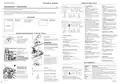


DURING AND AFTER THE WASH
PREFERENCE OPTIONS
You can change the setting of these options to suit your preferences or circumstances. We recommend selecting the most suitable
settings before you start using your dishwasher.
As the wash progresses, the display will count down the minutes remaining and show what stage the program is at.
When the program has finished, the display will show 0 and the dishwasher will sound a tone.
After 30 seconds the display will go out.
OPEN DRAWER
WATER SOFTENER
(SOME MODELS ONLY)
AUTO POWER-ON
(SUITABLE AS A
SABBATH OPTION)
CLOSED DRAWER
AUTOLOCK
You may notice the following noises at the end of the wash. These are all part of normal operation:
Both drawers may be draining simultaneously.
OPTION
RINSE AID
TURN TONES OFF
O
O
The drying fan may continue to run after a wash program has finished for a set time or until the drawer is opened.
The fan assists with drying and uses negligible amounts of energy.
What
does
it do?
Regulates the amount
of rinse aid dispensed.
Reduce this setting if
there is excess foam after
a wash. Increase this
Refer to the ‘Water
softener’ section of
the ‘User guide’ for
details.
Your dishwasher
is factory-set to
This turns all
tones off except
When this setting is on,
the drawer will automatically
lock 30 seconds after it’s
closed.
For best drying results, we recommend unloading the dishes once they have cooled.
automatically power for fault alerts.
on for 30 seconds
whenever you open
the drawer.
It can then be unlocked
by pressing
setting if dishes are wet
or streaky after a wash.
(unless
You can turn this
setting off.
Keylock or Childlock is also
activated). Useful in boats or
motor homes.
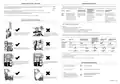
DOS AND DON’TS OF LOADING
How to change the setting of an option
1 CHECK
Check that there is no wash underway, press
2 ENTER MENU & SCROLL TO OPTION
To enter the menu: Press and hold the
and
together for four seconds.
O
You are now in the Rinse aid option of the preference options menu.
If you want to change the Rinse aid setting, go to step 3 now.
If you want to change the setting of another option, you will need to scroll to that option first.
O
O
Sharp or pointed items must be placed
horizontally or with sharp edges/points
facing down to avoid risk of injury.
Protruding items will stop the
internal lid of the dishwasher from
sealing properly, which could result
in a service call.
To scroll to the next option: press . To know which option you’re in, watch the letters in the display (see table below).
When you have scrolled to the end of the sequence, the menu will start again with Rinse aid.
OPEN DRAWER
WATER SOFTENER
(SOME MODELS ONLY)
AUTO POWER-ON
(SUITABLE AS A
SABBATH OPTION)
TONES AT END
OF WASH
CLOSED DRAWER
AUTOLOCK
OPTION
RINSE AID
Which option
am I in?
RA
Off to Max (rA5)
HD
Off to Max (Hd5)
AP
On or Off
BP
On or Off
LD
On or Off
Possible
settings
Example
setting is 1
On
On
On
setting is 1 RA1
HD1
APo
BPo
LDo
A neatly arranged load with evenly
spaced dishes helps wash performance.
Overcrowding reduces wash
performance.
Off
Off
Off
setting is 4 RA4 setting is 4 HD4
AP-
BP-
LD-
3 CHANGE SETTING
Press to change the setting within an option. For example, to change the Rinse aid setting from 4 (factory default) to 2,
you need to press 3 times.
4 SAVE SETTING & QUIT MENU
Press . This will save the new setting and quit the preference options menu.
Ensure there is enough space between
plates. Mix spoons, knives and forks
within the cutlery basket to prevent
them from nesting.
If plates and cutlery are nesting,
they are less likely to be cleaned
well.
FOR MORE INFORMATION
For detailed information on the
features of your dishwasher
see your ‘User guide’
For warranty information
see your ‘Service and warranty’ booklet
If you…
O
O
have any questions or comments
need a Fisher & Paykel authorized
technician to service your product
need replacement parts or accessories
want to register your product
see your ‘Service and warranty’ booklet
or contact us via our website:
O
O
Ensure that water reaches all
items on the racks.
Dishware is blocking water from
reaching items on the racks.
591218E 03.22

| General | Details |
|---|---|
| Name | Fisher and Paykel DD60DCHX9 Dishdrawer Dishwasher |
| Make | FISHER and PAYKEL |
| Language | English |
| Filetype | PDF (Download) |
| File size | 1.8 MB |
 (1 votes, average: 5.00 out of 5)
 Loading...

FISHER and PAYKEL DD60SCTX9 Dishwasher

FISHER and PAYKEL DD60DDFHX9 Dishwasher

FISHER and PAYKEL DD24SCTB9 N Dishwasher

FISHER and PAYKEL DD60SCTW9 Dishwasher

FISHER and PAYKEL DD60SDFTX9 Dishwasher

Fisher and Paykel DW24UT2I2 Dishwasher

FISHER AND PAYKEL DD24DTI9 N Dishwasher

FISHER AND PAYKEL DD24STI9 Dishwasher

FISHER AND PAYKEL DD60STX6I1 Dishwasher

FISHER AND PAYKEL DD24SHTI9N Dishwasher


Hotpoint H7F HS41 UK Full Size Dishwasher

FISHER PAYKEL DD24SCTW9 N Dishwasher

BOSCH SMI2ITS33E Dishwasher

oras Smart Electronic Dishwasher Valve

FISHER PAYKEL DD60SCHW9 Dishwasher

AMANA ADB1300AFS Full Console Dishwasher

indesit 15B1 S Dishwasher

PHILCO PD 1045 EA Dishwasher

BOSCH SMS46NB01V Free Standing Dishwasher

Electrolux TAPPAN Dishwasher