
IKEA 905.681.49 OSTVEDA Dishwasher








ENGLISH
20
-
-
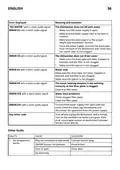
Press the "START/OK" to confirm the
-
If the "YES" setting is confirmed,
chosen language has been set,
"LANGUAGE" will be displayed and a
short sound will be heard.
To exit the menu, press the "ON/OFF"
key.
"TABLETS" light icon will turn on the
display.
-
-
If the "NO" setting is confirmed,
"TABLETS" light icon will turn off.
To exit the menu, press the "ON/OFF"
key.
"TABLETS"
BUZZER SELECTIONS AND SETTINGS
"TABLETS" OPTION SETUP 5 SEC
The buzzer signal that sounds upon pressing
the keys used for selecting and setting washing
functions and options can be activated/
This option enables optimal tablet usage
("3 in 1"/ "4 in 1"/ "5 in 1", etc.). By pressing
this button, the set washing programme is
changed, in order to obtain optimum
performance using tablets or combined
detergents; in addition, the salt and rinse
aid indicators are deactivated.
deactivated as follows (it is activated by default):
WARNING: The buzzer signal will
always remain active when the machine
is switched on and off, at the start or
end of a washing cycle or in the event
of a problem or error with the machine.
WARNING: Once selected, this option
also remains active (light on) for
subsequent washing cycles and can only
be de-activated (light off) by deselecting
the option.
-
-
-
-
Switch on the dishwasher with the
"ON/OFF" button.
Keep the "SETUP 5 SEC" button pressed
for about 5 sec.
This option is recommended when using
the RAPID programme, whose duration
will be extended to enable improved
performance from the detergent tablets.
The "SETTINGS" message appears on
the display.
By pressing the "PROGRAM
SELECTION"
key you can select the
successive parameters to be adjusted.
Select the "BUZZER" setting.
Press the "START/OK" button to
confirm the selected parameter.
Press the "PROGRAM SELECTION"
buttons to choose the two settings:
"YES" "NO".
Confirm your choice by pressing
"START/OK".
If the setting is confirmed, "BUZZER"
will appear on the display and will
scroll continuously.
-
-
-
-
Switch on the dishwasher with the
"ON/ OFF" button.
-
-
Keep the "SETUP 5 SEC" button pressed
for about 5 sec.
-
The "SETTINGS" message appears on
the display.
By pressing the "PROGRAM
-
-
SELECTION"
key you can select the
successive parameters to be adjusted.
Select the "TABLETS" setting.
Press the "START/OK" button to
confirm the selected parameter.
Press the "PROGRAM SELECTION"
buttons to choose the two settings:
"YES"
-
-
-
To exit the menu, press the "ON/OFF"
key.
-
"NO"
-
Confirm your choice by pressing
"START/OK"

| General | Details |
|---|---|
| Name | IKEA 905.681.49 OSTVEDA Dishwasher |
| Make | Ikea |
| Language | English |
| Filetype | PDF (Download) |
| File size | 0.63 MB |
 (1 votes, average: 5.00 out of 5)
 Loading...

IKEA 404.755.53 Medelstor Dishwasher

IKEA 804.621.67 Lagan Dishwasher

IKEA RENGÖRA 204.756.05 Dishwasher

IKEA 9001774317 TORSBODA Dishwasher

IKEA 9001774318 Dishwasher

IKEA SBE8596Z0E DISKAD PROFFSIG Dishwasher

IKEA VILLBODA Dishwasher

IKEA 504.754.25 HYGIENISK Dishwasher

IKEA AA-2412057-2-1 RÅGLANDA Dishwasher

IKEA RANSBERG Dishwasher


gorenje GV52040 Dishwasher

FISHER AND PAYKEL DD24DT2NX9 Drawer Dishwasher

FISHER PAYKEL DD24STX6HI1 Sanitize Dishwasher

IKEA SBE8596Z0E DISKAD Dishwasher

BOSCH SHP65CM2WH Dishwasher

FISHER PAYKEL DD60ST4NX9 Dishwasher

FISHER AND PAYKEL DW60UC6B Contemporary Built Under Dishwasher

IKEA SBE6496E0G PROFFSIG Dishwasher

seasons SDW2FCMB Front Dishwasher

BOSCH SPV4HMX55Q Dishwasher