
Kenmore W10898468B Ultra WashTMHE Dishwasher
































Delay Hours
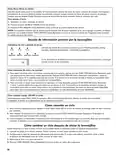
Use this option to run your dishwasher during off-peak hours. Local utility providers recommend using energy during off-peak
hours when possible. Delay displays how many hours before the cycle will begin.
To delay the start:
1. Select a wash cycle and options.
2. Press the DELAY HOURS button to choose the number of hours to be delayed.
3. Press START/RESUME to begin the delay countdown.
NOTE: Anytime the door is opened for more than a few seconds (such as, to add a dish), you must press the Start/Resume
button again and close the door within 4 seconds to resume the delay countdown.
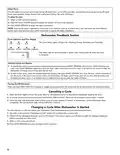
Dishwasher Feedback Section
Cycle Indicators and Time Display
The Cycle Status lights will glow for Washing, Drying, Sanitized, and Complete.
The Status light on the front panel is green when running and off when the cycle
is complete.
Selecting Cycles and Options
1. To repeat the same cycle and options used on the previous cycle, press START/RESUME once to show which selections you
used. Press START/RESUME again and close the door within 4 seconds to run the cycle. If the door is not closed in time, the
dishwasher will beep several times and will not start.
2. To start a new cycle, select the desired cycle and options, then press START/RESUME and close the door within 4 seconds to
run the cycle. If the door is not closed in time, the dishwasher will beep several times and will not start. Not all options are
available for every cycle. If an invalid option is selected for a given cycle, the lights will flash.
Turning On/Off the Sound
Press and hold HIGH TEMP for 3 seconds to toggle sound on and off. The sound will not be deactivated for cycle interruption.
Canceling a Cycle
1. Open the door slightly to stop the cycle. Wait for the spraying action to stop before completely opening the door.
2. To cancel selections and/or drain, press the CANCEL/DRAIN button. The drain will not begin until the door is closed.
3. Close the door. The dishwasher starts a drain cycle (if water remains in bottom of dishwasher). Let the dishwasher drain
completely. The Cancel/Drain light will turn off after 2 minutes.
Changing a Cycle After Dishwasher Is Started
You can interrupt a cycle and restart your dishwasher from the beginning using the following procedure.
1. See steps in the previous “Canceling a Cycle” section for canceling the current cycle.
2. Check that the detergent dispenser cover is still closed. If the cover is open, you will need to refill the detergent dispenser
before restarting your new cycle.
3. Select a new cycle and options.
4. Press START/RESUME and close the door within 4 seconds.
16

| General | Details |
|---|---|
| Name | Kenmore W10898468B Ultra WashTMHE Dishwasher |
| Make | Kenmore |
| Language | English |
| Filetype | PDF (Download) |
| File size | 9.33 MB |
 (1 votes, average: 5.00 out of 5)
 Loading...

Kenmore 14041 Automatic Dishwasher
Kenmore 263.1460 Dishwasher

Kenmore 665.15822000 Undercounter Dishwasher

Kenmore 665.1605 Ultra Wash Dishwasher

Kenmore 665.15632 Ultra Wash Dishwasher

Kenmore 665.15624000 Undercounter Dishwasher

Kenmore 665.15824000 Undercounter Dishwasher

Kenmore 587.141500 Dishwasher


Omega ODW300XN Slimline Dishwasher

FISHER PAYKEL DD60DDFHX9 Dishwasher

FISHER PAYKEL DD24SCTX9 N Sanitize Dishwasher

HEINNER HDW-BI4505IE++ Dishwasher

Whirlpool Thron Dishwasher

AEG FSB53927Z Integrated Dishwasher

FISHER and PAYKEL DW60UD6B Contemporary Built Under Dishwasher

Forte F24DWS650PR Dishwasher

WASHTECH XP Dishwasher

PKM GSP9-6TI Dishwasher