
Home > Lockeliving > Lockeliving 9001505619 Dishwasher
Lockeliving 9001505619 Dishwasher




User manual.


| General | Details |
|---|---|
| Name | Lockeliving 9001505619 Dishwasher |
| Make | Lockeliving |
| Language | English |
| Filetype | PDF (Download) |
| File size | 0.22 MB |
 (1 votes, average: 5.00 out of 5)
 Loading...

Lockeliving Dishwasher

Lockeliving 9001505619 Dishwasher Overview
Summary of Contents
- Page 1: Page 1
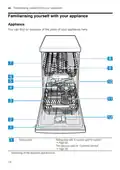
- Page 2: Familiarising yourself with your appliance You can find an overview of the parts of your appliance here. Rating plate with E number and FD number. The data you need for Customer Service. Depending on the appliance specifications.
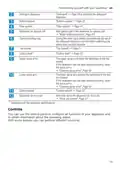
- Page 3: Familiarising yourself with your appliance Detergent is added to the detergent dispenser. Add special salt to the dispenser for special salt. During the wash cycle, tablets automatically fall out of the detergent dispenser into the tablet collecting tray where they can fully dissolve. The upper spray arms wash the tableware in the top basket. If the tableware has not been washed properly, clean the spray arms. The lower spray arm washes the tableware in the bottom basket. Add rinse aid to the dispenser for rinse aid. You can use the control panel to configure all functions of your appliance and to obtain information about the operating status.
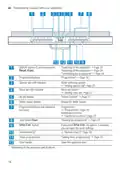
- Page 4: Familiarising yourself with your appliance ON/OFF button and reset button Switching on the appliance → Page 32 Switching off the appliance → Page 34 Terminating the programme → Page 34 Programme buttons Programmes → Page 18 Special salt refill indicator Water softening system → Adding special salt, Page 25 Rinse aid refill indicator Rinse aid system → Adding rinse aid, Page 27 WLAN display Home Connect → Page 37 Water supply display Display for water supply Start button Starting the programme → Page 33 Timer programming Setting timer programming → Page 33
- Page 5: Familiarising yourself with your appliance The display shows information about the remaining running time or the basic settings. You can change the basic settings via the display and the setting buttons.
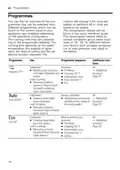
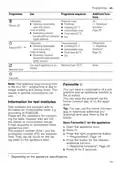
- Page 6: You can find an overview of the programmes that can be selected here. Different programmes are available depending on the appliance configuration. The running time may vary depending on the programme selected. The consumption values can be found in the quick reference guide. Programme: Intensive is for washing pots and pans and cleaning non-fragile tableware and cutlery. Sensor-controlled programme optimizes cleaning based on the soiling of the rinsing water. Eco 50° is the most economical programme for cleaning mixed tableware and cutlery. The level of soiling affects the choice of programme. Removing stubborn burned or dried-on food remnants is a key function of the Intensive programme. Common household food remnants can be removed with the Auto and Eco programmes.
- Page 7: Programmes Use Programme sequence Additional functions Tableware: Reduced noise: Cleaning mixed tableware and cutlery. You can save a combination of a programme and an additional function to the button. Test institutes are provided with information for comparability tests, e.g. according to EN60436. You can use the Home Connect app to download additional programmes and save them to the button.
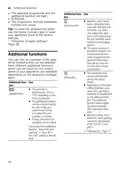
- Page 8: Additional functions The selected programme and the additional function will flash. The programme and the additional function are saved. The spray pressure in the bottom basket is increased and the maximum programme temperature held longer. You can find an overview of the additional functions that can be selected here. The appliance door opens automatically during the drying phase. Depending on the basic setting selected, automatic door opening is activated or deactivated by the additional function. The run time is shortened by 15% to 75% depending on the rinse programme. The additional function can be activated before the start of the programme and at any time when the programme is running. With the setting o02, automatic door opening cannot be deactivated in the Eco 50 °C program. Energy and water consumption are increased.

FISHER AND PAYKEL DD24SHTI9 N Tall Dish Drawer Dishwasher

FISHER PAYKEL DW60U4HI2 Dishwasher

FISHER PAYKEL DW60UT4I2 Tall Dishwasher

BOSCH SMS4HBI48Y Dishwasher
BOSCH SMV4EAX24E Dishwasher

Bosch SMU8ZCS01A Dishwasher

Electrolux GA55LV Dishwasher

InDesiT D2I HD526 Dishwasher

BOSCH SMS6ZCI12E Dishwasher

Whirlpool WFC 3C26 X UK Dishwasher