
Home > Master Kitchen > Master Kitchen 340965 Drawer Dishwasher
Master Kitchen 340965 Drawer Dishwasher













Control Panel
8
9
10 11
1
2
3
4
6
5
7
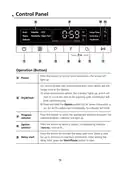
Operation (Button)
Press this button to turn on your dishwasher, the screen will
light up.
1
Power
For removing bad odor and moisture even when dishes are left
longer time in the baskets.
A) when selected this option, the indicator lights up, and it will
start to run at the end of the washing cycle, its indicator will
blink simultaneously.
2
Dry&Fresh
B) Press and hold the Option button for 3s, when dishwasher is
on, for let the option run immediately, its indicator will blink.
Press this button to select the appropriate washing program, the
selected program indicator will light up.
Program
selector
3
Press the button to select a option, corresponding indicator
Option
selector
4
(
) will be lit.
Press the button to increase the delay start time. Delay a cycle
for up to 24 hours in one-hour increments. After setting the
delay time, press the Start/Pause button to start.
5
Delay start
10

| General | Details |
|---|---|
| Name | Master Kitchen 340965 Drawer Dishwasher |
| Make | Master Kitchen |
| Language | English |
| Filetype | PDF (Download) |
| File size | 2.46 MB |
 (1 votes, average: 5.00 out of 5)
 Loading...

Master Kitchen FI60514 Dishwasher


ASKO DFI564XXL.U Dishwasher

CONCORD PACIFIC SHVM4AYB3N 30 Inch Dishwasher

Midea MDF24P1B** 24-inch Dishwasher

BOSCH SHE4AEM6N 100 Series Black Full Console Dishwasher

Whirlpool W7I HT58 T Fully Integrated Dishwasher

InDeSIT DFE 1B19 X Dishwasher

NEFF S189YCX01E Dishwasher

IKEA KALLBODA Dishwasher

Electrolux EEG62310L Dishwasher

FISHER AND PAYKEL DD60ST4HNX9 Contemporary Tall Dishwasher