
Home > RANGEmaster > RANGEMASTER RDWP6015-I54 Integrated Dishwasher
RANGEMASTER RDWP6015-I54 Integrated Dishwasher









9. Extra Dry Touch Button
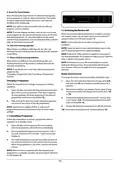
Press the Extra Dry touch button to add extra drying steps
to a programme in order to obtain drier dishes. This option
increases water temperature of the final rinse step and
duration of the drying step.
NOTE: If an option is not compatible with the selected
program, a buzzer sounds.
7.2 Switching the Machine Off
NOTE: If an extra feature has been used on the most recent
wash programme, this feature will remain active on the next
selected programme. To cancel this feature on the newly
selected wash programme, press the feature button until the
light on the button switches off.
When the selected wash programme is complete, a buzzer
will sound 5 times. You can then switch your machine off
using the Power On/Off touch button (1).
NOTE: Do not open the door before a programme is
complete.
10. Salt lack warning indicator
NOTE: Leave the door of your machine slightly open at the
end of a wash programme to speed up drying.
When there is insufficient softening salt, the Salt Lack
Warning Indicator will illuminate to indicate the salt chamber
needs filling.
NOTE: If the door of the machine is opened or the power is
cut during operation, the programme will continue when the
door is closed or the power returns.
11. Rinse Aid lack warning indicator
When there is insufficient rinse aid, the Rinse Aid Lack
Warning Indicator will illuminate to indicate the rinse aid
chamber needs filling.
NOTE: If the power is cut or the machine door is opened
during the drying process, the programme will terminate.
Your machine will now be ready for a new programme
selection.
NOTE: If you decide not to start the selected programme,
please see the
Buzzer Sound Control
“Changing a Programme”and “Cancelling a Programme”
sections.
To change the buzzer sound level, follow the below steps:
Changing a Programme
1. Open the door and press Extra Dry /Energy Save (5,9)
and Half Load (6) touch buttons simultaneously for 3
seconds.
Follow the steps below to change a programme while in
operation.
2. When sound setting is recognized, buzzer gives a long
sound and machine will display last set level, from “S0”
to “S3”.
1. Open the door and press the Programme touch button
(2) to select a new programme. If the door is opened
during operation, the time remaining of the selected
programme will show on the display (3).
3. To decrease sound level press Extra Dry / Energy Save
touch button (5,9). To increase sound level, press Half
Load touch button (6).
2. After closing the door, the newly selected programme
will resume the course of the old programme.
4. To save the selected sound level, turn off the machine.
NOTE: Open the door slightly at first to stop a wash
programme before it is complete in order to avoid water
spillage.
’’S0’’level means all voices are off. Factory setting is “S3”.
7.1 Cancelling a Programme
Follow the steps below to cancel a programme while in
operation or in standby mode.
1. Open the door of the machine, the most recently
selected programme will be shown on the display.
2. Press and hold the Programme touch button (2) for 3
seconds. At the end of 3 seconds, ‘1’will show on the
Display (3).
3. The water discharge process will start after the door of
the machine is closed and will continue for 30 seconds.
When the programme is cancelled, a buzzer will sound
5 times.
NOTE: When the door is opened after the selected wash
programme is complete, a buzzer will sound and ‘0’will show
on the display (3).
12

| General | Details |
|---|---|
| Name | RANGEMASTER RDWP6015-I54 Integrated Dishwasher |
| Make | RANGEmaster |
| Language | English |
| Filetype | PDF (Download) |
| File size | 1.11 MB |
 (1 votes, average: 5.00 out of 5)
 Loading...

RANGEMASTER RDWT6012-I1E Integrated Dishwasher


kogan KAM15PDWFSA 15 Place Dishwasher

FISHER AND PAYKEL DW60UNT4X2 Contemporary Tall Built Under Dishwasher

SIEMENS SE61IX12TG Dishwasher

Electrolux ESZ89400UX 800 SprayZone Dishwasher

SAMSUNG DW80CB5450 Dishwasher

IKEA KALLBODA Dishwasher

INDESIT DFE 1B19 UK Dishwasher

SIEMENS 9001902343 Fully Integrated Dishwasher

BOSCH SMS6HMW76M Dishwasher

BOSCH SMS2ITW41G WiFi Connected Standard Dishwasher