
seasons SDW2FCMW Front Dishwasher


8
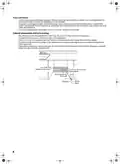
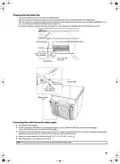
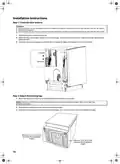
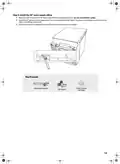
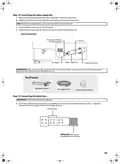
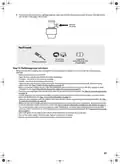
Replace the junction box cover on the right front of the dishwasher. Be sure that the wires are not pinched under the
cover.
Note: If you have trouble replacing the junction box cover, loosen the screws on the strain relief.
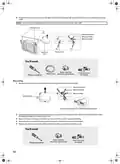
Junction box
Ground to green
White to white
Black to black
Power cord
Junction
box
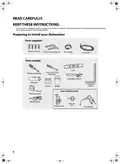
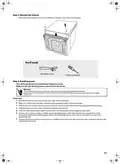
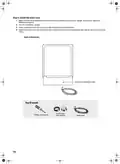
You’ll need:
Strain relief (for
electrical connections)
Three wire nuts
(UL listed)
Power cord
Phillips screwdriver
Direct wiring
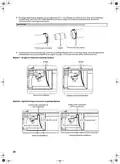
1 Remove the junction box cover from the power supply junction box on the wall.
Ground to green
White to white
Black to black
Junction box
Insert wires through strain relief fitting and tighten
2
Locate the three dishwasher wires, (white, black, and green) with stripped ends, then insert the dishwasher wires
through the small hole in the junction box.
3
4
5
Secure the house wiring to the bottom of the junction box with a strain relief fitting.
Use wire nuts to connect incoming ground to green, white to white, and black to black.
Replace the junction box cover. Make sure that no wires are pinched under the cover.
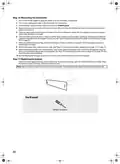
You’ll need:
Strain relief (for
Three wire nuts
(UL listed)
electrical connections)
Phillips screwdriver
12

| General | Details |
|---|---|
| Name | seasons SDW2FCMW Front Dishwasher |
| Make | seasons |
| Language | English |
| Filetype | PDF (Download) |
| File size | 1.82 MB |
 (1 votes, average: 5.00 out of 5)
 Loading...

seasons 224FPC2MAWB Dishwasher

seasons SDW2FCMB Front Dishwasher


HJC V31 Carbon 22 Inch Countertop Portable Dishwasher

SIEMENS SN13ES78CS Dishwasher

BOSCH SMV2ITX22E 2 Total Dishwasher

beko BDIN38651C Dishwasher

FISHER and PAYKEL DD60SCX9 Dishwasher

BOSCH SHX9PCM5N Benchmark Series Dishwasher

indesit DFG 15B1 Built Dishwasher

BOSCH SMV4ECX23E Dishwasher

Respekta GSP60TIDM Dishwasher

BOSCH SPI2HKS08E Dishwasher