
Home > SILVERCREST > SILVERCREST SGW 860 A1 Table Top Dishwasher
×
- 1. Tisch-geschirrspüler / Table Top (Dishwasher /mini Lave-vaisselle → Kurzanleitung → Quick Start Guide → Guide De Démarrage Rapide)
- 2. Kurzanleitung (Quick Start Guide → Guide De Démarrage Rapide → Korte Handleiding → Skrócona Instrukcja Obsługi)
- 3.
- 4.
- 5. Einführung (Informationen Zu Dieser Kurzanleitung → Sicherheitshinweise → Bestimmungsgemäßer Gebrauch → Technische Daten)
- 6. Einführung (Informationen Zu Dieser Kurzanleitung → Zeichenerklärung)
- 7. Hinweise Zum Zusammenbau Oder Zum Betrieb (Auszuführende Handlungsanweisung Zur Vermeidung Von Gefahren → Ce-kennzeichnung → Gerät Umweltgerecht Entsorgen → Kennzeichnung Von Verpackungsmaterialien Bei Der Mülltrennung)
- 8. Verpackung Umweltgerecht Entsorgen (Bestimmungsgemäßer Gebrauch)
- 9. Sicherheitshinweise (Wichtige Sicherheitsanweisungen Sorgfältig Lesen Und Für Den Weiteren Gebrauch Aufbewahren! → Verletzungsgefahr! → Verletzungsgefahr Für Kinder Und Personen Mit Verringerten Physischen, Sensorischen Oder Mentalen Fähigkeiten)
- 10. Gefahr! (Verletzungsgefahr! → Warnung! → Stromschlaggefahr!)
- 11. Benutzen Sie Keine Verlängerungskabel. (Stellen Sie Sicher, Dass Das Stromkabel Unbeschädigt Ist Und Nicht Unter Dem Gerät Oder Über Scharfe Kanten Verläuft. → Explosionsgefahr! → Verbrühungsgefahr! → Das Gerät Arbeitet Mit Hohen Wassertemperaturen.)
- 12. Vorsicht! (Hinweis! → Hinweis!)
- 13. Das Gerät Muss Auf Einer Ebenen, Stabilen Fläche Aufgestellt Werden, Die Das Eigengewicht Des Geräts Und Des Darin Enthaltenen Geschirrs Tra…
- 14. Teilebeschreibung (Bedienfeld → Geräterückseite)
- 15. Lieferumfang (Gefahr! → Erstickungsgefahr! → Überprüfen Sie Die Vollständigkeit Und Unversehrtheit Der Lieferung)
- 16. Technische Daten (Produktdatenblatt → Allgemeine Produktparameter → Energieeffizienzklasse → Energieverbrauch In Kwh)
- 17. Allgemeine Produktparameter (Eu-konformitätsinformation)
- 18. Installation (Aufstellen Und Ausrichten → Wasseranschluss)
- 19. Wasser Manuell Auffüllen (Wasserablauf Anschließen → Schlauch Mit Dem Siphon Am Spülbecken Verbinden)
- 20. Schlauch In Ein Abflussrohr Einleiten (Hinweis! → Möglicher Sachschaden! → Ablaufschlauch Verlängern)
- 21. Schlauch (Anschluss Ans Stromnetz)
- 22. Gerät Vorbereiten (Tür Öffnen → Tür Schließen → Salz In Das Gerät Einfüllen)
- 23. Entfernen Sie Den Geschirrkorb Und Drehen Sie Den Deckel Vom Salzbehälter Ab. (Salzverbrauch Einstellen → Spülprogramm Wählen)
- 24. Wasserhärtegrad (Displayanzeige → Regeneration → Salzverbrauch → Programmablauf)
- 25. Reiniger (Gefahr! → Spülmaschinenreiniger → Über Spülmaschinenreiniger)
- 26. Einräumen Des Geschirrs Und Bestecks (Allgemeines)
- 27. Nicht Oder Bedingt Geeignetes Geschirr (Beladebeispiel Geschirr)
- 28. Beladebeispiel (Besteck)
- 29. Spülmaschine Benutzen (Mögliche Betriebsanzeigen → Mögliche Fehlermeldungen)
- 30. Gerät Einschalten (Programmwahl → Extra-trockenvorgang → Led-anzeige Der Spülprogramme → Programm Starten)
- 31. Spülprogramm Wählen (Energie-/reiniger → Programm → Geeignet Für → Ablauf)
- 32. Energie-/wasseraufnahme (Reiniger (linke/rechte Dosierkammer) → Laufzeit In Minuten → Wasserverbrauch [liter] → Programm)
- 33. Led-anzeige Der Spülprogramme (Ende Des Spülprogramms)
- 34. Entsorgung (Verpackung → Gerät)
- 35. Service (Service Deutschland Hotline → Service Österreich Hotline → Service Schweiz Hotline → Lieferant/produzent/importeur)
- 36.
- 37. Introduction (Proper Use → Safety Information → Description Of Components → Using The Dishwasher)
- 38. Introduction (Information About This Quick Start Guide → Explanation Of Symbols)
- 39. Notice! (Ce Labelling → Indoor Use → Dispose Of The Appliance In Compliance With Environmental Regulations → Packaging Material Label Regarding Waste Separation)
- 40. Proper Use
- 41. Safety Information (Important Safety Instructions → Risk Of Injury → Danger → Risk Of Choking And Suffocation)
- 42. Risk Of Injury Due To Detergents (Risk Of Injury Due To Sharp Objects → Risk Of Electric Shock Due To Live Parts)
- 43. Risk Of Explosion! (Risk Of Scalding! → Risk Of Injury!)
- 44. Do Not Place Any Heavy Objects On The Door If It Is Open. The Appliance Could Tip Forwards.
- 45. Description Of Components (Control Panel)
- 46. Back Of The Appliance (Package Contents → Risk Of Choking And Suffocation → Check Your Purchase → User Manual With Warranty Information)
- 47. Technical Specifications (Product Data Sheet)
- 48. General Product Parameters (Eu Declaration Of Conformity)
- 49. Installation (Setup And Levelling → Connecting To A Water Supply)
- 50. Filling With Water Manually (Connecting The Water Outlet → Connecting The Hose With The Siphon On The Sink)
- 51. Feeding The Hose Into An Outlet Pipe (Running The Hose Into A Sink/container)
- 52. Connection To Power Supply (Preparations For Use → Opening The Door → Closing The Door → Adding Salt To The Appliance)
- 53. Notice! (Setting Salt Consumption)
- 54. Water Hardness (Display → Salt Consumption → Regeneration → Eco)
- 55. Adding Detergent (Danger → Dishwasher Detergent Must Be Added Before Each Wash Cycle → For Further Information On Dishwasher Detergents)
- 56. Arranging The Dishes And Cutlery (General Information)
- 57. Unsuitable Or Partially Suitable Dishes (Dish Loading Example)
- 58. Cutlery
- 59. Using The Dishwasher (Potential Operating Lights → Error Messages)
- 60. Switching On The Appliance (Arranging The Dishes And Cutlery → Program Selection → Extra Drying Cycle → Led Indicator For The Wash Program)
- 61. Selecting A Wash Program
- 62. Energy/water Consumption [kwh/l] (Detergent (left/right Dosing Chamber) → Runtime In Minutes → Water Consumption [litres] → Program)
- 63. Led Indicator For The Wash Program (End Of The Wash Program)
- 64. Disposal (Service)
- 65. Service United Kingdom (Service Ireland → Supplier/producer/importer)
- 66.
- 67. Introduction (Informations Concernant Le Présent Guide De Démarrage Rapide → Utilisation Conforme → Consignes De Sécurité → Caractéristiques Techniques)
- 68. Introduction (Informations Concernant Le Présent Guide De Démarrage Rapide → Explication Des Symboles)
- 69. Respectez Les Consignes Afin Déviter Tout Dommage Matériel ! (Instructions De Montage Ou Dutilisation → Action À Exécuter Afin Déviter Tout Danger → Marquage Ce → Utilisation En Intérieur)
- 70. Marquage Des Emballages Pour Le Tri Des Déchets (Matériaux Composites → Utilisation Conforme)
- 71. Consignes De Sécurité (Consignes De Sécurité Importantes → Risque De Blessure)
- 72. Danger (Avertissement → Risque De Blessure → Risque Délectrocution)
- 73. Nutilisez Pas De Rallonge. (Avertissement → Risque Dexplosion ! → Attention ! → Risque De Brûlure !)
- 74. Laissez Lappareil Refroidir Avant De Le Vider. Ne Touchez Jamais La Résistance Du Lave-vaisselle Pendant Ou Immédiatement Après Son Utilisat… (Risque De Blessure ! → Dommage Matériel Possible ! → Utilisez Uniquement De La Vaisselle Lavable Au Lave-vaisselle. → Dommage Matériel Possible !)
- 75. Ninstallez Pas Lappareil Dans Des Pièces Exposées Au Gel, Car Léclatement Des Tuyaux Pourrait Causer Des Dommages Considérables.
- 76. Description (Face Avant → Panneau De Commande → Dos De Lappareil)
- 77. Contenu De La Livraison (Danger → Risque De Suffocation → Vérifiez Si La Livraison Est Complète Et Intacte → Le Produit Que Vous Avez Acheté Comprend)
- 78. Caractéristiques Techniques (Fiche Produit)
- 79. Paramètres Généraux Du Produit (Consommation Dénergie → Consommation Deau → Durée Du Programme → Type)
- 80. Information Relative À La Conformité Ue (Installation → Installation Et Alignement → Raccordement Darrivée Deau)
- 81. Raccordez Le Tuyau Darrivée Deau (Remplir Leau Manuellement → Raccorder Lévacuation Deau → Raccordement Du Tuyau Au Siphon De Lévier)
- 82. Insertion Du Tuyau Dans Une Conduite Dévacuation (Avis ! → Dommage Matériel Possible ! → Veillez À Ce Que Le Tuyau Dévacuation Soit Inséré À Une Hauteur Maximale De 60 Cm. → Lextrémité Du Tuyau Ne Doit En Aucun Cas Être Sous Leau.)
- 83. Acheminer Le Tuyau Dans Un Lavabo/récipient (Raccordement Au Réseau Électrique)
- 84. Préparation De Lappareil (Ouverture De La Porte → Fermeture De La Porte → Remplissage Du Réservoir De Sel)
- 85. Remplissage Du Réservoir De Sel (Réglage De La Consommation De Sel → Démarrage Du Programme Rapide)
- 86. Régénération À Chaque Séquence De Programme (Degré De Dureté De Leau → Affichage Led Allumée/led Éteinte → Consommation De Sel → Remplir Le Détergent)
- 87. Du Détergent Pour Lave-vaisselle Doit Être Ajouté Avant Chaque Cycle De Lavage. Respectez Toujours Les Recommandations De Dosage Indiquées D…
- 88. Éliminez Les Plus Gros Résidus Alimentaires (Chargez Les Objets Creux → Vaisselle Non Adaptée Ou Adaptée Sous Conditions → Vaisselle Non Adaptée → Vaisselle Adaptée Sous Conditions)
- 89. Exemple De Chargement De La Vaisselle (Exemple De Chargement Des Couverts)
- 90. Couteaux (Utilisation Du Lave-vaisselle → Voyants De Fonctionnement Possibles)
- 91. Eco (Programme Verres Sélectionné → Programme Biberons Sélectionné → Mise En Marche De Lappareil → Messages Derreur)
- 92. Sélection Dun Programme De Lavage (Description Du Programme → Programme → Convient Pour)
- 93. Description Du Programme (Programme → Convient Pour Les Biberons → Lavage (69 C) → Eco)
- 94. Affichage Led Des Programmes De Lavage (Fin Du Programme)
- 95. Éteignez Lappareil (Recyclage → Emballage → Appareil)
- 96. Sav (Sav France → Sav Belgique → Sav Suisse → Fournisseur/producteur/importateur)
- 97. Inleiding (Beoogd Gebruik → Veiligheidsvoorschriften → Beschrijving Van De Onderdelen → Vaatwasmachine Gebruiken)
- 98. Inleiding (Informatie Over Deze Beknopte Handleiding → Betekenis Van De Symbolen)
- 99. Let Op! (Instructies Voor Montage Of Gebruik → Instructie Voor Een Uit Te Voeren Handeling Om Gevaren Te Voorkomen → Ce-markering → Afvalverwerking)
- 100. Beoogd Gebruik
- 101. Veiligheidsvoorschriften (Belangrijke Veiligheidsvoorschriften → Gevaar Voor Letsel → Gevarenzones)
- 102. Gevaar Voor Letsel (Gevaar Voor Elektrische Schok)
- 103. Installeer Het Apparaat Uitsluitend In Een Beschutte En Droge Ruimte. (Explosiegevaar! → Gevaar Voor Brandwonden! → Neem De Vaatwasser Pas In Gebruik Als De Deur Goed Is Gesloten.)
- 104. Gevaar Voor Letsel! (Mogelijke Materiële Schade! → Verkeerde Belading Kan Schade Toebrengen Aan Het Serviesgoed. → Als Het Apparaat Verkeerd Wordt Geïnstalleerd Of Gebruikt, Bestaat Er Gevaar Voor Materiële Schade En Waterschade. → Gebruik Als Het Apparaat Ter Vervanging Van Een Oud Apparaat Is Bedoeld Nooit Oude Slangensets Voor De Aansluiting.)
- 105. Gebruik Uitsluitend De Meegeleverde Of In Deze Gebruiksaanwijzing Als Geschikt Omschreven Accessoires.
- 106. Beschrijving Van De Onderdelen (Bedieningspaneel → Achterkant Van Het Apparaat)
- 107. Inhoud Van De Levering (Technische Gegevens)
- 108. Productinformatieblad (Algemene Productparameters → Modelaanduiding → Energieverbruik In Kwh → Waterverbruik In Liter)
- 109. Algemene Productparameters (Eu-conformiteitsinformatie)
- 110. Installatie (Opstellen En Waterpas Zetten → Wateraansluiting)
- 111. Water (Waterafvoer → Slang Aansluiten Op De Sifon Van De Gootsteen)
- 112. Slang In Een Afvoerpijp Steken (Let Op! → Mogelijke Materiële Schade! → Zorg Ervoor Dat De Afvoerslang In Ieder Geval Op Een Hoogte Van 60 Cm In De Afvoer Komt Te Zitten)
- 113. Slang (Aansluiting Op Het Elektriciteitsnet)
- 114. Apparaat Voorbereiden (Deur Openen → Deur Sluiten → Zoutreservoir Vullen)
- 115. Verwijder Het Serviesrek En Draai De Dop Van Het Zoutreservoir Af. (Zoutverbruik Instellen → Spoelprogramma Kiezen)
- 116. Waterhardheid (Displayaanduiding → Regeneratie Bij Xe Programmaverloop → Zoutverbruik → Vaatwasmiddel Toevoegen)
- 117. Vaatwasmiddel (Inruimen Van Het Serviesgoed En Het Bestek → Algemeen)
- 118. Verwijder Grotere Etensresten Van Het Serviesgoed En Week Ingedroogde Etensresten (bijvoorbeeld Opgedroogd Ijs Of Spinazie) In (zie Afb. N).
- 119. Inruimvoorbeeld Voor Serviesgoed (Inruimvoorbeeld Voor Bestek)
- 120. Vaatwasmachine Gebruiken (Mogelijke Bedrijfsindicaties → Extra Drogen Actief → Waarschuwingslampje: Te Weinig Speciaal Zout → Snelprogramma Geselecteerd)
- 121. Ecoprogramma Geselecteerd (Glasprogramma Geselecteerd → Babyflesprogramma Geselecteerd → Mogelijke Foutmeldingen → Apparaat Inschakelen)
- 122. Spoelprogramma Kiezen (Gebruik Energiebesparend Of Kort Programma → Programma → Geschikt Voor → Verloop)
- 123. Energie-/wateropname (Programma → Geschikt Voor → Verloop → Reinig Babyflessen)
- 124. Ledindicatie Van De Afwasprogramma's (Einde Van Het Afwasprogramma)
- 125. Afvalverwerking (Verpakking → Apparaat)
- 126. Service (Service Nederlands → Service België → Leverancier/producent/importeur)
- 127. Úvod (Informace O Tomto Stručném Návodu → Používání V Souladu S Určením → Bezpečnostní Pokyny → Obsah Balení)
- 128. Úvod (Informace O Tomto Stručném Návodu → Vysvětlení Symbolů)
- 129. Oznámení (Pokyny K Montáži Nebo Provozu → Označení Ce → Používání Ve Vnitřních Prostorách → Značení Obalových Materiálů Při Třídění Odpadu)
- 130. Používání V Souladu S Určením (Likvidaci Obalu Proveďte Ekologickým Způsobem)
- 131. Bezpečnostní Pokyny (Důležité Bezpeční Pokyny Pečlivě Přečtěte → Nebezpečí Úrazu! → Nebezpečí!)
- 132. Nebezpečí Úrazu (Nebezpečí Úrazu Elektrickým Proudem)
- 133. Nebezpečí Výbuchu! (Upozornění! → Nebezpečí Opaření! → Upozornění! → Nebezpečí Úrazu!)
- 134. Oznámení! (Používejte Pouze Nádobí Vhodné Do Myčky. → Přístroj Neinstalujte V Místech Ohrožených Mrazem. → Používejte Výhradně Příslušenství, Které Je Součástí Dodávky. → Přístroj Provozujte Výhradně Ve Vnitřních Prostorách.)
- 135. Popis Částí (Ovládací Panel)
- 136. Tlačítko Výběr Programu (Provozní Kontrolka Čisticí Program → Obsah Balení → Nebezpečí Udušení → Zkontrolujte Úplnost A Neporušenost Dodávky)
- 137. Technické Údaje (Informační List Výrobku → Obecné Parametry Výrobku)
- 138. Obecné Parametry Výrobku (Spotřeba Energie V Kwh → Spotřeba Vody V Litrech → Doba Trvání Programu (hod:min) → Minimální Doba Trvání Záruky)
- 139. Informace O Shodě Eu (Instalace → Připojení K Přívodu Vody)
- 140. Připojení Přívodní Hadice Na Vodu (Manuální Napouštění Vody → Připojení Odvodu Vody → Připojení Hadice K Sifonu U Dřezu)
- 141. Napojení Hadice Do Odpadní Trubky (Oznámení → Nebezpečí Vzniku Věcných Škod)
- 142. Vedení (Připojení Do Elektrické Sítě)
- 143. Příprava Přístroje (Otevření Dvířek → Zavření Dvířek → Naplnění Soli Do Přístroje)
- 144. Zásobník Soli (Nastavení Spotřeby Soli → Výběr Mycího Programu)
- 145. Stupeň Tvrdosti Vody (Indikace Na Displeji → Regenerace → Spotřeba Soli → Naplnění Mycího Prostředku)
- 146. Mycí Prostředek (Vkládání Nádobí A Příborů → Všeobecné Informace)
- 147. Odstraňte Z Nádobí Větší Zbytky Jídla A Zaschlé Zbytky Jídla Namočte (jako Například Zaschlá Vejce Nebo Špenát) (viz Obr. N). Není Však Nutn…
- 148. Melaminové Dezertní Talíře (Dezertní Talíře → Dezertní Misky → Podšálky → Pohárky)
- 149. Nože (Použití Myčky Nádobí → Možné Provozní Indikace → Rychlý Program Aktivní → Intenzivní Program Aktivní)
- 150. Eco (Zvolen Program Pro Sklo → Zvolen Program Pro Kojenecké Lahve → Možná Chybová Hlášení → Zapnutí Přístroje)
- 151. Výběr Mycího Programu (Mycí Prostředek)
- 152. Mycí Prostředek (Program → Vhodný Na → Doba Chodu → Spotřeba Vody [litry])
- 153. Led Indikace Pro Mycí Programy (Konec Mycího Programu)
- 154. Likvidace (Servis → Vypněte Přístroj Tlačítkem → Zavřete Přívod Vody → Vyndejte Nádobí A Příbory)
- 155. Dodavatel/výrobce/dovozce
- 156.
- 157. Wstęp (Informacje O Niniejszej Skróconej Instrukcji Obsługi → Objaśnienie Symboli → Użytkowanie Zgodne Z Przeznaczeniem → Wskazówki Bezpieczeństwa)
- 158. Wstęp (Informacje O Niniejszej Skróconej Instrukcji Obsługi → Objaśnienie Symboli)
- 159. Ostrzeżenie Przed Możliwymi Średnio Ciężkimi I/lub Lekkimi Obrażeniami! (Notyfikacja! → Wskazówki Dotyczące Montażu Lub Użytkowania → Instrukcja Wymaganego Postępowania W Celu Uniknięcia Niebezpieczeństw → Oznaczenie Ce)
- 160. Oznakowanie Materiałów Opakowaniowych Przy Selekcji Odpadów (Zutylizuj Opakowanie Zgodnie Z Wymogami Ochrony Środowiska → Użytkowanie Zgodne Z Przeznaczeniem)
- 161. Wskazówki Bezpieczeństwa (Ważne Instrukcje Dotyczące Bezpieczeństwa → Ostrzeżenie! → Niebezpieczeństwo Obrażeń! → Niebezpieczeństwo Odniesienia Obrażeń Przez Dzieci I Osoby O Ograniczonej Sprawności Fizycznej, Sensorycznej Lub Umysłowej)
- 162. Dzieci Nie Powinny Czyścić Ani Wykonywać Konserwacji Urządzenia Bez Nadzoru. Nadzoruj Dzieci Znajdujące Się W Pobliżu Zmywarki. Występuje M.…
- 163. Niebezpieczeństwo Porażenia Prądem Elektrycznym! (Niebezpieczeństwo Wybuchu!)
- 164. Przestroga! (Niebezpieczeństwo Poparzenia! → Niebezpieczeństwo Obrażeń! → Notyfikacja! → Możliwe Szkody Materialne!)
- 165. Zwracaj Uwagę Na To, Aby Elementy Naczyń Wykonane Z Tworzyw Sztucznych Podczas Pracy Nie Dotykały Elementów Grzejnych.
- 166. Opis Części (Panel Obsługowy → Tył Urządzenia)
- 167. Zawartość Opakowania (Niebezpieczeństwo Uduszenia → Zakupiony Komplet Zawiera Następujące Elementy)
- 168. Dane Techniczne (Zasilanie Elektryczne → Pojemność → Ogólne Parametry Urządzenia → Klasa Efektywności Energetycznej*)
- 169. Ogólne Parametry Urządzenia (Zużycie Energii W Kwh [na Cykl] → Zużycie Wody W Litrach [na Cykl] → Czas Trwania Programu (h:min) → Minimalny Okres Obowiązywania Gwarancji Producenta)
- 170. Informacje Dotyczące Zgodności Z Przepisami Ue (Instalacja → Ustawianie I Wyrównywanie)
- 171. Podłączanie Wody (Ręczne Napełnianie Wodą → Podłączanie Odpływu Wody)
- 172. Łączenie Węża Z Syfonem Zlewu (Wprowadzenie Węża Do Rury Odpływu)
- 173. Wprowadzenie Węża Do Umywalki/zbiornika (Podłączanie Do Sieci Elektrycznej)
- 174. Przygotowanie Urządzenia (Otwieranie Drzwiczek → Zamykanie Drzwiczek → Uzupełnianie Soli W Urządzeniu)
- 175. Wyjmij Kosz Na Naczynia I Odkręć Pokrywę Z Pojemnika Na Sól. (Ustawianie Zużycia Soli → Wybór Programu Mycia)
- 176. Stopień Twardości Wody (Wyświetlacz → Regeneracja → Zużycie Soli → Dodawanie Środka Do Mycia)
- 177. Wybór Programu Mycia (Wkładanie Naczyń I Sztućców → Informacje Ogólne)
- 178. Naczynia Nieodpowiednie Lub Odpowiednie Warunkowo (Nieodpowiednie Naczynia → Naczynia Odpowiednie Warunkowo)
- 179. Przykład Wsadu Naczyń (Przykład Wsadu Na Sztućce)
- 180. Noże (Widelce → Łyżki → Używanie Zmywarki Do Naczyń → Możliwe Wskaźniki Pracy)
- 181. Eco (Możliwe Komunikaty O Błędzie → Włączanie Urządzenia → Programy Mycia)
- 182. Wybór Programu Mycia (Środek Do Mycia)
- 183. Środek Do Mycia (Czas Pracy → Pobór Energii/wody → Program → Przeznaczenie)
- 184. Kontrolka Led Programów Mycia (Koniec Procesu Mycia)
- 185. Utylizacja (Opakowanie → Urządzenie)
- 186. Serwis (Dostawca / Producent / Importer)
- 187. Úvod (Informácie O Tomto Stručnom Návode → Správne Použitie → Bezpečnostné Pokyny → Opis Častí)
- 188. Úvod (Informácie O Tomto Stručnom Návode → Vysvetlenie Značiek)
- 189. Oznámenie (Poznámky K Montáži Alebo Prevádzke → Označenie Ce → Symbol Pre Striedavý Prúd → Označenie Obalových Materiálov Na Účely Triedenia Odpadu)
- 190. Správne Použitie
- 191. Bezpečnostné Pokyny (Dôležité Bezpečnostné Pokyny → Nebezpečenstvo Zranenia)
- 192. Nebezpečenstvo Zranenia (Varovanie → Nebezpečenstvo Zranenia Ostrými Predmetmi → Nebezpečenstvo Zásahu Elektrickým Prúdom)
- 193. Zariadenie Sa Zapína, Resp. Vypína Tlačidlom (Nebezpečenstvo Výbuchu! → Nebezpečenstvo Obarenia! → Upozornenie!)
- 194. Umývačku Riadu Uvádzajte Do Prevádzky (Upozornenie! → Oznámenie! → Používajte Iba Riad Vhodný Na Použitie V Umývačke Riadu → Zariadenie Neumiestňujte Do Priestorov Ohrozených Mrazom)
- 195. Pripojenie Zariadenia (Používanie Príslušenstva → Prevádzka Zariadenia → Podmienky Inštalácie → Dimenzovanie Zariadenia)
- 196. Opis Častí (Ovládací Panel → Zadná Strana Zariadenia)
- 197. Rozsah Dodávky (Nebezpečenstvo! → Nebezpečenstvo Zadusenia! → Skontrolujte Úplnosť A Neporušenosť Dodávky → S Balíkom, Ktorý Ste Si Zakúpili, Sme Vám Dodali:)
- 198. Technické Údaje (Karta Údajov Produktu → Všeobecné Parametre Produktu)
- 199. Všeobecné Parametre Produktu (Energetická Spotreba V Kwh → Spotreba Vody V Litroch → Trvanie Programu (a) (h:min) → Emisie Hluku* (db(a) Re 1 Pw))
- 200. Informácie O Zhode S Normami Eú (Inštalácia → Inštalácia A Nastavenie)
- 201. Pripojenie Prívodu Vody (Ručné Plnenie Vody → Pripojenie Odtoku Vody)
- 202. Pripojenie (Zavedenie)
- 203. Zavedenie Hadice Do Umývadla/nádoby (Pripojenie Do Elektrickej Siete)
- 204. Príprava Zariadenia (Otvorenie Dverí → Zatvorenie Dverí → Pridanie Soli Do Zariadenia)
- 205. Nastavenie Spotreby Soli
- 206. Stupeň Tvrdosti Vody (Zobrazenie Displeja → Regenerácia → Spotreba Soli → Pridanie Umývacieho Prostriedku)
- 207. Umývací Prostriedok (Ukladanie Riadu A Príboru → Všeobecné Informácie)
- 208. Odstránenie Zvyškov Potravín (Zabránenie Poškodeniu Skla Alebo Príboru → Nevhodný Alebo Len Čiastočne Vhodný Riad)
- 209. Príklad Uloženia Riadu (Príklad Uloženia Príboru)
- 210. Nože (Servírovacie Vidličky → Vidličky → Polievkové Lyžice → Čajové Lyžičky)
- 211. Eco (Zvolený Program Eko → Aktívny Program Eko → Možné Chybové Hlásenia → Zapnutie Zariadenia)
- 212. Výber Oplachovacieho Programu (Umývací Prostr. → Program → Vhodný Na → Priebeh)
- 213. Umývací Prostr. (Doba Chodu → Spotreba Energie/vody → Program → Vhodný Na)
- 214. Led Indikátor Oplachovacích Programov (Koniec Umývacieho Programu)
- 215. Zariadenie (Likvidácia → Balenie → Zariadenie)
- 216. Servis (Dodávateľ/výrobca/importér)
- 217. Introducción (Uso Conforme A Lo Previsto → Indicaciones De Seguridad → Descripción De Piezas → Instalación)
- 218. Introducción (Información Acerca De Esta Guía Rápida → Explicación De Los Símbolos)
- 219. Aviso! (Indicaciones Sobre El Ensamblaje O El Funcionamiento. → Marcado Ce → Uso En Interiores → Identificación De Materiales De Embalaje Para La Clasificación De Residuos)
- 220. Uso Conforme A Lo Previsto
- 221. Indicaciones De Seguridad (Indicaciones De Seguridad Importantes: Léalas Detenidamente Y Guárdelas Para Su Futuro Uso! → Peligro De Lesiones Para Niños Y Personas Con Capacidades Mentales, Sensoriales O Físicas Reducidas → El Aparato Y Los Accesorios Se Deben Guardar En Un Lugar Fuera Del Alcance De Los Niños → Los Niños No Deben Jugar Con El Aparato)
- 222. Peligro! (Advertencia! → Advertencia! → Advertencia! → Advertencia!)
- 223. No Utilice Cables De Prolongación. (Asegúrese De Que El Cable De Corriente No Esté Dañado Y De Que No Pase Por Debajo Del Aparato O Sobre Bordes Afilados. → Coloque El Aparato Únicamente En Un Entorno Protegido Y Seco. → Peligro De Escaldaduras! → El Aparato Funciona A Altas Temperaturas Del Agua.)
- 224. Antes De Vaciar El Aparato, Espere A Que Se Enfríe. No Toque El Elemento Calefactor Del Lavavajillas Durante O Directamente Después Del Uso.
- 225. El Aparato Debe Colocarse Sobre Una Superficie Plana Y Estable Que Pueda Soportar El Peso Propio Del Aparato Y De La Vajilla Que Incluya.
- 226. Descripción De Piezas (Panel De Control → Parte Trasera Del Aparato)
- 227. Volumen De Suministro (Peligro De Asfixia! → Compruebe La Integridad Del Suministro → Con El Paquete Que Ha Adquirido Recibirá Lo Siguiente → Manual De Instrucciones Con Información Sobre La Garantía)
- 228. Datos Técnicos (Ficha De Datos Del Producto → Parámetros Generales Del Producto)
- 229. Parámetros Generales Del Producto (Consumo De Energía → Duración Del Programa → Tipo → Periodo Mínimo De Garantía)
- 230. Información De Conformidad Ue (Instalación → Colocación Y Nivelación)
- 231. Conexión De Agua (Llenado Manual De Agua → Conexión De La Salida De Agua)
- 232. Conexión De La Manguera Con El Sifón En El Fregadero (Introducción De La Manguera En Una Tubería De Desagüe)
- 233. Dirigir La Manguera A Un Fregadero O Recipiente (Conexión A La Red Eléctrica)
- 234. Preparación Del Aparato (Apertura De La Puerta → Cierre De La Puerta → Llenado De Sal Del Aparato)
- 235. Ajuste Del Consumo De Sal (Llenado Del Depósito De Sal → Advertencias Sobre El Uso De Sal)
- 236. Grado De Dureza Del Agua (Indicación En Pantalla → Regeneración → Consumo De Sal → Llenado De Detergente)
- 237. El Detergente Para Lavavajillas Debe Añadirse Antes De Cada Ciclo De Lavado. Añada Siempre Solo La Cantidad De Detergente Que Se Indica En L…
- 238. Elimine Los Restos De Comida Importantes De La Vajilla Y Ponga En Remojo Los Restos De Comida Que Se Hayan Secado (por Ejemplo, Restos Secos…
- 239. Ejemplo De Carga De Vajilla (Ejemplo De Carga De Cubertería)
- 240. Cuchillos (Tenedores Para Servir → Cucharas Soperas → Uso Del Lavavajillas → Indicaciones De Funcionamiento Posibles)
- 241. Eco (Programa Ecológico Activo → Programa Para Vidrio Seleccionado → Programa Para Biberones Activo → Encendido Del Aparato)
- 242. Selección Del Programa De Lavado (Detergente → Consumo De Energía/agua → Duración En Minutos → Programa Adecuado Para)
- 243. Detergente (Consumo De Energía/agua [kwh/l] → Duración En Minutos → Consumo De Agua [litros] → Programa Adecuado Para)
- 244. Indicador Led De Los Programas De Lavado (Fin Del Programa De Lavado)
- 245. Eliminación (Embalaje → Aparato)
- 246. Atención Al Cliente (Proveedor/fabricante/importador)
- 247. Introduktion (Tilsigtet Brug → Sikkerhedsanvisninger → Beskrivelse Af Dele → Anvendelse Af Opvaskemaskinen)
- 248. Introduktion (Informationer Til Denne Korte Vejledning → Tegnforklaring)
- 249. Bemærk! (Anvisninger Vedrørende Montering Eller Drift → Handling, Der Skal Udføres For At Undgå Farer → Punktopstilling/informationer Om Hændelser Under Betjeningen → Ce-mærkning)
- 250. Tilsigtet Brug
- 251. Sikkerhedsanvisninger (Vigtige Sikkerhedsanvisninger - Læses Omhyggeligt Og Gemmes Til Senere Brug! → Fare For Kvæstelser! → Fare For Kvæstelser Af Børn Samt Af Personer Med Begrænsede Fysiske, Sensoriske Eller Mentale Evner. → Fare For Kvælningsfare Ved Indtagelse Eller Indånding Af Små Dele Eller Emballagefilm.)
- 252. Advarsel! (Fare For Kvæstelser! → Fare For Elektrisk Stød!)
- 253. Advarsel (Brintgas Er Højeksplosiv! → Forsigtig! → Forsigtig! → Fare For Kvæstelser!)
- 254. Bemærk! (Mulige Tingsskader! → Opstil Ikke Maskinen I Rum, Hvor Der Er Fare For Frost → Maskinen Skal Stilles På En Jævn, Stabil Flade → Anvend Kun Det Vedlagte Tilbehør)
- 255. Udsæt Ikke Maskinen For Ekstreme Betingelser (Beskrivelse Af Dele → Betjeningspanel)
- 256. Driftsvisning Opvaskeprogram (Maskinens Bagside → Tilslutning Til Vandtilløb → Tilslutning Til Vandafløb → Leveringsomfang)
- 257. Tekniske Data (Produktdatablad → Generelle Produktparametre)
- 258. Generelle Produktparametre (Eu-overensstemmelsesinformation)
- 259. Installation (Opstilling Og Justering → Vandtilslutning)
- 260. Manuel Påfyldning Af Vand (Tilslutning Af Vandafløb → Forbindelse Af Slangen Med Vandlåsen Ved Køkkenvasken)
- 261. Led Slangen Ind I Et Afløbsrør (Bemærk! → Mulige Tingsskader! → Sørg For, At Afløbsslangen Altid Ledes Ind I Et Afløb I En Højde På 60 Cm, Da Pumpens Effekt Ellers Vil Blive Påvirket. → Afløbsslangen Kan Forlænges Maks. 100 Cm.)
- 262. Led (Tilslutning Ved Strømforsyningen)
- 263. Forberedelse Af Maskinen (Åbning Af Låge → Lukning Af Låge → Påfyldning Af Salt I Maskinen)
- 264. Fjern Servicekurven Og Skru Dækslet Til Saltbeholderen Af (Indstilling Af Saltforbrug → Valg Af Opvaskeprogram → Saltbeholderen Skal Fyldes Op)
- 265. Vandhårdhedsgrad (Displayvisning → Regenerati-on Ved Hver X. Program-funktion* → Saltforbrug → Påfyldning Af Maskinopvask)
- 266. Påfyld Altid Maskinopvask Umiddelbart Inden Opvaskeprocessen, Så Pulveret Ikke Bliver Fugtigt Og Senere Ikke Opløses Rigtigt. (Isætning Af Servicet Og Bestikket → Generelt)
- 267. Fjern Større Madrester Fra Servicet (Uegnet Eller Kun Delvist Egnet Service → Eksempel På Fyldning Med Service)
- 268. Melamin-dessertallerkner (Desserttallerkner → Dessertskål → Underkop → Krus)
- 269. Anvendelse Af Opvaskemaskinen (Mulige Driftsvisninger)
- 270. Eco (Glasprogram Valgt → Sutteflaskeprogram Valgt → Mulige Fejlmeddelelser → Tænd For Maskinen)
- 271. Valg Af Opvaskeprogram (Maskinopvask → Program → Egnet Til → Forløb)
- 272. Maskinopvask (Energi-/vandforbrug → Driftstid → Vandforbrug → Program)
- 273. Led-visning For Opvaskeprogrammerne (Slut På Opvaskeprogrammet)
- 274. Bortskaffelse (Emballage → Maskine)
- 275. Service (Leverandør/producent/importør)
- 276.
- 277. Mlap Gmbh (Model No.: Sgw 860 A1 → Version: V 2.0 → Update: 07/2021)
×
SILVERCREST SGW 860 A1 Table Top Dishwasher













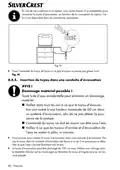








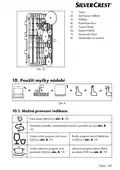




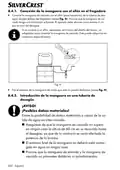










10.2. Switching on the appliance
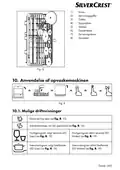
To start the appliance, proceed as follows:
Add the detergent, rinse aid and, if necessary, salt depending on the desired program.
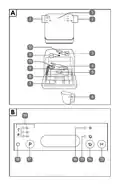
Insert the dish rack (7) and cutlery tray (9) (see section “9.6. Arranging the dishes and
cutlery” on page 56) and push the dish rack into the dishwasher.
Plug the mains plug (20) into the socket.
Press the
button (18) to switch on the appliance.
Turn on the water supply fully or fill the water tank manually.
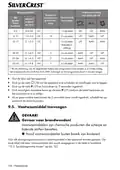
Press the program selection button P (17) several times to select the required program:
Quick, glass, baby bottle, intensive or ECO cleaning program.
You can also choose to switch on an extra drying cycle for these programs (except the
quick program). Press the
button (14).
The program duration increases when the extra dry function is switched on.
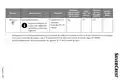
The control light (19) for the selected program lights up (see also “10.4. LED indicator for
the wash program” on page 63).
Press the
button (13) to start the program.
The control light (19) for the selected program flashes.
60 - English

| General | Details |
|---|---|
| Name | SILVERCREST SGW 860 A1 Table Top Dishwasher |
| Make | SILVERCREST |
| Language | English |
| Filetype | PDF (Download) |
| File size | 4.99 MB |
 (1 votes, average: 5.00 out of 5)
 Loading...


JENNAIR W11680101A Dishwasher

BOSCH SPI2HKS08E Semi Integrated Dishwasher

FISHER PAYKEL DD60DTX6I1

Whirlpool W10903644A Dishwasher

BOSCH 24-BOS-1812 Dishwasher

BOSCH SMS2HTW02E Free Standing Dishwasher

IKEA 404.755.53 Medelstor Dishwasher

InDesiT D2I HL326 UK Dishwasher

ORANIER GSV660 Fully Integrated Dishwasher

BOSCH SBV4HVX00E Dishwasher
Table of Contents
- 1. Tisch-geschirrspüler / Table Top - Dishwasher /mini Lave-vai... →
- 2. Kurzanleitung - Quick Start Guide →
- 3. Page 3 →
- 4. Page 4 →
- 5. Einführung - Informationen Zu Dieser Kurzanleitung →
- 6. Einführung - Informationen Zu Dieser Kurzanleitung →
- 7. Hinweise Zum Zusammenbau Oder Zum Betrieb - Auszuführende Ha... →
- 8. Verpackung Umweltgerecht Entsorgen - Bestimmungsgemäßer Gebr... →
- 9. Sicherheitshinweise - Wichtige Sicherheitsanweisungen Sorgfä... →
- 10. Gefahr! - Verletzungsgefahr! →
- 11. Benutzen Sie Keine Verlängerungskabel. - Stellen Sie Sicher,... →
- 12. Vorsicht! - Hinweis! →
- 13. Das Gerät Muss Auf Einer Ebenen, Stabilen Fläche Aufgestellt... →
- 14. Teilebeschreibung - Bedienfeld →
- 15. Lieferumfang - Gefahr! →
- 16. Technische Daten - Produktdatenblatt →
- 17. Allgemeine Produktparameter - Eu-konformitätsinfor... →
- 18. Installation - Aufstellen Und Ausrichten →
- 19. Wasser Manuell Auffüllen - Wasserablauf Anschließen →
- 20. Schlauch In Ein Abflussrohr Einleiten - Hinweis! →
- 21. Schlauch - Anschluss Ans Stromnetz →
- 22. Gerät Vorbereiten - Tür Öffnen →
- 23. Entfernen Sie Den Geschirrkorb Und Drehen Sie Den Deckel Vom... →
- 24. Wasserhärtegrad - Displayanzeige →
- 25. Reiniger - Gefahr! →
- 26. Einräumen Des Geschirrs Und Bestecks - Allgemeines →
- 27. Nicht Oder Bedingt Geeignetes Geschirr - Beladebeispiel Gesc... →
- 28. Beladebeispiel - Besteck →
- 29. Spülmaschine Benutzen - Mögliche Betriebsanzeigen →
- 30. Gerät Einschalten - Programmwahl →
- 31. Spülprogramm Wählen - Energie-/reiniger →
- 32. Energie-/wasseraufnahme - Reiniger (linke/rechte Dosierkamme... →
- 33. Led-anzeige Der Spülprogramme - Ende Des Spülprogramms →
- 34. Entsorgung - Verpackung →
- 35. Service - Service Deutschland Hotline →
- 36. Page 36 →
- 37. Introduction - Proper Use →
- 38. Introduction - Information About This Quick Start Guide →
- 39. Notice! - Ce Labelling →
- 40. Proper Use →
- 41. Safety Information - Important Safety Instructions →
- 42. Risk Of Injury Due To Detergents - Risk Of Injury Due To Sha... →
- 43. Risk Of Explosion! - Risk Of Scalding! →
- 44. Do Not Place Any Heavy Objects On The Door If It Is Open. Th... →
- 45. Description Of Components - Control Panel →
- 46. Back Of The Appliance - Package Contents →
- 47. Technical Specifications - Product Data Sheet →
- 48. General Product Parameters - Eu Declaration Of Conformity →
- 49. Installation - Setup And Levelling →
- 50. Filling With Water Manually - Connecting The Water Outlet →
- 51. Feeding The Hose Into An Outlet Pipe - Running The Hose Into... →
- 52. Connection To Power Supply - Preparations For Use →
- 53. Notice! - Setting Salt Consumption →
- 54. Water Hardness - Display →
- 55. Adding Detergent - Danger →
- 56. Arranging The Dishes And Cutlery - General Information →
- 57. Unsuitable Or Partially Suitable Dishes - Dish Loading Examp... →
- 58. Cutlery →
- 59. Using The Dishwasher - Potential Operating Lights →
- 60. Switching On The Appliance - Arranging The Dishes And Cutler... →
- 61. Selecting A Wash Program →
- 62. Energy/water Consumption [kwh/l] - Detergent (left/right Dos... →
- 63. Led Indicator For The Wash Program - End Of The Wash Program →
- 64. Disposal - Service →
- 65. Service United Kingdom - Service Ireland →
- 66. Page 66 →
- 67. Introduction - Informations Concernant Le Présent Guide De D... →
- 68. Introduction - Informations Concernant Le Présent Guide De D... →
- 69. Respectez Les Consignes Afin Déviter Tout Dommage Matériel !... →
- 70. Marquage Des Emballages Pour Le Tri Des Déchets - Matériaux ... →
- 71. Consignes De Sécurité - Consignes De Sécurité Importantes →
- 72. Danger - Avertissement →
- 73. Nutilisez Pas De Rallonge. - Avertissement →
- 74. Laissez Lappareil Refroidir Avant De Le Vider. Ne Touchez Ja... →
- 75. Ninstallez Pas Lappareil Dans Des Pièces Exposées Au Gel, Ca... →
- 76. Description - Face Avant →
- 77. Contenu De La Livraison - Danger →
- 78. Caractéristiques Techniques - Fiche Produit →
- 79. Paramètres Généraux Du Produit - Consommation Dénergie →
- 80. Information Relative À La Conformité Ue - Installation →
- 81. Raccordez Le Tuyau Darrivée Deau - Remplir Leau Manuellement →
- 82. Insertion Du Tuyau Dans Une Conduite Dévacuation - Avis ! →
- 83. Acheminer Le Tuyau Dans Un Lavabo/récipient - Raccordement A... →
- 84. Préparation De Lappareil - Ouverture De La Porte →
- 85. Remplissage Du Réservoir De Sel - Réglage De La Consommation... →
- 86. Régénération À Chaque Séquence De Programme - Degré De Duret... →
- 87. Du Détergent Pour Lave-vaisselle Doit Être Ajouté Avant Chaq... →
- 88. Éliminez Les Plus Gros Résidus Alimentaires - Chargez Les Ob... →
- 89. Exemple De Chargement De La Vaisselle - Exemple De Chargemen... →
- 90. Couteaux - Utilisation Du Lave-vaisselle →
- 91. Eco - Programme Verres Sélectionné →
- 92. Sélection Dun Programme De Lavage - Description Du Programme →
- 93. Description Du Programme - Programme →
- 94. Affichage Led Des Programmes De Lavage - Fin Du Programme →
- 95. Éteignez Lappareil - Recyclage →
- 96. Sav - Sav France →
- 97. Inleiding - Beoogd Gebruik →
- 98. Inleiding - Informatie Over Deze Beknopte Handleiding →
- 99. Let Op! - Instructies Voor Montage Of Gebruik →
- 100. Beoogd Gebruik →
- 101. Veiligheidsvoorschriften - Belangrijke Veiligheidsvoorschrif... →
- 102. Gevaar Voor Letsel - Gevaar Voor Elektrische Schok →
- 103. Installeer Het Apparaat Uitsluitend In Een Beschutte En Drog... →
- 104. Gevaar Voor Letsel! - Mogelijke Materiële Schade! →
- 105. Gebruik Uitsluitend De Meegeleverde Of In Deze Gebruiksaanwi... →
- 106. Beschrijving Van De Onderdelen - Bedieningspaneel →
- 107. Inhoud Van De Levering - Technische Gegevens →
- 108. Productinformatiebla... - Algemene Productparameters →
- 109. Algemene Productparameters - Eu-conformiteitsinfo... →
- 110. Installatie - Opstellen En Waterpas Zetten →
- 111. Water - Waterafvoer →
- 112. Slang In Een Afvoerpijp Steken - Let Op! →
- 113. Slang - Aansluiting Op Het Elektriciteitsnet →
- 114. Apparaat Voorbereiden - Deur Openen →
- 115. Verwijder Het Serviesrek En Draai De Dop Van Het Zoutreservo... →
- 116. Waterhardheid - Displayaanduiding →
- 117. Vaatwasmiddel - Inruimen Van Het Serviesgoed En Het Bestek →
- 118. Verwijder Grotere Etensresten Van Het Serviesgoed En Week In... →
- 119. Inruimvoorbeeld Voor Serviesgoed - Inruimvoorbeeld Voor Best... →
- 120. Vaatwasmachine Gebruiken - Mogelijke Bedrijfsindicaties →
- 121. Ecoprogramma Geselecteerd - Glasprogramma Geselecteerd →
- 122. Spoelprogramma Kiezen - Gebruik Energiebesparend Of Kort Pro... →
- 123. Energie-/wateropname - Programma →
- 124. Ledindicatie Van De Afwasprogramma's - Einde Van Het Afwaspr... →
- 125. Afvalverwerking - Verpakking →
- 126. Service - Service Nederlands →
- 127. Úvod - Informace O Tomto Stručném Návodu →
- 128. Úvod - Informace O Tomto Stručném Návodu →
- 129. Oznámení - Pokyny K Montáži Nebo Provozu →
- 130. Používání V Souladu S Určením - Likvidaci Obalu Proveďte Eko... →
- 131. Bezpečnostní Pokyny - Důležité Bezpeční Pokyny Pečlivě Přečt... →
- 132. Nebezpečí Úrazu - Nebezpečí Úrazu Elektrickým Proudem →
- 133. Nebezpečí Výbuchu! - Upozornění! →
- 134. Oznámení! - Používejte Pouze Nádobí Vhodné Do Myčky. →
- 135. Popis Částí - Ovládací Panel →
- 136. Tlačítko Výběr Programu - Provozní Kontrolka Čisticí Program →
- 137. Technické Údaje - Informační List Výrobku →
- 138. Obecné Parametry Výrobku - Spotřeba Energie V Kwh →
- 139. Informace O Shodě Eu - Instalace →
- 140. Připojení Přívodní Hadice Na Vodu - Manuální Napouštění Vody →
- 141. Napojení Hadice Do Odpadní Trubky - Oznámení →
- 142. Vedení - Připojení Do Elektrické Sítě →
- 143. Příprava Přístroje - Otevření Dvířek →
- 144. Zásobník Soli - Nastavení Spotřeby Soli →
- 145. Stupeň Tvrdosti Vody - Indikace Na Displeji →
- 146. Mycí Prostředek - Vkládání Nádobí A Příborů →
- 147. Odstraňte Z Nádobí Větší Zbytky Jídla A Zaschlé Zbytky Jídla... →
- 148. Melaminové Dezertní Talíře - Dezertní Talíře →
- 149. Nože - Použití Myčky Nádobí →
- 150. Eco - Zvolen Program Pro Sklo →
- 151. Výběr Mycího Programu - Mycí Prostředek →
- 152. Mycí Prostředek - Program →
- 153. Led Indikace Pro Mycí Programy - Konec Mycího Programu →
- 154. Likvidace - Servis →
- 155. Dodavatel/výrobce/do... →
- 156. Page 156 →
- 157. Wstęp - Informacje O Niniejszej Skróconej Instrukcji Obsługi →
- 158. Wstęp - Informacje O Niniejszej Skróconej Instrukcji Obsługi →
- 159. Ostrzeżenie Przed Możliwymi Średnio Ciężkimi I/lub Lekkimi O... →
- 160. Oznakowanie Materiałów Opakowaniowych Przy Selekcji Odpadów ... →
- 161. Wskazówki Bezpieczeństwa - Ważne Instrukcje Dotyczące Bezpie... →
- 162. Dzieci Nie Powinny Czyścić Ani Wykonywać Konserwacji Urządze... →
- 163. Niebezpieczeństwo Porażenia Prądem Elektrycznym! - Niebezpie... →
- 164. Przestroga! - Niebezpieczeństwo Poparzenia! →
- 165. Zwracaj Uwagę Na To, Aby Elementy Naczyń Wykonane Z Tworzyw ... →
- 166. Opis Części - Panel Obsługowy →
- 167. Zawartość Opakowania - Niebezpieczeństwo Uduszenia →
- 168. Dane Techniczne - Zasilanie Elektryczne →
- 169. Ogólne Parametry Urządzenia - Zużycie Energii W Kwh [na Cykl... →
- 170. Informacje Dotyczące Zgodności Z Przepisami Ue - Instalacja →
- 171. Podłączanie Wody - Ręczne Napełnianie Wodą →
- 172. Łączenie Węża Z Syfonem Zlewu - Wprowadzenie Węża Do Rury Od... →
- 173. Wprowadzenie Węża Do Umywalki/zbiornika - Podłączanie Do Sie... →
- 174. Przygotowanie Urządzenia - Otwieranie Drzwiczek →
- 175. Wyjmij Kosz Na Naczynia I Odkręć Pokrywę Z Pojemnika Na Sól.... →
- 176. Stopień Twardości Wody - Wyświetlacz →
- 177. Wybór Programu Mycia - Wkładanie Naczyń I Sztućców →
- 178. Naczynia Nieodpowiednie Lub Odpowiednie Warunkowo - Nieodpow... →
- 179. Przykład Wsadu Naczyń - Przykład Wsadu Na Sztućce →
- 180. Noże - Widelce →
- 181. Eco - Możliwe Komunikaty O Błędzie →
- 182. Wybór Programu Mycia - Środek Do Mycia →
- 183. Środek Do Mycia - Czas Pracy →
- 184. Kontrolka Led Programów Mycia - Koniec Procesu Mycia →
- 185. Utylizacja - Opakowanie →
- 186. Serwis - Dostawca / Producent / Importer →
- 187. Úvod - Informácie O Tomto Stručnom Návode →
- 188. Úvod - Informácie O Tomto Stručnom Návode →
- 189. Oznámenie - Poznámky K Montáži Alebo Prevádzke →
- 190. Správne Použitie →
- 191. Bezpečnostné Pokyny - Dôležité Bezpečnostné Pokyny →
- 192. Nebezpečenstvo Zranenia - Varovanie →
- 193. Zariadenie Sa Zapína, Resp. Vypína Tlačidlom - Nebezpečenstv... →
- 194. Umývačku Riadu Uvádzajte Do Prevádzky - Upozornenie! →
- 195. Pripojenie Zariadenia - Používanie Príslušenstva →
- 196. Opis Častí - Ovládací Panel →
- 197. Rozsah Dodávky - Nebezpečenstvo! →
- 198. Technické Údaje - Karta Údajov Produktu →
- 199. Všeobecné Parametre Produktu - Energetická Spotreba V Kwh →
- 200. Informácie O Zhode S Normami Eú - Inštalácia →
- 201. Pripojenie Prívodu Vody - Ručné Plnenie Vody →
- 202. Pripojenie - Zavedenie →
- 203. Zavedenie Hadice Do Umývadla/nádoby - Pripojenie Do Elektric... →
- 204. Príprava Zariadenia - Otvorenie Dverí →
- 205. Nastavenie Spotreby Soli →
- 206. Stupeň Tvrdosti Vody - Zobrazenie Displeja →
- 207. Umývací Prostriedok - Ukladanie Riadu A Príboru →
- 208. Odstránenie Zvyškov Potravín - Zabránenie Poškodeniu Skla Al... →
- 209. Príklad Uloženia Riadu - Príklad Uloženia Príboru →
- 210. Nože - Servírovacie Vidličky →
- 211. Eco - Zvolený Program Eko →
- 212. Výber Oplachovacieho Programu - Umývací Prostr. →
- 213. Umývací Prostr. - Doba Chodu →
- 214. Led Indikátor Oplachovacích Programov - Koniec Umývacieho Pr... →
- 215. Zariadenie - Likvidácia →
- 216. Servis - Dodávateľ/výrobca/im... →
- 217. Introducción - Uso Conforme A Lo Previsto →
- 218. Introducción - Información Acerca De Esta Guía Rápida →
- 219. Aviso! - Indicaciones Sobre El Ensamblaje O El Funcionamient... →
- 220. Uso Conforme A Lo Previsto →
- 221. Indicaciones De Seguridad - Indicaciones De Seguridad Import... →
- 222. Peligro! - Advertencia! →
- 223. No Utilice Cables De Prolongación. - Asegúrese De Que El Cab... →
- 224. Antes De Vaciar El Aparato, Espere A Que Se Enfríe. No Toque... →
- 225. El Aparato Debe Colocarse Sobre Una Superficie Plana Y Estab... →
- 226. Descripción De Piezas - Panel De Control →
- 227. Volumen De Suministro - Peligro De Asfixia! →
- 228. Datos Técnicos - Ficha De Datos Del Producto →
- 229. Parámetros Generales Del Producto - Consumo De Energía →
- 230. Información De Conformidad Ue - Instalación →
- 231. Conexión De Agua - Llenado Manual De Agua →
- 232. Conexión De La Manguera Con El Sifón En El Fregadero - Intro... →
- 233. Dirigir La Manguera A Un Fregadero O Recipiente - Conexión A... →
- 234. Preparación Del Aparato - Apertura De La Puerta →
- 235. Ajuste Del Consumo De Sal - Llenado Del Depósito De Sal →
- 236. Grado De Dureza Del Agua - Indicación En Pantalla →
- 237. El Detergente Para Lavavajillas Debe Añadirse Antes De Cada ... →
- 238. Elimine Los Restos De Comida Importantes De La Vajilla Y Pon... →
- 239. Ejemplo De Carga De Vajilla - Ejemplo De Carga De Cubertería →
- 240. Cuchillos - Tenedores Para Servir →
- 241. Eco - Programa Ecológico Activo →
- 242. Selección Del Programa De Lavado - Detergente →
- 243. Detergente - Consumo De Energía/agua [kwh/l] →
- 244. Indicador Led De Los Programas De Lavado - Fin Del Programa ... →
- 245. Eliminación - Embalaje →
- 246. Atención Al Cliente - Proveedor/fabricante... →
- 247. Introduktion - Tilsigtet Brug →
- 248. Introduktion - Informationer Til Denne Korte Vejledning →
- 249. Bemærk! - Anvisninger Vedrørende Montering Eller Drift →
- 250. Tilsigtet Brug →
- 251. Sikkerhedsanvisninger - Vigtige Sikkerhedsanvisninger - Læse... →
- 252. Advarsel! - Fare For Kvæstelser! →
- 253. Advarsel - Brintgas Er Højeksplosiv! →
- 254. Bemærk! - Mulige Tingsskader! →
- 255. Udsæt Ikke Maskinen For Ekstreme Betingelser - Beskrivelse A... →
- 256. Driftsvisning Opvaskeprogram - Maskinens Bagside →
- 257. Tekniske Data - Produktdatablad →
- 258. Generelle Produktparametre - Eu-overensstemmelses... →
- 259. Installation - Opstilling Og Justering →
- 260. Manuel Påfyldning Af Vand - Tilslutning Af Vandafløb →
- 261. Led Slangen Ind I Et Afløbsrør - Bemærk! →
- 262. Led - Tilslutning Ved Strømforsyningen →
- 263. Forberedelse Af Maskinen - Åbning Af Låge →
- 264. Fjern Servicekurven Og Skru Dækslet Til Saltbeholderen Af - ... →
- 265. Vandhårdhedsgrad - Displayvisning →
- 266. Påfyld Altid Maskinopvask Umiddelbart Inden Opvaskeprocessen... →
- 267. Fjern Større Madrester Fra Servicet - Uegnet Eller Kun Delvi... →
- 268. Melamin-dessertaller... - Desserttallerkner →
- 269. Anvendelse Af Opvaskemaskinen - Mulige Driftsvisninger →
- 270. Eco - Glasprogram Valgt →
- 271. Valg Af Opvaskeprogram - Maskinopvask →
- 272. Maskinopvask - Energi-/vandforbrug →
- 273. Led-visning For Opvaskeprogrammerne - Slut På Opvaskeprogram... →
- 274. Bortskaffelse - Emballage →
- 275. Service - Leverandør/producent... →
- 276. Page 276 →
- 277. Mlap Gmbh - Model No.: Sgw 860 A1 →