
Thermador DWHD660EFM Dishwasher





en-usꢀBasic settings
¡ To save energy, the appliance switches off
automatically 10 minutes after the end of the wash
cycle. If you open the appliance door immediately after
the wash cycle has ended, the appliance will switch off
after 4 seconds.
2. Press On/Off.
B
t
12ꢀBasic settings
You can configure the basic settings for your appliance to
meet your needs.
B
t
11.5ꢀInterrupting the wash cycle
1. Press On/Off.
The program is saved and the appliance switches off.
2. Press On/Off.
12.1ꢀChanging the basic settings
3. Press
to resume the wash cycle.
Tip: Connect your appliance to a mobile device. You can
conveniently change all settings using the
Home Connect® app.
11.6ꢀTerminating the wash cycle
To end a cycle early or to switch from one that has already
started, you will need to cancel it first.
1. Open the appliance door.
1. Open the appliance door.
2. Press
.
2. Press
for approx. 4 seconds.
3. To open the basic settings, press button and hold for
3 seconds.
3. Close the appliance door.
a All displays light up.
a As soon as the displays are off, the display shows
"00h:01m" and the residual water is pumped out.
a The cycle is cancelled and ends after approx. 1 minute.
4. Press the button repeatedly until the display shows
the required setting.
5. Press
repeatedly until the display shows the right
value.
11.7ꢀSwitching off the appliance
You can change one or more settings.
6. To store the settings, press button and hold for 3
seconds.
7. Close the appliance door.
CAUTION
To avoid risk of injury, always use caution when opening
the door during or following a wash cycle as hot water or
steam may escape.
▶ Do not fully open the door until water noises have
stopped and steam has subsided.
Tip: You can reset the changed settings back to the
factory settings at any time.
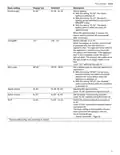
12.2ꢀOverview of the basic settings
The basic settings depend on the features of your appliance.
Basic setting
Display text
Selection
Description
1
Rinse aid disp.
r:05
r:00 - r:06
Set the amount of rinse aid.
Switch the rinse aid system off with level
r:00.
Sensor setting
Extra Dry
SE:00 1
d:00 1
SE:00 - SE:02
d:00 - d:01
Set the water sensor for identifying soiling.
The temperature is increased during the final
rinse, which improves the drying result. This
may increase the run time slightly.
Note: Not suitable for delicate items of
dishware.
Switch Extra Dry on "d:01" or off "d:00".
1
Factory setting (may vary according to model)
20

| General | Details |
|---|---|
| Name | Thermador DWHD660EFM Dishwasher |
| Make | Thermador |
| Language | English |
| Filetype | PDF (Download) |
| File size | 3.01 MB |
 (1 votes, average: 5.00 out of 5)
 Loading...

Thermador DWHD660EFP Sapphire Dishwasher

Thermador DWHD640EFP Dishwasher

Thermador Dishwasher : for DWHD650W and More

Thermador DWHD640EFM Dishwasher


KitchenAid KDSDM82143 Dishwasher

comfee FD1201P-W Dishwasher

SIEMENS SN23EI00ME Dishwasher

GE APPLIANCES GTW845 Dishwasher

BOSCH SGS4HVI31E Dishwasher

FISHER and PAYKEL DD60ST4HZB9 Dishwasher

Smeg ST292D Dishwasher

BOSCH SPV2HKX41E Dishwasher

FISHER PAYKEL DW60UT4HI2 Fully Integrated Dishwasher
lord D3 Dishwasher