
AEG F8642FI Tall Tub Dishwasher
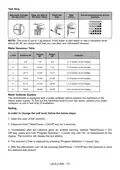
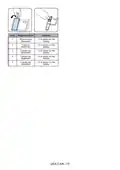
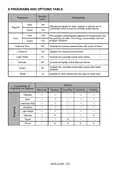
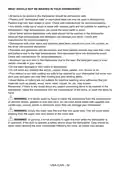
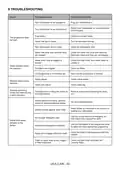
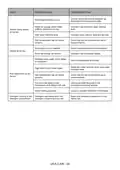
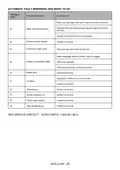


NOTE: The program duration may change according to the amount of dishes, the
water temperature, the ambient temperature in the room, and any selected ad-
ditional functions.
NOTE: The energy-usage label is based on the “Regular” program. This program
is the most efficient in terms of its combined energy and water consumption at
cleaning normally soiled dishes.
• Only use powder detergent for short programs.
• Short programs do not include drying.
• To assist drying, we recommend slightly opening the door after a cycle is
complete.
Water Temperature
Hot water is needed for best dishwashing and drying results. Water entering
dishwasher should be at least 120°F (49°C) to give satisfactory results.
To check water temperature entering dishwasher:
• Turn on hot water faucet nearest dishwasher for several minutes to clear cool
water from pipes.
• Hold a candy or meat thermometer in stream of water to check the temperature.
•If temperature is below 120°F (49°C), have a qualified person raise the hot water
heater thermostat setting.
Salt Indicator (Model Depending)
Please check the salt indicator on the control panel to see whether there is ad-
equate amount of softening salt in the dishwasher or not. You need to refill the salt
reservoir with salt whenever salt warning indicator appears on the control panel of
your machine. In order to add salt to the machine,
1. Open the door of the machine,
2. Press and hold “Start/Pause + On/Off” key for 3 seconds,
3. Immediately after the machine gives an audible warning, release “Start/Pause
+ On/Off” key, press and hold “Program Selection + Cancel” key until “SL” is
rep-resented on the display. The machine will display the last setting,
4. The amount of Salt is adjusted by pressing “Program Selection + Cancel”
key,
5. After the adjustment, turn off (by pressing Start/Pause + On/Off key) on the
ma-chine to save the selected salt amount.
USA-CAN - 24

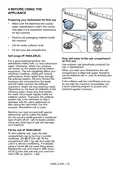
Preparing The Machine
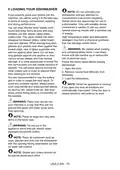
1. Open the door of the dishwasher.
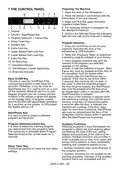
7 THE CONTROL PANEL
2. Place the dishes in accordance with the
instructions in the user manual.
3. Make sure that the upper and lower
impellers rotate freely.
4. Put adequate amount of detergent into
the detergent dispenser.
5. Check if the Salt and Rinse Aid indicators
light and add salt and/or rinse aid if needed.
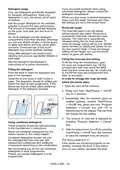
1. Display
2. On/Off + Start/Pause Key
3. Program Selection + Cancel Key
4. Delay Timer Key
5. Sanitize Key
6. Extra Fast Key
7. Upper Basket Half Load Key
8. Lower Basket Half Load Key
9. Extra Dry Key
Program Selection
1. Press the On/Off key to turn on your
machine. Note that the door of the
dishwasher is OPEN position.
2. Refer the “Programs Table” to determine
a washing program suitable of your dishes.
3. Press program selection key until the
number of the program you selected
appears on the display.
In order to start the selected program, Start/
Pause key must be pressed and the door of
the diswasher must be closed within
4 seconds after the Start/Pause key is
pressed. If the door is not closed within
4 seconds, the machine will not start. In
this case; to start the selected program,
the door must be opened, the Start/Pause
key must be pressed and the door must
be closed again within 4 seconds after the
Start/Pause key is pressed.
If the door of the machine is opened when
the machine is running, the machine stops
working. If the door is closed back within
4 seconds after the door is opened, the
machine will continue. If the door stays
open for more than 4 seconds, Start/Pause
key must be pressed and the door of the
diswasher must be closed within 4 seconds
after the Start/Pause key is pressed.
10. Hi-Temp Key
11. Sanitized Indicator
12. Salt Indicator (model depending)
13. Rinse Aid Indicator
Keys On/Off Key
This key is used as On/Off key if the
corresponding button is held down for 3
seconds. Otherwise, it can be used as
Start/Pause key. It is used to turn on or turn
off the machine. Machine will turn on with
Regular program and the number and the
duration of the regular program will appear
on the display. Each of program number
and the duration will sequentially represent
for 2 seconds on the display. In Off position,
the display will turn off.
Start/Pause Key
It is used to start or pause a selected
program and functions.
Program Selection/Cancel Key
It is used to select the washing program
you determined from the programs table.
The cancel key is activated when Program
Selection/Cancel Key is held down for 3
seconds.
Auxiliary Functions
Washing programs of your dishwasher are
designed to obtain the best cleaning effect,
considering the type of the soil, soiling
degree and properties of the dishes to be
washed. Auxiliary functions are provided in
order to enable you to save time, water and
energy and to perform a more comfortable
washing with conditions specific to you.
Delay Timer Key
It should be pressed to make the time delay
settings.
i. Auxiliary functions may cause changes in
the program duration.
ii. Auxiliary functions are not suitable for all
washing programs. Indicator of the auxiliary
function that is not compatible with the
USA-CAN - 25

| General | Details |
|---|---|
| Name | AEG F8642FI Tall Tub Dishwasher |
| Make | AEG |
| Language | English |
| Filetype | PDF (Download) |
| File size | 1.2 MB |
 (1 votes, average: 5.00 out of 5)
 Loading...

AEG FSK76748P Dishwasher

AEG FSK53617Za Dishwasher

AEG FSK74747P Dishwasher

AEG FSE73507P Dishwasher

AEG GS60AIM Dishwasher

AEG FSB73427Z Dishwasher

AEG FSE74737P Quickselect Dishwasher

AEG FFB73727PM Dishwasher

AEG FFE83800PM Dishwasher

AEG FFE73600PM Built Under Dishwasher


COVE DW2450, DW2450WS Dishwasher

Indesit DI9E 2B10 Dishwasher

BOSCH SGX78B55UC Smart Dishwasher

BOSCH SPV4HMX10E Dishwasher

BOSCH SPS4HMW49G Dishwasher

FISHER PAYKEL DW24U2I1 Drop Down Dishwasher
GE Triton XL Dishwasher

FISHER PAYKEL DW60FC6X1 Dishwasher

BOSCH SMS2HMI03E Dishwasher

BOSCH SHV88C73N Custom Panel Dishwasher