
×
- 1. Geschirrspüler / Dishwasher / Vaatwasmachine
- 2. Wichtige Sicherheitshinweise (Vor Der Ersten Inbetriebnahme → Empfehlungen: → Montageanleitung → Reinigung Und Wartung)
- 3. Safety Instructions For Use (Before You Install The Appliance → Daily Maintenance → In Case Of Problems → Dishes And Utensils That Are Not Suitable For Dishwashers.)
- 4. Indications Concernant La Sécurité D'utilisation (Avant Linstallation → Avant La Première Utilisation → Utilisation Quotidienne → Nettoyage Et Entretien)
- 5. Aanwijzingen Voor Veilig Gebruik (Voor De Installatie → Voor Het Eerste Gebruik → Dagelijkse Bediening → Bij Problemen)
- 6. Sehr Geehrter Kunde, Von Heute An Werden Ihre Alltäglichen Pflichten Einfacher Denn Je. Dieses Gerät Ist Eine Verbindung Einer Außergewöhnli…
- 7. Wichtige Sicherheitshinweise (Vor Der Ersten Inbetriebnahme)
- 8. Sicherheitshinweise Für Kinder (Vorsichtsmaßnahmen Beim Gebrauch → Verwendung Des Geräts Im Haushalt → Reinigung Und Benutzerwartung)
- 9. Setzen Und Stellen Sie Sich, Und Auch Keine Anderen Lasten Auf Die Geöffnete Tür. Das Gerät Kann Kippen. (Bei Störfällen → Beladen Des Haushaltsgeschirrspülers)
- 10. Empfindliche Dekorgläser Und Porzellanteile (Gegenstände, Die Wie Schwämme Und Haushaltstücher Wasser Aufsaugen → Mindestzeitraum Für Ersatzteile → Ersatzteilliste Und Bestellverfahren → Weitere Informationen Über Das Produkt)
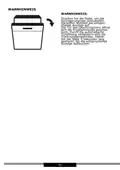
- 11. Auspacken (Hinweis!)
- 12. Entsorgung Von Altgeräten (Richtlinien Zur Entsorgung → Verpflichtungen Des Benutzers → Sammelstellen Für Elektrogeräte → Umweltschutz Und Gesundheit)
- 13. Montageanleitung (Aufstellen Des Geschirrspülers → Wasseranschluss → Zulaufschlauch)
- 14. Ablaufschlauch (Elektrischer Anschluss)
- 15. Vorbereitung Des Gerätes (Zum Gebrauch → Vor Dem Ersten Gebrauch → Bedeutung Der Entkalkung Von Wasser → Salz Einfüllen)
- 16. Nach Dem Auffüllen Des Salzbehälters Erlischt Die Salzanzeige. (Teststreifen → Mehrzweckspülmittel (z. B.: 2 In 1', 3 In 1' Usw.))
- 17. Darauf Müssen Sie Achten, Wenn Sie Produkte Dieser Art Verwenden: (Anwendungsempfehlung: Für Bestmögliche Spülergebnisse Mit Mehrzweckspülmitteln Geben Sie Salz Und Klarspüler In Den Geschirrspüler. → Einstellen Der Verwendung Von Mehrzweckspülmitteln)
- 18. Wasserhärte (Einstellungen Der Wasserhärte → Verbrauch Von Spülmitteln)
- 19. Standardbeladung Und Prüfergebnisse (Oberkorb → Unterer Korb → Informationen Zu Den Prüfungen Nach Der Norm En 60436 → Volumen - 12 Standard-geschirrsets)
- 20. Besteckkorb (Anzahl → Besteck)
- 21. Einräumen Von Geschirr (Oberer Geschirrkorb → Herunterklappen Der Ablagen Für Becher/tassen)
- 22. Einklappen Der Korbständer (Anheben → Senken → Hinweise Für Die Benutzung Des Korbs → Verstellen Des Oberen Korbs)
- 23. Um Den Korb In Die Obere Position Zu Bringen, Heben Sie Ihn An, Bis Er Sich An Beiden Seiten Auf Derselben Höhe Befindet. Vergewissern Sie S…
- 24. Spülmittel Einfüllen (Öffnen Sie Die Klappe Des Spülmittelbehälters → Füllen Sie Das Größere Fach (a) Für Den Hauptspülgang Mit Spülmittel → Für Optimale Spülergebnisse)
- 25. Füllen Des Klarspülbehälters Und Auswahl Der Einstellungen (Verwendung Des Klarspülers → Hinweis Zur Handhabung Des Waschmittelbehälters)
- 26. Einstellen Des Klarspülerbehälters (Um Eine Bessere Trocknungsleistung Mit Begrenzter Spülhilfe Zu Erzielen, Ist Der Geschirrspüler So Ausgelegt, Dass Er Den Verbrauch Durch Den Benutzer Anpassen Lässt.)
- 27. Einschalten Des Geräts (Programmwechsel → Einräumen Von Geschirr Während Des Spülvorgangs)
- 28. Nach Dem Ende Des Spülprogramms (Abschalten Des Geschirrspülers → Ausräumen Des Geschirrs)
- 29. Display I Bedienpanel (Betriebsanzeige (schalter) → Programm → Halbe Beladung → Startverzögerung → Kindersicherung)
- 30. Verzögerungsdauer (Klarspüler → Regeneriersalz → Wasserzulaufventil → Fehlercode)
- 31. Warnhinweis (Verzögerungszeit Einstellen → Automatische Türöffnung)
- 32. Reinigung Und Wartung (Reinigung Der Außenflächen → Bedienfeld → Reinigen Der Innenflächen → Reinigen Der Filter)
- 33. Größere Überreste Können Unter Fließendem Wasser Abgespült Werden. Mit Einem Weichen, Sauberen Tuch Kann Der Filter Noch Sorgfältiger Gerein…
- 34. Reinigung Des Geschirrspülers (Frostschutz → Nach Jedem Spülvorgang → Transport Des Geräts)
- 35. Lokalisierung Von Störungen (Problem → Wahrscheinliche Ursache → Lösung)
- 36. Benutzen Sie Den Geschirrspüler, Wenn Der Wasserdruck Normal Ist. (Das Geschirr Ist Nicht Sauber Genug. → Das Geschirr Ist Nicht Trocken Genug. → Das Wasser Ist Zu Hart. → Auf Dem Geschirr Sind Flecken Und Ablagerungen.)
- 37. Die Klappe Des Spülmittelbehälters Funktioniert Nicht (Der Geschirrspüler Pumpt Das Wasser Nicht Richtig Ab → Der Geschirrspüler Leckt → Geräuschbildung → Der Geschirrspüler Füllt Sich Nicht Mit Wasser)
- 38. Garantie, Nachverkauf-service (Wartung → Reparaturmeldungen Und Hilfe Bei Fehlern → Ce-konformitätserklärung)
- 39. Dear Customer, From Now On, Your Daily Housework Will Be Easier Than Ever Before. Your Appliance Is Exceptionally Easy To Use And Extremely …
- 40. Safety Instructions For Use (Before You Install The Appliance → Before First Use → Child Safety)
- 41. Daily Maintenance (In Case Of Problems → Recommendations)
- 42. Energy And Water Saving Tips (Dishwasher Safe Dishes → Spare Parts Availability → Additional Information)
- 43. Bel Or Enter The Product Model Listed On The Energy Label In The Eprel Search Engine Https://eprel.ec.europa.eu/
- 44. Unpacking
- 45. Disposal Of Old Appliance
- 46. Install The Appliance (Place Your Appliance → Water Supply Connection → Water Supply Hose → The Drain Hose)
- 47. Electrical Connection
- 48. Prepare The Appliance For Operation (Before First Use → The Importance Of Water Descaling → Add Special Salt)
- 49. Fill The Special Salt Dispenser (The Test Strip → Multi-component (multitab) Detergents → What You Should Pay Attention To When Using These Tablets)
- 50. If You Use The Detergent Properly And Dishwasher Settings Are Correct You Can Save On Salt And/or Rinse Aid. (Recommended Use: For Best Results Using Multi-component Cleaning Agents, Add Special Salt And Rinse Aid In The Dishwasher And Set The Water Hardness And Amount Of Rinse Aid To The Lowest Setting. → Water Hardness Table → If The Water Hardness Is Higher Than The Maximum Values Given In The Table Above, Or If You Use Water From A Deep Well, It Is Recommended To Use Filters And Water Treatment Equipment. → Note: The Factory Settings Are For The Water Hardness Level 3.)
- 51. The Use Of Detergents
- 52. Standard Loading And Test Results (Upper Basket → Lower Basket → Information For Comparability Test In Accordance With En 60436 → Capacity: 12 Place Settings)
- 53. Cutlery Basket (Place Knives And Forks Separately From Each Other → Best Washing Results)
- 54. Load Dishes Into Dishwasher (Upper Basket → Fold The Mugs And Cups Shelves)
- 55. Fold The Dishwasher Basket Spikes (Tips For Using The Dishwasher Basket → Adjust The Upper Basket)
- 56. To Raise The Basket To The Upper Position, Raise It Until It Is At The Same Height On Both Sides. Make Sure It Is Securely Attached To The R…
- 57. Fill The Detergent Dispenser (Pour The Detergent Into The Larger Chamber (a) For The Main Cycle → For A Better Washing Result)
- 58. Add Rinse Aid To The Dispenser (Use Rinse Aid To Prevent Formation Of White Water Drops → Adjusting The Rinse Aid Setting)
- 59. Adjust The Rinse Aid Dispenser
- 60. Turn On The Appliance (Change Programme → Add Dishes During The Programme)
- 61. The Dishwashing Programme Completes (Turn Off The Dishwasher → Unload The Dishwasher)
- 62. Display And Control Panel (Operation (button) → Program Indicator → Child Lock → Delay)
- 63. Rinse Aid (Salt → Water Faucet → Error Code → Description Of The Fault)
- 64. Automatic Opening (Press The Button To Set The Delay Time, The Corresponding Indicator Lights Up. → The Dishwasher Door Opens Automatically At The End Of The Operation. → The Automatic Opening Function Improves The Drying Results. → Hold The Button For 3 Seconds And The Relevant Indicator Will Light Up.)
- 65. Cleaning And Maintenance (Clean External Surfaces → Control Panel → Clean Internal Surfaces → Filter System)
- 66. Clean The Filter (Spray Arms → Clean The Dishwasher → Frost Protection)
- 67. Remove The Filter And Use A Sponge To Collect The Water From The Bottom Of The Dishwasher. (After Each Wash → Unplug The Appliance → If The Dishwasher Is Not Used For A Long Time → Move The Appliance)
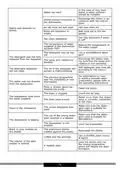
- 68. Trouble-shooting (Problem → Possible Cause → Solution → The Dishwasher Will Not Start)
- 69. The Water Pressure Is Temporarily Low. Ensure That The Dishwasher Is Connected To Hot Water. The Dishes Are Not Clean Enough. The Dishwasher…
- 70. Water Softener Installation (Dishwasher Loading Instructions → Rinse Aid Usage → Detergent Issues → Drainage Problems)
- 71. Noise Of The Detergent Dispenser Lid Opening Or Water Drain Pump Operating (The Appliance Does Not Fill With Water → Check That The Water Tap Is Open → The Door Lock May Not Be Engaged)
- 72. Warranty And After Sales Service (Warranty → Service → Manufacturers Declaration)
- 73. Sécurité Et Fonctionnalité (Instructions D'utilisation)
- 74. Indications Concernant (La Sécurité D'utilisation → Avant Linstallation → Avant La Première Utilisation → Sécurité Des Enfants)
- 75. Utilisation Quotidienne
- 76. Recommandations
- 77. Objets À Éviter Dans Le Lave-vaisselle (Vérification De La Vaisselle Avant Achat → Disponibilité Des Pièces De Rechange → Informations Supplémentaires Sur Le Produit)
- 78. Déballage
- 79. Élimination Des Appareils Usagés
- 80. Installation De Lappareil (Emplacement De Lappareil → Raccordement À Leau → Tuyau Dalimentation En Eau)
- 81. Tuyau Dévacuation (Raccordement Électrique)
- 82. Préparer Lappareil À Lutilisation (Avant La Première Utilisation Du Lave-vaisselle → Importance De La Décalcification De Leau → Versement Du Sel)
- 83. Attention (Bandelette Indicatrice → Détergents Mixtes (p.ex. : 2en1 , 3en1 , Etc.) → À Quoi Faire Attention En Utilisant Ce Type De Produits)
- 84. Utilisation Des Détergents En Pastilles (Mode Demploi Recommandé → Arrêt De Lutilisation De Détergents Tout-en-un → Avertissement Concernant Les Produits De Rinçage → Tableau De Dureté De Leau)
- 85. Consommation Des Détergents (Réglages De Dureté De L'eau)
- 86. Chargement Standard Et Résultats Des Études (Informations Pour Les Tests Conformément À La Norme En 60436 → Capacité - 12 Ensembles De Vaisselle Standards → Réglage Du Panier Supérieur Position Basse → Programme - Eco)
- 87. Panier À Couverts (Les Couverts Doivent Être Placés Séparément, De Façon Correcte. Veiller À Ce Quils Ne Sentremêlent Pas, Car Cela Peut Entraîner Un Lavage Incomplet.)
- 88. Charger La Vaisselle (Dans Le Lave-vaisselle → Panier Supérieur → Pliage Des Clayettes Pour Les Mugs/tasses)
- 89. Pliage Des Pics (Consignes Pour Lutilisation Du Panier → Réglage Du Panier Supérieur → Position Basse → Position Haute)
- 90. Type 2 (Panier Inférieur)
- 91. Remplissage Du Distributeur De Détergent (Ouvrir Le Couvercle Du Distributeur De Détergent → Utilisation Des Indicateurs De Quantité → Verser Le Détergent Dans Le Compartiment → Conseils Pour Un Meilleur Résultat De Lavage)
- 92. Remplissage Du Distributeur Du Produit De Rinçage Et Choix Des Paramètres (Utilisation Du Produit De Rinçage → Vérification De La Quantité De Produit De Rinçage)
- 93. Réglage Du Doseur Du Produit De Rinçage (Pour Avoir De Meilleurs Résultats De Séchage, Avec Une Consommation Limitée Du Produit De Rinçage Il Est Possible De Régler La Consommation Dans Le Lave-vaisselle.)
- 94. Mise En Marche De Lappareil Et Sélection Du Programme (Changement Du Programme → Ajout De La Vaisselle En Cours De Lavage)
- 95. Fin Du Cycle De Lavage (Arrêter Le Lave-vaisselle → Déchargement Du Lave-vaisselle)
- 96. Fonctionnement De Lappareil (touche) (Puissance → Programme → Mi-charge → Départ Différé → Verrouillage De Démarrage)
- 97. Voyant De Sélection Du Programme (Départ Différé → Voyant Davertissement → Code De Lerreur → Description De La Défaillance)
- 98. Ouverture Automatique De La Porte (Départ Différé → Fonction D'ouverture Automatique)
- 99. Nettoyage Et Entretien (Nettoyage Des Surfaces Extérieures → Panneau De Commande → Nettoyage Des Surfaces Intérieures → Système De Filtres)
- 100. Rincer À Leau Courante Pour Évacuer Les Grosses Particules (Assembler De Nouveau Le Filtre → Avertissement → Bras Daspersion → Nettoyage Des Bras Daspersion)
- 101. Nettoyage Du Lave-vaisselle (Protection Contre Le Gel → Après Chaque Lavage → Retirer La Fiche → Si Le Lave-vaisselle Nest Pas Utilisé Pendant Une Longue Période)
- 102. Localisation Des Pannes (Problème → Cause Probable → Solution → La Porte Du Lave-vaisselle Est Ouverte, Fermer La Porte De Lappareil.)
- 103. Utiliser Le Lave-vaisselle Lorsque La Pression Deau Est Normale (La Vaisselle Nest Pas Suffisamment Propre → Le Lave-vaisselle Ne Se Met Pas En Marche → Le Doseur Du Détergent Est Vide → La Vaisselle Nest Pas Suffisamment Sèche)
- 104. Eau Trop Dure (Placement De La Vaisselle Incorrect → Taches Et Dépôts Sur La Vaisselle → Le Lave-vaisselle Névacue Pas Correctement Leau → Le Lave-vaisselle Fuit)
- 105. Niveau Sonore (Vérifier Si La Vanne Deau Est Ouverte → Le Lave-vaisselle Ne Se Remplit Pas Deau → La Porte Peut Être Mal Fermée)
- 106. Garantie, Service Après-vente (Garantie → Service → Demande De Réparation Et Soutien En Cas De Défaillance → Déclaration Du Fabricant)
- 107. Beste Klant (Gebruik Van Het Apparaat → Veiligheid En Functionaliteit → Naleving Van Aanwijzingen → Bewaren Van De Gebruiksaanwijzing)
- 108. Aanwijzingen Voor Veilig Gebruik (Voor De Installatie → Voor Het Eerste Gebruik)
- 109. Veiligheid Van Kinderen (Dagelijkse Bediening)
- 110. Aanbevelingen
- 111. Vaatwerk Dat Niet Bestand Is Tegen Hoge Temperaturen (Voorwerpen Van Aluminium En Zilver → Absorberende Voorwerpen → Reserveonderdelen En Bestelprocedure → Meer Informatie Over Het Product)
- 112. Uitpakken (Attentie!)
- 113. Verwijdering Van Gebruikte Apparatuur (Juiste Behandeling Van Gebruikte Elektrische En Elektronische Apparatuur)
- 114. Installatie Van Het Apparaat (Plaatsing Van Het Apparaat → Wateraansluiting → Wateraanvoerslang)
- 115. Afvoerslang (Elektrische Aansluiting)
- 116. Voorbereiding Van Het Apparaat (Voor Het Eerste Gebruik Van De Vaatwasmachine → De Betekenis Van Waterontkalking → Vullen Met Zout)
- 117. Schakel (Teststrip → Gecombineerde Afwasmiddelen)
- 118. Waar Moet U Op Letten Als U Dergelijke Producten Gebruikt (Aanbevolen Gebruikswijze → Stoppen Met Het Toepassen Van Gecombineerde Afwasmiddelen)
- 119. Waterhardheidstabel (Afwasmiddelgebruik)
- 120. Standaardlading En Onderzoeksresultaten (Informatie Voor Onderzoeken In Overeenstemming Met De Norm En 60436 → Inhoud - Standaard 12 Delig Servies → Instelling Bovenste Korf - Onderste Positie → Programma - Eco)
- 121. Bestekkorf (Aantal)
- 122. Inruimen Van De Vaatwasmachine Met Vaatwerk (Bovenste Korf → Uitklappen Van De Roosters Voor Bekers/kopjes)
- 123. Inklappen Steunen Van De Korf (Aanwijzingen Voor Het Gebruik Van De Korf: → Instelling Bovenste Korf → Onderste Positie → Bovenste Positie)
- 124. Om De Korf Naar De Hoogste Positie Te Brengen, Moet U Hem Aan Beide Zijden Op Dezelfde Hoogte Tillen. Zorg Ervoor Dat Hij Goed Is Vastgezet …
- 125. Vul De Zeepdispenser Met Afwasmiddel (Open Het Klepje Van De Zeepdispenser → Giet Het Afwasmiddel In Het Grotere Bakje → Voor Een Beter Afwasresultaat → Open Het Deksel Door De Ontgrendelingshendel Te Verschuiven)
- 126. Vullen Van Het Vakje Met Glansspoelmiddel En Keuze Van De Instelling (Gebruik Van Glansspoelmiddel → Controle Van De Dispenser)
- 127. Instelling Van De Dispenser Voor Het Glansspoelmiddel (Om Betere Droogresultaten Te Bereiken Met Beperkt Gebruik Van Glansspoelmiddel, Kunt U Het Verbruik In De Vaatwasser Aanpassen.)
- 128. Inschakelen Van Het Apparaat (Wijziging Van Het Programma → Toevoegen Van Vaatwerk Tijdens Het Programma)
- 129. Na Afloop Van De Afwascyclus (Schakel De Vaatwasmachine Uit → Uitruimen Van De Vaatwasmachine)
- 130. Werking Van Het Apparaat (knop) (Program → Halve Lading → Uitgesteld Starten → Kinderslot)
- 131. Aanduiding (Uitgestelde Starttijd → Glansspoelmiddel → Zout → Watertoevoerkraan)
- 132. Automatisch Openen Van De Deur (Vertragingstijd Kiezen → Droogresultaten Verbeteren)
- 133. Reiniging En Onderhoud (Schoonmaken Van Buitenoppervlakken → Bedieningspaneel → Schoonmaken Van Binnenoppervlakken → Filtersysteem)
- 134. Grove Etensresten Spoelt U Weg Onder Stromend Water (Zet De Filter In Omgekeerde Volgorde In Elkaar → Sproeiarmen → Schoonmaken Van De Sproeiarmen)
- 135. Reiniging Van De Vaatwasmachine (Beveiliging Tegen Bevriezen → Na Iedere Afwasbeurt → Als U De Vaatwasmachine Langere Tijd Niet Gebruikt → Verplaatsen Van Het Apparaat)
- 136. Storingen Vinden En Verhelpen (Waarschijnlijke Oorzaak → Probleem → Oplossing → De Vaatwasmachine Werkt Te Lang)
- 137. Gebruik De Vaatwasmachine Als De Waterdruk Normaal Is (Het Vaatwerk Is Onvoldoende Schoon → De Vaatwasmachine Start Niet → Het Vaatwerk Is Onvoldoende Droog → De Zeepdispenser Is Leeg)
- 138. Bij Zeer Hard Water Moet U Een Waterontharder Installeren. (Verkeerde Plaatsing Van Het Vaatwerk In De Vaatwasmachine → Oud Glansspoelmiddel Gebruikt → Vlekken En Neerslag Op Het Vaatwerk → De Vaatwasmachine Lekt)
- 139. Geluid Van Geopend Klepje (De Vaatwasmachine Vult Zich Niet Met Water → Controleer Of De Deur Van Het Apparaat Goed Is Gesloten)
- 140. Garantie, Service (Garantie → Service → Reparatiemelding En Assistentie Bij Storingen → Verklaring Van De Producent)
×
Amica GSP 546 110 W Standing Dishwasher






















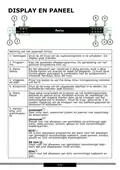


DISPLAY AND CONTROL PANEL
8
7
2
4
3
5
6
1
9
Operation (Button)
1. Power
Press this button to turn on your dishwasher, the screen lights
up.
2. Program
3. Half-load
Select the appropriate washing program, the selected program
indicator will be lit.
When you have about or less than 6 place setting dishware to
wash, you can choose this function to save energy and water.
(It can only be used with Intensive, Normal, ECO, 90 min.).
4. Delay
Press the button to set the delay time, corresponding indicator
will be lit.
5. Child lock This option allows you to lock the buttons on the control panel,
except the Power button, so children cannot accidently start
the dishwasher by pressing the buttons on the panel.
To lock or unlock the buttons on the control panel, hold the
button for 3 seconds.
6. Start/
Pause
To start the selected washing program or pause it when the
dishwasher is working.
7. Program
indicator
Intensive
Heavily soiled items include pots and pans. With dried on food.
Universal
For normally soiled loads, such as pots, plates, glasses and
lightly soiled pans.
ECO
This is the standard program suitable for normally soiled loads,
such as pots, plates, glasses and lightly soiled pans.
90 min
For normally soiled loads that need quick wash.
Glass
For lightly soiled crockery and glass.
Rapid
A shorter wash for lightly soiled loads that do not need drying.
8. Delay
time
To show the delay time(2h/4h/6h/8h).
- 63 -

| General | Details |
|---|---|
| Name | Amica GSP 546 110 W Standing Dishwasher |
| Make | Amica |
| Language | English |
| Filetype | PDF (Download) |
| File size | 2.74 MB |
 (1 votes, average: 5.00 out of 5)
 Loading...

Amica EGSP 14797-1 E Dishwasher


BOSH SBH4HVX00E Fully Integrated Dishwasher

comfee CDC22P1AWW Compact Dishwasher

Honeywell HCTDS1W Dishwasher

MAYTAG ADB1200AWS Dishwasher

Miele G 7986 Panel Dishwasher

KitchenAid KDTE304RBS Third Level Jet Rack Dishwasher

Danby DDW18D1EW Dishwasher

SHARP SDW6767HS Smart Dishwasher

BOSCH SMS2HTW02E Dishwasher

AEG FSK52617Z Dishwasher
Table of Contents
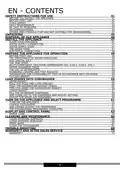
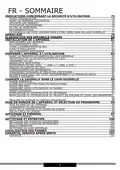
- 1. Geschirrspüler / Dishwasher / Vaatwasmachine →
- 2. Wichtige Sicherheitshinweise - Vor Der Ersten Inbetriebnahme →
- 3. Safety Instructions For Use - Before You Install The Applian... →
- 4. Indications Concernant La Sécurité D'utilisation - Avant Lin... →
- 5. Aanwijzingen Voor Veilig Gebruik - Voor De Installatie →
- 6. Sehr Geehrter Kunde, Von Heute An Werden Ihre Alltäglichen P... →
- 7. Wichtige Sicherheitshinweise - Vor Der Ersten Inbetriebnahme →
- 8. Sicherheitshinweise Für Kinder - Vorsichtsmaßnahmen Beim Geb... →
- 9. Setzen Und Stellen Sie Sich, Und Auch Keine Anderen Lasten A... →
- 10. Empfindliche Dekorgläser Und Porzellanteile - Gegenstände, D... →
- 11. Auspacken - Hinweis! →
- 12. Entsorgung Von Altgeräten - Richtlinien Zur Entsorgung →
- 13. Montageanleitung - Aufstellen Des Geschirrspülers →
- 14. Ablaufschlauch - Elektrischer Anschluss →
- 15. Vorbereitung Des Gerätes - Zum Gebrauch →
- 16. Nach Dem Auffüllen Des Salzbehälters Erlischt Die Salzanzeig... →
- 17. Darauf Müssen Sie Achten, Wenn Sie Produkte Dieser Art Verwe... →
- 18. Wasserhärte - Einstellungen Der Wasserhärte →
- 19. Standardbeladung Und Prüfergebnisse - Oberkorb →
- 20. Besteckkorb - Anzahl →
- 21. Einräumen Von Geschirr - Oberer Geschirrkorb →
- 22. Einklappen Der Korbständer - Anheben →
- 23. Um Den Korb In Die Obere Position Zu Bringen, Heben Sie Ihn ... →
- 24. Spülmittel Einfüllen - Öffnen Sie Die Klappe Des Spülmittelbe... →
- 25. Füllen Des Klarspülbehälters Und Auswahl Der Einstellungen -... →
- 26. Einstellen Des Klarspülerbehälters - Um Eine Bessere Trocknu... →
- 27. Einschalten Des Geräts - Programmwechsel →
- 28. Nach Dem Ende Des Spülprogramms - Abschalten Des Geschirrspü... →
- 29. Display I Bedienpanel - Betriebsanzeige (schalter) →
- 30. Verzögerungsdauer - Klarspüler →
- 31. Warnhinweis - Verzögerungszeit Einstellen →
- 32. Reinigung Und Wartung - Reinigung Der Außenflächen →
- 33. Größere Überreste Können Unter Fließendem Wasser Abgespült W... →
- 34. Reinigung Des Geschirrspülers - Frostschutz →
- 35. Lokalisierung Von Störungen - Problem →
- 36. Benutzen Sie Den Geschirrspüler, Wenn Der Wasserdruck Normal... →
- 37. Die Klappe Des Spülmittelbehälters Funktioniert Nicht - Der ... →
- 38. Garantie, Nachverkauf-service - Wartung →
- 39. Dear Customer, From Now On, Your Daily Housework Will Be Eas... →
- 40. Safety Instructions For Use - Before You Install The Applian... →
- 41. Daily Maintenance - In Case Of Problems →
- 42. Energy And Water Saving Tips - Dishwasher Safe Dishes →
- 43. Bel Or Enter The Product Model Listed On The Energy Label In... →
- 44. Unpacking →
- 45. Disposal Of Old Appliance →
- 46. Install The Appliance - Place Your Appliance →
- 47. Electrical Connection →
- 48. Prepare The Appliance For Operation - Before First Use →
- 49. Fill The Special Salt Dispenser - The Test Strip →
- 50. If You Use The Detergent Properly And Dishwasher Settings Ar... →
- 51. The Use Of Detergents →
- 52. Standard Loading And Test Results - Upper Basket →
- 53. Cutlery Basket - Place Knives And Forks Separately From Each... →
- 54. Load Dishes Into Dishwasher - Upper Basket →
- 55. Fold The Dishwasher Basket Spikes - Tips For Using The Dishw... →
- 56. To Raise The Basket To The Upper Position, Raise It Until It... →
- 57. Fill The Detergent Dispenser - Pour The Detergent Into The L... →
- 58. Add Rinse Aid To The Dispenser - Use Rinse Aid To Prevent Fo... →
- 59. Adjust The Rinse Aid Dispenser →
- 60. Turn On The Appliance - Change Programme →
- 61. The Dishwashing Programme Completes - Turn Off The Dishwasher →
- 62. Display And Control Panel - Operation (button) →
- 63. Rinse Aid - Salt →
- 64. Automatic Opening - Press The Button To Set The Delay Time, ... →
- 65. Cleaning And Maintenance - Clean External Surfaces →
- 66. Clean The Filter - Spray Arms →
- 67. Remove The Filter And Use A Sponge To Collect The Water From... →
- 68. Trouble-shooting - Problem →
- 69. The Water Pressure Is Temporarily Low. Ensure That The Dishw... →
- 70. Water Softener Installation - Dishwasher Loading Instruction... →
- 71. Noise Of The Detergent Dispenser Lid Opening Or Water Drain ... →
- 72. Warranty And After Sales Service - Warranty →
- 73. Sécurité Et Fonctionnalité - Instructions D'utilisation →
- 74. Indications Concernant - La Sécurité D'utilisation →
- 75. Utilisation Quotidienne →
- 76. Recommandations →
- 77. Objets À Éviter Dans Le Lave-vaisselle - Vérification De La ... →
- 78. Déballage →
- 79. Élimination Des Appareils Usagés →
- 80. Installation De Lappareil - Emplacement De Lappareil →
- 81. Tuyau Dévacuation - Raccordement Électrique →
- 82. Préparer Lappareil À Lutilisation - Avant La Première Utilis... →
- 83. Attention - Bandelette Indicatrice →
- 84. Utilisation Des Détergents En Pastilles - Mode Demploi Recom... →
- 85. Consommation Des Détergents - Réglages De Dureté De L'eau →
- 86. Chargement Standard Et Résultats Des Études - Informations P... →
- 87. Panier À Couverts - Les Couverts Doivent Être Placés Séparém... →
- 88. Charger La Vaisselle - Dans Le Lave-vaisselle →
- 89. Pliage Des Pics - Consignes Pour Lutilisation Du Panier →
- 90. Type 2 - Panier Inférieur →
- 91. Remplissage Du Distributeur De Détergent - Ouvrir Le Couverc... →
- 92. Remplissage Du Distributeur Du Produit De Rinçage Et Choix D... →
- 93. Réglage Du Doseur Du Produit De Rinçage - Pour Avoir De Meil... →
- 94. Mise En Marche De Lappareil Et Sélection Du Programme - Chan... →
- 95. Fin Du Cycle De Lavage - Arrêter Le Lave-vaisselle →
- 96. Fonctionnement De Lappareil (touche) - Puissance →
- 97. Voyant De Sélection Du Programme - Départ Différé →
- 98. Ouverture Automatique De La Porte - Départ Différé →
- 99. Nettoyage Et Entretien - Nettoyage Des Surfaces Extérieures →
- 100. Rincer À Leau Courante Pour Évacuer Les Grosses Particules -... →
- 101. Nettoyage Du Lave-vaisselle - Protection Contre Le Gel →
- 102. Localisation Des Pannes - Problème →
- 103. Utiliser Le Lave-vaisselle Lorsque La Pression Deau Est Norm... →
- 104. Eau Trop Dure - Placement De La Vaisselle Incorrect →
- 105. Niveau Sonore - Vérifier Si La Vanne Deau Est Ouverte →
- 106. Garantie, Service Après-vente - Garantie →
- 107. Beste Klant - Gebruik Van Het Apparaat →
- 108. Aanwijzingen Voor Veilig Gebruik - Voor De Installatie →
- 109. Veiligheid Van Kinderen - Dagelijkse Bediening →
- 110. Aanbevelingen →
- 111. Vaatwerk Dat Niet Bestand Is Tegen Hoge Temperaturen - Voorw... →
- 112. Uitpakken - Attentie! →
- 113. Verwijdering Van Gebruikte Apparatuur - Juiste Behandeling V... →
- 114. Installatie Van Het Apparaat - Plaatsing Van Het Apparaat →
- 115. Afvoerslang - Elektrische Aansluiting →
- 116. Voorbereiding Van Het Apparaat - Voor Het Eerste Gebruik Van... →
- 117. Schakel - Teststrip →
- 118. Waar Moet U Op Letten Als U Dergelijke Producten Gebruikt - ... →
- 119. Waterhardheidstabel - Afwasmiddelgebruik →
- 120. Standaardlading En Onderzoeksresultaten - Informatie Voor On... →
- 121. Bestekkorf - Aantal →
- 122. Inruimen Van De Vaatwasmachine Met Vaatwerk - Bovenste Korf →
- 123. Inklappen Steunen Van De Korf - Aanwijzingen Voor Het Gebrui... →
- 124. Om De Korf Naar De Hoogste Positie Te Brengen, Moet U Hem Aa... →
- 125. Vul De Zeepdispenser Met Afwasmiddel - Open Het Klepje Van D... →
- 126. Vullen Van Het Vakje Met Glansspoelmiddel En Keuze Van De In... →
- 127. Instelling Van De Dispenser Voor Het Glansspoelmiddel - Om B... →
- 128. Inschakelen Van Het Apparaat - Wijziging Van Het Programma →
- 129. Na Afloop Van De Afwascyclus - Schakel De Vaatwasmachine Uit →
- 130. Werking Van Het Apparaat (knop) - Program →
- 131. Aanduiding - Uitgestelde Starttijd →
- 132. Automatisch Openen Van De Deur - Vertragingstijd Kiezen →
- 133. Reiniging En Onderhoud - Schoonmaken Van Buitenoppervlakken →
- 134. Grove Etensresten Spoelt U Weg Onder Stromend Water - Zet De... →
- 135. Reiniging Van De Vaatwasmachine - Beveiliging Tegen Bevrieze... →
- 136. Storingen Vinden En Verhelpen - Waarschijnlijke Oorzaak →
- 137. Gebruik De Vaatwasmachine Als De Waterdruk Normaal Is - Het ... →
- 138. Bij Zeer Hard Water Moet U Een Waterontharder Installeren. -... →
- 139. Geluid Van Geopend Klepje - De Vaatwasmachine Vult Zich Niet... →
- 140. Garantie, Service - Garantie →