
Home > architecto > architecto SPV5939st Dishwasher
×
- 1. Geschirrspüler / Dishwasher / Lave-vaisselle
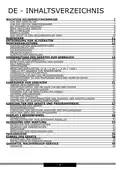
- 2. De - Inhaltsverzeichnis (Wichtige Sicherheitshinweise → Vor Der Ersten Inbetriebnahme → Entsorgung Von Altgeräten → Reinigung Und Wartung)
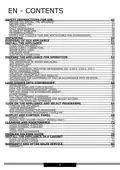
- 3. Safety Instructions For Use (Before You Install The Appliance → Daily Maintenance → In Case Of Problems → Water Supply Connection)
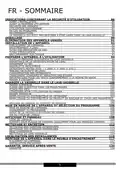
- 4. Indications Concernant La Sécurité D'utilisation (Avant Linstallation → Utilisation Quotidienne → En Cas De Problèmes → Installation De Lappareil)
- 5. Sehr Geehrter Kunde, Von Heute An Werden Ihre Alltäglichen Pflichten Einfacher Denn Je. Dieses Gerät Ist Eine Verbindung Einer Außergewöhnli…
- 6. Wichtige Sicherheitshinweise (Vor Dem Aufstellen → Vor Der Ersten Inbetriebnahme)
- 7. Sicherheitshinweise (Verwendung Durch Kinder → Vorsichtsmaßnahmen Beim Spülen → Täglicher Einsatz Des Geräts)
- 8. Setzen Und Stellen Sie Sich, Und Auch Keine Anderen Lasten Auf Die Geöffnete Tür. Das Gerät Kann Kippen. (Bei Störfällen → Beladen Des Haushaltsgeschirrspülers)
- 9. Gegenstände, Die Nicht Für Geschirrspüler Geeignet Sind (Mindestzeitraum Für Ersatzteile → Ersatzteilliste Und Bestellverfahren → Weitere Informationen Über Das Produkt)
- 10. Auspacken (Hinweis!)
- 11. Entsorgung Von Altgeräten (Richtlinien Zur Entsorgung → Verpflichtungen Des Benutzers → Sammelstellen Für Elektrogeräte → Umweltschutz Und Gesundheit)
- 12. Montageanleitung (Aufstellen Des Geschirrspülers → Wasseranschluss → Zulaufschlauch)
- 13. Ablaufschlauch (Elektrischer Anschluss)
- 14. Vorbereitung Des Gerätes (Zum Gebrauch → Vor Dem Ersten Gebrauch → Bedeutung Der Entkalkung Von Wasser → Salz Einfüllen)
- 15. Nach Dem Auffüllen Des Salzbehälters Erlischt Die Salzanzeige. (Teststreifen → Mehrzweckspülmittel)
- 16. Darauf Müssen Sie Achten, Wenn Sie Produkte Dieser Art Verwenden: (Anwendungsempfehlung: Für Bestmögliche Spülergebnisse Mit Mehrzweckspülmitteln Geben Sie Salz Und Klarspüler In Den Geschirrspüler. → Einstellen Der Verwendung Von Mehrzweckspülmitteln)
- 17. Tabelle Mit Angaben Zur Wasserhärte (Verbrauch Von Spülmitteln)
- 18. Standardbeladung Und Prüfergebnisse (Oberkorb → Untertassen → Informationen Zu Den Prüfungen Nach Der Norm En 60436 → Programm - Eco)
- 19. Besteckkorb (Anzahl)
- 20. Einräumen Von Geschirr (Oberer Geschirrkorb → Herunterklappen Der Ablagen Für Becher/tassen)
- 21. Einklappen Der Korbständer (Anheben → Senken → Hinweise Für Die Benutzung Des Korbs → Verstellen Des Oberen Korbs)
- 22. Um Den Korb In Die Obere Position Zu Bringen, Heben Sie Ihn An, Bis Er Sich An Beiden Seiten Auf Derselben Höhe Befindet. Vergewissern Sie S…
- 23. Spülmittel Einfüllen (Öffnen Sie Die Klappe Des Spülmittelbehälters → Markierungen Im Spülmittelbehälter → Füllen Sie Das Größere Fach (a) Für Den Hauptspülgang Mit Spülmittel → Zusätzliches Spülmittel Auf Die Tür Geben)
- 24. Füllen Des Klarspülbehälters Und Auswahl Der Einstellungen (Verwendung Des Klarspülers → Hinweis Zur Handhabung Des Waschmittelbehälters)
- 25. Einstellen Des Klarspülerbehälters (Trocknungsleistung Verbessern → Gerät Einschalten → Einstellmodus Starten → Richtige Einstellung Auswählen)
- 26. Einschalten Des Geräts (Programmwechsel → Einräumen Von Geschirr Während Des Spülvorgangs)
- 27. Nach Dem Ende Des Spülprogramms (Abschalten Des Geschirrspülers → Ausräumen Des Geschirrs)
- 28. Display I Bedienpaneel (Betriebsanzeige (schalter) → Programm → Funktion → Halbe Beladung → Warnanzeige)
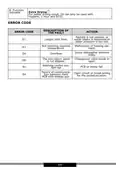
- 29. Pro-programm (Anzeige Der Startverzögerung → Extra Trocknung → Fehlercode → Beschreibung Des Fehlercode)
- 30. Glashalter (nur Bestimmte Modelle) (Kleines Glas Bis 120 Mm Höhe → Mittelgroßes Glas Bis 180 Mm Höhe → Stellen Sie Kleine Und Mittelgroße Gläser In Den Halter Im Oberen Korb → Der Halter Wird In Den Unteren Korb Eingesetzt)
- 31. Backblechhalter (nur Bestimmte Modelle) (Blue Dot (nur Bestimmte Modelle) → Bodenanzeige Und Funktion Zum Hinzufügen Von Geschirr)
- 32. Reinigung Und Wartung (Reinigung Der Außenflächen → Reinigen Der Innenflächen → Reinigen Der Filter)
- 33. Reinigung Der Filter (Sprüharme → Reinigung Der Sprüharme)
- 34. Reinigung Des Geschirrspülers (Frostschutz → Nach Jedem Spülvorgang → Transport Des Geräts)
- 35. Fehlersuche (Problem → Wahrscheinliche Ursache → Lösung)
- 36. Problem (Wahrscheinliche Ursache → Lösung → Das Geschirr Ist Nicht Trocken Genug. → Auf Dem Geschirr Sind Flecken Und Ablagerungen.)
- 37. Einbau Des Geräts (Aufstellen Des Geräts → Ausrichten Des Geräts)
- 38. Das Gewicht Der Möbelplatte Sollte Betragen: (Bitte Beachten Sie, Dass Bei Geräten Mit Schiebetüren Das Empfohlene Gewicht Der Frontplatte 3,2-10 Kg Beträgt)
- 39. Installation Im Einbauschrank (Schritt 1. Wahl Des Besten Standorts Für Den Geschirrspüler → Schritt 2. Abmessungen Und Montage Der Schranktür (bei Bestimmten Modellen))
- 40. Halbeingebautes Modell (Band → Montieren Sie Den Haken An Der Holzfront)
- 41. Einbaumodell (Schritt 3. Einstellen Der Türfederspannung)
- 42. Schritte Zum Installieren Des Geschirrspülers (Befestigen Sie Das Kondensatband → Schließen Sie Den Zulaufschlauch An → Richten Sie Den Geschirrspüler Aus → Justieren Sie Die Türfederspannung)
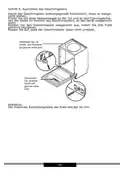
- 43. Schritt 5. Ausrichten Des Geschirrspülers (Hinweis: Die Maximale Einstellungshöhe Der Füße Beträgt 50 Mm.)
- 44. Garantie, Nachverkauf-service (Wartung → Reparaturmeldungen Und Hilfe Bei Fehlern → Ce-konformitätserklärung)
- 45. Operating Instructions (Safety And Functionality → Using The Appliance → Storing Instructions)
- 46. Safety Instructions For Use (Before You Install The Appliance → Before First Use → Child Safety)
- 47. Children Safety (Daily Maintenance → In Case Of Problems → Recommendations)
- 48. Do's And Don'ts For Loading Dishes (Dishwasher Safe Items → Spare Parts Availability → Product Information Resources)
- 49. Unpacking
- 50. Disposal Of Old Appliance
- 51. Install The Appliance (Place Your Appliance → Water Supply Connection → Water Supply Hose → The Drain Hose)
- 52. Electrical Connection
- 53. Prepare The Appliance For Operation (Before First Use → The Importance Of Water Descaling → Add Special Salt)
- 54. Note (The Test Strip → Multi-component (multitab) Detergents → What You Should Pay Attention To When Using These Tablets)
- 55. Recommended Use (Adjust The Water Hardness → Adjust Rinse Aid Setting → Water Hardness Table → If The Water Hardness Is Higher Than The Maximum Values Given In The Table Above)
- 56. The Use Of Detergents
- 57. Standard Loading And Test Results (Upper Basket → Lower Basket → Information For Comparability Test In Accordance With En 60436 → Capacity: 13 Place Settings)
- 58. Cutlery Basket (Place Knives And Forks Separately From Each Other → Best Washing Results)
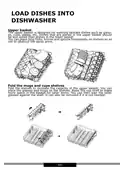
- 59. Load Dishes Into Dishwasher (Upper Basket → Fold The Mugs And Cups Shelves)
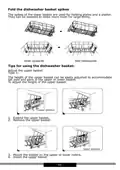
- 60. Fold The Dishwasher Basket Spikes (Tips For Using The Dishwasher Basket → Adjust The Upper Basket)
- 61. To Raise The Basket To The Upper Position, Raise It Until It Is At The Same Height On Both Sides. Make Sure It Is Securely Attached To The R…
- 62. Fill The Detergent Dispenser (Open The Detergent Dispenser Flap → Pour The Detergent Into The Larger Chamber → For A Better Washing Result)
- 63. Add Rinse Aid To The Dispenser (Use Rinse Aid To Prevent Formation Of White Water Drops → Adjusting The Rinse Aid Setting)
- 64. Adjust The Rinse Aid Dispenser
- 65. Turn On The Appliance (Change Programme → Add Dishes During The Programme)
- 66. The Dishwashing Programme Completes (Turn Off The Dishwasher → Unload The Dishwasher)
- 67. Display And Control Panel (Operation (button) → Program → Function → Delay → Half Load)
- 68. Function (Error Code → Description Of The Fault → Action)
- 69. Glass Holder (select Models Only) (Glass Rack (select Models Only))
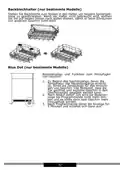
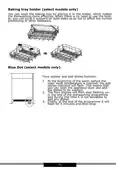
- 70. Baking Tray Holder (select Models Only) (Blue Dot (select Models Only) → Floor Display And Add Dishes Function:)
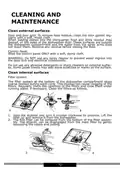
- 71. Cleaning And Maintenance (Clean External Surfaces → Control Panel → Clean Internal Surfaces → Filter System)
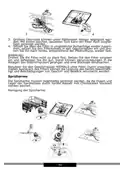
- 72. Clean The Filter (Spray Arms → Clean The Dishwasher → Frost Protection)
- 73. After Each Wash (Unplug The Appliance → Do Not Use Solvents Or Abrasive Detergents → If The Dishwasher Is Not Used For A Long Time → Move The Appliance)
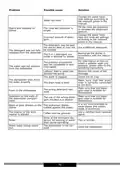
- 74. Problem Solving Guide (Problem → Possible Cause → Solution)
- 75. Problem (Possible Cause → Solution → Stains And Deposits On Dishes → Noise)
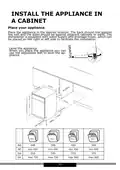
- 76. Install The Appliance In A Cabinet (Place Your Appliance → Level The Appliance)
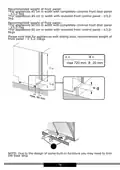
- 77. Recommended Weight Of Front Panel For Appliances 45 Cm In Width (Recommended Weight Of Front Panel For Appliances 60 Cm In Width → Recommended Weight Of Front Panel For Appliances With Sliding Door)
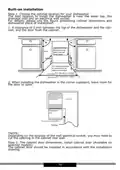
- 78. Built-on Installation (Step 1. Choose The Optimal Location For Your Dishwasher → Step 2. The Cabinet Door Dimensions, Install Cabinet Door (available On Selected Models))
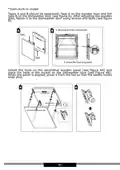
- 79. Semi-built-in Model (Install The Hook On The Decorative Wooden Panel)
- 80. Built-in Model (Step 3. Adjust The Door Spring Tension)
- 81. Step 4. Dishwasher Installation Steps (Connect The Water Supply Hose To The Cold Water Tap. → Connect The Power Supply Cord. → Attach The Furniture Door To The Dishwasher Door. → The Dishwasher Must Be Fixed.)
- 82. Step 5. Level The Dishwasher (Check The Level)
- 83. Warranty And After Sales Service (Warranty → Service → Manufacturers Declaration)
- 84. Introduction (Sécurité → Instructions D'utilisation → Entretien)
- 85. Indications Concernant (La Sécurité D'utilisation → Avant Linstallation → Avant La Première Utilisation → Sécurité Des Enfants)
- 86. Utilisation Quotidienne
- 87. Recommandations
- 88. Objets À Éviter Dans Le Lave-vaisselle (Vérification De La Vaisselle Avant Achat → Disponibilité Des Pièces De Rechange → Informations Supplémentaires Sur Le Produit)
- 89. Déballage
- 90. Élimination Des Appareils Usagés
- 91. Installation De Lappareil (Emplacement De Lappareil → Raccordement À Leau → Tuyau Dalimentation En Eau)
- 92. Tuyau Dévacuation (Raccordement Électrique)
- 93. Préparer Lappareil À Lutilisation (Avant La Première Utilisation Du Lave-vaisselle → Importance De La Décalcification De Leau → Versement Du Sel)
- 94. Attention (Bandelette Indicatrice → Détergents Mixtes (p.ex. : 2en1 , 3en1 , Etc.) → À Quoi Faire Attention En Utilisant Ce Type De Produits)
- 95. Si Cest Un Détergent En Pastilles, Ne Jamais Le Placer Dans Le Panier À Couverts. Toujours Placer Les Pastilles Dans Le Compartiment Pour Dé…
- 96. Réglages De Dureté De L'eau (Consommation Des Détergents)
- 97. Chargement Standard Et Résultats Des Études (Informations Pour Les Tests Conformément À La Norme En 60436 → Capacité - 13 Ensembles De Vaisselle Standards → Réglage Du Panier Supérieur Position Basse → Programme - Eco)
- 98. Panier À Couverts (Les Couverts Doivent Être Placés Séparément, De Façon Correcte. Veiller À Ce Quils Ne Sentremêlent Pas, Car Cela Peut Entraîner Un Lavage Incomplet.)
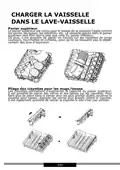
- 99. Charger La Vaisselle (Dans Le Lave-vaisselle → Panier Supérieur → Pliage Des Clayettes Pour Les Mugs/tasses)
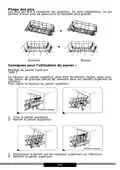
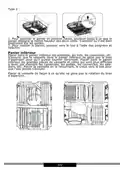
- 100. Pliage Des Pics (Consignes Pour Lutilisation Du Panier → Réglage Du Panier Supérieur → Type 1)
- 101. Type 2 (Panier Inférieur)
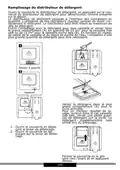
- 102. Remplissage Du Distributeur De Détergent (Utilisation Des Indicateurs De Quantité → Quantité De Détergent À Utiliser → Conseils Pour Un Meilleur Résultat De Lavage)
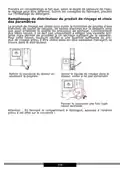
- 103. Remplissage Du Distributeur Du Produit De Rinçage Et Choix Des Paramètres (Utilisation Du Produit De Rinçage → Vérification Du Niveau De Produit De Rinçage)
- 104. Réglage Du Doseur Du Produit De Rinçage (Meilleurs Résultats De Séchage → Consommation Limitée Du Produit De Rinçage → Étapes Pour Le Réglage)
- 105. Mise En Marche De Lappareil Et Sélection Du Programme (Changement Du Programme → Ajout De La Vaisselle En Cours De Lavage)
- 106. Fin Du Cycle De Lavage (Arrêter Le Lave-vaisselle → Déchargement Du Lave-vaisselle)
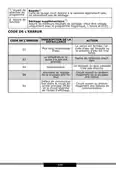
- 107. Fonctionnement De Lappareil (touche) (Programme → Départ Différé → Mi-charge → Voyant Davertissement)
- 108. Voyant De Sélection Du Programme (Voyant De Fonction → Code De Lerreur → Description De La Défaillance → Action)
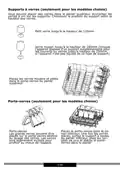
- 109. Supports À Verres (seulement Pour Les Modèles Choisis) (Porte-verres (seulement Pour Les Modèles Choisis))
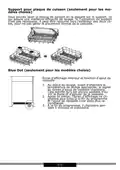
- 110. Support Pour Plaque De Cuisson (Blue Dot (seulement Pour Les Modèles Choisis) → Écran Daffichage Inférieur Et Fonction Dajout De Vaisselle)
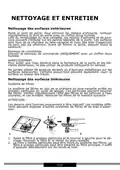
- 111. Nettoyage Et Entretien (Nettoyage Des Surfaces Extérieures → Panneau De Commande → Nettoyage Des Surfaces Intérieures → Système De Filtres)
- 112. Rincer À Leau Courante Pour Évacuer Les Grosses Particules. Nettoyer Plus Soigneusement Le Filtre À Laide Dune Brosse Souple Propre.
- 113. Nettoyage Du Lave-vaisselle (Protection Contre Le Gel → Après Chaque Lavage → Retirer La Fiche → Si Le Lave-vaisselle Nest Pas Utilisé Pendant Une Longue Période)
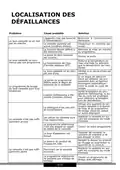
- 114. Localisation Des Défaillances (Problème → Cause Probable → Solution)
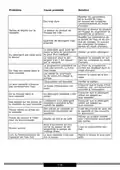
- 115. Problème (Cause Probable → Solution → Eau Trop Dure → Taches Et Dépôts Sur La Vaisselle)
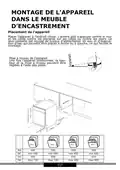
- 116. Montage De L'appareil (Dans Le Meuble → Dencastrement → Placement De Lappareil → Mise À Niveau De Lappareil)
- 117. La Masse De La Plaque De Meuble Doit Être De : (Installation Encastrée → Étape 1 . Choix Du Meilleur Emplacement Pour Le Lave-vaisselle)
- 118. Le Meilleur Endroit Pour Installer Le Lave-vaisselle Est À Proximité De La Vanne Darrivée Deau, De Lévacuation Deau Et De La Prise Électriqu…
- 119. La Bande En Feutre B Sur Lextérieur De La Porte De Lave-vaisselle (voir Dessin A). Après Avoir Positionné La Porte En Bois, La Fixer À La Po…
- 120. Réglage De La Tension Du Ressort De La Porte (Étapes De Montage Du Lave-vaisselle)
- 121. Fixer Le Plateau De Condensation Sous Le Plan De Travail De Larmoire (Raccorder Le Tuyau Darrivée Deau Au Robinet Deau Froide → Brancher Le Câble Dalimentation → Mettre À Niveau Le Lave-vaisselle → Fixer La Porte Du Meuble À La Porte Du Lave-vaisselle)
- 122. Placer Le Niveau Sur La Porte Et Le Guide Du Panier À Lintérieur Du Lave-vaisselle, Afin De Sassurer Que Lappareil Est Équilibré.
- 123. Garantie, Service Après-vente (Service → Demande De Réparation Et Soutien En Cas De Défaillance → Déclaration Du Fabricant)
×
architecto SPV5939st Dishwasher



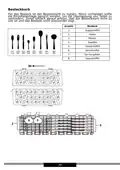
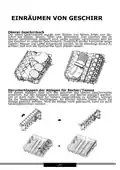
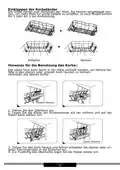
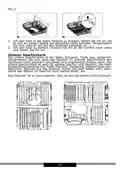
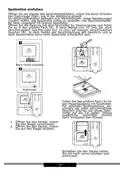
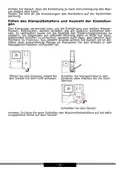

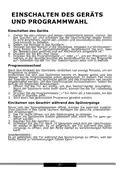


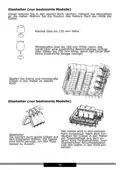




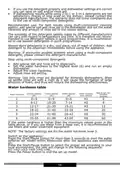


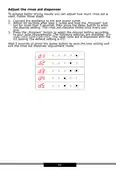






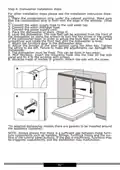
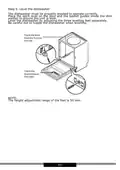

















Adjust the rinse aid dispenser
To achieve better drying results you can adjust how much rinse aid is
used. Follow these steps.
1. Connect the appliance to the wall power outlet
2. Within 60 seconds after step 1, press and hold the „Program“ but-
ton for more than 5 seconds, then press the delay button to enter
the desired setting. The rinse aid indicator blinks once every sec-
ond.
3. Press the „Program“ button to select the desired setting according
to your local requirements. The following settings are available: D1-
>D2->D3->D4->D5->D1, The most rinse aid is dispensed with the
D5 setting The default setting is D3.
Wait 5 seconds or press the power button to save the new setting and
exit the rinse aid dispenser adjustment mode.
- 65 -

| General | Details |
|---|---|
| Name | architecto SPV5939st Dishwasher |
| Make | architecto |
| Language | English |
| Filetype | PDF (Download) |
| File size | 2.53 MB |
 (1 votes, average: 5.00 out of 5)
 Loading...


GE APPLIANCES GDF 565-645 Series Interior Dishwasher

dacor EDWH24S Dishwasher

ELVITA CBD6603V Countertop Dishwasher

WASHTECH XP Dishwasher

COMFEE CDC22P1ABB Countertop Dishwasher

BOSH SBH4HVX00E Dishwasher

BOSCH SPS4HMW49G Dishwasher

AEG FEE63600ZM Dishwasher

Amana ADB1400AGW Dishwasher

AEG FSK93847P Dishwasher
Table of Contents
- 1. Geschirrspüler / Dishwasher / Lave-vaisselle →
- 2. De - Inhaltsverzeichnis - Wichtige Sicherheitshinweise →
- 3. Safety Instructions For Use - Before You Install The Applian... →
- 4. Indications Concernant La Sécurité D'utilisation - Avant Lin... →
- 5. Sehr Geehrter Kunde, Von Heute An Werden Ihre Alltäglichen P... →
- 6. Wichtige Sicherheitshinweise - Vor Dem Aufstellen →
- 7. Sicherheitshinweise - Verwendung Durch Kinder →
- 8. Setzen Und Stellen Sie Sich, Und Auch Keine Anderen Lasten A... →
- 9. Gegenstände, Die Nicht Für Geschirrspüler Geeignet Sind - Mi... →
- 10. Auspacken - Hinweis! →
- 11. Entsorgung Von Altgeräten - Richtlinien Zur Entsorgung →
- 12. Montageanleitung - Aufstellen Des Geschirrspülers →
- 13. Ablaufschlauch - Elektrischer Anschluss →
- 14. Vorbereitung Des Gerätes - Zum Gebrauch →
- 15. Nach Dem Auffüllen Des Salzbehälters Erlischt Die Salzanzeig... →
- 16. Darauf Müssen Sie Achten, Wenn Sie Produkte Dieser Art Verwe... →
- 17. Tabelle Mit Angaben Zur Wasserhärte - Verbrauch Von Spülmitt... →
- 18. Standardbeladung Und Prüfergebnisse - Oberkorb →
- 19. Besteckkorb - Anzahl →
- 20. Einräumen Von Geschirr - Oberer Geschirrkorb →
- 21. Einklappen Der Korbständer - Anheben →
- 22. Um Den Korb In Die Obere Position Zu Bringen, Heben Sie Ihn ... →
- 23. Spülmittel Einfüllen - Öffnen Sie Die Klappe Des Spülmittelbe... →
- 24. Füllen Des Klarspülbehälters Und Auswahl Der Einstellungen -... →
- 25. Einstellen Des Klarspülerbehälters - Trocknungsleistung Verb... →
- 26. Einschalten Des Geräts - Programmwechsel →
- 27. Nach Dem Ende Des Spülprogramms - Abschalten Des Geschirrspü... →
- 28. Display I Bedienpaneel - Betriebsanzeige (schalter) →
- 29. Pro-programm - Anzeige Der Startverzögerung →
- 30. Glashalter (nur Bestimmte Modelle) - Kleines Glas Bis 120 Mm... →
- 31. Backblechhalter (nur Bestimmte Modelle) - Blue Dot (nur Best... →
- 32. Reinigung Und Wartung - Reinigung Der Außenflächen →
- 33. Reinigung Der Filter - Sprüharme →
- 34. Reinigung Des Geschirrspülers - Frostschutz →
- 35. Fehlersuche - Problem →
- 36. Problem - Wahrscheinliche Ursache →
- 37. Einbau Des Geräts - Aufstellen Des Geräts →
- 38. Das Gewicht Der Möbelplatte Sollte Betragen: - Bitte Beachte... →
- 39. Installation Im Einbauschrank - Schritt 1. Wahl Des Besten S... →
- 40. Halbeingebautes Modell - Band →
- 41. Einbaumodell - Schritt 3. Einstellen Der Türfederspannung →
- 42. Schritte Zum Installieren Des Geschirrspülers - Befestigen S... →
- 43. Schritt 5. Ausrichten Des Geschirrspülers - Hinweis: Die Max... →
- 44. Garantie, Nachverkauf-service - Wartung →
- 45. Operating Instructions - Safety And Functionality →
- 46. Safety Instructions For Use - Before You Install The Applian... →
- 47. Children Safety - Daily Maintenance →
- 48. Do's And Don'ts For Loading Dishes - Dishwasher Safe Items →
- 49. Unpacking →
- 50. Disposal Of Old Appliance →
- 51. Install The Appliance - Place Your Appliance →
- 52. Electrical Connection →
- 53. Prepare The Appliance For Operation - Before First Use →
- 54. Note - The Test Strip →
- 55. Recommended Use - Adjust The Water Hardness →
- 56. The Use Of Detergents →
- 57. Standard Loading And Test Results - Upper Basket →
- 58. Cutlery Basket - Place Knives And Forks Separately From Each... →
- 59. Load Dishes Into Dishwasher - Upper Basket →
- 60. Fold The Dishwasher Basket Spikes - Tips For Using The Dishw... →
- 61. To Raise The Basket To The Upper Position, Raise It Until It... →
- 62. Fill The Detergent Dispenser - Open The Detergent Dispenser ... →
- 63. Add Rinse Aid To The Dispenser - Use Rinse Aid To Prevent Fo... →
- 64. Adjust The Rinse Aid Dispenser →
- 65. Turn On The Appliance - Change Programme →
- 66. The Dishwashing Programme Completes - Turn Off The Dishwashe... →
- 67. Display And Control Panel - Operation (button) →
- 68. Function - Error Code →
- 69. Glass Holder (select Models Only) - Glass Rack (select Model... →
- 70. Baking Tray Holder (select Models Only) - Blue Dot (select M... →
- 71. Cleaning And Maintenance - Clean External Surfaces →
- 72. Clean The Filter - Spray Arms →
- 73. After Each Wash - Unplug The Appliance →
- 74. Problem Solving Guide - Problem →
- 75. Problem - Possible Cause →
- 76. Install The Appliance In A Cabinet - Place Your Appliance →
- 77. Recommended Weight Of Front Panel For Appliances 45 Cm In Wi... →
- 78. Built-on Installation - Step 1. Choose The Optimal Location ... →
- 79. Semi-built-in Model - Install The Hook On The Decorative Woo... →
- 80. Built-in Model - Step 3. Adjust The Door Spring Tension →
- 81. Step 4. Dishwasher Installation Steps - Connect The Water Su... →
- 82. Step 5. Level The Dishwasher - Check The Level →
- 83. Warranty And After Sales Service - Warranty →
- 84. Introduction - Sécurité →
- 85. Indications Concernant - La Sécurité D'utilisation →
- 86. Utilisation Quotidienne →
- 87. Recommandations →
- 88. Objets À Éviter Dans Le Lave-vaisselle - Vérification De La ... →
- 89. Déballage →
- 90. Élimination Des Appareils Usagés →
- 91. Installation De Lappareil - Emplacement De Lappareil →
- 92. Tuyau Dévacuation - Raccordement Électrique →
- 93. Préparer Lappareil À Lutilisation - Avant La Première Utilis... →
- 94. Attention - Bandelette Indicatrice →
- 95. Si Cest Un Détergent En Pastilles, Ne Jamais Le Placer Dans ... →
- 96. Réglages De Dureté De L'eau - Consommation Des Détergents →
- 97. Chargement Standard Et Résultats Des Études - Informations P... →
- 98. Panier À Couverts - Les Couverts Doivent Être Placés Séparém... →
- 99. Charger La Vaisselle - Dans Le Lave-vaisselle →
- 100. Pliage Des Pics - Consignes Pour Lutilisation Du Panier →
- 101. Type 2 - Panier Inférieur →
- 102. Remplissage Du Distributeur De Détergent - Utilisation Des I... →
- 103. Remplissage Du Distributeur Du Produit De Rinçage Et Choix D... →
- 104. Réglage Du Doseur Du Produit De Rinçage - Meilleurs Résultat... →
- 105. Mise En Marche De Lappareil Et Sélection Du Programme - Chan... →
- 106. Fin Du Cycle De Lavage - Arrêter Le Lave-vaisselle →
- 107. Fonctionnement De Lappareil (touche) - Programme →
- 108. Voyant De Sélection Du Programme - Voyant De Fonction →
- 109. Supports À Verres (seulement Pour Les Modèles Choisis) - Por... →
- 110. Support Pour Plaque De Cuisson - Blue Dot (seulement Pour Le... →
- 111. Nettoyage Et Entretien - Nettoyage Des Surfaces Extérieures →
- 112. Rincer À Leau Courante Pour Évacuer Les Grosses Particules. ... →
- 113. Nettoyage Du Lave-vaisselle - Protection Contre Le Gel →
- 114. Localisation Des Défaillances - Problème →
- 115. Problème - Cause Probable →
- 116. Montage De L'appareil - Dans Le Meuble →
- 117. La Masse De La Plaque De Meuble Doit Être De : - Installatio... →
- 118. Le Meilleur Endroit Pour Installer Le Lave-vaisselle Est À P... →
- 119. La Bande En Feutre B Sur Lextérieur De La Porte De Lave-vais... →
- 120. Réglage De La Tension Du Ressort De La Porte - Étapes De Mon... →
- 121. Fixer Le Plateau De Condensation Sous Le Plan De Travail De ... →
- 122. Placer Le Niveau Sur La Porte Et Le Guide Du Panier À Lintér... →
- 123. Garantie, Service Après-vente - Service →