
BOSCH SHX9PCM5N Benchmark Series Dishwasher




en-usꢀHome Connect®
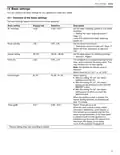
Basic setting
Display text
SP:00 1
Selection
Description
Start cycle
SP:00 - SP:01
Set a default cycle for when the appliance is
switched on.
¡ With the setting "SP:00", the last cycle
selected and the last additional function
selected are set by default when the
appliance is switched on.
¡ With the setting "SP:01", the standard
cycle is set by default when the appliance
is switched on.
Signal volume
Button volume
Wi-Fi
SL:02 1
bL:02 1
Cn:00
SL:00 -SL:03
bL:00 - bL:03
Cn:00 - Cn:01
Adjusting the signal volume.
Level "SL:00" switches the signal tone off.
Set the button volume during operation.
Level "bL:00" switches the button tones off.
Switch the wireless network connection on
or off.
Level "Cn:00" switches the wireless network
connection off.
The basic setting is not available until you
have connected the appliance with the
Home Connect® app.
Remote Start
rc:01
rc:00 - rc:02
Activate or deactivate
The following settings are possible:
¡ With the setting "rc:00", the option is
permanently deactivated.
¡ With the setting "rc:01", the option can be
selected via the
button.
¡ With the setting "rc:02", the option is
permanently activated.
The basic setting is not available until you
have connected the appliance with the
Home Connect® app.
Factory setting
rE:
Starting with
Y:ES
Restore changed settings to the factory
settings.
Confirming with
The settings for initial use must be
configured.
1
Factory setting (may vary according to model)
You can change one or more settings.
5. To store the settings, press the button for 3 seconds.
14.2ꢀChanging the basic settings
Tip: Connect your appliance to a mobile device. You can
conveniently change all settings using the
Home Connect® app.
H
o
15ꢀHome Connect®
H
o
This appliance is network-capable. Connecting your
appliance to a mobile device lets you control its functions
via the Home Connect® app.
The Home Connect® services are not available in every
country. The availability of the Home Connect® function
depends on the availability of Home Connect® services in
your country. You can find information on this at:
1. Press
.
2. To open the basic settings, press the button for 3
seconds.
3. Press the button repeatedly until the display shows
the required setting.
4. Press
repeatedly until the display shows the right
value.
24

| General | Details |
|---|---|
| Name | BOSCH SHX9PCM5N Benchmark Series Dishwasher |
| Make | Bosch |
| Language | English |
| Filetype | PDF (Download) |
| File size | 2.49 MB |
 (1 votes, average: 5.00 out of 5)
 Loading...

BOSCH SMV6ZCX49E-39 Dishwasher

BOSCH SMI4HVS33E Dishwasher

BOSCH SRV2HKX39G Dishwasher

BOSCH SGS4HAW40G Dishwasher

BOSCH SGH4HVX32G Dishwasher

BOSCH SMS4ECI26E Dishwasher

BOSCH SPV4XMX28E Dishwasher

BOSCH SMS6EDI02G Free-Standing Dishwasher

BOSCH SMS6EDW02G Free-Standing Dishwasher

BOSCH SMV4HTX27G Dishwasher


Bosch SMV4HTX00G Fully Integrated Dishwasher

Hotpoint H2IHKD526UK Dishwasher

FISHER PAYKEL DW24U6I1 Sanitize Integrated Dishwasher

SIEMENS SR93EX24MG Fully Integrated Dishwasher

IKEA KALLBODA Dishwasher

BOSCH SPS4HMI49E Dishwasher

Master Kitchen 340965 Drawer Dishwasher

eta 239490001B Dishwasher

COVE DW2450 Dishwasher

PKM GSP12A++7TI2 Dishwasher