
Home > Everglades Witgoed > Everglades Witgoed EVDW5111B Dishwasher
×
- 1. Evdw5111b (Vaatwasser Dishwasher → Geschirrspüler Lava-vaiselle → Gebrauchsanleitung → User Manual)
- 2. Vaatwasser (Handleiding → Deel I : Generieke Versie → Evdw5111b)
- 3. Veiligheidsinformatie (Productoverzicht → Onderhoud En Reiniging → Installatie-instructie → Tips Om Problemen Op Te Lossen)
- 4. Veiligheidsinformatie (Volg De Onderstaande Voorzorgsmaatregelen Bij Het Gebruik Van Uw Vaatwasser: → Installatie En Reparatie Mogen Alleen Worden Uitgevoerd Door Een Gekwalificeerde Technicus. → Dit Apparaat Is Bedoeld Voor Gebruik In Huishoudelijke En Soortgelijke Omstandigheden. → Dit Apparaat Kan Worden Gebruikt Door Kinderen Vanaf 8 Jaar En Personen Met Beperkte Lichamelijke, Zintuiglijke Of Geestelijke Vermogens.)
- 5. Verpakkingsmateriaal Kan Gevaarlijk Zijn Voor Kinderen! (Aardingsinstructies)
- 6. Veiligheidsinstructies (Gebruik Van De Vaatwasser → Inladen Van Voorwerpen → Aanbevelingen Voor Vaatwasmiddelen)
- 7. Gebruik Nooit Zeep, Wasmiddel Of Handwasmiddel In Uw Vaatwasser. De Deur Mag Niet Worden Opengelaten, Aangezien Dit Het Risico Op Struikelen…
- 8. Verwijdering (Ga Voor Het Weggooien Van De Verpakking En Het Apparaat Naar Een Recyclingcentrum.)
- 9. Productoverzicht (Belangrijk → Binnenste Buis → Filtersamenstel → Zoutreservoir)
- 10. Uw Vaatwasser Gebruiken (Stel De Waterontharder In → Doe Zout In De Ontharder → Laad De Mand → Vul De Wasmiddeldispenser)
- 11. Stappen Voor Het Toevoegen Van Vaatwasser Zout (Zoutreservoir Vullen → Zout Controlelampje → Belang Van Het Starten Van Een Wasprogramma)
- 12. Tips Voor Het Laden Van Het Mandje (Afstellen Van Het Bovenste Mandje)
- 13. Om De Korf Lager Te Zetten, Drukt U De Hendel In En Laat U Deze Weer Los. (Het Kopjesrek Inklappen → Het Bordenrek Inklappen)
- 14. Onderhoud En Reiniging (Externe Zorg → Het Bedieningspaneel → Interne Zorg → Filtersysteem)
- 15. Grove Filter (Hoofdfilter → Fijne Filter → Reiniging → Montage Van De Filters)
- 16. Sproeiarmen (Reinigen Van De Sproeiarmen → Instructies Voor Het Verwijderen Van De Sproeiarmen → Schoonmaken Van De Sproeiarmen)
- 17. Zorg Dragen Voor De Vaatwasser (Voorzorg Tegen Vorst → Na Elke Wasbeurt → Trek De Stekker Uit → Wanneer Hij Lange Tijd Niet Wordt Gebruikt)
- 18. Installatie-instructie (Gevaar Op Elektrische Schokken → Over De Stroomaansluiting → Elektrische Voorschriften → Elektrische Aansluiting)
- 19. Watertoevoer En -afvoer (Koud Water Aansluiting → Over De Veiligheidstoevoerslang → Hoe De Veiligheidstoevoerslang Aansluiten → Hoe De Veiligheidstoevoerslang Loskoppelen)
- 20. Aanleggen Van Afvoerslangen (Hoe Overtollig Water Afvoeren → Waterafvoer → Verlengslang → Syphon-aansluiting)
- 21. Het Apparaat Plaatsen (Het Apparaat Waterpas Zetten → Vrijstaande Installatie → Onder Een Bestaand Werkblad → Aandacht)
- 22. De Installatieplaats Van De Vaatwasser Moet In De Buurt Zijn Van De Bestaande Aan- En Afvoer Slang En Het Stopcontact.
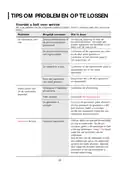
- 23. Tips Om (Problemen Op Te Lossen → Voordat U Belt Voor Service → De Vaatwasser Start Niet → Water Wordt Niet Uit De Vaatwasser Gepompt)
- 24. Probleem (Mogelijk Oorzaken → Wat Te Doen → Gemorst Spoelglansmiddel → Bevlekt Kuip Interieur)
- 25. Probleem (Mogelijk Oorzaken → Wat Te Doen → De Vaat Is Niet Schoon → De Vaat Droogt Niet)
- 26. Probleem (Mogelijk Oorzaken → Wat Te Doen → De Vaat Droogt Niet → Het Verkeerde Programma Werd Geselecteerd)
- 27. Demanden Laden Volgens En60436 (Bovenste Mand → Onderste Mand)
- 28. Plaats De Lichteplaten Vaat Op Het Rek. Het Maximalelaadgewicht Is 1,5 Kg.
- 29. Vaatwasser (Handleiding → Deel Ii: Speciale Versie)
- 30. Uw Vaatwasser Gebruiken (Bedieningspaneel → Waterontharder → De Vaat Voorbereiden En Laden → Programmaselectie)
- 31. De Vaatwasser Installeren (Laad De Manden. → Vul De Dispenser Met Vaatwasmiddel En Spoelglansmiddel. → Kies Een Geschikt Programma En Start De Vaatwasser.)
- 32. Uw Vaatwasser Gebruiken (Bedieningspaneel → Programma → Halve Lading → Automatisch Openen → Kinderslot)
- 33. Display (Programma-indicator → Spoelglansmiddel → Zout → Vertragingstijd)
- 34. Waterontharder (Zoutverbruik → Instelmodus Voor De Waterontharder → Regeneratie → Fabrieksinstelling)
- 35. Waterontharder (De Vaat Voorbereiden En Laden → Voor Het Afwassen Van Het Volgende Bestek/borden → Zijn Niet Geschikt → Zijn Beperkt Geschikt)
- 36. Aanbevelingen Voor Het Laden Van De Vaat (Plaats Voorwerpen Als Volgt In De Vaatwasser: → De Bovenste Mand Is Bedoeld Voor Delicater En Lichter Vaatwerk, Zoals Glazen, Koffie- En Theekopjes. → Gelieve Uw Vaatwasser Niet Te Overladen. → De Vaat Verwijderen)
- 37. Het Bovenste Mandje Laden (Het Onderste Mandje Laden → Het Bestekmand Laden)
- 38. Functie Van Spoelglansmiddel En Wasmiddel (Wanneer Moet U Het Glansspoelmiddelbakje Bijvullen? → Correct Gebruik Van Wasmiddel)
- 39. Het Spoelglansmiddelreservoir Vullen (Het Gebruik Van Het Glansspoelmiddel Instellen)
- 40. De Vaatwasmiddel Dispenser Vullen (Drie Manieren Om De Cover Te Openen → Voeg Wasmiddel Toe Aan De Grotere Opening → Kies Een Open Manier Volgens De Werkelijke Situatie → Afhankelijk Van Het Vuil Worden Van Het Water Kan De Instelling Anders Zijn)
- 41. Programma Selectie (Verbruikswaarden En Programmaduur → Beschrijving Van De Cyclus)
- 42. Energie Besparen (Een Programma Starten → Het Programma Wijzigen Halverwege De Cyclus)
- 43. Vergeten Een Bord Toe Te Voegen? (Automatisch Openen)
- 44. Foutcodes (Codes → Betekenissen → Mogelijke Oorzaken)
- 45. Tec Hni S C H E In F O R M A Tie
- 46. Productinformatieblad (Algemene Productparameters → Aanvullende Informatie)
- 47. Algemene Garantievoorwaarden (Schade Aan Het Apparaat → Garantie Uitsluitingen → Garantieprestatie → Klachten En Servicebezoeken)
- 48. Algemene Garantievoorwaarden (Reparatie Of Omruiling Ten Tijde Van De Garantietermijn → Schade Door Defect Apparaat → Aansprakelijkheid → Toepasselijk Recht)
- 49. Geschirrspüler (Bedienungsanleitung → Teil I: Allgemeine Version)
- 50. Inhaltsangabe (Produktbescht → Wartung Und Reinigung → Montageanleitung → Tipps Zur Problemlösung)
- 51. Sicherheitshinweise (Installation Und Reparatur → Gebrauch Durch Kinder Und Personen Mit Eingeschränkten Fähigkeiten)
- 52. Verpackungsmaterial Kann Für Kinder Gefährlich Sein! (Das Gerät Ist Nur Für Den Hausgebrauch Bestimmt. → Erdungsanweisung)
- 53. Ändern Sie Nicht Den Mit Dem Gerät Gelieferten Stecker (Lassen Sie Sich Eine Geeignete Steckdose Von Einem Qualifizierten Elektriker Installieren → Nicht Missbrauchen, Darauf Sitzen Oder Auf Der Tür Oder Dem Geschirrkorb Der Spülmaschine Stehen → Beim Laden Von Zu Waschenden Gegenständen → Spülmittel Sind Stark Alkalisch)
- 54. Verwendung Von Reinigungs- Und Spülmitteln (Installation → Energieeinsparung → Maximale Anzahl Der Zu Waschenden Gedecke → Einlasswasserdruck)
- 55. Entsorgung (Entsorgen Sie Die Verpackung Und Das Gerät → Recyclinginformationen)
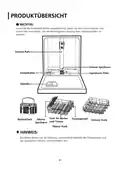
- 56. Produktübersicht (Wichtig: → Inneres Rohr → Unterer Sprüharm → Oberer Sprüharm)
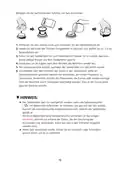
- 57. Verwendung Ihrer Spülmaschine (Bevor Sie Ihren Geschirrspüler Benutzen: → Stellen Sie Den Wasserenthärter Ein → Einfüllen Des Salzes In Den Wasserenthärter → Beladen Sie Den Korb → Füllen Sie Den Spülmittel-spender)
- 58. Befolgen Sie Die Nachstehenden Schritte, Um Salz Einzufüllen (Salzwarnleuchte → Hinweis)
- 59. Tipps Zum Beladen Der Ablagen (Obere Ablage Verstellen → Tiefere Position → Höhere Position)
- 60. Um Den Geschirrkorb Auf Seine Obere Position Einzustellen, Korb Anheben, Bis Sich Beide Seiten Auf Der Gleichen Höhe Befinden. Der Geschirrk…
- 61. Wartung Und Reinigung (Außenpflege → Tür Und Türdichtung → Innenpflege → Filtersystem)
- 62. Grobfilter (Hauptfilter → Feinfilter → Reinigung Der Filter → Wiedereinsetzen Der Filter)
- 63. Sprüharme (Reinigung Der Sprüharme)
- 64. Pflege Der Spülmaschine (Frost Vorsichtsmaßnahme → Nach Jedem Spülvorgang → Entfernen Sie Den Stecker → Bei Längerem Nichtgebrauch)
- 65. Montageanleitung (Informationen Zum Stromanschluss → Elektrische Anforderungen → Elektrischer Anschluss)
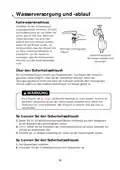
- 66. Wasserverorgung Und -ablauf (Kaltwasseranschluss → Über Den Sicherheitsschlauch → So Trennen Sie Den Sicherheitsschlauch)
- 67. Abflussschlauch (Wasserablaufschlauch → Verlängerungsschlauch → Siphonverbindung)
- 68. Positionieren Sie Das Gerät (Gerät Nivellieren → Freistehende Aufstellung → Unter Der Vorhandenen Arbeitsfläche → Achtung)
- 69. Auswahl Des Besten Standorts Für Die Spülmaschine (Installationsposition Des Geschirrspülers → Abbildungen Der Schrankabmessungen Und Einbaulage Des Geschirrspülers → Anschluss Von Stromzufuhr, Wasserabfluss Und Wasserzufuhr → Mindestabstand Von 50 Mm)
- 70. Tipps Zur Problemlösung (Mögliche Ursachen → Was Tun → Geschirrspüler Startet Nicht → Wasser Nicht Aus Der Spülmaschine Gepumpt)
- 71. Problem (Mögliche Ursachen → Was Tun → Verschmutzter Innenraum → Das Geschirr Ist Nicht Sauber)
- 72. Problem (Was Tun → Das Geschirr Ist Nicht Sauber → Das Geschirr Trocknet)
- 73. Problem (Mögliche Ursachen → Was Tun → Das Geschirr Trocknet Nicht → Verwendung Von Besteck Mit Einer Minderwertigen Beschichtung)
- 74. Ladende Körbe Nach En 60436: (Oberer Korb: → Unterer Korb:)
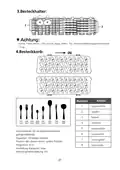
- 75. Besteckhalter (Besteckkorb → Informationen Für Vergleichbarkeitstests → Kapazität: 14-teiliges Gedeck → Programm: Eco)
- 76. Geschirrspüler (Bedienungsanleitung → Teil Ii: Sonderausgabe)
- 77. Inhaltsangabe (Bedienfeld → Wasserenthärter → Geschirr Vorbereiten Und Laden → Programmieren Der Spülmaschine)
- 78. Kurze Bedienungsanleitung (Installieren Sie Den Geschirrspüler → Beladender Körbe → Befüllen Des Spenders → Auswählen Eines Programms Und Ausführen Der Geschirrspüler)
- 79. Verwendung Ihrer Spülmaschine (Bedienfeld → Betrieb → Programm → Halbe Ladung → Kinder- Sicherung)
- 80. Display (Programmadvertisement → Klarspüler → Warnanzeige → Zeit Programmieren)
- 81. Wasserenthärter (Salzverbrauch Anpassen → Wasserhärte)
- 82. Laden Des Salzes In Den Weichspüler (Wasserenthärter → Geschirr Vorbereiten Und Laden → Nicht Geeignete Bestecke/geschirre)
- 83. Empfehlungen Zum Laden Des Geschirrspülers (Gegenstände In Die Spülmaschine Stellen → Laden Von Hohlen Gegenständen → Überladen Des Geschirrspülers Vermeiden → Geschirr Entfernen)
- 84. Be Laden Des Oberen Korbs (Be Laden Des Unteren Korbs → Be Laden Des Besteckkorbs)
- 85. Funktion Von Klarspüler Und Waschmittel (Nachfüllen Von Klarspüler → Funktion Des Waschmittels → Ordnungsgemäße Verwendung Von Reinigungsmittel)
- 86. Füllen Des Klarspülerbehälters (Einstellen Der Klarspülerkammer)
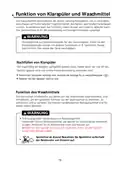
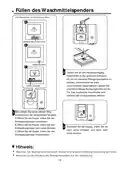
- 87. Füllen Des Waschmittelspenders (Drei Möglichkeiten, Die Abdeckung Zu Öffnen → Hinweis)
- 88. Programmieren Der Spülmaschine (Waschzyklus-tabelle → Erklärung Spülmittel → Hinweis)
- 89. Energie Sparen (Starten Einer Zykluswäsche → Ändern Des Programms Während Des Zyklus)
- 90. Vergessenes Geschirr Hinzufügen (Automatisches Öffnen → Achtung)
- 91. Fehlercodes (E1 → E3 → E4 → Warnung)
- 92. Ec Hni S C H E In F O R M A T I O N
- 93. Allgemeine Produktparameter (Energieverbrauch In Kwh [pro Zyklus], Basierend Auf → Mindestdauer Der Garantie Des Lieferanten → Zusätzliche Informationen → Link Zur Webseite Des Lieferanten Mit Den Informationen Zu Punkt 6 Anhang Ii Der Verordnung Der Kommission (eu) 2019/2022)
- 94. Allgemeine Garantiebedingungen (Herstellergarantie → Garantieausschlüsse → Garantieleistungen → Kosten Bei Unbegründeten Beschwerden)
- 95. Allgemeine Garantiebedingungen (Servicenummer Für Die Niederlande → Servicenummer Für Belgien)
- 96. Generic Version
- 97. Safety Information (Product Overview → Using Your Dishwasher → Maintenance And Cleaning → Installation Instruction)
- 98. Safety Information (Installation And Repair → Intended Use → Use By Children And Persons With Reduced Capabilities)
- 99. Packaging Material Safety (Appliance Use Guidelines → Electrical Shock Prevention → Cleaning And Maintenance → Earthing Instructions)
- 100. Do Not Modify The Plug Provided With The Appliance If It Does Not Fit The Outlet. Have A Proper Outlet Installed By A Qualified Electrician.
- 101. For Unmarked Plastic Items Not So Marked, Check The Manufacturer's Recommendations. Use Only Detergent And Rinse Agents Recommended For Use …
- 102. Disposal
- 103. Product Overview (Important → Inner Pipe → Lower Spray Arm → Salt Container)
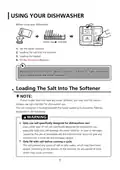
- 104. Using Your Dishwasher (Before Using Your Dishwasher : → Set The Water Softener → Loading The Salt Into The Softener → Fill The Detergent Dispenser)
- 105. Adding Dishwasher Salt (Steps For Filling The Salt Container → Salt Warning Light → Important Notes)
- 106. Basket Loading Tips (Adjusting The Upper Basket → Type 1)
- 107. To Raise The Upper Basket (To Lower The Upper Basket → Folding Back The Cup Shelves → Folding Back The Rack Shelves)
- 108. Maintenance And Cleaning (External Care → The Control Panel → Internal Care → Filtering System)
- 109. Grove Filter (Hoofdfilter → Fijne Filter → Reassemble The Filters → Do Not Over Tighten The Filters)
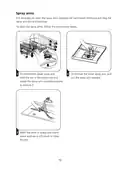
- 110. Spray Arms
- 111. Caring For The Dishwasher (Frost Precaution → After Every Wash → Remove The Plug → Moving The Appliance)
- 112. Installation Instruction (About Power Connection → Electrical Requirements → Electrical Connection)
- 113. Water Supply And Drain (Cold Water Connection → About The Safety Supply Hose → How To Connect The Safety Supply Hose → How To Disconnect The Safety Supply Hose)
- 114. Connection Of Drain Hoses (How To Drain Excess Water From Hoses → Water Outlet → Extension Hose → Syphon Connection)
- 115. Positioning The Appliance (Levelling The Appliance → Free Standing Installation)
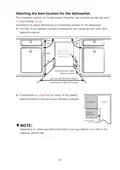
- 116. Selecting The Best Location For The Dishwasher (Installation Position Of The Dishwasher → Electrical, Drain And Water Supply Line Connection → Space Between Cabinet Bottom And Floor → Minimum Space When The Door Is Opened)
- 117. Troubleshooting Tips (Before Calling For Service → Problem → Possible Causes → What To Do)
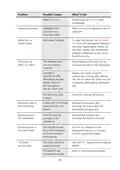
- 118. Problem (Possible Causes → What To Do → Stained Tub Interior → White Film On Inside Surface)
- 119. Problem (Possible Causes → What To Do → The Dishes Are Not Clean. → Cloudiness On Glassware.)
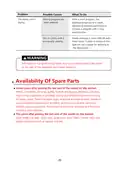
- 120. Problem (Possible Causes → What To Do → Availability Of Spare Parts)
- 121. Loading The Baskets (Upper Basket → Lower Basket)
- 122. Cutlery Rack (Cutlery Basket → Capacity: 14 Place Settings → Position Of The Upper Basket: Lower Position → Program: Eco)
- 123. Special Version (Evdw5111b → Please Read This Manual Carefully Before Using The Dishwasher And Keep This Manual For Future Reference.)
- 124. Using Your Dishwasher (Control Panel → Preparing And Loading Dishes → Program Selection → Error Codes)
- 125. Quick User Guide (Install The Dishwasher → Remove Larger Residue From Dishes → Load The Baskets → Fill The Dispenser With Detergent And Rinse Aid → Select A Suitable Program And Start The Dishwasher)
- 126. Using Your Dishwasher (Control Panel → Operation (button) → Program → Half-load → Child Lock)
- 127. Display (Intensive → Universal → Eco → Glass)
- 128. Water Softener (Adjusting Salt Consumption → Water Hardness → Water Softner Level → Regeneration Occurs Every X Program)
- 129. Water Softener (Preparing And Loading Dishes)
- 130. Recommendations For Loading The Dishwasher (Removing The Dishes)
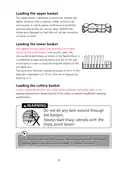
- 131. Loading The Upper Basket (Loading The Lower Basket → Loading The Cutlery Basket)
- 132. Function Of The Rinse Aid And Detergent (When To Refill The Rinse Aid → Function Of Detergent → Proper Use Of Detergent)
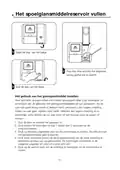
- 133. Filling The Rinse Aid Reservoir (Adjusting The Rinse Aid Reservoir)
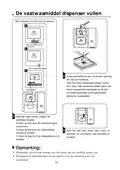
- 134. Filling The Detergent Dispenser (Three Ways To Open The Cover: → Add Detergent Into The Larger Cavity → For Better Cleaning Result, Especially If You Have Very Dirt Items, Pour A Small Amount Of Detergent Onto The Door. → Please Choose An Open Way According To The Actual Situation.)
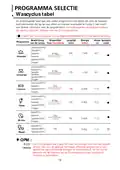
- 135. Wash Cycle Table (Consumption Values And Program Duration → Description Of Cycle → Eco)
- 136. Saving Energy (Starting A Program → Changing The Program Mid-cycle)
- 137. Forget To Add A Dish? (Auto Open)
- 138. Error Codes (Meanings → Possible Causes)
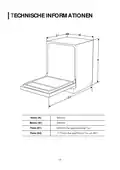
- 139. Technical Information (Height (h) → Width (w) → Depth (d1) → Depth (d2))
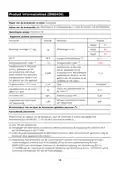
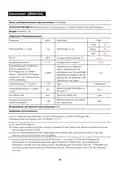
- 140. Product Information Sheet (en60436) (General Product Parameters → Energy Efficiency Class → Cleaning Performance Index → Water Consumption In Litres)
- 141. General Warranty Conditions (Warranty Exclusions → Repair And Replacement Process → Consumer Responsibilities → Service Visit Requirements)
- 142. General Warranty Conditions (Damage → Additional Or Alternative Claims → Legal Provisions → Warranty Conditions Of Everglades)
- 143. Lave-vaisselle (Manuel Dinstructions → Partie I : Version Générique)
- 144. Consignes De Securite (Vue D'ensemble Du Produit → Utilisation De Votre Lave-vaisselle → Entretien Et Nettoyage → Consignes Dinstallation)
- 145. Consignes De Securite (Avertissement)
- 146. Instructions De Mise À La Terre (Sécurité Des Enfants → Utilisation Domestique Intérieure → Risques D'électrocution → Entretien De L'appareil)
- 147. Vérification De La Mise À La Terre (Installation De La Prise → Utilisation Sécuritaire Du Lave-vaisselle → Chargement Des Objets À Laver → Précautions Concernant Les Détergents)
- 148. Vérification Des Résidus De Détergent (Recommandations Pour Les Articles En Plastique → Utilisation Des Détergents Et Produits De Rinçage → Installation Et Raccordement → Consommation D'énergie Et Mode Veille)
- 149. Mise Au Rebut (Elimination)
- 150. Vue Densemble Du Produit (Important : → Tuyau Interne → Bras D'aspersion Inférieur → Conteneur De Sel)
- 151. Utilisation De Votre Lave-vaisselle (Avant D'utiliser Votre Lave-vaisselle : → Régler L'adoucisseur D'eau → Charger Le Sel Dans Ladoucisseur → Charger Le Panier → Remplir Le Distributeur De Détergent)
- 152. Ajouter Du Sel Pour Lave-vaisselle (Remarques Sur Le Réservoir De Sel → Conseils Après Le Remplissage Du Sel)
- 153. Conseils De Chargement Des Paniers (Réglage Du Panier Supérieur)
- 154. Pour Relever Le Panier À La Position Supérieure, Soulevez Le Panier Jusqu'à Ce Que Les Deux Côtés Soient À La Même Hauteur. Le Panier Se Pla…
- 155. Entretien Et Nettoyage (Entretien Externe → Le Panneau De Commande → Entretien Interne → Système De Filtrage)
- 156. Filtre Brut (Filtre Principal → Filtre Fin → Nettoyage Des Filtres → Remontage Des Filtres)
- 157. Bras Daspersion (Instructions De Nettoyage → Retirer Le Bras Daspersion → Laver Les Bras)
- 158. Entretien Du Lave-vaisselle (Précautions Contre Le Gel → Après Chaque Lavage → Pas De Solvants Ni De Nettoyant Abrasif → En Cas De Non Utilisation Pour Une Durée Prolongée)
- 159. Consignes Dinstallation (Connexion Electrique → Exigences Electriques → Connexions Electriques)
- 160. Alimentation Et Évacuation De L'eau (Raccordement D'eau Froide → A Propos Du Tuyau D'alimentation De Sécurité → Comment Connecter Le Tuyau D'alimentation De Sécurité → Comment Déconnecter Le Tuyau D'alimentation De Sécurité)
- 161. Connexion Des Tuyaux Dévacuation (Comment Évacuer L'excès D'eau Des Tuyaux → Sortie D'eau → Extension De Tuyau → Connexion Du Siphon)
- 162. Positionnement De L'appareil (Mise À Niveau De L'appareil → Installation Autonome → Installation Entre Des Armoires Existantes → Sous Un Plan De Travail Existant)
- 163. Etape 2. Choisir Le Meilleur Emplacement Pour Le Lave-vaisselle (La Position D'installation Du Lave-vaisselle Doit Être Proche Du Tuyau D'arrivée Et Dévacuation Existant Et De La Prise De Courant. → Raccordement De L'électricité, Dévacuation Et De L'alimentation D'eau → Espace Entre Le Fond De L'armoire Et Le Sol → Remarque : En Fonction De L'emplacement De Votre Prise Électrique, Vous Devrez Peut-être Découper Un Trou Dans Le Côté Opposé Du Meuble.)
- 164. Conseils De Depannage (Avant D'appeler Le Service → Problème → Causes Possibles → Que Faire)
- 165. Problème (Causes Possibles → Que Faire → Produit De Rinçage → Les Éléments Concernés)
- 166. Problème (Causes Possibles → Que Faire → La Vaisselle N'est Pas Propre → La Vaisselle Ne Sèche Pas)
- 167. Problème (Causes Possibles → Que Faire → La Vaisselle Ne Sèche Pas)
- 168. Charger Les Paniers (Conformement A En60436 → Panier Supérieur → Panier Inférieur)
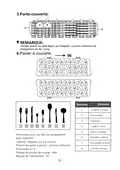
- 169. Porte-couverts (Panier À Couverts → Informations Pour Les Tests De Comparabilité Selon En60436 → Capacité : Réglages Sur 14 Couverts → Programme: Eco)
- 170. Lave-vaisselle (Manuel Dinstructions → Partie Ii : Version Spéciale)
- 171. Utilisation De Votre Lave-vaisselle (Selection Du Programme → Codes Erreur → Informations Techniques)
- 172. Installer Le Lave-vaisselle (Charger Les Paniers → Remplir Le Distributeur De Détergent Et De Produit De Rinçage → Sélectionner Un Programme Approprié Et Mettre Le Lave-vaisselle En Marche)
- 173. Utilisation De Votre Lave-vaisselle (Panneau De Commandes → Fonctionnement (touches) → Alimentation → Sécurité Enfants)
- 174. Affichage (Intensif → Universel → Eco → Indicateur De Programme)
- 175. Adoucisseur D'eau (Ajustement De La Consommation De Sel)
- 176. Chargement Du Sel Dans L'adoucisseur (Adoucisseur D'eau → Préparation Et Chargement De La Vaisselle → Pour Le Lavage Des Couverts/plats Suivants → Ne Conviennent Pas)
- 177. Recommandations Pour Le Chargement Du Lave-vaisselle (Placer Les Objets Dans Le Lave-vaisselle De La Manière Suivante → Charger Les Objets Creux Tels Que Les Tasses, Les Verres, Les Casseroles, Etc. → Retirer La Vaisselle → Avertissement)
- 178. Chargement Du Panier Supérieur (Chargement Du Panier Inférieur → Chargement Du Panier À Couverts)
- 179. Fonction Du Produit De Rinçage Et Du Détergent (Quand Faut-il Réapprovisionner Le Distributeur De Liquide De Rinçage ? → Fonction Du Détergent → Utilisation Correcte Du Détergent)
- 180. Remplissage Du Réservoir De Produit De Rinçage (Réglage Du Réservoir De Liquide De Rinçage)
- 181. Trois Façons D'ouvrir Le Couvercle (Ajoutez Du Détergent Dans La Plus Grande Cavité (a) Pour Le Lavage Principal → Veuillez Choisir Une Voie Ouverte En Fonction De La Situation Réelle → Remarque)
- 182. Selection Du Programme (Tableau Des Cycles De Lavage → Détergent → Remarque:)
- 183. Economies D'energie (Démarrer Un Programme → Modification Du Programme En Milieu De Cycle)
- 184. Vous Avez Oublié Dajouter Un Plat ? (Ouverture Automatique)
- 185. Codes Erreur (Significations → Causes Possibles → Avertissement)
- 186. Informations Techniques
- 187. Fiche D'information Sur Le Produit (Paramètres Généraux Du Produit → Consommation D'énergie En Kwh [par Cycle] → Durée Du Programme (h:min) → Informations Complémentaires)
- 188. Conditions Générales De Garantie (Garantie D'usine Complète → Exclusions De Garantie → Mise En Œuvre De La Garantie → Frais En Cas De Plainte Non Fondée)
- 189. Conditions Générales De Garantie (Numéro Du Service Après-vente Pour Les Pays-bas → Numéro Du Service Après-vente Pour La Belgique)
×
Everglades Witgoed EVDW5111B Dishwasher









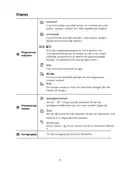


























































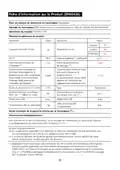
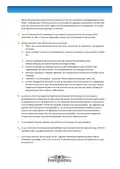


USING YOUR DISHWASHER
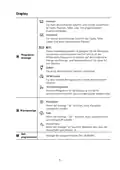
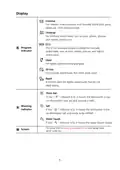
Control Panel
8
10
1
2
3 5 4
6
7
9
Operation (Button)
Press this button to turn on your dishwasher, the screen lights up.
When pressing this button, corresponding indicator will be lit.
1
Power
Press this button to select the appropriate washing program,
the program indicator will be lit.
2
Program
When you have about or less than half of full place settings
dishware to wash, you can choose this function to save energy
and water. (It can only be used with Intensive, Universal, ECO,
Glass and 90 min.)
3
Half-load
Press this button to open/close the door when the wash cycle is
over. Open the door to get better drying effect in daily life. When
you are out for a long time, you can close the door to prevent the
bugs(It can not used with Rapid.)
4 Autoopen
This option allows you to lock the buttons on the control panel -
except the Power button - so children cannot accidently start the
dishwasher by pressing the buttons on the panel.
To lock or unlock the buttons on the control panel, press and
hold the Half load button+ Extra drying button for 3 seconds
simultaneously. When pressing this button, corresponding
indicator will be lit.
5
Child lock
Press this button to set the delayed hours for washing. You can
delay the start of washing up to 24 hours. One press on this
button delays the start of washing by one hour.
Delay
6
7
To start the selected washing program or pause it when the
dishwasher is working.
Start/Pause
4

| General | Details |
|---|---|
| Name | Everglades Witgoed EVDW5111B Dishwasher |
| Make | Everglades Witgoed |
| Language | English |
| Filetype | PDF (Download) |
| File size | 23.85 MB |
 (1 votes, average: 5.00 out of 5)
 Loading...


Electrolux EEC87400W Sliding Door Dishwasher

Magic Chef MCSCD3W 18 Inch Full Console Dishwasher

Miele 12496690 Full Size Dishwasher

BOSCH SMV26DX00T Dishwasher

ARDESTO DWMB-V459SMT3 Dishwasher

BOSCH SMS23DW01T Dishwasher

Indesit I0F D641A Dishwasher

Miele G 5051 Dishwasher

Haier HDW13G1X Dishwasher

BOSCH SMH6ZCX03E Dishwasher
Table of Contents
- 1. Evdw5111b - Vaatwasser Dishwasher →
- 2. Vaatwasser - Handleiding →
- 3. Veiligheidsinformati... - Productoverzicht →
- 4. Veiligheidsinformatie - Volg De Onderstaande Voorzorgsmaatre... →
- 5. Verpakkingsmateriaal Kan Gevaarlijk Zijn Voor Kinderen! - Aa... →
- 6. Veiligheidsinstructi... - Gebruik Van De Vaatwasser →
- 7. Gebruik Nooit Zeep, Wasmiddel Of Handwasmiddel In Uw Vaatwas... →
- 8. Verwijdering - Ga Voor Het Weggooien Van De Verpakking En He... →
- 9. Productoverzicht - Belangrijk →
- 10. Uw Vaatwasser Gebruiken - Stel De Waterontharder In →
- 11. Stappen Voor Het Toevoegen Van Vaatwasser Zout - Zoutreservo... →
- 12. Tips Voor Het Laden Van Het Mandje - Afstellen Van Het Boven... →
- 13. Om De Korf Lager Te Zetten, Drukt U De Hendel In En Laat U D... →
- 14. Onderhoud En Reiniging - Externe Zorg →
- 15. Grove Filter - Hoofdfilter →
- 16. Sproeiarmen - Reinigen Van De Sproeiarmen →
- 17. Zorg Dragen Voor De Vaatwasser - Voorzorg Tegen Vorst →
- 18. Installatie-instruct... - Gevaar Op Elektrische Schokken →
- 19. Watertoevoer En -afvoer - Koud Water Aansluiting →
- 20. Aanleggen Van Afvoerslangen - Hoe Overtollig Water Afvoeren →
- 21. Het Apparaat Plaatsen - Het Apparaat Waterpas Zetten →
- 22. De Installatieplaats Van De Vaatwasser Moet In De Buurt Zijn... →
- 23. Tips Om - Problemen Op Te Lossen →
- 24. Probleem - Mogelijk Oorzaken →
- 25. Probleem - Mogelijk Oorzaken →
- 26. Probleem - Mogelijk Oorzaken →
- 27. Demanden Laden Volgens En60436 - Bovenste Mand →
- 28. Plaats De Lichteplaten Vaat Op Het Rek. Het Maximalelaadgewi... →
- 29. Vaatwasser - Handleiding →
- 30. Uw Vaatwasser Gebruiken - Bedieningspaneel →
- 31. De Vaatwasser Installeren - Laad De Manden. →
- 32. Uw Vaatwasser Gebruiken - Bedieningspaneel →
- 33. Display - Programma-indicator →
- 34. Waterontharder - Zoutverbruik →
- 35. Waterontharder - De Vaat Voorbereiden En Laden →
- 36. Aanbevelingen Voor Het Laden Van De Vaat - Plaats Voorwerpen... →
- 37. Het Bovenste Mandje Laden - Het Onderste Mandje Laden →
- 38. Functie Van Spoelglansmiddel En Wasmiddel - Wanneer Moet U H... →
- 39. Het Spoelglansmiddelreservoir Vullen - Het Gebruik Van Het G... →
- 40. De Vaatwasmiddel Dispenser Vullen - Drie Manieren Om De Cove... →
- 41. Programma Selectie - Verbruikswaarden En Programmaduur →
- 42. Energie Besparen - Een Programma Starten →
- 43. Vergeten Een Bord Toe Te Voegen? - Automatisch Openen →
- 44. Foutcodes - Codes →
- 45. Tec Hni S C H E In F O R M A Tie →
- 46. Productinformatiebla... - Algemene Productparameters →
- 47. Algemene Garantievoorwaarden - Schade Aan Het Apparaat →
- 48. Algemene Garantievoorwaarden - Reparatie Of Omruiling Ten Ti... →
- 49. Geschirrspüler - Bedienungsanleitung →
- 50. Inhaltsangabe - Produktbescht →
- 51. Sicherheitshinweise - Installation Und Reparatur →
- 52. Verpackungsmaterial Kann Für Kinder Gefährlich Sein! - Das G... →
- 53. Ändern Sie Nicht Den Mit Dem Gerät Gelieferten Stecker - Las... →
- 54. Verwendung Von Reinigungs- Und Spülmitteln - Installation →
- 55. Entsorgung - Entsorgen Sie Die Verpackung Und Das Gerät →
- 56. Produktübersicht - Wichtig: →
- 57. Verwendung Ihrer Spülmaschine - Bevor Sie Ihren Geschirrspül... →
- 58. Befolgen Sie Die Nachstehenden Schritte, Um Salz Einzufüllen... →
- 59. Tipps Zum Beladen Der Ablagen - Obere Ablage Verstellen →
- 60. Um Den Geschirrkorb Auf Seine Obere Position Einzustellen, K... →
- 61. Wartung Und Reinigung - Außenpflege →
- 62. Grobfilter - Hauptfilter →
- 63. Sprüharme - Reinigung Der Sprüharme →
- 64. Pflege Der Spülmaschine - Frost Vorsichtsmaßnahme →
- 65. Montageanleitung - Informationen Zum Stromanschluss →
- 66. Wasserverorgung Und -ablauf - Kaltwasseranschluss →
- 67. Abflussschlauch - Wasserablaufschlauch →
- 68. Positionieren Sie Das Gerät - Gerät Nivellieren →
- 69. Auswahl Des Besten Standorts Für Die Spülmaschine - Installa... →
- 70. Tipps Zur Problemlösung - Mögliche Ursachen →
- 71. Problem - Mögliche Ursachen →
- 72. Problem - Was Tun →
- 73. Problem - Mögliche Ursachen →
- 74. Ladende Körbe Nach En 60436: - Oberer Korb: →
- 75. Besteckhalter - Besteckkorb →
- 76. Geschirrspüler - Bedienungsanleitung →
- 77. Inhaltsangabe - Bedienfeld →
- 78. Kurze Bedienungsanleitung - Installieren Sie Den Geschirrspü... →
- 79. Verwendung Ihrer Spülmaschine - Bedienfeld →
- 80. Display - Programmadvertisemen... →
- 81. Wasserenthärter - Salzverbrauch Anpassen →
- 82. Laden Des Salzes In Den Weichspüler - Wasserenthärter →
- 83. Empfehlungen Zum Laden Des Geschirrspülers - Gegenstände In ... →
- 84. Be Laden Des Oberen Korbs - Be Laden Des Unteren Korbs →
- 85. Funktion Von Klarspüler Und Waschmittel - Nachfüllen Von Kla... →
- 86. Füllen Des Klarspülerbehälters - Einstellen Der Klarspülerka... →
- 87. Füllen Des Waschmittelspenders - Drei Möglichkeiten, Die Abd... →
- 88. Programmieren Der Spülmaschine - Waschzyklus-tabelle →
- 89. Energie Sparen - Starten Einer Zykluswäsche →
- 90. Vergessenes Geschirr Hinzufügen - Automatisches Öffnen →
- 91. Fehlercodes - E1 →
- 92. Ec Hni S C H E In F O R M A T I O N →
- 93. Allgemeine Produktparameter - Energieverbrauch In Kwh [pro Z... →
- 94. Allgemeine Garantiebedingungen - Herstellergarantie →
- 95. Allgemeine Garantiebedingungen - Servicenummer Für Die Niede... →
- 96. Generic Version →
- 97. Safety Information - Product Overview →
- 98. Safety Information - Installation And Repair →
- 99. Packaging Material Safety - Appliance Use Guidelines →
- 100. Do Not Modify The Plug Provided With The Appliance If It Doe... →
- 101. For Unmarked Plastic Items Not So Marked, Check The Manufact... →
- 102. Disposal →
- 103. Product Overview - Important →
- 104. Using Your Dishwasher - Before Using Your Dishwasher : →
- 105. Adding Dishwasher Salt - Steps For Filling The Salt Containe... →
- 106. Basket Loading Tips - Adjusting The Upper Basket →
- 107. To Raise The Upper Basket - To Lower The Upper Basket →
- 108. Maintenance And Cleaning - External Care →
- 109. Grove Filter - Hoofdfilter →
- 110. Spray Arms →
- 111. Caring For The Dishwasher - Frost Precaution →
- 112. Installation Instruction - About Power Connection →
- 113. Water Supply And Drain - Cold Water Connection →
- 114. Connection Of Drain Hoses - How To Drain Excess Water From H... →
- 115. Positioning The Appliance - Levelling The Appliance →
- 116. Selecting The Best Location For The Dishwasher - Installatio... →
- 117. Troubleshooting Tips - Before Calling For Service →
- 118. Problem - Possible Causes →
- 119. Problem - Possible Causes →
- 120. Problem - Possible Causes →
- 121. Loading The Baskets - Upper Basket →
- 122. Cutlery Rack - Cutlery Basket →
- 123. Special Version - Evdw5111b →
- 124. Using Your Dishwasher - Control Panel →
- 125. Quick User Guide - Install The Dishwasher →
- 126. Using Your Dishwasher - Control Panel →
- 127. Display - Intensive →
- 128. Water Softener - Adjusting Salt Consumption →
- 129. Water Softener - Preparing And Loading Dishes →
- 130. Recommendations For Loading The Dishwasher - Removing The Di... →
- 131. Loading The Upper Basket - Loading The Lower Basket →
- 132. Function Of The Rinse Aid And Detergent - When To Refill The... →
- 133. Filling The Rinse Aid Reservoir - Adjusting The Rinse Aid Re... →
- 134. Filling The Detergent Dispenser - Three Ways To Open The Cov... →
- 135. Wash Cycle Table - Consumption Values And Program Duration →
- 136. Saving Energy - Starting A Program →
- 137. Forget To Add A Dish? - Auto Open →
- 138. Error Codes - Meanings →
- 139. Technical Information - Height (h) →
- 140. Product Information Sheet (en60436) - General Product Parame... →
- 141. General Warranty Conditions - Warranty Exclusions →
- 142. General Warranty Conditions - Damage →
- 143. Lave-vaisselle - Manuel Dinstructions →
- 144. Consignes De Securite - Vue D'ensemble Du Produit →
- 145. Consignes De Securite - Avertissement →
- 146. Instructions De Mise À La Terre - Sécurité Des Enfants →
- 147. Vérification De La Mise À La Terre - Installation De La Pris... →
- 148. Vérification Des Résidus De Détergent - Recommandations Pour... →
- 149. Mise Au Rebut - Elimination →
- 150. Vue Densemble Du Produit - Important : →
- 151. Utilisation De Votre Lave-vaisselle - Avant D'utiliser Votre... →
- 152. Ajouter Du Sel Pour Lave-vaisselle - Remarques Sur Le Réserv... →
- 153. Conseils De Chargement Des Paniers - Réglage Du Panier Supér... →
- 154. Pour Relever Le Panier À La Position Supérieure, Soulevez Le... →
- 155. Entretien Et Nettoyage - Entretien Externe →
- 156. Filtre Brut - Filtre Principal →
- 157. Bras Daspersion - Instructions De Nettoyage →
- 158. Entretien Du Lave-vaisselle - Précautions Contre Le Gel →
- 159. Consignes Dinstallation - Connexion Electrique →
- 160. Alimentation Et Évacuation De L'eau - Raccordement D'eau Fro... →
- 161. Connexion Des Tuyaux Dévacuation - Comment Évacuer L'excès D... →
- 162. Positionnement De L'appareil - Mise À Niveau De L'appareil →
- 163. Etape 2. Choisir Le Meilleur Emplacement Pour Le Lave-vaisse... →
- 164. Conseils De Depannage - Avant D'appeler Le Service →
- 165. Problème - Causes Possibles →
- 166. Problème - Causes Possibles →
- 167. Problème - Causes Possibles →
- 168. Charger Les Paniers - Conformement A En60436 →
- 169. Porte-couverts - Panier À Couverts →
- 170. Lave-vaisselle - Manuel Dinstructions →
- 171. Utilisation De Votre Lave-vaisselle - Selection Du Programme →
- 172. Installer Le Lave-vaisselle - Charger Les Paniers →
- 173. Utilisation De Votre Lave-vaisselle - Panneau De Commandes →
- 174. Affichage - Intensif →
- 175. Adoucisseur D'eau - Ajustement De La Consommation De Sel →
- 176. Chargement Du Sel Dans L'adoucisseur - Adoucisseur D'eau →
- 177. Recommandations Pour Le Chargement Du Lave-vaisselle - Place... →
- 178. Chargement Du Panier Supérieur - Chargement Du Panier Inféri... →
- 179. Fonction Du Produit De Rinçage Et Du Détergent - Quand Faut-... →
- 180. Remplissage Du Réservoir De Produit De Rinçage - Réglage Du ... →
- 181. Trois Façons D'ouvrir Le Couvercle - Ajoutez Du Détergent Da... →
- 182. Selection Du Programme - Tableau Des Cycles De Lavage →
- 183. Economies D'energie - Démarrer Un Programme →
- 184. Vous Avez Oublié Dajouter Un Plat ? - Ouverture Automatique →
- 185. Codes Erreur - Significations →
- 186. Informations Techniques →
- 187. Fiche D'information Sur Le Produit - Paramètres Généraux Du ... →
- 188. Conditions Générales De Garantie - Garantie D'usine Complète →
- 189. Conditions Générales De Garantie - Numéro Du Service Après-v... →