
Hotpoint H2F HL626 UK Dishwasher





EN
DAILY REFERENCE
GUIDE
You can download the Safety Instructions and the User
Manual, by visiting our website docs.hotpoint.eu
and following the Instructions on the back of this
booklet.
THANK YOU FOR BUYING A HOTPOINT PRODUCT.
In order to receive a more complete assistance, please
register your appliance on: www.hotpoint.eu/register
Before using the appliance carefully read Safety Instructions guide.
PRODUCT DESCRIPTION
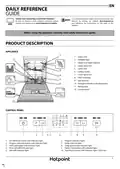
APPLIANCE
1
3
1. Upper rack
7
8
2. Foldable flaps
2
3. Upper rack height adjuster
4. Upper spray arm
5. Lower rack
6. Cutlery basket
7. Lower spray arm
8. Filter Assembly
9. Salt reservoir
4
5
9
10. Detergent and Rinse Aid dispensers
11. Rating plate
6
11
12. Control panel
10
Service:
0000 000 00000
12
CONTROL PANEL
1
2
3
4 5
6
7
8
9
10
1. On-Off/Reset button with indicator light
2. Program selection button with indicator light
3. Half Load button with indicator light
4. Rinse Aid refill indicator light
6. Program indicator lights
7. Delay indicator light
8. Delay button with indicator light
9. Tablet (Tab) button with indicator light
10. Start/Pause button with indicator light / Drain out
5. Salt refill indicator light
1


| General | Details |
|---|---|
| Name | Hotpoint H2F HL626 UK Dishwasher |
| Make | Hotpoint |
| Language | English |
| Filetype | PDF (Download) |
| File size | 2.05 MB |
 (1 votes, average: 5.00 out of 5)
 Loading...

Hotpoint H7I HP42 L UK Dishwasher

Hotpoint H7F HP33 UK Dishwasher

Hotpoint H7F HS41 UK Full Size Dishwasher

Hotpoint H8I HT59 LS UK Dishwasher

Hotpoint H7F HS51 Dishwasher

Hotpoint H7FHS41 Dishwasher

Hotpoint HA3FC10BS7A0S Dishwasher

Hotpoint H7F HS41 X Dishwasher

Hotpoint 869991662940 Dishwasher

Hotpoint H7I HT59 L Dishwasher

Hotpoint H2F HL626 UK Dishwasher Overview
Summary of Contents
- Page 1: Daily reference guide You can download the safety instructions and the user manual by visiting our website. Thank you for buying a Hotpoint product. Before using the appliance, carefully read the safety instructions guide. Product description Control panel On-Off/Reset button with indicator light. Program selection button with indicator light. Half Load button with indicator light. Rinse Aid refill indicator light. Program indicator lights. Delay button with indicator light. Tablet (Tab) button with indicator light. Start/Pause button with indicator light / Drain out.
- Page 2: First time use Advice regarding the first time use Rinse aid makes dish drying easier. The rinse aid dispenser should be filled when the rinse aid refill indicator light is lit. The use of salt prevents the formation of limescale on the dishes and on the machine’s functional components. It is mandatory that the salt reservoir never be empty. The salt reservoir must be filled when the salt refill indicator light in the control panel is lit. To allow the water softener to work perfectly, the water hardness setting is based on the actual water hardness in your house. To open the detergent dispenser, use the opening device. Only use salt that has been specifically designed for dishwashers. If the salt container is not filled, the water softener and the heating element may be damaged as a result of limescale accumulation.
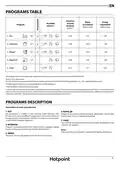
- Page 3: Programs table outlines the duration, water consumption, and energy consumption for various wash programs. ECO program data is measured under laboratory conditions according to European Standard EN 60436:2020. Pre-treatment of the dishes is not needed before any of the programs. Not all options can be used simultaneously. Values for programs other than the ECO program are indicative only and may vary based on several factors. Instructions on wash cycle selection are provided. The ECO program is the most efficient for normally soiled tableware in terms of energy and water consumption. The RAPID program is for half loads of lightly-soiled dishes without dried food residues. The SOAK program is used to refresh crockery planned to be washed later without detergent. The INTENSIVE program is recommended for heavily soiled crockery, especially pans and saucepans.
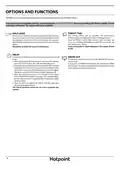
- Page 4: Options can be selected directly by pressing the corresponding button. If an option is not compatible with the selected program, the corresponding LED flashes rapidly 3 times and beeps will sound. The tablet setting allows you to optimize the performance of the program according to the type of detergent used. Press the tablet button if you use combined detergents in tablet form. A half load cycle may be used to save water, electricity, and detergent. If you use powder or liquid detergent, the half load option should be off. It is possible to delay the start time of the program by 2, 4, or 8 hours. To stop and cancel the active cycle, the drain out function can be used. A long press of the start/pause button will activate the drain out function. The delay function cannot be set once a program has started.
- Page 5: Loading the racks involves specific guidelines for the upper and lower racks. The upper rack is designed for delicate and light dishes such as glasses, cups, and low salad bowls. The lower rack is suitable for pots, lids, plates, salad bowls, and cutlery, with large plates ideally placed at the sides to avoid interference with the spray arm. The cutlery basket has top grilles for improved arrangement and should be positioned only at the front of the lower rack. The height of the upper rack can be adjusted to accommodate bulky crockery or to create more space upwards. It is advised not to adjust the height of the rack when it is loaded. Knives and sharp utensils should be placed with points facing downwards or horizontally in the tip-up compartments. Never raise or lower the basket on one side only. The side foldable flaps can be adjusted to optimize the arrangement of crockery inside the rack. Wine glasses can be safely placed in the foldable flaps by inserting the stem into the corresponding slots.
- Page 6: Daily use Check water connection The machine will switch off automatically during certain extended periods of inactivity to minimize electricity consumption. Check that the dishwasher is connected to the water supply and that the tap is open. Switch on the dishwasher Press the ON/OFF button. Load the racks Modify a running program If a wrong program was selected, it is possible to change it, provided that it has only just begun. Choose the program and customize the cycle Select the most appropriate program in accordance with the type of crockery and its soiling level. Start adding extra crockery Without switching off the machine, open the door and place the crockery inside the dishwasher. End of wash cycle The end of the wash cycle is indicated by beeps and by the flashing of the wash cycle indicator on the panel. Accidental interruptions If the door is opened during the wash cycle, or if there is a power cut, the cycle stops. Advice and tips Before loading the baskets, remove all food residues from the crockery and empty the glasses. Tips on energy saving When the household dishwasher is used according to the manufacturer’s instructions, washing tableware in a dishwasher usually consumes less energy and water than hand dishwashing. Unsuitable crockery Wooden crockery and cutlery are not suitable for the dishwasher. Hygiene To avoid odour and sediment, please run a high temperature program at least once a month.
- Page 7: Care and maintenance Cleaning the filter assembly Regularly clean the filter assembly to prevent clogging and ensure proper wastewater flow. The filter assembly consists of three filters that remove food residues from washing water. The dishwasher must not be used without filters or if the filter is loose. Check the filter assembly at least once per month or after every 30 cycles. Water softening system Water softener reduces water hardness and prevents scale buildup on the heater. Regeneration of the water softener occurs with salt and depends on the water hardness level setting. Single regeneration consumes approximately 3.5 liters of water and takes up to 5 additional minutes. Cleaning the water inlet hose Let the water run to ensure it is clear and free of impurities before making connections.
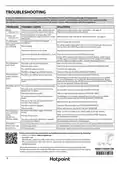
- Page 8: Troubleshooting In case your dishwasher doesn’t work properly, check if the problem can be solved by going through the following list. The manufacturer ensures the availability of spare parts for at least 10 years after production date of this appliance. Salt indicator is lit. Refill reservoir with salt. Rinse aid indicator is lit. Refill dispenser with rinse aid. The dishwasher won’t start or does not respond. Insert the plug into the socket. The dishwasher won’t drain. Wait until the wash cycle finishes. The dishwasher makes excessive noise. The detergent has not been measured out correctly or it is not suitable for use in dishwashers. The dishes are not clean. Arrange the crockery correctly. The dishwasher does not fill the water. Make sure there is water in the water supply or the tap is running. Dishwasher finishes the cycle prematurely. Check if end of drain hose is placed at correct height.

BOSCH SPH4HKX10E Dishwasher

omega ODWIS6015X Semi Integrated Dishwasher

IKEA 704.756.17 RENODLAD Integrated Dishwasher

BOSCH SMU6ECW70S Dishwasher

ChuMaste CM-XWJ01 Tabletop Dishwasher

Fisher and Paykel DD24DT2NX9 Built-Under Dishwasher

Midea MDT24X2APR Dishwasher

Hotpoint H7F HP43 X UK 15 Place Setting Dishwasher

FISHER PAYKEL DD24STX6PX1 DishDrawerT Dishwasher

BOSCH SPV4HMX10E Dishwasher