
Hotpoint H7F HP33 UK Dishwasher


Daily Reference Guide
EN
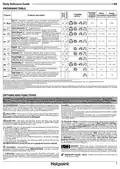
PROGRAMS TABLE
Duration
of wash
program
(h:min)**)
Water
Energy
Available
options *)
Program
Programs description
consumption consumption
(litres/cycle) (kWh/cycle)
Eco 50°- Program is suitable to clean normally soiled tableware,
that for this use, it is the most efficient program in terms of its
combined energy and water consumption, and that it is used to
assess compliance with the EU Ecodesign legislation.
3:30
9.5
0.86
P1
Auto Intensive 65° - Automatic pro-
gram for heavily soiled dishes and pans.
2:25 - 3:10
1:20 - 3:00
15.5 - 24.5
7.5 - 19.5
1.30 - 1.70
0.75 - 1.20
P2
P3
Senses the level of
soiling on the dishes
and adjusts the program
accordingly. When the
sensor is detecting the
soil level an animation
appears in the display
and the cycle duration is
updated.
Auto Mixed 55° - Automatic program
for normally soiled dishes with dried
food residues.
Auto Fast Wash 50° - Automatic
program for normally and lightly soiled
dishes. The everyday cycle that ensures
optimal cleaning and drying perfor-
mance in a shorter time.
1:00 - 1:50
7.5 - 15.5
0.70 - 1.10
P4
Rapid 45° - Program is recommended for limited amount of
lightly-soiled dishes with no dried food residues. Does not include
the drying phase.
0:30 - 0:40
1:40 - 1:50
3:50 - 4:10
10.0 - 12.0
12.5 - 16.5
10.5 - 14.5
0.55 - 0.65
0.95 - 1.20
0.80 - 1.15
-
P5
P6
P7
Delicates 45° - Program for delicate items, which are more
sensitive to high temperatures, for example, glasses and cups.
Good Night 55° - Suitable for night-time operation of the
appliance. Ensures optimal cleaning and drying performance
with the lowest noise emission.
Sanitizing 65° - Normally or heavily soiled crockery, with
additional antibacterial wash. Can be used to perform
maintenance of the dishwasher.
1:55 - 2:10
0:12
12.0 - 19.0
4.5
1.40 - 1.80
0.10
-
P8
P9
Soak - Used to refresh crockery planned to be washed later.
No detergent is to be used with this program.
-
-
Self Clean 65° - Program to be used to perform maintenance
of the dishwasher, to be carried out only when the dishwasher
is EMPTY using specific detergents designed for dishwasher
maintenance.
1:15
11.0
1.10
-
P10
ECO program data is measured under laboratory conditions according to European Standard EN 60436:2020.
Note for Test Laboratories: For information on comparative EN testing conditions, please send an email to the following address: dw_test_support@whirlpool.com
Pre-treatment of the dishes is not needed before any of the programs.
*) Not all options can be used simultaneously.
**) Values given for programs other than the program Eco are indicative only. The actual time may vary depending on many factors such as temperature and pressure of the incoming
water, room temperature, amount of detergent, quantity and type of load, load balancing, additional selected options and sensor calibration. The sensor calibration can increase
program duration by up to 20 min.
OPTIONS AND FUNCTIONS
OPTIONS can be selected/ deselected, after choosing the program, directly by pressing the corresponding button (if available - the indicator
lights up) (see CONTROL PANEL). If an option is not compatible with the selected program (see PROGRAMS TABLE), the corresponding LED flashes rapidly
3 times and beeps will sound. The option will not be enabled. An option can change time or water or energy consumption for the program.
3D ZONEWASH - Thanks to the additional power jets this option provides ActiveDry - It is a convection drying system which automatically opens
up to 80% more water power, a more intensive and powerful wash in the the door during/after the drying phase to ensure exceptional drying per-
lower rack, in the specific bottom area. This option is recommended for formance every day. The door opens at a temperature that is safe to your
washing pots and casseroles (Please refer to the 3D loading section).
kitchen furniture.
As additional steam protection, specially designed protection foil is added
together with the dishwasher.
HALF LOAD - If there are not many dishes to be washed, HALF LOAD is
used to save water, electricity or time, depending on the selected program.
Remember to reduce the amount of detergent.
To see how to mount protection foil please refer to the INSTALLATION GUIDE.
This feature is active by default, but it is possible to deactivate it in the
“SETTINGS MENU”.
EXTRA DRY - The higher temperature during the final rinse and the
extended drying phase allows for improved drying. The EXTRA DRY option
results in the lengthening of the wash cycle.
DESCALE – Alarm - Limescale accumulation was detected on the internal
components of the appliance. Check if the Water Hardness Setting is
at the correct value and salt is present in the salt container (see FIRST TIME
USE), then use a descaling product (WPro brand is recommended) with the
Self-Clean program. After a successful descaling, the icon will stop being
displayed.
If the actions above are not performed, product performance will deteriorate.
DESCALE warning will start blinking and «dES» alarm will appear on the
display. If still no action is taken, the appliance will only allow a certain number
of cycles to be started (indicated during «dES» alarm display) and then will
be BLOCKED to prevent component damage, with only the Self-Clean
program available. Performing a full descaling will unblock the product.
In the case of extremely high amounts of limescale, descaling may have to
be performed twice to be efficient.
DELAY - The start of the program may be delayed for a period of time
between 0:30 and 24 hours.
1. Select the program and any desired options. Press the DELAY button
(repeatedly) to delay the start of the program. Adjustable from 0:30 to 24
hours. Once the 24 hours setting is reached, press the DELAY another time
to deactivate the DELAY function.
2. Close the door and press the START/Pause button. The timer will begin
counting down.
3. Once this time has elapsed, the indicator light switches off and the
program begins automatically.
The DELAY function cannot be set once a program has been started.
SENSING - When the sensor is detecting the soil level an
animation appears in the display (around 20 min.) and the cycle
duration is updated. SENSING is for the level of soiling on the dishes and it
is present for all cycles (excepting Eco) adjusting the program accordingly.
FAVOURITE - The FAVOURITE program may be saved and will be easily
accessible. Find the program using PREVIOUS/NEXT, and then press the
FAVOURITE program button for 3 seconds..
KEYLOCK - A long press (for 3 seconds) of EXTRA DRY button, will
activate the KEYLOCK function. The KEYLOCK function will block the control
panel except for the ON/OFF button. To deactivate the KEYLOCK, long press
again.
WATER TAP CLOSED – Alarm - Flashes when there is no inlet water or
water tap is closed.
3

| General | Details |
|---|---|
| Name | Hotpoint H7F HP33 UK Dishwasher |
| Make | Hotpoint |
| Language | English |
| Filetype | PDF (Download) |
| File size | 5.92 MB |
 (1 votes, average: 5.00 out of 5)
 Loading...

Hotpoint H7I HP42 L UK Dishwasher

Hotpoint H7F HS41 UK Full Size Dishwasher

Hotpoint H8I HT59 LS UK Dishwasher

Hotpoint H7F HS51 Dishwasher

Hotpoint H7FHS41 Dishwasher

Hotpoint HA3FC10BS7A0S Dishwasher

Hotpoint H7F HS41 X Dishwasher

Hotpoint 869991662940 Dishwasher

Hotpoint H7I HT59 L Dishwasher

Hotpoint HFC 3C26 WCUK Dishwasher


SIEMENS SN23EW01ME Dishwasher

BOSCH SPH4EKX24E Dishwasher

BOSCH SHX5AEM5N 100 Series Dishwasher

IKEA 304.754.26 LAGAN Integrated Dishwasher

RAZORRI Comodo CDW04A Dishwasher Machine

Miele 12 698 330 Clean Touch Steel Dishwasher

Fisher and Paykel 82085 Door Panels for Dishwasher

SIEMENS SN97T801BE Dishwasher

BOSCH SMV2HVX02E-01 Dishwasher

SIEMENS SN27ZI04CZ Dishwasher