
×
- 1. Dishwasher User Manual (Dw60r2014 Series)
- 2. Safety Information (Important Safety Instructions → Setting Up Your Dishwasher → Using Your Dishwasher → Cleaning And Care)
- 3. Cycles (Cycle Chart → Troubleshooting → Information Codes → Appendix)
- 4. Safety Information (Important Safety Instructions → California Proposition 65 Warning)
- 5. When Using The Dishwasher, Follow Basic Precautions, Including The Following: Read All Instructions Before Using The Dishwasher.
- 6. Safety Information (Do Not Put Gasoline, Solvents, Or Other Flammable Materials Inside The Dishwasher. → Keep Your Dishwasher Detergent Out Of The Reach Of Children. → Disconnect The Power Cable Before Servicing Your Dishwasher. → Do Not Repair, Replace, Or Service Any Part Of Your Dishwasher Yourself. → This Dishwasher Is Intended For Residential Use Only.)
- 7. Before Using Your Dishwasher (Tip-over Hazard → Electric Shock Hazard → Save These Instructions)
- 8. Setting Up Your Dishwasher (Unpacking Your Dishwasher)
- 9. Checking Parts
- 10. Setting Up Your Dishwasher (Meeting Installation Requirements → Electrical Supply And Grounding → Caution)
- 11. Water Supply (Flooring)
- 12. Setting Up Your Dishwasher (Control Panel → Dw60r2014us → Cycles → Sanitize)
- 13. Hi-temp Wash (Control Lock → Start → Important)
- 14. Setting Up Your Dishwasher (Cycles → Half Load → Sanitize → Control Lock)
- 15. Display Window (Delay Start → Start → Important)
- 16. Setting Up Your Dishwasher (Cycle Overview → Auto → Normal → Heavy)
- 17. Using Your Dishwasher (Basic Guidelines → Add Detergent To The Dispenser → Select An Appropriate Cleaning Cycle → When The Wash Cycle Is Completed)
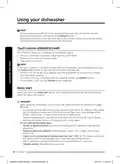
- 18. Using Your Dishwasher (Touch Controls (dw60r2014ap) → Delay Start)
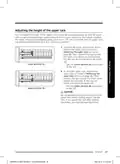
- 19. Adjusting The Height Of The Upper Rack (Removing The Upper Rack → Lower Position (a) → Upper Position (b) → Caution)
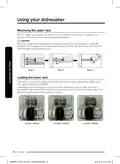
- 20. Using Your Dishwasher (Removing The Upper Rack → Loading The Lower Rack)
- 21. Loading The Upper Rack (Using The Cutlery Rack)
- 22. Using Your Dishwasher (Place Setting → Place Setting → Place Setting → Note)
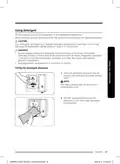
- 23. Using Detergent (Filling The Detergent Dispenser)
- 24. Using Your Dishwasher (Amount Of Detergent → Cycle)
- 25. Using Rinse Aid (Filling The Rinse Aid Reservoir → Rinse Aid Improves The Drying Performance Of The Dishwasher → Do Not Add Regular Detergent To The Rinse Aid Reservoir → Adding Rinse Aid When You Use Tablet Detergents Will Improve Drying Performance)
- 26. Using Your Dishwasher (Adjusting The Amount Of Rinse Aid)
- 27. Cleaning And Care (Cleaning The Filters → Filtering System)
- 28. Cleaning And Care (Filter Assembly → Open)
- 29. Cleaning The Spray Arms (Cleaning The Door → Caring For The Dishwasher)
- 30. Cleaning And Care (How To Maintain Your Dishwasher → Remove The Plug → When You Go On Vacation → Moving The Appliance)
- 31. Cycles (Cycle Chart → Dw60r2014 Series → Cycle Sequence → Available Options)
- 32. Troubleshooting (Will Not Start → Is Taking Too Long With An Operation Or Cycle → Not Cleaning Properly)
- 33. Problem (Possible Cause → Solution → Detergent Remains In The Dispenser. → Leaves Glasses With A Dim Polish.)
- 34. Troubleshooting (Problem → Possible Cause → Solution → Does Not Dry Dishes Well.)
- 35. Problem (Possible Cause → Solution → Is Too Noisy. → Water Wont Pump Out Of The Dishwasher.)
- 36. Troubleshooting (Information Codes → Water Supply Check → Thermistor Check → Pcb Communication Check)
- 37. Helping The Environment (Specifications)
- 38. Warranty (Limited Warranty To Original Consumer Purchaser → Warranty Service → In-home Service → Repair Or Replacement Options)
- 39. This Limited Warranty Covers Manufacturing Defects In Materials Or Workmanship Encountered In Normal Household, Noncommercial Use Of This Pr…
- 40. Warranty (Limitation Of Remedies → Your Sole And Exclusive Remedy)
- 41. Warranty (canada) (Limited Warranty To Original Purchaser → In Home Service Is Not Available In All Areas. → Samsung Will Repair, Replace, Or Refund This Product At Our Option And At No Charge As Stipulated Herein.)
- 42. Warranty (Limited Warranty Coverage → Exclusions From Warranty → Disclaimer Of Warranties → Purchaser's Assumption Of Risk)
- 43. To Obtain Warranty Service, Please Contact Samsung At:
- 44. Questions Or Comments? (Call Or Visit Us Online At → Consumer Electronics → Www.samsung.com/us/support → Www.samsung.com/ca/support (english))
- 45. Lave-vaisselle (Manuel D'utilisation → Série Dw60r2014)
- 46. Consignes De Sécurité Importantes (Avant D'utiliser Votre Lave-vaisselle → Installation Du Lave-vaisselle → Utilisation Du Lave-vaisselle → Nettoyage Et Entretien)
- 47. Programmes (Dépannage → Codes D'information → Annexe → Caractéristiques Techniques)
- 48. Consignes De Sécurité (Consignes De Sécurité Importantes → Signification Des Icônes Et Des Symboles Utilisés Dans Ce Manuel → Avertissement De La Proposition 65 De La Californie → Conservez Ces Instructions)
- 49. Avertissement (Consignes De Sécurité → Utilisation Prévue → Chargement D'objets À Laver → Risques Potentiels)
- 50. Consignes De Sécurité (Utilisation Sûre De L'appareil → Entretien Du Lave-vaisselle → Précautions Pour Les Enfants → Mise Au Rebut Du Lave-vaisselle)
- 51. Avant D'utiliser Votre Lave-vaisselle (Risque De Basculement → Risque D'électrocution → Conservez Ces Instructions)
- 52. Installation Du Lave-vaisselle (Déballage Du Lave-vaisselle)
- 53. Contrôle Du Contenu (Commutateur De La Porte → Gicleur Inférieur → Panier Inférieur → Panier Supérieur)
- 54. Installation Du Lave-vaisselle (Conditions Indispensables À L'installation → Mise À La Terre Et Alimentation Électrique → Attention → Avertissement)
- 55. Alimentation En Eau (Sol)
- 56. Installation Du Lave-vaisselle (Tableau De Commande → Dw60r2014us → Sanitize (assainissement))
- 57. Hi-temp Wash (Control Lock → Start (départ) → Important)
- 58. Installation Du Lave-vaisselle (Programmes → Half Load → Sanitize → Hi-temp Wash)
- 59. Remplissage De Produit De Rinçage (Indication → Départ Différé → Fenêtre Daffichage → Start (départ))
- 60. Installation Du Lave-vaisselle (Présentation Des Programmes → Auto (automatique) → Normal → Heavy (intensif))
- 61. Utilisation Du Lave-vaisselle (Instructions De Base → Ajouter De La Vaisselle En Cours De Programme → Sélection D'un Programme De Lavage → À La Fin Du Programme De Lavage)
- 62. Utilisation Du Lave-vaisselle (Commandes Tactiles (dw60r2014ap) → Départ Différé)
- 63. Réglage De La Hauteur Du Panier Supérieur (Retrait Du Panier Supérieur → Position Inférieure → Position Supérieure → Attention)
- 64. Utilisation Du Lave-vaisselle (Retrait Du Panier Supérieur → Chargement Du Panier Inférieur)
- 65. Chargement Du Panier Supérieur (Utilisation Du Panier À Couverts)
- 66. Utilisation Du Lave-vaisselle (Entrée → Suggestion De Disposition Des Couverts Dans Le Panier → Remarque)
- 67. Utilisation Du Produit De Lavage (Remplissage Du Réservoir De Produit De Lavage)
- 68. Utilisation Du Lave-vaisselle (Quantité De Produit De Lavage → Programme → Réservoir De Lavage Principal → Dans La Porte Pour Le Prélavage)
- 69. Utilisation Du Produit De Rinçage (Remplissage Du Réservoir De Produit De Rinçage → Attention → Remarque)
- 70. Utilisation Du Lave-vaisselle (Ajustement De La Quantité De Liquide De Rinçage)
- 71. Nettoyage Et Entretien (Nettoyage Des Filtres → Système De Filtration)
- 72. Nettoyage Et Entretien (Filtre Assemblé → Ouverture)
- 73. Nettoyage Des Bras Gicleurs (Nettoyage De La Porte → Entretien De Votre Lave-vaisselle)
- 74. Nettoyage Et Entretien (Protection Contre Le Gel → Entretien De Votre Lave-vaisselle → Débrancher Le Cordon D'alimentation → Déplacement De L'appareil)
- 75. Programmes (Série Dw60r2014 → Options Disponibles → Consommation Deau → Durée Du Programme (min))
- 76. Dépannage (Problème → Cause Possible → Solution)
- 77. Problème (Cause Possible → Solution)
- 78. Dépannage (Problème → Cause Possible → Solution → La Vaisselle N'est Pas Sèche.)
- 79. Problème (Cause Possible → Solution → Le Lave-vaisselle Est Trop Bruyant. → L'eau Ne S'évacue Pas Du Lave-vaisselle.)
- 80. Dépannage (Codes D'information → Contrôle Des Fuites → Contrôle De L'alimentation En Eau → Contrôle De La Thermistance)
- 81. Protection De L'environnement (Caractéristiques Techniques)
- 82. Garantie Limitée Pour L'acheteur-consommateur Initial Avec Preuve D'achat Et/ou Preuve De Livraison (Lave-vaisselle Samsung → Service De Réparation À Domicile → Conditions De La Garantie → Exclusions De La Garantie)
- 83. Garantie Limitée (Exclusions De Garantie)
- 84. Garantie (Limitation De Recours → Votre Seul Et Exclusif Recours Est La Réparation Du Produit → Samsung Ne Garantit Pas Un Fonctionnement Continu Ou Sans Erreur De Ce Produit → Pour Bénéficier Dun Service Dassistance Couvert Par Votre Garantie, Contactez Samsung)
- 85. Garantie Limitée À Lacheteur Initial (Service De Réparation À Domicile → Conditions De Garantie)
- 86. Garantie Limitée (Exclusions De La Garantie → Limitations De Responsabilité → Recours Exclusif)
- 87. Garantie Et Droits Légaux (Service D'assistance)
- 88. Consumer Electronics (Une Question ? Un Commentaire ? → Pays → N De Téléphone → Site Internet)
- 89. Lavavajillas (Manual Del Usuario → Serie Dw60r2014)
- 90. Información Sobre Seguridad (Instrucciones De Seguridad Importantes → Configuración De Su Lavavajillas → Uso De La Lavavajillas → Limpieza Y Cuidado)
- 91. Ciclos (Solución De Problemas → Códigos De Información → Especificaciones → Garantía)
- 92. Información Sobre Seguridad (Instrucciones De Seguridad Importantes → Significado De Los Íconos Y Señales De Este Manual Del Usuario → Advertencia Sobre La California Proposition 65 → Conserve Estas Instrucciones)
- 93. Advertencia (Lea Todas Las Instrucciones Antes De Usar La Lavavajillas. → Utilice La Lavavajillas Únicamente Para La Función Para La Cual Está Diseñada. → No Toque El Elemento Calentador Durante El Uso O Inmediatamente Luego De Él. → Conserve Estas Instrucciones)
- 94. Información Sobre Seguridad (Uso Seguro Del Electrodoméstico → Mantenimiento Y Reparaciones → Precauciones Con El Detergente → Desconexión Y Almacenamiento)
- 95. Antes De Usar La Lavavajillas (Riesgo De Vuelco → Riesgo De Descarga Eléctrica → Conserve Estas Instrucciones)
- 96. Configuración De Su Lavavajillas (Desempaque De La Lavavajillas)
- 97. Verificación De Las Piezas (Accesorios)
- 98. Configuración De Su Lavavajillas (Cumplimiento De Los Requisitos De Instalación → Suministro Eléctrico Y Conexión A Tierra → Precaución → Advertencia)
- 99. Suministro De Agua (Piso)
- 100. Configuración De Su Lavavajillas (Panel De Control → Dw60r2014us → Sanitize (desinfección))
- 101. Hi-temp Wash (Control Lock → Start (inicio) → Importante)
- 102. Configuración De Su Lavavajillas (Ciclos → Sanitize (desinfección) → Hi-temp Wash (lavado A Alta Temperatura) → Control Lock (bloqueo De Controles (3 Segundos)))
- 103. Reponer Producto De Enjuague (Inicio Retardado → Pantalla Digital → Delay Start → Start (inicio))
- 104. Configuración De Su Lavavajillas (Descripción General De Los Ciclos → Auto → Normal → Heavy (muy Sucio) → Express 60)
- 105. Uso De La Lavavajillas (Pautas Básicas → Agregar Detergente Al Dosificador → Seleccione El Ciclo De Limpieza Adecuado → Cuando Se Completa El Ciclo De Lavado)
- 106. Uso De La Lavavajillas (Controles Táctiles (dw60r2014ap) → Inicio Retardado)
- 107. Ajuste De La Altura Del Estante Superior (Cómo Retirar El Estante Superior → Posición Baja → Posición Superior → Precaución)
- 108. Uso De La Lavavajillas (Cómo Retirar El Estante Superior → Carga Del Estante Inferior)
- 109. Carga Del Estante Superior (Uso Del Estante Para Cubiertos)
- 110. Uso De La Lavavajillas (Soporte Para Cucharas → Nota → Cucharitas Para Té → Cuchillos)
- 111. Uso Del Detergente (Llenado Del Dosificador De Detergente)
- 112. Uso De La Lavavajillas (Cantidad De Detergente → Dosificador Para El Lavado Principal)
- 113. Uso Del Producto De Enjuague (Llenado Del Depósito De Producto De Enjuague → Precaución)
- 114. Uso De La Lavavajillas (Ajustar La Cantidad De Producto De Enjuague)
- 115. Limpieza Y Cuidado (Limpieza De Los Filtros → Sistema De Filtrado → Filtro Principal → Filtro Grueso)
- 116. Limpieza Y Cuidado (Conjunto Del Filtro → Abierto)
- 117. Limpieza De Los Brazos Rociadores (Limpieza De La Puerta → Cuidado De La Lavavajillas)
- 118. Limpieza Y Cuidado (Protección Anticongelamiento → Cómo Mantener La Lavavajillas → Desenchufar → Al Irse De Vacaciones)
- 119. Ciclos (Serie Dw60r2014 → Express 60 → Opciones Disponibles → Consumo De Agua)
- 120. Solución De Problemas (Problema → Causa Posible → Solución)
- 121. Problema (Causa Posible → Solución)
- 122. Solución De Problemas (Problema → Causa Posible → Solución)
- 123. Problema (Causa Posible → Solución → Hace Demasiado Ruido. → No Se Vacía El Agua De La Lavavajillas.)
- 124. Solución De Problemas (Códigos De Información → Verificación De Fugas → Control De Suministro De Agua → Verificación Del Termistor)
- 125. Apéndice (Ayuda Al Medio Ambiente → Especificaciones → Modelo → Dimensiones)
- 126. Garantía Limitada (estados Unidos) (Garantía Limitada Al Comprador Original Con Prueba De Compra Y/o Entrega → Períodos De Garantía Limitada → Servicio Técnico En Garantía → Reparación O Reemplazo Del Producto)
- 127. Garantía Limitada (Exclusión De Garantías Implícitas)
- 128. Garantía (Limitación De Recursos → Recurso Exclusivo)
- 129. Garantía Limitada Para El Comprador Original (Período De La Garantía Limitada → Servicio Técnico De La Garantía → Servicio Técnico A Domicilio → Reemplazo Y Propiedad De Las Piezas)
- 130. Garantía Limitada (Cobertura De La Garantía → Exclusiones De La Garantía → Limitaciones De Responsabilidad → Transferibilidad De La Garantía)
- 131. Algunos Estados O Provincias No Permiten Limitaciones En Cuanto Al Plazo De Una Garantía Implícita, O La Exclusión O Limitación De Daños Imp…
- 132. Tiene Alguna Pregunta O Algún Comentario? (País → Llame Al → O Visítenos En Línea En)
×
SAMSUNG DW60R2014 Wide 12 Place Dishwasher























Using your dishwasher
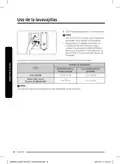
Adjusting the amount of rinse aid
You can adjust the amount of rinse aid used by following the instructions below. Generally.
the higher the setting, the better the drying performance.
1. Turn on the dishwasher.
2. Press the Express 60 (DW60R2014AP) or Cycles (DW60R2014US) button for five
seconds within 60 seconds of turning on the dishwasher.
3. The LED display shows the current rinse level. (between d1-d5)
4. Press the Express 60 (DW60R2014AP) or Cycles (DW60R2014US) button to select the
amount of rinse aid you want. Each time you press the button, the setting will change in
the following sequence.
-
d1 > d2 > d3 > d4 > d5 > d1. (The default level is d5.)
5. Select the amount of rinse aid, and then wait 5 seconds or turn off the dishwasher for
the setup to complete.
26 English
DW60R2014_DD81-02706A-01_EN+CFR+MES.indb 26
2021-03-16 10:01:59

| General | Details |
|---|---|
| Name | SAMSUNG DW60R2014 Wide 12 Place Dishwasher |
| Make | Samsung |
| Language | English |
| Filetype | PDF (Download) |
| File size | 8.2 MB |
 (1 votes, average: 5.00 out of 5)
 Loading...

SAMSUNG DW80N3030UW Front Dishwasher

SAMSUNG DW90F89 Dishwasher

SAMSUNG DW80BB70 Dishwasher

SAMSUNG DW50T6060U Dishwasher

SAMSUNG DW80BB70 Series Dishwasher

SAMSUNG DW80CB5450 Dishwasher

Samsung DW60M5062 Dishwasher

Samsung DW60 7 Series Dishwasher

SAMSUNG DW9000F Dishwasher

SAMSUNG DW60H9950FW-SA Dishwasher


BOSCH SPS2IKI04E Free Standing Dishwasher

Amana ADB1400AGW Dishwasher

SIEMENS SR65YX11ME Dishwasher

AEG FSE76738P Dishwasher

Indesit 869991713220 Dishwasher

IKEA 404.755.53 Medelstor Dishwasher

Electrolux ESF97400RKX Built Under Dishwasher
BOSCH SHE53C82WH Dishwasher

BOSCH SMH6ZDX00E Dishwasher

BOSCH SMS2HTW02E Free Standing Dishwasher
Table of Contents
- 1. Dishwasher User Manual - Dw60r2014 Series →
- 2. Safety Information - Important Safety Instructions →
- 3. Cycles - Cycle Chart →
- 4. Safety Information - Important Safety Instructions →
- 5. When Using The Dishwasher, Follow Basic Precautions, Includi... →
- 6. Safety Information - Do Not Put Gasoline, Solvents, Or Other... →
- 7. Before Using Your Dishwasher - Tip-over Hazard →
- 8. Setting Up Your Dishwasher - Unpacking Your Dishwasher →
- 9. Checking Parts →
- 10. Setting Up Your Dishwasher - Meeting Installation Requiremen... →
- 11. Water Supply - Flooring →
- 12. Setting Up Your Dishwasher - Control Panel →
- 13. Hi-temp Wash - Control Lock →
- 14. Setting Up Your Dishwasher - Cycles →
- 15. Display Window - Delay Start →
- 16. Setting Up Your Dishwasher - Cycle Overview →
- 17. Using Your Dishwasher - Basic Guidelines →
- 18. Using Your Dishwasher - Touch Controls (dw60r2014ap) →
- 19. Adjusting The Height Of The Upper Rack - Removing The Upper ... →
- 20. Using Your Dishwasher - Removing The Upper Rack →
- 21. Loading The Upper Rack - Using The Cutlery Rack →
- 22. Using Your Dishwasher - Place Setting →
- 23. Using Detergent - Filling The Detergent Dispenser →
- 24. Using Your Dishwasher - Amount Of Detergent →
- 25. Using Rinse Aid - Filling The Rinse Aid Reservoir →
- 26. Using Your Dishwasher - Adjusting The Amount Of Rinse Aid →
- 27. Cleaning And Care - Cleaning The Filters →
- 28. Cleaning And Care - Filter Assembly →
- 29. Cleaning The Spray Arms - Cleaning The Door →
- 30. Cleaning And Care - How To Maintain Your Dishwasher →
- 31. Cycles - Cycle Chart →
- 32. Troubleshooting - Will Not Start →
- 33. Problem - Possible Cause →
- 34. Troubleshooting - Problem →
- 35. Problem - Possible Cause →
- 36. Troubleshooting - Information Codes →
- 37. Helping The Environment - Specifications →
- 38. Warranty - Limited Warranty To Original Consumer Purchaser →
- 39. This Limited Warranty Covers Manufacturing Defects In Materi... →
- 40. Warranty - Limitation Of Remedies →
- 41. Warranty (canada) - Limited Warranty To Original Purchaser →
- 42. Warranty - Limited Warranty Coverage →
- 43. To Obtain Warranty Service, Please Contact Samsung At: →
- 44. Questions Or Comments? - Call Or Visit Us Online At →
- 45. Lave-vaisselle - Manuel D'utilisation →
- 46. Consignes De Sécurité Importantes - Avant D'utiliser Votre L... →
- 47. Programmes - Dépannage →
- 48. Consignes De Sécurité - Consignes De Sécurité Importantes →
- 49. Avertissement - Consignes De Sécurité →
- 50. Consignes De Sécurité - Utilisation Sûre De L'appareil →
- 51. Avant D'utiliser Votre Lave-vaisselle - Risque De Basculemen... →
- 52. Installation Du Lave-vaisselle - Déballage Du Lave-vaisselle →
- 53. Contrôle Du Contenu - Commutateur De La Porte →
- 54. Installation Du Lave-vaisselle - Conditions Indispensables À... →
- 55. Alimentation En Eau - Sol →
- 56. Installation Du Lave-vaisselle - Tableau De Commande →
- 57. Hi-temp Wash - Control Lock →
- 58. Installation Du Lave-vaisselle - Programmes →
- 59. Remplissage De Produit De Rinçage - Indication →
- 60. Installation Du Lave-vaisselle - Présentation Des Programmes →
- 61. Utilisation Du Lave-vaisselle - Instructions De Base →
- 62. Utilisation Du Lave-vaisselle - Commandes Tactiles (dw60r201... →
- 63. Réglage De La Hauteur Du Panier Supérieur - Retrait Du Panie... →
- 64. Utilisation Du Lave-vaisselle - Retrait Du Panier Supérieur →
- 65. Chargement Du Panier Supérieur - Utilisation Du Panier À Cou... →
- 66. Utilisation Du Lave-vaisselle - Entrée →
- 67. Utilisation Du Produit De Lavage - Remplissage Du Réservoir ... →
- 68. Utilisation Du Lave-vaisselle - Quantité De Produit De Lavag... →
- 69. Utilisation Du Produit De Rinçage - Remplissage Du Réservoir... →
- 70. Utilisation Du Lave-vaisselle - Ajustement De La Quantité De... →
- 71. Nettoyage Et Entretien - Nettoyage Des Filtres →
- 72. Nettoyage Et Entretien - Filtre Assemblé →
- 73. Nettoyage Des Bras Gicleurs - Nettoyage De La Porte →
- 74. Nettoyage Et Entretien - Protection Contre Le Gel →
- 75. Programmes - Série Dw60r2014 →
- 76. Dépannage - Problème →
- 77. Problème - Cause Possible →
- 78. Dépannage - Problème →
- 79. Problème - Cause Possible →
- 80. Dépannage - Codes D'information →
- 81. Protection De L'environnement - Caractéristiques Techniques →
- 82. Garantie Limitée Pour L'acheteur-consommateur Initial Avec P... →
- 83. Garantie Limitée - Exclusions De Garantie →
- 84. Garantie - Limitation De Recours →
- 85. Garantie Limitée À Lacheteur Initial - Service De Réparation... →
- 86. Garantie Limitée - Exclusions De La Garantie →
- 87. Garantie Et Droits Légaux - Service D'assistance →
- 88. Consumer Electronics - Une Question ? Un Commentaire ? →
- 89. Lavavajillas - Manual Del Usuario →
- 90. Información Sobre Seguridad - Instrucciones De Seguridad Imp... →
- 91. Ciclos - Solución De Problemas →
- 92. Información Sobre Seguridad - Instrucciones De Seguridad Imp... →
- 93. Advertencia - Lea Todas Las Instrucciones Antes De Usar La L... →
- 94. Información Sobre Seguridad - Uso Seguro Del Electrodoméstic... →
- 95. Antes De Usar La Lavavajillas - Riesgo De Vuelco →
- 96. Configuración De Su Lavavajillas - Desempaque De La Lavavajil... →
- 97. Verificación De Las Piezas - Accesorios →
- 98. Configuración De Su Lavavajillas - Cumplimiento De Los Requis... →
- 99. Suministro De Agua - Piso →
- 100. Configuración De Su Lavavajillas - Panel De Control →
- 101. Hi-temp Wash - Control Lock →
- 102. Configuración De Su Lavavajillas - Ciclos →
- 103. Reponer Producto De Enjuague - Inicio Retardado →
- 104. Configuración De Su Lavavajillas - Descripción General De Los... →
- 105. Uso De La Lavavajillas - Pautas Básicas →
- 106. Uso De La Lavavajillas - Controles Táctiles (dw60r2014ap) →
- 107. Ajuste De La Altura Del Estante Superior - Cómo Retirar El E... →
- 108. Uso De La Lavavajillas - Cómo Retirar El Estante Superior →
- 109. Carga Del Estante Superior - Uso Del Estante Para Cubiertos →
- 110. Uso De La Lavavajillas - Soporte Para Cucharas →
- 111. Uso Del Detergente - Llenado Del Dosificador De Detergente →
- 112. Uso De La Lavavajillas - Cantidad De Detergente →
- 113. Uso Del Producto De Enjuague - Llenado Del Depósito De Produ... →
- 114. Uso De La Lavavajillas - Ajustar La Cantidad De Producto De ... →
- 115. Limpieza Y Cuidado - Limpieza De Los Filtros →
- 116. Limpieza Y Cuidado - Conjunto Del Filtro →
- 117. Limpieza De Los Brazos Rociadores - Limpieza De La Puerta →
- 118. Limpieza Y Cuidado - Protección Anticongelamiento →
- 119. Ciclos - Serie Dw60r2014 →
- 120. Solución De Problemas - Problema →
- 121. Problema - Causa Posible →
- 122. Solución De Problemas - Problema →
- 123. Problema - Causa Posible →
- 124. Solución De Problemas - Códigos De Información →
- 125. Apéndice - Ayuda Al Medio Ambiente →
- 126. Garantía Limitada (estados Unidos) - Garantía Limitada Al Co... →
- 127. Garantía Limitada - Exclusión De Garantías Implícitas →
- 128. Garantía - Limitación De Recursos →
- 129. Garantía Limitada Para El Comprador Original - Período De La... →
- 130. Garantía Limitada - Cobertura De La Garantía →
- 131. Algunos Estados O Provincias No Permiten Limitaciones En Cua... →
- 132. Tiene Alguna Pregunta O Algún Comentario? - País →