
TECHNIKA TDX7SS-7 Dishwasher
















OPERATION
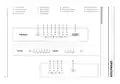
How To Use the Control Panel
Controls
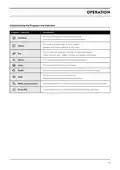
Power
Description
Press this button to turn on your dishwasher.
Press the Delay button to increase the delay start time.
Delay a cycle for up to 24 hours in one-hour increments.
Delay Start
Half Load
When you have about or less than 6 place setting dishware
to wash, you can choose this function to save energy and water.
It can be used with Intensive, Heavy, ECO, Glass and 90min.
Add to cycle for an improved drying result.
Extra Dry
It can be used with Intensive, Heavy, ECO, Glass 90min.
This option allows you to lock the buttons on the control panel - except
the Power button - so children cannot accidentally start the dishwasher
by pressing the buttons on the panel. Only the Power button remains active.
Child Lock
Start / Pause
To start the selected washing program or
pause it when the dishwasher is working.
LED Screen
To show the remaining time, delay time or error code.
14

| General | Details |
|---|---|
| Name | TECHNIKA TDX7SS-7 Dishwasher |
| Make | TECHNIKA |
| Language | English |
| Filetype | PDF (Download) |
| File size | 4.28 MB |
 (1 votes, average: 5.00 out of 5)
 Loading...


FISHER AND PAYKEL DD24DCTB9_N Contemporary Tall Dishwasher

Whirlpool WFC 3C26 Dishwasher

STIRLING STR-DWSS14 14 Place Setting Dishwasher

BLAKESLEE G-3000-1 30-Racks per Hour Stainless Glasswasher Commercial Dishwasher

FISHER PAYKEL DD60SCX9 Dish Drawer Dishwasher

BOSCH SMV6ZCX07E 6 Total Dishwasher

BOSCH SHE41CM2N Recessed Handle Dishwasher

TESLA WDI661M Dishwasher

KLEENmaid DW6031 Dishwasher

Hotpoint H3B L626 B UK Dishwasher