
ZLINE 65286410 Monument Dishwasher








INSTALLATION
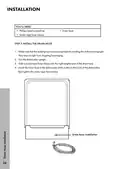
Power cord
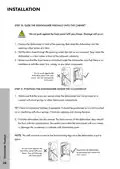
1. Remove the junction box cover on the front right of the dishwasher.
2. Make sure the junction box’s electrical wires are pulled inside of the junction box.
3. Remove the lock nut from the strain relief, then push the strain relief into the round
opening of the junction box.
4. Install the lock nut on the strain relief from inside the junction box.
5. Insert the ends of the power cord’s electrical wires into the junction box through the
strain relief.
6. Connect the incoming white (or ribbed) wire to the dishwasher’s white wire, the
black (or smooth) wire to the dishwasher’s black wire, and the ground wire to the
dishwasher’s green wire. Use cUL/UL listed wire nuts of the appropriate size.
7. Tighten the strain relief screws and lock nut to stabilize the power cord’s electrical
wires, then make sure that all of the connections are secure.
8. Replace the junction box cover on the right front of the dishwasher. Be sure that the
wires are not pinched under the cover.
NOTE: If you have trouble replacing the junction box cover, loosen the screws on the
strain relief.
21

| General | Details |
|---|---|
| Name | ZLINE 65286410 Monument Dishwasher |
| Make | Zline |
| Language | English |
| Filetype | PDF (Download) |
| File size | 1.56 MB |
 (1 votes, average: 5.00 out of 5)
 Loading...

ZLINE Monument Top Touch Dishwasher

ZLINE Monument Series 24 Red Matte Dishwasher

ZLINE 65286411 Monument Dishwasher

ZLINE Classic Dishwasher

ZLINE DWV-18 Tallac Dishwasher


FISHER and PAYKEL DD24DTX6I1 Tall Dishwasher
Diamond WR-LV50-MPSC Dishwasher

CHAMPION 2000 Series Door type Dishwasher

FISHER PAYKEL DD60SCX9 Sanitise Single DishDrawer Dishwasher

Gudsunal WQP4-6207 Dishwasher

BOSCH SMH4EVX00E Dishwasher

FISHER AND PAYKEL DD24SHTI9N Integrated Single Dishwasher

BOSCH SMI2HTS02G Dishwasher

KINGFISHER KF1000DW Deluxe Passthrough Dishwasher
FISHER PAYKEL DD60SDFHX9 Single DishDrawer Dishwasher