
AEG FSE64637P Dishwasher


























ENGLISH
47
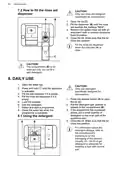
The upper ends of the two
vertical ribs inside the
compartment (B) indicate
the maximum level for filling
the dispenser with gel (max.
30ml).
Not all options are
compatible with each other.
Activating options often
increases the water and
energy consumption as well
as the programme duration.
8.2 How to select and start a
programme using MY TIME
selection bar
8.4 How to start the AUTO
Sense program
1. Slide your finger across MY TIME
selection bar to choose a suitable
programme.
1. Press
.
•
The light related to the button is
on.
•
The light related to the selected
programme is on.
•
The display shows the longest
possible program duration.
•
The ECOMETER indicates the
level of energy and water
consumption.
2. Close the appliance door to start the
program.
The appliance senses the type of load
and adjusts a suitable wash cycle.
During the cycle, the sensors operate
several times and the initial program
duration can decrease.
•
The display shows the
programme duration.
2. Activate applicable EXTRAS if
desired.
3. Close the appliance door to start the
programme.
8.5 How to delay the start of a
programme
1. Select a programme.
8.3 How to activate EXTRAS
1. Select a programme using MY TIME
2. Press
repeatedly until the display
selection bar.
shows the desired delay time (from 1
to 24 hours).
2. Press the button dedicated to the
option you want to activate.
The light related to the button is on.
3. Close the appliance door to start the
countdown.
•
•
•
The light related to the button is
on.
The display shows the updated
programme duration.
During the countdown, you cannot
change the delay time and the
programme selection.
The ECOMETER indicates the
updated level of energy and water
consumption.
When the countdown is complete, the
programme starts.
By default, options must be
activated every time before
you start a programme.
If the latest programme
selection is enabled, the
saved options are activated
automatically along with the
programme.
8.6 How to cancel the delay
start while the countdown
operates
Press and hold
The appliance returns to the programme
selection.
for about 3 seconds.
It is not possible to activate
or deactivate options while a
programme is running.
If you cancel the delay start,
you have to select the
programme again.

| General | Details |
|---|---|
| Name | AEG FSE64637P Dishwasher |
| Make | AEG |
| Language | English |
| Filetype | PDF (Download) |
| File size | 1.72 MB |
 (1 votes, average: 5.00 out of 5)
 Loading...

AEG FSK76748P Dishwasher

AEG FSK53617Za Dishwasher

AEG FSK74747P Dishwasher

AEG FSE73507P Dishwasher

AEG GS60AIM Dishwasher

AEG FSB73427Z Dishwasher

AEG FSE74737P Quickselect Dishwasher

AEG FFB73727PM Dishwasher

AEG F8642FI Tall Tub Dishwasher

AEG FFE83800PM Dishwasher


BOSCH SMS6ZDI11E-38 Dishwasher

ATAG VA7214LR 60 cm Dishwasher

FRIGIDAIRE FFBD2406NB Full Console Dishwasher

BOSCH SMV2ITX09E Dishwasher

Gudsunal WQP4-6207 Dishwasher

Whirlpool W11703656 Dishwasher

BOSCH SMS6ZDW48E Dishwasher

Mueller DW-1800 18 in. Black Front Digital Dishwasher

FRANKE FDW 614 Integrated Dishwasher

FISHER AND PAYKEL DD60STX6I1 Dish Drawer Dishwasher