
Home > Master Kitchen > Master Kitchen FI60514 Dishwasher
Master Kitchen FI60514 Dishwasher




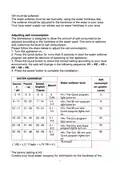




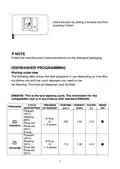
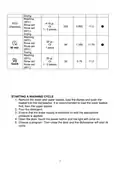



Rinse aid adjustment
To obtain a better drying performance using little rinse aid, it is possible to
adjust the quantity used for each washing cycle. Please proceed as follows.
1. Open the door and switch the appliance on.
2. Within 60 seconds of Step 1, press the Program button for more than 5
seconds, then press the Delay button to access the set model, the rinse aid
indication flashes with a frequency of 1Hz.
3. Press the Program button to select the correct series according to your
usage habits, the series will change in the following sequence: D1 > D2 > D3
> D4 > D5 > D1.
The greater the number, the bigger will be the quantity of rinse aid used by the
dishwasher.
3. To exit the configuration mode, press the power button or do not take any
action for 5 seconds.
Rinse aid
level
D1
Selected position
The Quick program light
turns on
D2
D3
The 90 min program light
turns on
The 90 min and Quick
program lights turn on
D4
D5
The Eco program lamp
turn on
The Eco and Quick
program lights turn on
11

| General | Details |
|---|---|
| Name | Master Kitchen FI60514 Dishwasher |
| Make | Master Kitchen |
| Language | English |
| Filetype | PDF (Download) |
| File size | 0.91 MB |
 (1 votes, average: 5.00 out of 5)
 Loading...

Master Kitchen 340965 Drawer Dishwasher


FISHER and PAYKEL DD60ST4NB9 Contemporary Tall Dishwasher

SIEMENS SN61IX09TE Dishwasher

BOSCH SMV6ZCX02E-39 Dishwasher

ELVITA CDM5600X Dishwasher

SIEMENS SR25YW04ME Dishwasher

Electrolux XE75530V Dishwasher

STRLING STR-DWSS14 Dishwasher

BOSCH S255HTX15E-4 Dishwasher

aspes AJI12600E Dishwasher

BOSCH SMV26DX00T Dishwasher