
SAMSUNG DW80BB70 Dishwasher





















Dishwasher
User manual
DW80BB70* Series, DW80B70* Series, DW80B60* Series
DW7000B_DW80B7070_AA_DD68-00243A-01_EN_FULL.indd
1
2023-02-24 3:45:35


| General | Details |
|---|---|
| Name | SAMSUNG DW80BB70 Dishwasher |
| Make | Samsung |
| Language | English |
| Filetype | PDF (Download) |
| File size | 6.83 MB |
 (1 votes, average: 5.00 out of 5)
 Loading...

SAMSUNG DW80N3030UW Front Dishwasher

SAMSUNG DW90F89 Dishwasher

SAMSUNG DW50T6060U Dishwasher

SAMSUNG DW80BB70 Series Dishwasher

SAMSUNG DW80CB5450 Dishwasher

Samsung DW60M5062 Dishwasher

Samsung DW60 7 Series Dishwasher

SAMSUNG DW9000F Dishwasher

SAMSUNG DW60R2014 Wide 12 Place Dishwasher

SAMSUNG DW60H9950FW-SA Dishwasher

SAMSUNG DW80BB70 Dishwasher Overview
Summary of Contents
- Page 1: Dishwasher user manual for DW80BB70* Series, DW80B70* Series, DW80B60* Series.
- Page 2: Safety information What you need to know about the safety instructions Important safety symbols Before using your dishwasher Regulatory notice Unpacking your dishwasher Unsuitable items for the dishwasher Detergent guidelines Cycle overview Simple steps to start your dishwasher
- Page 3: Troubleshooting Check these solutions if your dishwasher… Information codes Cycle chart Appendix Helping the environment Specifications Open Source Announcement Warranty (U.S.A)
- Page 4: Safety information Congratulations on your new Samsung dishwasher. This manual contains important information on the installation, use, and care of your appliance. What you need to know about the safety instructions Warnings and Important Safety Instructions in this manual do not cover all possible conditions and situations that may occur. It is your responsibility to use common sense, caution, and care when installing, maintaining, and operating your dishwasher. Important safety symbols What the icons and signs in this user manual mean: WARNING: Hazards or unsafe practices that may result in severe personal injury or death. To reduce the risk of fire, explosion, electric shock, or personal injury when using your dishwasher, follow these basic safety precautions. CAUTION: Hazards or unsafe practices that may result in minor personal injury or property damage. These warning signs are here to prevent injury to you and others. Please follow them explicitly. After reading this section, keep it in a safe place for future reference.
- Page 5: California Proposition 65 Warning: Cancer and reproductive harm. When using your dishwasher, follow basic precautions, including the following: Read all instructions before using the dishwasher. Use the dishwasher only for its intended function. Use only detergents or wetting agents recommended for use in a dishwasher. When loading items to be washed, locate sharp items so that they are not likely to damage the door seal. Do not wash plastic items unless they are marked “dishwasher safe.” Do not touch the heating element during or immediately after use. Do not operate your dishwasher unless all enclosure panels are properly in place. Do not tamper with the controls. To reduce the risk of injury, do not allow children to play in or on the dishwasher. Remove the door to the washing compartment when removing an old dishwasher from service or discarding it.
- Page 6: Safety information After unpacking the dishwasher, keep the packaging out of the reach of children. The dishwasher is extremely heavy. Do not attempt to move or carry the dishwasher by yourself. As with any equipment using electricity, water, and moving parts, potential hazards exist. Do not install the dishwasher near electrical components. Keep the dishwasher away from open flames. Your dishwasher must be properly grounded. Never connect it to an ungrounded outlet. Check that the drain hose is properly connected and that there is no leakage from the hose connectors. The water supply line is susceptible to breakage. Check the line periodically for any damage. Familiarize yourself with the operations of the appliance and exercise care when using it. Keep your dishwasher detergent out of the reach of children. Detergent is corrosive and harmful. Do not repair, replace, or service any part of your dishwasher yourself. Only authorized service technicians should perform these tasks.
- Page 7: Before disposing of your dishwasher, remove the door of the washing compartment or the door latch so that children or small animals cannot get trapped inside. If the dishwasher is left unused for an extended period of time, turn off the water supply. This dishwasher is intended for residential use only. Do not use the dishwasher until it is correctly installed. Do not push down on the dishwasher door when it is open. Do not place excessive weight on the dishwasher door when it is open. Electrically ground the dishwasher. Connect the ground wire to the green ground connector in the junction box. Do not use an extension cord. Failure to follow these instructions can result in death, fire, or electric shock.
- Page 8: Safety information Any changes or modifications not expressly approved by the party responsible for compliance could void the user’s authority to operate the equipment. This device complies with Part 15 of FCC Rules. Operation is subject to two conditions: it may not cause harmful interference and must accept any interference received. For products sold in the US and Canadian markets, only channels 1–11 are available. This equipment has been tested and found to comply within the limits for a Class B digital device. These limits are designed to provide reasonable protection against harmful interference in a residential installation. This equipment generates, uses, and can radiate radio frequency energy and may cause harmful interference if not installed and used according to the instructions. If this equipment does cause harmful interference to radio or television reception, the user is encouraged to try to correct the interference. Reorienting or relocating the receiving antenna may help reduce interference. Increasing the separation between the equipment and receiver can also be effective. Consulting the dealer or an experienced radio/TV technician for help is recommended.
- Page 9: FCC radiation exposure statement: This equipment complies with FCC radiation exposure limits set forth for an uncontrolled environment. This equipment should be installed and operated so there is at least 8 inches (20 cm) between the radiator and your body. This device and its antenna(s) must not be co-located or operated in conjunction with any other antenna or transmitter. IC notice: The term “IC” before the radio certification number only signifies that Industry Canada technical specifications were met. Operation is subject to the following two conditions: (1) this device may not cause interference, and (2) this device must accept any interference, including interference that may cause undesired operation of the device. This Class B digital apparatus complies with Canadian ICES-003. For products sold in the US and Canadian markets, only channels 1–11 are available. IC radiation exposure statement: This equipment complies with IC RSS-102 radiation exposure limits set forth for an uncontrolled environment. SAVE THESE INSTRUCTIONS.
- Page 10: Before you start Be sure to have your installer follow these instructions closely so that your new dishwasher works properly and that you’re not at risk of injury when washing dishes. Unpacking your dishwasher Once your new dishwasher has been delivered to you, carefully unpack it and check for any damage. If the dishwasher has been damaged, make note of it on the waybill and keep a copy. Do not install the dishwasher, and contact Samsung Customer Service. If there is no damage to the product, you can proceed with the installation. If you are going to install it yourself, make sure to read through the installation guide and follow the directions inside. After unpacking your dishwasher, keep the packaging out of the reach of children to ensure their safety.
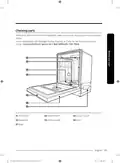
- Page 11: Checking parts Make sure you’ve received all the parts shown below. If your dishwasher was damaged during shipping, contact Samsung Customer Service. Top nozzle Storm Wash+ Lower nozzle Dispenser Control panel Door Base
- Page 12: Before you start Accessory parts include the user/installation manual, installation kit, and kick plate. Do not wash items that are covered with ash, sand, wax, lubricating grease, or paint. These materials will damage the dishwasher. Remove food remains such as bones, fruit seeds, etc., and waste such as toothpicks and paper napkins from your dishes. Food remains and waste can make noise, cause the dishwasher to malfunction, and damage your dishes and dishwasher.
- Page 13: Unsuitable items for the dishwasher Wash only items such as glass, porcelain, and cutlery which the manufacturer states is dishwasher safe. Do not wash aluminium (e.g. grease filters). The dishwasher may damage aluminium or cause a severe chemical reaction. Do not wash copper, brass, tin, ivory, and aluminium items or items with adhesive. Non-heat resistant plastics should not be washed in the dishwasher. Avoid washing craft items, antiques, valuable vases, and decorative glassware. Pottery or glazed-ceramic items are unsuitable for the dishwasher. Wooden cutlery and crockery or items with wooden parts should not be washed. Delicate glassware or glassware containing lead crystal may cloud after frequent washing. Silverware that has contacted food containing sulphur may become discoloured.
- Page 14: Using your dishwasher Basic use of racks In the lower rack, you can easily fold down the fold-down tines to make room for large items such as pots and pans in the StormWash area. In the upper rack, you can adjust the angle of the tines to two different positions to match the size and shape of your dishes.
- Page 15: Height adjustment You can adjust the height of the upper rack in your Samsung dishwasher to accommodate larger sized dishes. Depending on where you set the upper rack height, the lower rack can accommodate plates up to 12 in. (30 cm) in diameter. To raise the upper rack, pull the upper rack upwards. To lower the upper rack, hold both adjustable handles located at the left and right sides of the upper rack, and then evenly press down. Adjust the height of the upper rack before loading dishes into the rack. Adjusting the rack after loading the dishes may damage the dishes. Make sure to hold both handles when adjusting, or the dishwasher door may not close properly.
- Page 16: Using your dishwasher To remove the upper rack, pull it towards the front and lift it slightly to remove. While the upper rack is removable, it must be installed for the dishwasher to operate properly. If you attempt to operate the dishwasher without the rack, noise will occur and the dishwasher will perform poorly.
- Page 17: To remove the 3rd rack: Stand facing the dishwasher and pull the 3rd rack out so that the handles at the ends of the rack supports are even with the end of the rack. Find the small indentation on the inside of the left rack support that houses the tab for the handle lock. Push the handle lock tab in with the tip of your thumb, and then pull the handle towards you until it disengages from the support. Repeat this process with the right handle using your left thumb. When the handles are removed, remove the 3rd rack from the dishwasher. Reverse the order of removal to re-insert the 3rd rack. Make sure the hook-shaped part of the handle faces downward and the handle lock re-engages when reinserting the handle into the rail.
- Page 18: Using your dishwasher Loading dishes Loading the lower rack The lower rack has been especially designed for dinner dishes, soup bowls, plates, pots, lids, casserole dishes, and plates. Load large items such as pans and pots into the dishwasher so their open sides face downwards. We recommend loading cups, stemware, and small plates into the upper rack. See the recommended loading patterns below.
- Page 19: Loading the Storm Wash+ area is important for effective cleaning. Large items should be placed in the Storm Wash+ area on the left side of the lower rack. Selecting Storm Wash+ activates additional power to enhance the water jet in that area. Ensure that pot handles and other items do not obstruct the rotation of the nozzles. Caution is advised to prevent clogging the hot air outlet of SmartDry in the lower basket's right corner. A clogged outlet will hinder heat circulation. Keep plastic dishes away from the hot air outlet of SmartDry, as they can be damaged by heat.
- Page 20: Using your dishwasher Loading the upper rack The upper rack has been designed for small plates, mugs, glasses, and plastic items marked “dishwasher safe”. Load your plates into the dishwasher in two half rows, so that the front of each plate faces the back of the plate in front of it. Make sure the loaded dishes do not interfere with the rotation of the nozzle which is located at the bottom of the upper rack. When loading dishes, pull the upper rack out sufficiently so you can load it without striking the counter above. The glass support is especially suited for wine glasses. Hang wine glasses onto the pegs of the glass support. Fold the glass support back when it is not being used. Do not adjust the level of the upper rack with the glass support propped up.
- Page 21: The cutlery rack is best suited for flatware and cooking or serving utensils. Use it with the spoon stands in the lower basket. You can load cutlery and utensils in the 3rd rack or the spoon stands in the lower basket. The entire cutlery rack can be removed if more space is needed on the upper rack for larger items. Refer to the To remove the 3rd Rack section for instructions.
- Page 22: Using your dishwasher Loading the cutlery rack The cutlery rack consists of two compartments. You can place each knife, spoon, or fork separately into the spoon stands in the basket’s covers to prevent chipping and discoloration. You can use the cutlery rack with the cover open.
- Page 23: The spoon stands as seen from above with the suggested placement of cutlery items. Match the numbers in the diagram to the numbers in the list of cutlery items below. Do not let any item extend through the bottom. Do not load chopsticks in this rack, which should be loaded in the 3rd rack. Forks Tea spoons Dinner spoons Knives Serving spoons and serving forks Remaining items
- Page 24: Using your dishwasher Detergent guidelines All dishwasher cycles require detergent in the detergent compartment. Apply detergent as appropriate for the selected cycle to ensure best performance. Do not consume dishwasher detergent. Avoid breathing in detergent fumes. Dishwasher detergent contains irritants and caustic chemicals that can induce respiratory conditions. Keep dishwasher detergent out of children’s reach. Use dishwasher detergent only. Other types of detergent produce excessive foam. To fill the detergent dispenser, gently press the dispenser flap to unlock, and then slide it open.
- Page 25: Apply the recommended amount of detergent to the main compartment. Close the flap, and then press down to lock. This dishwasher has no separate compartment for tablet detergent. For better performance, pour a small amount of detergent onto the door to clean heavily soiled items more effectively. The additional detergent will activate during the pre-wash process.
- Page 26: Using your dishwasher The cover opens automatically to dispense the detergent during the wash. Amount of detergent Main wash dispenser Rinse aid improves the drying performance of the dishwasher. When the rinse refill indicator lights up on the control panel, refill with rinse aid. Only use liquid rinse aid. Do not apply any type of detergent to the rinse aid compartment. Do not overfill the compartment. Pull up the cap of the rinse compartment to open. Fill the compartment with rinse aid as specified by the rinse aid manufacturer.
- Page 27: For more information on setting the rinse aid amount, see page 35. Press down the circle area of the cap to close. To prevent the touch-enabled controls from losing responsiveness, follow these instructions. Touch the center of each button with one finger. Do not touch more than one button at a time, except as directed. Clean the surface of the control panel regularly with a soft, damp cloth.
- Page 28: To reduce the risk of fire, electric shock, or injury to persons, read the important safety instructions before operating this appliance. When you press the power button, the cycle on light for the most recently started cycle turns on. When the selected cycle is complete, the dishwasher powers off automatically. Select the appropriate wash cycle depending on the soil level of your dishes. If you want to change the cycle once it has started, press the power button. If selected, only the lower rack nozzle is activated to reduce both the cycle time and power consumption. Use this cycle to wash a small load of dishes or glasses in the lower rack. To wash heavily soiled items, select the Storm Wash+ option.
- Page 29: Use the Storm Wash+ option for washing pots, pans, and large, dirty dishes. Place dishes face down in the marked Storm Wash+ area in the lower basket. Hi-Temp Wash raises the main wash temperature for tough, baked-on food. The Sanitize option increases water temperature to 163 ˚F (73 ˚C) in the final rinse cycle. The Sanitize lamp blinks when the water reaches the sanitary temperature. Only the Normal cycle with the Sanitize option meets NSF 184 requirements for soil removal and sanitization. For the Sanitize mode, use 3/4 oz (20 g) of detergent in the main wash dispenser. Control Lock prevents accidental starting of the dishwasher by children. To lock the control panel, hold the Sanitize button for three seconds when powered on.
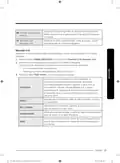
- Page 30: Operations Hi – Press SmartDry Hi/Lo once to select “SmartDry High”. This option increases the rinsing temperature up to 73 ˚C and enhances the drying performance compared to “SmartDry Low”. Lo – Press SmartDry Hi/Lo twice to select “SmartDry Low”. This option reinforces the drying performance inside the dishwasher through the circulation of heated air. “SmartDry Low” is a recommended drying option by the manufacturer. Off – Press SmartDry Hi/Lo three times to exit. SmartDry Low condition is recommended for regular use to completely wash a full load of normally soiled dishes. The dishwasher stays in a high temperature inside during the SmartDry process. Do not open the door or touch any of the loaded dishes or the hot air outlet of SmartDry. Take caution not to clog the hot air outlet of SmartDry with dishes. Clogged outlet will not facilitate heat circulation. Keep plastic dishes away from the hot air outlet of SmartDry as they are vulnerable to heat. To enhance the drying performance, it is recommended to use rinse for the SmartDry cycle. You can monitor and control the dishwasher remotely through a Wi-Fi connection.
- Page 31: Delay a cycle for up to 24 hours in one-hour increments. To increase the delay start time, press or hold the Delay Start button. After setting the delay time, press the START button, and then close the door to start the cycle. To change the delay time after the dishwasher has started, first turn the dishwasher off and turn it back on. Cancel & Drain: To cancel a currently running cycle and drain the dishwasher, press and hold the START button for three seconds. Once the dishwasher is reset, select a cycle and option, and then press START to restart the dishwasher. Lights up if Control Lock is activated, and blinks if any button except for the POWER button is pressed. Lights up if Self Clean is activated, and blinks for 5 seconds every 20-22 cycles. Lights up if the dishwasher runs out of rinse aid. Lights up if SmartThings is activated.
- Page 32: Operations Progress displays Cycle overview Auto cycle detects soil level and initiates optimal cycle. Normal cycle is for normally soiled dishes. Heavy cycle is for heavily soiled dishes. Delicate cycle is for fragile items like fine glassware. Express 60' cycle washes dishes quickly in about 1 hour. Wash, rinse, and dry indicators show the current cycle status. All lights turn off after the dishwasher completes the cycle.
- Page 33: Use this cycle for dislodging large food debris quickly and preventing caking. No detergent or rinse is applied. You can download and use additional cycles on your smartphone. The default cycle is Self Clean. You can save the downloaded cycle for future use. Use this cycle to clean the dishwasher’s tub. If the dishwasher needs self cleaning, the Self Clean indicator will blink for 5 seconds. Be sure to run the Self Clean cycle with the dishwasher empty. Appropriate for cleaning plastic dishes that are vulnerable to heat and temperature. Appropriate for cleaning cookware such as pans and pots that are likely to be soiled heavily. Use this cycle for normal dishwashing after a meal.
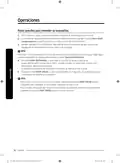
- Page 34: Simple steps to start your dishwasher Open the door, and then load the dishwasher. Make sure dishes are empty. If applicable, put the dishes in the lower rack. If adding the Storm Wash+ option, put the dishes in the left side of the lower rack. Add detergent to the detergent dispenser. For better results, add rinse aid to the rinse aid compartment. You should use rinse aid for better drying performance. You can further improve drying performance by also selecting the Sanitize option. Press POWER, and then select a cycle with necessary options (Lower Rack, Storm Wash+, Hi-Temp Wash, Sanitize). Press START, and then close the door within 3 seconds. The dishwasher starts the cycle after draining for a few seconds. To change the cycle after it has started, press and hold START for 3 seconds to cancel the cycle. Then, select a new cycle. To resume after you have opened the door to stop the dishwasher while operating, simply press START first, and then close the door.
- Page 35: Settings allow you to change sound, Auto Release™ Dry alert, rinse aid amount, and Auto Release™ Dry settings. To change the settings, press the Sanitize and Delay Start buttons simultaneously for 3 seconds. Press Sanitize to navigate through the sub menus, and then press Delay Start to confirm your changes. To mute the dishwasher, select ‘U0’, and then press Delay Start. To unmute, select ‘U1’, and then press Delay Start. You can enable or disable the setting that alerts you when the door opens to start the Auto Release™ Dry function. To disable the Auto Release™ alert, select ‘J0’, and then press Delay Start. To enable, select ‘J1’, and then press Delay Start. The higher the rinse aid number, the more rinse aid the dishwasher uses. The factory default level for rinse aid is ‘F4’.
- Page 36: Auto Release™ Dry function improves drying performance by automatically opening the dishwasher’s door 1 to 15 minutes before a cycle ends. You can enable or disable Auto Release™ Dry using the Setting Mode or toggle keys. Press Sanitize until “A1” or “A0” is displayed, then press Delay Start to enable (A1) or disable (A0) Auto Release™ Dry. Using the toggle keys, press the Lower + Hi-Temp Wash button for 3 seconds to enable (A1) or disable (A0) Auto Release™ Dry. Once the door opens in Auto Release™ Dry mode, it cannot be closed manually for the next 2 minutes. Disabling Auto Release™ Dry can affect drying results; enabling it is recommended for better results. After a cycle is complete, the door automatically opens to let steam out, which is normal and not a malfunction.
- Page 37: SmartThings Wi-Fi connection On your smartphone, go to Settings, and then connect to your home Wi-Fi network. Download the SmartThings app using “SmartThings” as the search term. The SmartThings app is designed for Android 8.0 or later, iOS 13.0 or later. You must first log into SmartThings using your Samsung account. To register your device to SmartThings, make sure your smartphone is connected to a wireless network. When a message of “A new device is found,” select Add. If no message appears, select + and then select your dishwasher in a list of devices available. Follow the on-screen instructions to complete the connection process for your dishwasher. When a network connection is established, the Wi-Fi icon lights up on your dishwasher.
- Page 38: Operations Dishwasher app Integrated control: You can monitor and control your dishwasher both at home and on the go. Select the dishwasher icon on SmartThings. The dishwasher page appears. Check the operation status or notifications related to your dishwasher, and then change options or settings if necessary. This device is designed for household use only (Class B), and can be used in all residential areas. Recommended encryption methods are WPA/TKIP and WPA2/AES. Newly developed Wi-Fi protocols or unapproved Wi-Fi protocols are not supported. The reception sensitivity of a wireless network may be affected by surrounding wireless environments. Your Samsung dishwasher supports the Wi-Fi 2.4 GHz protocols. The SmartThings app is available on Android devices with OS 8.0 or higher and iOS devices with iOS 13 or higher.
- Page 39: SmartThings You can check the current cycle and its options, and the remaining cycle time. The Smart Control status is shown for the dishwasher. Use this to monitor the energy consumption status. Select a cycle and necessary options, and then select Start/Pause/Cancel to start an operation, to stop temporarily, or to cancel the current operation. Add frequently used cycles and options to My Favorite for later use. Set Delay Start to start the cycle at a scheduled time. Notifies you that the current cycle is complete. Notifies you if the dishwasher is out of rinse aid. Recommends the best cycle with optimal options for loaded dishes. The wizard features a maintenance management service and a usage guide.
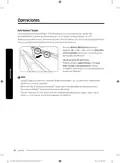
- Page 40: Operations You can delay the cycle starting time up to 24 hours in 1-hour increments. To change the delay time once the dishwasher has started, press POWER and then restart the dishwasher. Touch controls allow you to operate the dishwasher easily. They are convenient to operate, requiring only a soft touch. If you have children or you want to clean the Control Interface, we recommend activating the Control Lock feature. Control Lock locks all button controls except for POWER. To activate Control Lock, press and hold Sanitize or Lock for 3 seconds. To deactivate Control Lock, press and hold Sanitize or Lock again for 3 seconds. Control Lock remains active after the dishwasher restarts. To cancel Control Lock, you must deactivate it first.
- Page 41: Maintenance Keep the dishwasher clean to improve performance, reduce unnecessary repairs, and lengthen its lifecycle. Clean spills on the surface of the dishwasher as they occur. Use a soft, damp cloth on the control panel to gently wipe away spills and dust. Do not use benzene, wax, thinner, chlorine bleach, alcohol, or other chemical substances. The dishwasher has electric parts inside. Do not sprinkle water directly onto the dishwasher. For a stainless-steel door panel, clean using a stainless steel cleaner for home appliances. Clean the interior of the dishwasher on a regular basis to remove any dirt or food particles. Wipe inside the dishwasher and inside the door with a wet dishcloth. To maintain optimum cleanliness, we recommend running the Self Clean cycle periodically with the dishwasher empty. Use a damp cloth to remove lime scale or grease deposits inside the dishwasher.
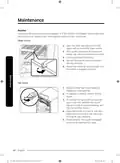
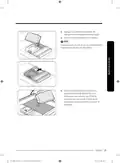
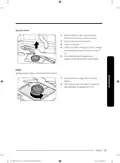
- Page 42: Maintenance To prevent the nozzles from being clogged, or if the nozzles are clogged, remove and clean each nozzle. Upper nozzle Open the door, and then pull out the upper rack to reveal the upper nozzle. Turn counter clockwise to remove the nozzle cap, and then remove the nozzle. Unclog and clean the nozzle. Reinsert the nozzle, and then tighten the cap clockwise. Top nozzle Check whether the nozzle holes are clogged by food particles. If cleaning is needed, remove the top nozzle. To remove the top nozzle, pull out the upper rack first, unfasten the nozzle cap by turning it counterclockwise, and then remove the nozzle. Clean the nozzle, re-insert it, and then fasten the nozzle cap to the nozzle by turning the cap clockwise. Check whether the nozzle is engaged correctly by rotating it by hand.
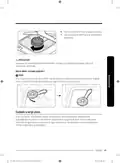
- Page 43: Lower nozzle Open the door, and then pull out the lower rack to reveal the lower nozzle. Pull up the nozzle to remove it. Clean the nozzle. Re-insert the nozzle, and then push the nozzle down until you hear a click. Rotate the nozzle by hand to make sure the nozzle is engaged correctly. Filter We recommend cleaning the filter every month. Open the door, and then remove the lower rack. Turn the filter handle counterclockwise to unlock the filter cover.
- Page 44: Maintenance involves removing the filter cover and the cylindrical micro filter underneath. It's important to remove any dirt and impurities from the micro filter and the filter cover. Rinse them with running water and then dry well.
- Page 45: Reinsert the filter, and then the filter cover. Turn the filter handle clockwise to lock. Make sure the filter cover is closed properly. A loose cover can reduce the filtering performance. If the Storm Wash nozzle has already been rotated, rotate it back to the original position as shown. If you will not use the dishwasher for an extended period of time, first drain the unit completely, and then disconnect the water hose. Shut off the water supply valve and the circuit breaker. Water remaining in the hoses or the internal components can damage the dishwasher.
- Page 46: Maintenance Cleaning the drain pump If the dishwasher fails to drain because the drain pump is clogged with foreign matter or there is an abnormal noise coming from the drain pump, you must unclog and clean the drain pump as instructed below. Remove the lower rack. See the Filter section to remove the cylindrical micro filter. Remove any moisture from the filter using a sponge. Remove the drain-pump cover by pushing its handle in the direction of the arrow, and then pulling up. Check the impeller to see if it's in good condition. Then, remove any foreign matter from the pump. Reinsert the drain-pump cover and then press down until you hear a click. Storing your dishwasher If you need to store your dishwasher for an extended period of time, first drain and disconnect it. If you leave water in the hoses and internal components, you can damage the dishwasher. After draining and disconnecting the dishwasher, be sure to turn off the water supply valve and circuit breaker.
- Page 47: Troubleshooting Check these solutions if your dishwasher… Problem Possible cause Solution Check if the door is latched and closed completely. Check whether the upper rack is properly joined to the duct nozzle. Also, check if the upper rack is crooked or unbalanced. The door is not closed completely. Will not start. The START button was not pressed. See the information code that appears on the display. Make sure the power cable is connected properly. Doesn't operate at all. Check if the water supply valve is open. The water supply does not work. Check if the supplied water pressure is between 20 and 120 psi. The control panel is locked. Unlock the control lock. A circuit breaker is open. Reset the circuit breaker. Check if the water supply line is connected to a cold water supply. To work properly, the dishwasher must be connected to a hot water supply.
- Page 48: Troubleshooting Select a cycle according to the number and soil level of the dishes, as directed in this manual. Connect the water supply line to a hot water supply. For best performance, the temperature of the supplied water should be 120 ˚F (49 ˚C). The water pressure should be between 20 and 120 psi (140-830 kPa). Use a commercial dishwasher cleaner. Use high-quality, fresh detergent with rinse aid. Use automatic dishwasher detergent. We recommend a powder type or multi-function tablet dishwasher detergent. Make sure large items such as cookie sheets, cutting boards, or containers are not blocking the detergent dispenser. Rearrange the dishes so they do not interfere with detergent dispenser operation.
- Page 49: Problem: There is no rinse aid. Possible cause: A nozzle is clogged. Solution: Check the dispenser and add rinse aid. Use liquid type rinse aid. Clean the nozzle. Rearrange the dishes so they do not interfere with nozzle rotation and detergent dispenser operation. The dishes are improperly loaded. Load only an appropriate number of dishes. Scrape food from dishes prior to loading. The filters are clogged or not correctly fastened. Check if the supplied water pressure is between 20 and 120 psi.
- Page 50: Troubleshooting There is no rinse aid in the dispenser or not enough rinse aid was used. Check the dispenser and add rinse aid. The temperature of the water is low when the dishwasher is running. Connect the water supply line to a hot water supply. Proper loading of items can affect drying. Too many dishes have been loaded. Load your dishes as recommended. Glasses and cups with concave bottoms hold water. After finishing the cycle, empty the lower rack first and then the upper rack. Auto Release™ Dry is turned off.
- Page 51: Problem Possible cause Solution Clean the dishwasher by running the Heavy cycle with the dishwasher empty and no detergent. Water was left over from an incomplete cycle. Contact a qualified service technician to remove any obstruction from the drain hose. The drain hose is obstructed. Has a bad odor. The dishwasher is not used daily or soiled dishes are left in unit too long. With the dishwasher empty and no detergent, place a glass with 8 ounces of vinegar upright into the lower rack, and then run a Heavy cycle. Sound is generated when the dispenser cover is open and the drain pump is operating in an early stage. This is normal operation. The dishwasher is not level. Ensure the dishwasher is level. Foreign material is in the pump chamber. Contact a qualified service technician to remove foreign material from the pump chamber. There is a ‘chopping’ sound because a nozzle is bumping against the dishes. Rearrange the dishes. Check if the supplied water pressure is between 20 and 120 psi. Less water than required is supplied. Nozzle holes are clogged with food particles. Clean the nozzle holes. Does not have a smoothly rotating nozzle. After placing the dishes into the racks, rotate the nozzles by hand to check whether any of the dishes interfere with them. The nozzle is blocked by a dish or pot and cannot rotate. Water won’t pump out of the dishwasher. Clean the drain pump by removing the drain-pump cover.
- Page 52: Troubleshooting Has a bent upper rack after dishes are loaded. The dishes are not loaded properly. Load your dishes as recommended. Cannot close the door. Auto Release™ Dry mode is in operation. Information codes The Control Panel displays information codes to help you understand what is occurring with your dishwasher. Leakage check. If a water supply valve connection leak occurs, close the water supply valve and contact the installer to fix. Water supply check. Check if the water supply valve is closed or clogged, or is frozen. Drain check. Check whether the drain hose is clogged or folded. High temperature heating check. Functional check. With the dishwasher empty, add detergent, and then run a cycle.
- Page 53: Pump operation check. Functional check. Turn off the dishwasher and try to start it again. If the problem continues, contact an authorized Samsung service center. Zone wash function check. Dry heater failure check. Turn the dishwasher off and turn it back on. Dry heater overheat check. Unplug the power cord of the dishwasher before contacting an authorized Samsung service center. For any codes not listed above, call 1-800-SAMSUNG.
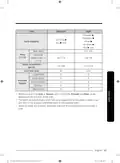
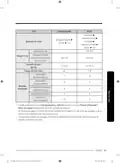
- Page 54: Cycle chart for DW80BB70* Series and DW80B7* Series outlines various wash cycles including Auto, Normal, Heavy, and Prewash. Each cycle consists of a sequence that includes Mainwash, Rinse, and Dry stages. Temperature settings for the cycles range from 122-140°F (50-60°C) to 149°F (65°C). The sanitize option operates at 163°F (73°C). Water consumption varies by cycle, with values ranging from 2.6 to 5.4 gallons. Cycle times differ, with durations from 109 to 137 minutes. The document lists available options such as Storm Wash+, Hi-Temp Wash, and SmartDry settings. Delay Start is also mentioned as an available feature. The lower rack is compatible with all cycles and options. The information is part of the user manual for the dishwasher model.
- Page 55: Cycle options include delicate, express 60', pre blast, and prewash. Mainwash and rinse cycles are essential components of the washing process. Hot rinse is included in the cycle sequence. Drying options are available after the wash cycles. Sanitize temperature is set at 163 ˚F (73 ˚C). Water consumption varies by cycle, with values ranging from 1.1 to 4.3 gallons. Cycle time for the main wash is 79 minutes. Available options include storm wash+, hi-temp wash, and smartdry settings. Delay start is an option for scheduling washes. The document includes specifications for different wash temperatures and water usage.
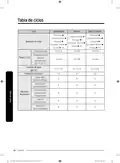
- Page 56: Cycle chart Cycle SelfClean Plastic PotsPans Cycle sequence Main wash Temp Water consumption Cycle time (min)
- Page 57: Cycle options include BabyCare, Night, Prewash, Mainwash, Rinse, Hot Rinse, and Dry. The cycle sequence consists of Prewash, Mainwash, Rinse, Hot Rinse, and Dry. The sanitize temperature is 163 ˚F (73 ˚C). Water consumption varies by cycle, with values of 1.0 (3.8) and 5.0 (19.1) gallons (liters). Cycle time can be 89 or 150 minutes depending on the selected options. The lower rack features options like Storm Wash+, Hi-Temp Wash, and Sanitize. Selecting Auto or Normal cycles adjusts Prewash and Rinse based on soil level. Water consumption and wash time can vary with added steps or options. Empty Rinse Aid may increase wash time and Last Rinse temperature. Available options include SmartDry-High, SmartDry-Low, and Delay Start.
- Page 58: Cycle chart DW80B6* series Cycle options include Auto, Normal, Heavy, and Prewash. The cycle sequence consists of Prewash, Mainwash, Rinse, Hot Rinse, and Dry. Temperature settings range from 122-140°F (50-60°C) to 149°F (65°C). Sanitize option reaches 163°F (73°C). Water consumption varies from 4.0-5.3 gallons (15.2-20.2 liters). Cycle time ranges from 113 to 153 minutes. Available options include Storm Wash+, Hi-Temp Wash, and Delay Start. Lower rack compatibility is indicated for all cycles. End of cycle is marked after Dry.
- Page 59: Cycle options include delicate, express 60', pre blast, and prewash. Main wash and rinse cycles are part of the sequence. Hot rinse and dry cycles are included with an end indication. Sanitize temperature is set at 163 ˚F (73 ˚C). Water consumption varies by cycle, with values of 4.3 (16.4), 2.9 (10.8), and 1.1 (4.1) gallons (liters). Cycle time ranges from 10 to 95 minutes. Lower rack options include storm wash+, hi-temp wash, and sanitize. Delay start is available for multiple cycles. The document includes English language instructions. The document version is indicated as DW7000B_DW80B7070_AA_DD68-00243A-01_EN_FULL.
- Page 60: Cycle chart Cycle SelfClean Plastic PotsPans Cycle sequence Main wash Temp Water consumption Cycle time (min)
- Page 61: Cycle options include BabyCare, Night, Prewash, Mainwash, Rinse, Hot Rinse, and Dry. The cycle sequence ends with Dry and End. Main wash temperature is 131°F (55°C) with a sanitize option at 163°F (73°C). Water consumption varies by cycle, with 1.0 gallons (3.8 liters) for Prewash and 5.0 gallons (19.1 liters) for Mainwash. Cycle time for the main wash is 80 minutes, while the total can extend to 170 minutes depending on options selected. Lower Rack options include Storm Wash+, Hi-Temp Wash, and Sanitize. When selecting Auto or Normal cycles, Prewash and Rinse depend on the soil level of the load. Water consumption and wash time vary based on selected steps, options, and water conditions. Empty Rinse Aid can increase wash time and Last Rinse temperature.
- Page 62: Helping the environment Your dishwasher is manufactured from recyclable materials. If you decide to dispose of it, please observe local waste disposal regulations. Cut off the power cable so that the appliance cannot be connected to a power source. Remove the door so that animals and small children cannot get trapped inside the appliance. Do not exceed the detergent quantities recommended in the detergent manufacturers’ instructions. Specifications Model: DW80B7070AP / DW80B7071US / DW80B7071UG / DW80B7070US / DW80B7070UG / DW80B6061US / DW80B6061UG / DW80B6060US / DW80B6060UG Type: Built-in Dishwasher Power: 120 V / 60 Hz AC only, 15 A circuit breaker Wash capacity: 15 place settings Used water pressure: 20-120 psi (140-830 kPa) Rated power usage: 1100 W Dimensions: 23 7/8 x 25 x 33 7/8 in. (605 x 636 x 860 mm) Weight (Unpacked): 89.28 lb (40.5 kg) for certain models, 91.49 lb (41.5 kg) for others.
- Page 63: Open source announcement. The software included in this product contains open source software. The following URL leads to open source license information as related to this product.
- Page 64: Warranty (U.S.A) Limited warranty to original purchaser with proof of purchase. This Samsung brand product is warranted against manufacturing defects in materials or workmanship. The limited warranty period is one year for parts and labor. There is a five-year warranty for the printed circuit board, racking, and stainless door liner & tub for leakage (parts only). This limited warranty is valid only on products purchased and used in the United States. Warranty service can only be performed by a Samsung authorized service center. The original dated bill of sale must be presented as proof of purchase to receive warranty service. Samsung will provide in-home service within the contiguous United States during the warranty period at no charge. During the warranty period, a product will be repaired, replaced, or the purchase price refunded at Samsung's sole option. Replacement parts and products are warranted for the remaining portion of the original product’s warranty or ninety days, whichever is longer.
- Page 65: This limited warranty covers manufacturing defects in materials or workmanship encountered in normal household, noncommercial use of this product. It does not cover damage that occurs in shipment, delivery, installation, and uses for which this product was not intended. Damage caused by unauthorized modification or alteration of the product is excluded. The warranty does not apply to products where the original factory serial numbers have been removed or cannot be readily determined. Cosmetic damage including scratches, dents, and chips is not covered. Damage caused by abuse, misuse, pest infestations, accidents, fire, floods, or other acts of nature is excluded. The cost of repair or replacement under excluded circumstances is the customer’s responsibility. Visits by an authorized servicer for product functions, maintenance, or installation are not covered by this limited warranty. Implied warranties are limited to one year or the shortest period allowed by law. This warranty gives you specific rights, and you may also have other rights, which vary from state to state.
- Page 66: Warranty (U.S.A) Limitation of remedies Your sole and exclusive remedy is product repair, product replacement, or refund of the purchase price at Samsung’s option, as provided in this limited warranty. Samsung shall not be liable for special, incidental or consequential damages. Some states do not allow exclusion or limitation of incidental or consequential damages, so the above limitations or exclusions may not apply to you. This warranty gives you specific rights, and you may also have other rights, which vary from state to state. Samsung does not warrant uninterrupted or error-free operation of the product. No warranty or guarantee given by any other person, firm, or corporation with respect to this product shall be binding on Samsung. To obtain warranty service, please contact Samsung.
- Page 67: Page 67
- Page 68: Page 68
- Page 69: Lavavajillas Manual del usuario Serie DW80BB70*, Serie DW80B70*, Serie DW80B60*
- Page 70: Contenidos Información sobre seguridad Lo que necesita saber sobre las instrucciones de seguridad Símbolos de seguridad importantes Antes de usar la lavavajillas Aviso normativo Desempaque de la lavavajillas Verificación de las piezas Artículos no adecuados para la lavavajillas Uso de la lavavajillas Descripción general de los ciclos
- Page 71: Solución de problemas Intente implementar las siguientes soluciones si su lavavajillas… Códigos de información Tabla de ciclos Apéndice Ayuda al medio ambiente Especificaciones Anuncio de código abierto Garantía (EE. UU.) Español
- Page 72: Información sobre seguridad Felicitaciones por la compra de su nueva lavavajillas Samsung. Este manual contiene información importante acerca de la instalación, el uso y el cuidado del electrodoméstico. Lo que necesita saber sobre las instrucciones de seguridad Las advertencias y las instrucciones de seguridad importantes de este manual no cubren todas las posibles condiciones y situaciones que pueden ocurrir. Símbolos de seguridad importantes Significado de los íconos y señales de este manual del usuario: ADVERTENCIA Peligros o prácticas inseguras que pueden causar lesiones físicas graves o la muerte. Para reducir el riesgo de incendio, explosión, descargas eléctricas o lesiones físicas cuando usa la máquina lavavajillas, siga estas instrucciones básicas de seguridad. PRECAUCIÓN Peligros o prácticas inseguras que pueden causar lesiones físicas leves o daños a la propiedad. NOTA Estas señales de advertencia sirven para evitar que usted y otras personas sufran lesiones. Sígalas explícitamente.
- Page 73: Advertencia sobre la California Proposition 65 Cáncer y daño reproductivo. Cuando utilice la lavavajillas, tome todas las precauciones básicas. Lea todas las instrucciones antes de usar la lavavajillas. Utilice la lavavajillas únicamente para la función para la cual está diseñada. Utilice únicamente detergentes o productos humectantes recomendados. No lave objetos de plástico a menos que tengan el rótulo apto para lavavajillas. No toque el elemento calentador durante el uso o inmediatamente luego de él. No ponga en funcionamiento la lavavajillas a menos que todos los paneles de cierre estén correctamente colocados. Trate con cuidado la puerta y el estante de la lavavajillas. En ciertas circunstancias, se puede producir gas hidrógeno en un sistema de agua caliente que no se ha usado durante dos semanas o más.
- Page 74: Información sobre seguridad Después de desempacar la lavavajillas, mantenga el empaque fuera del alcance de los niños. La máquina lavavajillas es muy pesada. No intente mover o trasladarla usted mismo. No instale la lavavajillas cerca de componentes eléctricos. Mantenga la lavavajillas alejada de llamas abiertas. Instale y nivele la lavavajillas sobre una superficie no alfombrada que pueda soportar su peso. La lavavajillas debe conectarse a tierra correctamente. Nunca la conecte a un tomacorriente sin conexión a tierra. Conecte el cable a tierra a la conexión a tierra de color verde de la caja de terminales. No vierta gasolina, solventes ni otros materiales inflamables dentro de la lavavajillas. Mantenga el detergente de la lavavajillas fuera del alcance de los niños. Desconecte el cable de alimentación (o corte el disyuntor) antes de realizar el mantenimiento de la lavavajillas. Solo se permite que técnicos calificados autorizados realicen el desensamble, las reparaciones y las modificaciones.
- Page 75: Antes de deshacerse de su lavavajillas, retire la puerta del compartimiento de lavado o la traba de la puerta para evitar que niños o animales pequeños puedan quedar atrapados adentro. Si no va a utilizarse la lavavajillas durante un período prolongado, corte el suministro de agua. Esta lavavajillas ha sido diseñada para uso residencial únicamente. No utilice la lavavajillas hasta que no esté correctamente instalada. No ejerza presión sobre la puerta de la lavavajillas cuando está abierta. No coloque excesivo peso sobre la puerta de la lavavajillas cuando está abierta. Conecte a tierra la lavavajillas. Conecte el cable a tierra a la conexión a tierra de color verde de la caja de conexiones. No utilice un cable prolongador. Conserve estas instrucciones.
- Page 76: Información sobre seguridad Este dispositivo cumple con el apartado 15 de las normas de la FCC. El funcionamiento se encuentra sujeto a dos condiciones: no puede causar interferencias perjudiciales y debe aceptar la recepción de cualquier interferencia. Para productos vendidos en EE.UU. y Canadá, solo los canales 1-11 están disponibles. Este equipo ha sido sometido a pruebas y cumple con los límites para dispositivos digitales clase B. Los límites han sido diseñados para proporcionar una protección razonable contra interferencias perjudiciales en instalaciones residenciales. Este equipo puede provocar interferencias perjudiciales si no se instala y utiliza de acuerdo con las instrucciones. Si el equipo provoca interferencias, se sugiere corregir la interferencia mediante varias medidas, como reorientar la antena receptora. Aumentar la distancia entre el equipo y el receptor puede ayudar a reducir interferencias. Conectar el equipo a una toma en un circuito diferente al de la radio o televisor es otra opción. Consultar a un distribuidor o técnico experimentado en radio/TV para obtener ayuda es recomendable.
- Page 77: Declaración de la FCC sobre la exposición a la radiación: Este equipo cumple con los límites de exposición a la radiación establecidos por la FCC para un entorno no controlado. Este equipo debe instalarse y utilizarse de manera que queden por lo menos 8 pulgadas (20 cm) entre el radiador y su cuerpo. Este dispositivo y su/s antena/s no deben ubicarse ni utilizarse junto con ninguna otra antena o transmisor. Aviso de IC: El término “IC” antes del número de certificación de radio solo significa que se han cumplido las especificaciones técnicas de la industria canadiense. El funcionamiento se encuentra sujeto a las siguientes dos condiciones: (1) este dispositivo no puede causar interferencias perjudiciales, y (2) este dispositivo debe aceptar la recepción de cualquier interferencia, incluidas aquellas que puedan causar un funcionamiento indeseado. Este aparato digital Clase B cumple con la norma canadiense ICES-003. Para productos vendidos en los mercados de EE.UU. y Canadá únicamente los canales 1-11 se encuentran disponibles. No es posible seleccionar otros canales. Declaración de IC sobre la exposición a la radiación: Este equipo cumple con los límites de exposición a la radiación establecidos por IC RSS-102 para un entorno no controlado. Este equipo debe instalarse y utilizarse de manera que queden por lo menos 8 pulgadas (20 cm) entre el radiador y su cuerpo. Este dispositivo y su/s antena/s no deben ubicarse ni utilizarse junto con ninguna otra antena o transmisor. Conserve estas instrucciones.
- Page 78: Antes de comenzar, asegúrese de que su instalador siga estas instrucciones minuciosamente para que su nueva lavavajillas funcione adecuadamente y no existan riesgos de sufrir lesiones al lavar los platos. Desempaque de la lavavajillas. Cuando haya recibido la lavavajillas, desembálela con cuidado y compruebe que no esté dañada. Si la lavavajillas está dañada, tome nota de ello en la carta de porte y guarde una copia. No instale la lavavajillas y comuníquese con el Servicio al cliente de Samsung. Si el producto no está dañado, comience con la instalación. Si va a instalarlo por su cuenta, asegúrese de leer la guía de instalación y de seguir sus instrucciones. Después de desempacar la lavavajillas, mantenga el empaque fuera del alcance de los niños para garantizar su seguridad.
- Page 79: Verificación de las piezas Asegúrese de haber recibido todas las piezas que aparecen a continuación. Si su lavavajillas sufrió daños durante el transporte, o si falta alguna pieza, comuníquese con el servicio al cliente de Samsung. Boquilla techo Dosificador Base Lavado potente Boquilla inferior Panel de control Puerta
- Page 80: Antes de comenzar Accesorios Estante superior Estante inferior Estante para cubiertos 3er estante Accesorios - Manual del usuario/instalación, kit de instalación, placa de protección. Precaución No lave artículos que estén cubiertos con cenizas, arena, cera, grasa lubricante o pintura. Estos materiales dañarán la lavavajillas. Retire de la vajilla los restos de alimentos tales como huesos, semillas, etc. y los desechos como palillos, servilletas de papel, etc.
- Page 81: Artículos no adecuados para la lavavajillas. Lave solamente artículos tales como vidrio, porcelana y cubiertos que el fabricante declara como aptos para lavavajillas. No lave artículos de aluminio, ya que la lavavajillas puede dañarlos o provocar una reacción química grave. No lave elementos de cobre, latón, hojalata, marfil y aluminio o elementos con adhesivo. No lave plásticos no resistentes al calor. No lave elementos artesanales, antigüedades, jarrones valiosos y cristalería decorativa. No lave elementos de cerámica o cerámica vidriada. No lave cubiertos y vajilla de madera o elementos con partes de madera. No lave cristalería delicada o que contenga cristal al plomo, ya que puede enturbiarse con el lavado frecuente. Los cubiertos que entran en contacto con alimentos que contienen azufre pueden decolorarse.
- Page 82: Uso de la lavavajillas Uso básico de los estantes En el estante inferior, puede plegar fácilmente los dientes plegables para hacer lugar para artículos grandes, como ollas y sartenes. Retire el estante de la lavavajillas, luego pliegue los dientes uno a uno. En el estante superior, puede ajustar el ángulo de los dientes en dos posiciones para adaptarse al tamaño y la forma de su vajilla. Para ajustar los dientes, sujete la manija de la parte frontal del estante y empuje hacia la izquierda o la derecha.
- Page 83: Ajuste de la altura Puede ajustar la altura del estante superior de su lavavajillas Samsung para dar cabida a platos de mayor tamaño en el estante inferior. Según la altura del estante superior que establezca, en el estante inferior puede ubicar platos de hasta 12 pulgadas (30 cm) de diámetro y en el estante superior platos de hasta 8 pulgadas (20 cm) de diámetro. Para elevar el estante superior, jale el estante superior hacia arriba. La manija ajustable se trabará y el estante superior se elevará. Para bajar el estante superior, sujete ambas manijas ajustables y presione uniformemente hacia abajo. Ajuste la altura del estante superior antes de cargar la vajilla. Si ajusta el estante luego de cargar la vajilla, esta puede resultar dañada. Asegúrese de sujetar ambas manijas al realizar el ajuste; de lo contrario, es posible que la puerta no cierre adecuadamente.
- Page 84: Uso de la lavavajillas Para retirar el estante superior, jale el estante, levántelo levemente y jale hacia el frente. Si bien puede retirarse el estante superior, debe estar instalado para que la lavavajillas funcione correctamente. Si trata de operar la lavavajillas sin el estante, se escuchará ruido y el desempeño de la lavavajillas será deficiente.
- Page 85: Para retirar el 3º estante De pie frente a la lavavajillas, jale el 3º estante hacia afuera. Busque la pequeña hendidura en el interior del soporte izquierdo del estante. Empuje la lengüeta hacia adentro con la punta de su pulgar. Repita este proceso con la manija derecha utilizando su pulgar izquierdo. Cuando se hayan retirado las manijas, retire el 3º estante de la lavavajillas. Realice el procedimiento en el sentido inverso para insertar nuevamente el 3º estante. Asegúrese de que la pieza con forma de gancho del soporte esté mirando hacia abajo.
- Page 86: Uso de la lavavajillas Cómo cargar la vajilla Carga del estante inferior Se ha diseñado el estante inferior específicamente para la vajilla para comida, recipientes para sopa, platos, ollas, tapas y fuentes de horno. Cargue los objetos grandes como recipientes y ollas en la lavavajillas de manera que sus lados abiertos miren hacia abajo. Recomendamos cargar las tazas, la cristalería y los platos pequeños en el estante superior. Observe los patrones recomendados de carga que se encuentran a continuación.
- Page 87: Cargar la zona de lavado potente para una limpieza más eficaz. Coloque los artículos grandes en la zona de Storm Wash a la izquierda del estante inferior. Cuando selecciona Storm Wash+, la lavavajillas suministra energía adicional para reforzar el chorro de agua. Asegúrese de que las manijas de las ollas y otros objetos no interfieran con la rotación de las boquillas. Tenga cuidado de no obstruir la salida de aire caliente de SmartDry. Una salida obstruida no facilitará la circulación de aire. Mantenga los platos plásticos alejados de la salida de aire caliente de SmartDry, dado que son sensibles al calor.
- Page 88: Uso de la lavavajillas Carga del estante superior Se ha diseñado el estante superior para platos pequeños, jarras, vasos y objetos de plástico que tengan el rótulo apto para lavavajillas. Cargue los platos en la lavavajillas en dos medias hileras, de manera que la cara de cada plato mire la parte trasera del otro que tiene enfrente. Asegúrese de que la vajilla cargada no interfiera con la rotación de la boquilla que se encuentra en la parte inferior del estante superior. Para cargar la vajilla, tire del estante superior dejando el espacio suficiente para que pueda cargarlo sin golpear la encimera superior. Uso del soporte para vasos El soporte para vasos es ideal para las copas de vino. Cuelgue las copas de vino de las espigas del soporte para copas. No ajuste el nivel del estante superior con el soporte para copas elevado.
- Page 89: El estante para cubiertos es adecuado para cubiertos y utensilios para cocinar y servir. Utilícelo con los soportes para cucharas de la canasta inferior. Puede cargar los cubiertos y utensilios en el 3er estante de los soportes de cucharas de la canasta inferior. Se puede retirar el estante para cubiertos completo si se necesita disponer de más espacio en el estante superior para artículos voluminosos.
- Page 90: Uso de la lavavajillas Carga del estante para cubiertos El estante para cubiertos consiste en dos compartimientos. Puede colocar independientemente cada cuchillo, cuchara o tenedor en el soporte para cucharas en la cubierta de la canasta para evitar roturas o decoloración. El estante para cubiertos puede utilizarse con la cubierta abierta.
- Page 91: Soporte para cucharas visto desde arriba con las ubicaciones sugeridas para los cubiertos. Haga coincidir los números del diagrama con los números de la lista inferior de los cubiertos. NO permita que ningún objeto llegue hasta la parte inferior. No cargue los palillos en este estante, que deben cargarse en el 3er estante. Tenedores Cucharitas para té Cucharas Cuchillos Cucharas y tenedores de servir Elementos restantes
- Page 92: Uso de la lavavajillas Guías sobre detergentes Todos los ciclos de la lavavajillas requieren detergente en el compartimiento correspondiente. Agregue detergente según corresponda para el ciclo seleccionado a fin de asegurar el mejor rendimiento. ADVERTENCIA No ingiera detergente para lavavajillas. Evite inhalar las emanaciones del detergente. Los detergentes para lavavajillas contienen productos químicos irritantes y cáusticos que pueden provocar trastornos respiratorios. Mantenga el detergente fuera del alcance de los niños. PRECAUCIÓN Use solamente detergente para lavavajillas. Otros tipos de detergentes producen demasiada espuma. Para llenar el dosificador de detergente, presione suavemente la tapa del dosificador para destrabarla.
- Page 93: Agregue la cantidad recomendada de detergente en el compartimiento principal. Cierre la tapa y presiónela para trablarla. Esta lavavajillas no cuenta con un compartimiento separado para tabletas de detergente. Para un mejor desempeño, coloque una pequeña cantidad de detergente en la puerta para una limpieza más eficaz de los elementos muy sucios. El detergente adicional se activará durante el proceso de prelavado.
- Page 94: Uso de la lavavajillas La cubierta se abre automáticamente para dosificar el detergente durante el lavado. Cantidad de detergente Ciclo Dosificador para el lavado En la puerta para el prelavado principal Producto para el enjuague El producto de enjuague mejora el desempeño del secado de la lavavajillas. Use solamente productos líquidos para el enjuague. No agregue ningún tipo de detergente en el compartimiento para el producto de enjuague. No llene excesivamente el compartimiento.
- Page 95: Llene el compartimento con el producto de enjuague según lo especificado por el fabricante de dicho producto. Para más información sobre el ajuste de cantidad de producto de enjuague, consulte la página 35. Para cerrar, presione hacia abajo la zona del círculo de la tapa. Para evitar que los controles táctiles pierdan la capacidad de respuesta, siga estas instrucciones. Toque con el dedo el centro de cada botón. No toque más de un botón al mismo tiempo, excepto cuando así se le indique. Limpie de forma regular la superficie del panel táctil con un trapo suave y húmedo.
- Page 96: Operaciones Advertencia Para reducir el riesgo de incendio, descarga eléctrica o lesiones personales, lea las instrucciones de seguridad importantes antes de poner en marcha este electrodoméstico. Panel de control Cuando presiona el botón Power (Encendido) se enciende la luz del último ciclo iniciado. Una vez completado el ciclo seleccionado, la lavavajillas se apaga automáticamente. Seleccione el ciclo de lavado adecuado según el nivel de suciedad de la vajilla. Cuando se selecciona un ciclo, se enciende el indicador de ciclo activado correspondiente. Si desea modificar el ciclo una vez iniciado, presione el botón Power (Encendido). Luego encienda de nuevo la lavavajillas y seleccione un nuevo ciclo. Si se selecciona esta opción, solo se activa la boquilla del estante inferior para reducir tanto el tiempo del ciclo como el consumo de energía. Use esta opción cuando desee lavar ollas y sartenes, bowls de servir duraderos y otros elementos de gran tamaño, muy sucios y difíciles de limpiar. Para usar Storm Wash+ (Lavado potente+), coloque los platos cara abajo en la zona marcada Storm Wash+ (Lavado potente+) en la canasta inferior.
- Page 97: Hi-Temp Wash eleva la temperatura del lavado principal para mejorar la limpieza de cargas muy sucias o que contienen restos de alimentos adheridos. Cuando se selecciona la opción Sanitize, la temperatura del agua se eleva a 163 ˚F (73 ˚C) en el ciclo de enjuague final para la desinfección a alta temperatura. El indicador “Sanitize” parpadea cuando la temperatura del agua alcanza la temperatura de desinfección (más de 155 ˚F (68 ˚C)) y permanece encendido hasta el final de la opción Sanitize. Cuando abre la puerta o presiona el botón POWER, el indicador Sanitize se apaga. Solo el ciclo Normal con la opción Sanitize ha sido diseñado para cumplir con los requisitos de NSF 184 con respecto a la eficacia en la eliminación de la suciedad y la desinfección. En el modo de desinfección, se utiliza una cantidad de detergente de 3/4 oz (20 g) en el dosificador para el lavado principal y 1/3 oz (10 g) en la puerta para el prelavado. Bloqueo de controles le permite bloquear los botones del panel de control para que los niños no puedan encender la lavavajillas accidentalmente. Para bloquear y desbloquear los botones del panel de control, mantenga presionado el botón Sanitize durante tres (3) segundos con la máquina encendida.
- Page 98: Operaciones SmartDry Hi/Lo (Secado inteligente Alto/Bajo) permite seleccionar entre dos opciones de secado. SmartDry Hi (Secado inteligente Alto) aumenta la temperatura de enjuague a 73 ˚C. SmartDry Low (Secado inteligente Bajo) mejora el desempeño del secado mediante la circulación de aire caliente. SmartDry Low es la opción de secado recomendada por el fabricante. El lavavajillas se mantiene a alta temperatura durante el proceso de SmartDry. No abra la puerta ni toque los platos cargados durante el secado inteligente. Mantenga los platos plásticos alejados de la salida de aire caliente de SmartDry. Se recomienda utilizar el enjuague para mejorar el desempeño del secado. La lavavajillas se puede supervisar y controlar de forma remota a través de Wi-Fi. Smart Control muestra información sobre el ciclo actual, incluyendo tiempo restante y parámetros específicos.
- Page 99: Retarde un ciclo hasta 24 horas, en incrementos de una hora. La hora en pantalla indica el tiempo en el cual comenzará el lavado. Para modificar el tiempo de retardo después de la puesta en marcha de la lavavajillas, primero apáguela y enciéndala nuevamente. Para iniciar un ciclo, presione el botón START (INICIO) antes de cerrar la puerta. Para cancelar un ciclo que esté ejecutándose y desaguar la lavavajillas, mantenga presionado el botón START (INICIO) durante tres (3) segundos. Una vez restablecida la lavavajillas, seleccione un ciclo y una opción y luego presione START (INICIO) para reiniciar la lavavajillas. Se enciende cuando está activada la función Bloqueo de controles. Se enciende cuando está activada la función Autolimpieza y parpadea durante 5 segundos cada 20 a 22 ciclos. Se enciende cuando la lavavajillas se queda sin producto de enjuague. Se enciende al activarse SmartThings.
- Page 100: Operaciones Pantallas de progreso Cuando la lavavajillas está ejecutando un ciclo de lavado, se enciende el primer indicador. Cuando la lavavajillas está ejecutando un ciclo de enjuague, se enciende el segundo indicador. Cuando la lavavajillas está ejecutando un ciclo de secado, se ilumina el tercer indicador. Cuando la lavavajillas ha completado todo el ciclo, se apagan todos los indicadores. Descripción general de los ciclos Este ciclo detecta el nivel de suciedad e inicia automáticamente el ciclo óptimo luego de algunos minutos de funcionamiento. Utilice este ciclo para vajilla con suciedad normal. Utilice este ciclo para vajilla muy sucia. Utilice este ciclo para artículos frágiles sucios, tales como cristalería fina y copas de cristal. Utilice este ciclo cuando desee lavar la vajilla rápidamente.
- Page 101: Utilice este ciclo para desprender los restos de comida grandes de manera rápida y evitar el apelmazamiento. No se aplica detergente ni enjuague. Además de los ciclos predeterminados, puede descargar y utilizar ciclos adicionales en su teléfono inteligente. El ciclo predeterminado es Autolimpieza. Puede guardar el ciclo descargado para utilizarlo en el futuro. Utilice este ciclo para limpiar la tina de la lavavajillas. Asegúrese de ejecutar el ciclo Autolimpieza con el lavavajillas vacío. Adecuado para la limpieza de platos de plástico sensibles al calor y a la temperatura. Adecuado para la limpieza de utensilios de cocina como sartenes y ollas que pueden estar muy sucias. Utilice este ciclo para enjuagar la vajilla con agua a alta temperatura antes de secarla. No se aplica detergente. Utilice este ciclo para el lavado normal de la vajilla después de una comida. Este ciclo requiere más tiempo pero menos energía que el ciclo Normal.
- Page 102: Pasos sencillos para encender su lavavajillas Abra la puerta y, luego, cargue la lavavajillas. Asegúrese de que los platos estén vacíos. Si corresponde, coloque los platos en el estante inferior. Agregue detergente en el dosificador. Para obtener mejores resultados, agregue producto de enjuague en el compartimiento para el producto de enjuague. Para lograr un mejor desempeño en el secado debería utilizar productos para el enjuague. Presione POWER (ENCENDIDO), y seleccione un ciclo con las opciones necesarias. Presione el botón START (INICIO), y cierre la puerta antes de 3 segundos. Para cambiar el ciclo una vez que se ha iniciado, mantenga presionado START (INICIO) durante 3 segundos para cancelarlo. Para reanudar después de abrir la puerta para detener la lavavajillas durante el funcionamiento, simplemente presione START (INICIO) primero, y cierre la puerta.
- Page 103: Configuración Puede modificar los ajustes de sonido, Auto Release™ Dry alert, Rinse aid amount, y Auto Release™ Dry según su preferencia. Alerta de secado Auto Release™ Puede activar o desactivar la configuración que alerta cuando abre la puerta para iniciar la función de secado Auto Release™. Cantidad de producto de enjuague Cuanto más alto es el número, más cantidad de producto de enjuague utiliza la lavavajillas. Para mejorar el rendimiento del secado, seleccione un número superior. Si los platos parecen decolorados después de un lavado, seleccione a un número inferior. El nivel predeterminado de fábrica es ‘F4’.
- Page 104: Auto Release™ secado La función de secado Auto Release™ abre automáticamente la puerta del lavavajillas de 1 a 15 minutos antes de finalizar un ciclo. Puede activar o desactivar el secado Auto Release™ con el modo de configuración o con las teclas de alternancia. Presione Sanitize hasta que aparezca “A1” o “A0” para activar (A1) o desactivar (A0) el secado Auto Release™. Uso de las teclas de alternancia: Presione el botón Lower + Hi-Temp Wash durante 3 segundos para activar (A1) o desactivar (A0) el secado Auto Release™. Cuando la puerta se abre en el modo de Secado Auto Release™, no se puede cerrar manualmente durante los 2 minutos siguientes. Desactivar (A0) el “Secado Auto Release™” puede afectar los resultados de secado. Active (A1) “Secado Auto Release™” para mejores resultados de secado. Una vez finalizado un ciclo, la puerta se abre automáticamente para que salga el vapor. Esto es normal y no se trata de un mal funcionamiento del producto.
- Page 105: SmartThings Conexión Wi-Fi En su teléfono inteligente, vaya a Configuración y luego conéctese a su red Wi-Fi hogareña. Descarga Busque la aplicación SmartThings utilizando SmartThings como término de búsqueda. Descargue e instale la aplicación en su dispositivo. La aplicación SmartThings está diseñada para Android 8.0 o superior, iOS 13.0 o superior. Inicio de sesión Primero debe iniciar sesión en SmartThings usando su cuenta de Samsung. Para registrar su dispositivo en SmartThings Asegúrate de que tu smartphone está conectado a una red inalámbrica. Ejecute SmartThings en su teléfono inteligente. Cuando aparezca el mensaje A new device is found, seleccione Agregar. Siga las instrucciones en pantalla para finalizar el proceso de conexión de su lavavajillas.
- Page 106: Operaciones Aplicación del lavavajillas Control integrado: Puede supervisar y controlar su lavavajillas en su casa y en viaje. Seleccione el icono del lavavajillas en SmartThings. Aparece la página del lavavajillas. Verifique el estado de operación o notificaciones relacionadas con su lavavajillas y luego modifique las opciones o ajustes si fuera necesario. Este dispositivo ha sido diseñado para uso doméstico únicamente (Clase B) y puede utilizarse en todas las zonas residenciales. Este dispositivo puede provocar interferencia inalámbrica y ni el fabricante ni el instalador pueden proporcionar medidas de seguridad de ningún tipo. Los métodos de encriptación recomendados son WPA/TKIP y WPA2/AES. La sensibilidad de recepción de una red inalámbrica puede verse afectada por el entorno inalámbrico circundante. Si su proveedor de Internet ha registrado la dirección MAC de su OC o del módulo del módem para uso permanente, su lavavajillas Samsung no podrá conectarse a Internet. Para instalar y configurar su enrutador alámbrico o inalámbrico, consulte el manual del enrutador. Su lavavajillas Samsung es compatible con los protocolos de Wi-Fi 2.4 GHz.
- Page 107: SmartThings Verificación Puede verificar el ciclo actual y sus opciones y el tiempo restante del ciclo. El estado Smart Control aparece para la lavavajillas. Utilice esta función para supervisar el estado de consumo de energía. Seleccione un ciclo y las opciones necesarias y luego seleccione Inicio/Pausa/Cancelar para iniciar una operación. Agregue los ciclos utilizados con mayor frecuencia a Mis favoritos para uso posterior. Configure el inicio retardado para iniciar el ciclo a la hora programada. Notifica que su ciclo actual ha terminado. Notifica si la lavavajillas se queda sin producto de enjuague. Recomienda el mejor ciclo con opciones óptimas para los platos cargados.
- Page 108: Operaciones Características especiales Inicio retardado permite retrasar el tiempo de inicio de un ciclo hasta 24 horas en incrementos de 1 hora. Para modificar el tiempo de retardo después de la puesta en marcha de la lavavajillas, presione POWER y reinicie la lavavajillas. Controles táctiles permiten operar fácilmente la lavavajillas. Se activan fácilmente con un toque suave y son fáciles de limpiar. Se recomienda activar la función Bloqueo de controles para bloquear los botones de control si hay niños. Bloqueo de controles evita que los niños jueguen con la lavavajillas. Para activarlo, mantenga presionado Sanitize o Lock durante 3 segundos. Con Bloqueo de controles activado, no es posible seleccionar ciclos u opciones ni iniciar una operación. Bloqueo de controles permanece activo después de reiniciar la lavavajillas.
- Page 109: Mantenimiento Limpieza Mantenga limpia la lavavajillas para mejorar su rendimiento, reducir la cantidad de reparaciones innecesarias y alargar su vida útil. Exterior Limpie los derrames en la superficie de la lavavajillas a medida que ocurran. Utilice un paño suave y húmedo para limpiar suavemente todos los derrames y el polvo del panel de control. No utilice benceno, cera, diluyente, blanqueador a base de cloro, alcohol u otras sustancias químicas. Estos materiales pueden decolorar la superficie de la lavavajillas y ocasionar manchas. La lavavajillas tiene piezas eléctricas en su interior. No rocíe agua directamente sobre la lavavajillas. Interior Limpie con regularidad el interior de la lavavajillas para eliminar las partículas de suciedad o comida. Para mantener un nivel de limpieza óptimo, recomendamos ejecutar el ciclo de autolimpieza periódicamente con la lavavajillas vacía. Utilice un paño húmedo para eliminar los depósitos de cal o grasa dentro de la lavavajillas.
- Page 110: Mantenimiento Boquillas Para evitar que las boquillas se atasquen o si están obstruidas, retire y limpie cada una. Tenga cuidado al retirar las boquillas porque pueden romperse. Boquilla superior Abra la puerta y jale el estante superior para revelar la boquilla superior. Gire hacia la izquierda y retire la tapa de la boquilla; luego, retire la boquilla. Desobstruya y limpie la boquilla. Vuelva a insertar la boquilla y ajuste la tuerca hacia la derecha. Boquilla techo Verifique que los orificios de la boquilla no estén obstruidos con partículas de comida. Si hace falta limpiarla, retire la boquilla del techo. Para retirar la boquilla del techo, quite primero el estante superior. Limpie la boquilla, insértela nuevamente y ajuste la tapa de la boquilla. Haga rotar manualmente la boquilla para verificar que haya quedado instalada correctamente.
- Page 111: Boquilla inferior Abra la puerta y, luego, jale el estante inferior para revelar la boquilla inferior. Quite la boquilla para extraerla. Limpie la boquilla. Vuelva a insertar la boquilla y, luego, empuje la boquilla hacia abajo hasta que se oiga un clic. Gire manualmente la boquilla para asegurarse de que esté bien enganchada. Filtro Recomendamos limpiar el filtro de forma mensual. Abra la puerta y, luego, retire el estante inferior. Gire la manija del filtro hacia la izquierda para destrabar la cubierta del filtro.
- Page 112: Mantenimiento Retire la cubierta y, luego, el microfiltro cilíndrico que está debajo. Elimine la suciedad y las impurezas del microfiltro y la cubierta del filtro. Enjuague con agua corriente y, luego, seque bien.
- Page 113: Vuelva a insertar el filtro y, luego, la cubierta. Gire la manija del filtro hacia la derecha para bloquearlo. Asegúrese de que la cubierta del filtro esté bien cerrada. Una cubierta suelta puede reducir el rendimiento del filtrado. Si ya se giró la boquilla de Storm Wash, vuelva a girarla hasta su posición original. Si no va a utilizar la lavavajillas durante un período de tiempo prolongado, primero drene completamente la unidad y, a continuación, desconecte la manguera de agua. Cierre la válvula de suministro de agua y corte el disyuntor. El agua que queda en las mangueras o en los componentes internos puede dañar la lavavajillas.
- Page 114: Mantenimiento Limpieza de la bomba de drenaje Si la lavavajillas no desagua porque la bomba de drenaje está obstruida con objetos extraños, o produce un ruido anormal, deberá desatascar y limpiar la bomba. Retire el estante inferior. Consulte la sección Filtro para retirar el microfiltro cilíndrico. Retire la humedad del filtro con una esponja. Retire la tapa de la bomba de drenaje empujando la manija en la dirección de la flecha y, luego, levantándola. Revise el estado del impulsor. Luego, retire los objetos extraños de la bomba. Vuelva a colocar la tapa de la bomba de drenaje y presione hacia abajo hasta que oiga un clic. Cómo guardar la lavavajillas Si necesita guardar su lavavajillas durante un período prolongado, primero drénela y desconéctela.
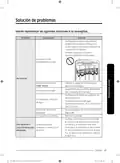
- Page 115: Solución de problemas Intente implementar las siguientes soluciones si su lavavajillas… Verifique que la puerta esté trabada y completamente cerrada. Verifique si el estante superior está unido correctamente a la boquilla del conducto. La puerta no está completamente cerrada. Consulte el código de información que aparece en la pantalla. Asegúrese de que el cable de alimentación esté correctamente conectado. Verifique que la válvula de suministro de agua esté abierta. Verifique si la presión del agua suministrada está entre 20 y 120 psi. Desactive Bloqueo de controles. Reinicie el disyuntor. Verifique que el conducto esté conectado al suministro de agua fría.
- Page 116: Solución de problemas Seleccione un ciclo de acuerdo con la cantidad de vajilla y su nivel de suciedad. El ciclo seleccionado no es el adecuado. Conecte la tubería de suministro de agua a la llave del agua caliente. La temperatura del agua es baja. La presión del agua debe estar entre 20 y 120 psi. Presión de agua baja. Use un limpiador para lavavajillas comercial. El agua es demasiado dura. Utilice un detergente fresco, de alta calidad, con producto de enjuague. No se usó detergente para lavavajillas.
- Page 117: Problema Causa posible Solución Verifique el dosificador y agregue agente de enjuague. No hay producto de enjuague. Utilice un agente de enjuague líquido. Hay una boquilla obstruida. Limpie la boquilla. Consulte la página 42. Reacomode la vajilla de manera que no interfiera con la rotación de la boquilla ni con el funcionamiento del dosificador del detergente. La vajilla no se cargó correctamente. Cargue solamente la cantidad adecuada de platos. Cargue la vajilla según las recomendaciones. (Consulte la página 18.) Cargue los artículos muy sucios en la zona de la Storm Wash + (Lavado potente+). Elimine los restos de comida de la vajilla antes de cargarla. (No realice un enjuague previo.) Los filtros están obstruidos o no están ajustados correctamente. Limpie el filtro. (Consulte la página 43.) Asegúrese de que los filtros estén bien ajustados. Verifique si la presión del agua suministrada está entre 20 y 120 psi (entre 140 y 830 kPa). Disminuya la carga de la lavavajillas y utilice un agente de enjuague para minimizar esto. Elimine las marcas de la vajilla con un limpiador de baja sensibilidad. Elimine esta suciedad con un limpiador de manchas. Use un ciclo con una temperatura más alta.
- Page 118: Solución de problemas Verifique el dosificador y agregue agente de enjuague. No hay producto de enjuague en el dosificador o no se utilizó suficiente. Use un producto líquido para el enjuague. Conecte la tubería de suministro de agua a la llave del agua caliente. Cuando la lavavajillas está funcionando, la temperatura del agua es baja. La carga inadecuada de los elementos puede afectar el secado. Cargue la vajilla según las recomendaciones. Los vasos y las copas cóncavos retienen agua. Active el Secado Auto Release™. Seleccione la opción Sanitize o use producto de enjuague.
- Page 119: Problema Causa posible Solución Limpie la lavavajillas ejecutando el ciclo Heavy (muy sucio) con la lavavajillas vacía y sin detergente. Quedó agua después de un ciclo incompleto. La manguera de desagüe está obstruida. Tiene mal olor. Con la lavavajillas vacía y sin detergente, ponga un vaso con 8 onzas de vinagre boca arriba en el estante inferior y ejecute un ciclo Heavy (muy sucio). No usa la lavavajillas cada día o deja vajilla sucia en la unidad demasiado tiempo. La lavavajillas no está nivelada. Asegúrese de que la lavavajillas esté nivelada. Hay materiales extraños en la cámara de la bomba. Comuníquese con un técnico de servicio calificado para eliminar cualquier material extraño de la cámara de la bomba.
- Page 120: Solución de problemas Presenta su estante superior doblado luego de cargar los platos. Se cargó incorrectamente la vajilla. Cargue la vajilla según las recomendaciones. Cuando la puerta se abre en el modo de secado Auto Release™, no se puede cerrar manualmente durante los 2 minutos siguientes. El panel de control muestra códigos de información para ayudarle a comprender mejor qué ocurre con la lavavajillas. Código LC: Verificación de fugas. Si se producen fugas desde la conexión de la válvula de suministro de agua, cierre la válvula y comuníquese con el instalador para que realice la reparación. Código 4C: Control de suministro de agua. Verifique si la válvula de suministro de agua está cerrada, obstruida o congelada. Código 5C: Control del drenaje. Revise si la manguera de desagüe está obstruida o doblada. Código HC: Control de calentamiento de temperatura alta. Con la lavavajillas vacía, agregue detergente y ejecute un ciclo.
- Page 121: Control del funcionamiento de la bomba. Control funcional. Apague la lavavajillas y enciéndala nuevamente. Si el problema continúa, contacte a un centro de servicio técnico de Samsung autorizado. Control de funcionamiento del lavado de zona. Comprobación de falla del calentador en seco. Apague el lavavajillas y vuelva a encenderlo. Comprobación de recalentamiento del calentador en seco. Desenchufe el cable de alimentación del lavavajillas antes de ponerse en contacto con un centro de servicio autorizado de Samsung. Para los códigos que no figuran más arriba, llame al 1-800-SAMSUNG.
- Page 122: Tabla de ciclos Ciclo Auto (Automático) Ciclo Normal Ciclo Heavy (Muy sucio) Prelavado Lavado principal Enjuague Enjuague caliente Secado Consumo de agua Tiempo del ciclo (min.)
- Page 123: Delicate Express 60’ Pre Blast Ciclo Prelavado Lavado principal Enjuague Secuencia de ciclos Consumo de agua Tiempo del ciclo
- Page 124: Tabla de ciclos Ciclo Autolimpieza Plástico Ollas y sartenes Prelavado Lavado principal Enjuague Secuencia de ciclos Enjuague caliente Secado Consumo de agua Tiempo del ciclo (min.) Opciones disponibles
- Page 125: Ciclo Cuidado del bebé Noche Prelavado Lavado principal Enjuague Secado Opciones disponibles El consumo de agua y el tiempo de lavado depende de los pasos o las opciones que agregue. Cuando falta producto de enjuague, el tiempo de lavado y la temperatura del último enjuague se pueden incrementar un poco.
- Page 126: Tabla de ciclos Serie DW80B6* Ciclo Auto (Automático) Ciclo Normal Ciclo Heavy (Muy sucio) Prelavado Lavado principal Enjuague Enjuague caliente Secado Consumo de agua Tiempo del ciclo (min.)
- Page 127: Delicate Express 60’ Pre Blast Ciclo Prelavado Lavado principal Enjuague Secuencia de ciclos Consumo de agua Tiempo del ciclo
- Page 128: Tabla de ciclos Ciclo Autolimpieza Plástico Ollas y sartenes Prelavado Lavado principal Enjuague Secuencia de ciclos Enjuague caliente Secado Consumo de agua Tiempo del ciclo (min.)
- Page 129: Ciclo Cuidado del bebé Noche Prelavado Lavado principal Enjuague Secado Opciones disponibles El consumo de agua y el tiempo de lavado depende de los pasos o las opciones que agregue. Cuando falta producto de enjuague, el tiempo de lavado y la temperatura del último enjuague se pueden incrementar un poco.
- Page 130: Ayuda al medio ambiente Esta lavavajillas se fabrica con materiales reciclables. Si decide deshacerse de ella, siga la normativa local relacionada con la eliminación de desechos. Corte el cable de alimentación para que el aparato no pueda conectarse a una fuente de alimentación. Quite la puerta para que los animales y los niños pequeños no puedan quedar atrapados dentro del electrodoméstico. No utilice cantidades de detergente superiores a las recomendadas por el fabricante del detergente. Especificaciones Modelo: DW80B7070AP / DW80B7071US / DW80B7071UG / DW80B7070US / DW80B7070UG / DW80B6061US / DW80B6061UG / DW80B6060US / DW80B6060UG Tipo: Lavavajillas integrable Alimentación: 120 V / 60 Hz CA solamente, disyuntor de 15 A Capacidad de lavado: 15 puestos Presión de agua utilizada: 20-120 psi (140-830 kPa) Uso de potencia nominal: 1100 W Dimensiones: 23 7/8 x 25 x 33 7/8 pulg. (605 x 636 x 860 mm) Peso (Sin empaque): 89.28 lb (40.5 kg)
- Page 131: El software incluido en este producto contiene software de código abierto. Encontrará información sobre la licencia de código abierto relacionada con este producto.
- Page 132: Garantía limitada para el comprador original con prueba de compra. El producto de la marca Samsung está garantizado contra defectos de fabricación de los materiales o mano de obra. Un (1) año de garantía para todas las piezas y la mano de obra. Cinco (5) años de garantía para la placa de circuito impreso, los estantes, el revestimiento de la puerta y el tambor de acero inoxidable. La garantía es válida únicamente para productos comprados y usados en los Estados Unidos. El comprador debe comunicarse con Samsung para determinar el problema y los procedimientos del servicio. El servicio técnico de la garantía solo puede ser prestado por un centro de servicio técnico autorizado de Samsung. SAMSUNG brindará servicio técnico a domicilio sin cargo dentro del territorio contiguo de Estados Unidos. Durante el periodo de garantía, el producto se reparará, reemplazará o se devolverá el importe de compra. Todas las piezas y productos reemplazados son propiedad de Samsung y deben ser devueltos.
- Page 133: La presente garantía limitada cubre defectos de fabricación de los materiales y la mano de obra encontrados durante el uso normal y doméstico de este producto. No será válida para daños que ocurran durante el envío, entrega e instalación, o aplicaciones y usos para los cuales el producto no fue destinado. La garantía no cubre daños causados por modificación o alteración no autorizada del producto. No se aceptarán productos con números de serie de fábrica originales alterados, defectuosos o que falten. La garantía excluye daños estéticos como raspones, abolladuras, muescas u otros daños al acabado del producto. No cubre daños causados por abuso, mal uso, plagas, accidentes, incendios, inundaciones u otros casos fortuitos. Los daños causados por el uso de equipos o servicios no autorizados por SAMSUNG no están cubiertos. El costo de reparación o reemplazo bajo circunstancias excluidas será responsabilidad del cliente. Las visitas de un técnico de servicio autorizado para explicar funciones, mantenimiento o instalación no están cubiertas por esta garantía. Las garantías implícitas están limitadas a un año o al periodo más corto permitido por la ley.
- Page 134: Garantía (EE. UU.) Limitación de recursos El único y exclusivo recurso es la reparación del producto, el reemplazo del producto o la devolución del importe de compra, a discreción de Samsung, conforme a esta garantía limitada. Samsung no será responsable por daños especiales, imprevistos o derivados. Algunos estados no permiten la exclusión o la limitación de daños imprevistos o derivados. Esta garantía le otorga derechos específicos, e incluso puede otorgarle otros derechos que varían de un estado a otro. Samsung no garantiza el funcionamiento ininterrumpido o sin errores del producto. Ningún aval o garantía otorgados por otra persona, compañía o corporación con respecto al presente producto revestirá carácter vinculante para Samsung.
- Page 135: Page 135
- Page 136: Page 136

FISHER PAYKEL WB60S Double Drawer Dishwasher

seasons SDW2FCMW Front Dishwasher

FISHER PAYKEL DW24U6I1 Sanitize Integrated Dishwasher

INVENTUM IVW6015A Dishwasher

kogan KABNCHTPDWA Benchtop Dishwasher

TESLA WDI661M Dishwasher

IKEA ÖSTVEDA Integrated Dishwasher

Miele G 7765 SCVi XXL Auto Dos Obsidian Dishwasher

Miele 12 698 330 Clean Touch Steel Dishwasher

BLAKESLEE UC-1000-1 Undercounter Dishwasher