
stalgast 801350V06 Dishwasher


















4.ꢁEmptying of the tank in models equipped with a drain pump
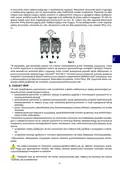
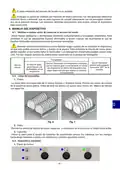
Open the door of the device, remove the overflow plug and close the door, turn the device off by
pressing the On/Off switch (fig. 9). The draining process proceeds automatically until the tank is
completely emptied of water. In order to reactivate the device, put the overflow plug back in its place,
close the door and press the On/Off switch. However, if the device will not be used any more, turn the
main switch off.
In the event the device will no longer be used, after the completion of the above and the possi-
ble initiation of a regeneration cycle, it is necessary to turn the device off by pressing the switch. The
main switch should then be turned off and the water valve should be closed.
5.ꢁEmptying of the tank in models not equipped with a drain pump
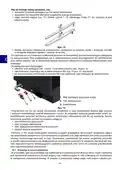
Turn the device off by pressing the switch (fig. 9), then open the door of the device, remove the over-
flow plug (fig. 8) and wait until the water is drained off completely from the tank. Put the overflow plug
back in its place, close the door of the device.
6.4.ꢀꢁElectronic elements
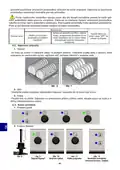
1.ꢁControl panel
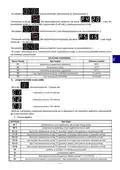
2.ꢁButton functions
• turns the device on
• Pressing the button with the door open, launches the STOP
Start button
function. You can then close the door without starting the wa-
shing cycle. To turn the function off, press the button again
• confirmation of the introduced input data, setting of the
Set button
Down arrow
Up arrow
password
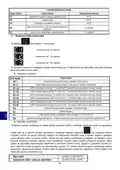
• access to data setting: P1, P2, P3, P4, P5, P6
• reduces the washing or rinsing temperature
• drain pump (optional)
• increases the washing or rinsing temperature and increases
the duration of the wash or rinse cycle. C1-90 sec. C2-120 sec.
C3-180 sec.
• turns the device off (does not disconnect the device from po-
wer supply, the complete disconnection of the device occurs
after the plug is removed from the socket or the main external
switch is turned off), stops the washing and rinsing process
Stop button
3.ꢁDisplays
display 1 – indicates the rinsing and sanitization temperature; washing cyc-
19
22
le length C1 – C2 – C3
display 2 – indicates the washing temperature
4.ꢁParameter setting
After the first pressing of
the display will show
. Use the
- 35 -

| General | Details |
|---|---|
| Name | stalgast 801350V06 Dishwasher |
| Make | stalgast |
| Language | English |
| Filetype | PDF (Download) |
| File size | 1.47 MB |
 (1 votes, average: 5.00 out of 5)
 Loading...


LG LRFLC2706S Dishwasher

FISHER PAYKEL DW60UC2X2 Built-Under Dishwasher

AEG FSE63657P Dishwasher

AEG FSE75748P Dishwasher
Haier HDW15U3S1 Built Under Dishwasher

FISHER PAYKEL DD24DDFTB9_N Double Dishwasher

IKEA AA-2412050-2-1 LAGAN Dishwasher

IKEA 905.681.49 OSTVEDA Dishwasher

FISHER PAYKEL DD24SI9 N Integrated Single Dishwasher

FISHER PAYKEL DD24DTX6HI1 Dishwasher