
AEG FSK83828P Dishwasher








16
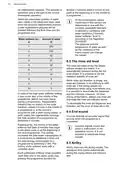
7.1 How to connect the
7.2 How to deactivate the
wireless connection
dishwasher to the network
and to the app
Press and hold simultaneously and
for 2 seconds.
To connect your dishwasher, you need:
•
Wireless network with the Internet
connection.
Mobile device connected to the
wireless network.
•
•
The indicator
is off.
The display shows Off for a few
seconds.
•
•
The appliance returns to the
programme selection.
1. Launch My AEG Kitchen app on your
mobile device and follow the
instructions in the app. When
prompted in the app, activate the
wireless connection in the
dishwasher.
2. To activate the wireless connection,
7.3 How to activate the
wireless connection
Press and hold simultaneously and
for 2 seconds.
press and hold simultaneously and
for 2 seconds.
•
•
The indicator
is on.
The display shows On for a few
seconds.
•
•
The indicator
flashes.
The display shows On for a few
seconds and then AP.
•
The appliance returns to the
programme selection.
•
All buttons are inactive except for
the on/off button.
Refer to "Daily use" to activate the
remote start.
3. When prompted, enter the home
network credentials in My AEG
Kitchen app.
7.4 How to reset the network
credentials
If you want to connect to a different
wireless network or update the
credentials of the current network, reset
the network credentials.
If the credentials are not
entered, the dishwasher
cancels the procedure after
some time and returns to the
programme selection.
Press and hold simultaneously and
for about 5 seconds.
If the connection is successful, the
indicator
is steady and the
•
The display shows Off and then
letters AP are off. The appliance returns
to the programme selection. Refer to
"Daily use" to activate the remote start.
--- for a few seconds.
•
•
The indicator
is off.
The appliance returns to the
programme selection.
If the connection is
unsuccessful or the display
shows upd, refer to
"Troubleshooting".
Connect the dishwasher to the network
and to the app to enter new network
credentials. Refer to the instructions
provided earlier in this chapter.
If you want to cancel the procedure,
switch the appliance off and on.
8. BEFORE FIRST USE
1. Make sure that the current level of
the water softener agrees with the
hardness of the water supply. If
not, adjust the level of the water
softener.
3. Fill the rinse aid dispenser.
4. Open the water tap.
5. Start the programme Quick to
remove any residuals from the
manufacturing process. Do not use
2. Fill the salt container.

| General | Details |
|---|---|
| Name | AEG FSK83828P Dishwasher |
| Make | AEG |
| Language | English |
| Filetype | PDF (Download) |
| File size | 1.92 MB |
 (1 votes, average: 5.00 out of 5)
 Loading...

AEG FSK76748P Dishwasher

AEG FSK53617Za Dishwasher

AEG FSK74747P Dishwasher

AEG FSE73507P Dishwasher

AEG GS60AIM Dishwasher

AEG FSB73427Z Dishwasher

AEG FSE74737P Quickselect Dishwasher

AEG FFB73727PM Dishwasher

AEG F8642FI Tall Tub Dishwasher

AEG FFE83800PM Dishwasher


beko BDI1420 Dishwasher

BOSCH SMS6ITI00I Dishwasher

CMA DISHMACHINES CMA-180 Dishwasher

BOSCH SHE4AEM6BK 100 Series Plus Recessed Handle Dishwasher

Whirlpool W10903644A Dishwasher

FISHER PAYKEL DD24DCHTX9 N Dishwasher

GAGGENAU 11029813 Fully- Dishwasher

SHARP SDW6767HS Dishwasher

BOSCH SMS2HVW67G Standing Dishwasher

BLAUPUNKT 5VF4X00BXB Dishwasher