
AEG FSK83828P Dishwasher


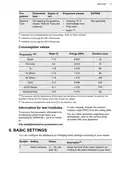






ENGLISH
19
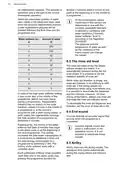
9.2 Using the detergent
How to activate the remote
start
A
B
Make sure that the indicator
is
on and your dishwasher is added in My
AEG Kitchen app. If not, refer to
"Wireless connection".
1. Press
.
•
The light related to the button is
on.
•
The display shows APP.
2. Close the appliance door.
3. Use My AEG Kitchen app to remotely
operate the appliance.
C
Opening the door
CAUTION!
deactivates the remote start.
Refer to the information
provided further in this
chapter.
Only use detergent
specifically designed for
dishwashers.
1. Press the release button (A) to open
the lid (C).
How to deactivate the remote
start
2. Put the detergent (gel, powder or
tablets) in the compartment (B).
3. If the programme has a prewash
phase, put a small quantity of
detergent on the inner part of the
appliance door.
Press until the display shows 0h.
•
The light related to the button is
off.
•
The appliance returns to the
programme selection.
4. Close the lid. Make sure that the lid
locks into position.
For information about the
detergent dosage, refer to
the manufacturer's
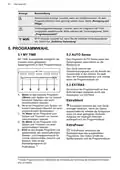
9.4 How to select and start a
programme using MY TIME
selection bar
instructions on the
packaging of the product.
Usually, 20 - 25 ml of gel
detergent is adequate for
washing a load with normal
soil.
1. Slide your finger across MY TIME
selection bar to choose a suitable
programme.
•
The light related to the selected
programme is on.
•
The ECOMETER indicates the
level of energy and water
consumption.
The upper ends of the two
vertical ribs inside the
compartment (B) indicate
the maximum level for filling
the dispenser with gel (max.
30ml).
•
The display shows the
programme duration.
2. Activate applicable EXTRAS if
desired.
3. Close the appliance door to start the
programme.
9.3 Remote start
Activate this function to remotely control
and monitor your dishwasher in My AEG
Kitchen app.
9.5 How to activate EXTRAS
1. Select a programme using MY TIME
selection bar.

| General | Details |
|---|---|
| Name | AEG FSK83828P Dishwasher |
| Make | AEG |
| Language | English |
| Filetype | PDF (Download) |
| File size | 1.92 MB |
 (1 votes, average: 5.00 out of 5)
 Loading...

AEG FSK76748P Dishwasher

AEG FSK53617Za Dishwasher

AEG FSK74747P Dishwasher

AEG FSE73507P Dishwasher

AEG GS60AIM Dishwasher

AEG FSB73427Z Dishwasher

AEG FSE74737P Quickselect Dishwasher

AEG FFB73727PM Dishwasher

AEG F8642FI Tall Tub Dishwasher

AEG FFE83800PM Dishwasher


Miele PFD 402 Fresh Water Dishwasher

FISHER and PAYKEL DW60UZ6B Built Under Dishwasher

SHARP SDW6888JS Smart Dishwasher

FISHER and PAYKEL DW24UT2I2 Sanitize Integrated Dishwasher

smeg DI13M2 Dishwasher

FARBERWARE FDW05ASBWHA Complete Dishwasher

aspes AJ14600BD Dishwasher

Fisher and Paykel DD60D2NX9 Built-Under Dishwasher

BOSCH SMI2HTB02G Dishwasher

HOBART S.48820 Commercial Dishwasher