
Bauknecht BFP 5O41 PLT X Dishwasher


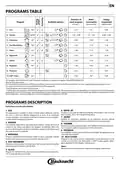








OPTIONS AND FUNCTIONS
OPTIONS can be selected directly by pressing the corresponding button (see CONTROL PANEL).
If an option is not compatible with the selected program see PROGRAMS TABLE, the corresponding LED flashes rapidly 3 times
and beeps will sound. The option will not be enabled.
MULTIZONE
DELAY
If there are not many dishes to be washed, a half loading may
be used in order to save water, electricity and detergent.
Select the program and then press the MULTIZONE button:
the indicator over the button lights up and the symbol of the
chosen rack will appear on the display. By default the appliance
washes dishes in all racks.
The start of the program may be delayed for a period of time
between 0:30 and 24 hours.
1. Select the program and any desired options. Press the
DELAY button (repeatedly) to delay the start of the program.
Adjustable from 0:30 to 24 hours. With each press of the
button, the delay start increases by: 0:30 if selection below
4 hours, 1:00 if selection is below 12 hours, 4 hours if
selection is above 12 hours. If 24 hours reached, and the
button is pressed, the delayed start is deactivated.
2. Press the START/PAUSE button: the timer will begincounting
down;
3. Once this time has elapsed, the indicator light switches off
and the program begins automatically.
If at the time of the countdown the START/PAUSE button is
pressed again the DELAY option is cancelled and the selected
program starts automatically.
To wash only the specific rack, press this button repeatedly:
shown on the display (only lower rack)
shown on the display (only upper rack)
shown on the display (option is OFF and the appliance will
wash dishes in all racks).
Remember to load the upper or lower rack only, and to
reduce the amount of detergent accordingly.
If upper rack is removed, please apply detergent directly
to tub instead of detergent dispenser.
The DELAY function cannot be set once a program has
been started.
TURBO
This option can be used to reduce the duration of the main
programs while maintaining the same washing and drying
performance levels.
After selecting the program, press the TURBO button and the
indicator light will switch on. To deselect the option, press the
same button again.
DRAIN OUT
To stop and cancel the active cycle, the Drain Out function
can be used.
A long press of START/PAUSE button, will activate the DRAIN
OUT function.The active program will be stopped and the water
in the dishwasher will be drained out.
KEYLOCK
A long press (for 3 seconds) of TURBO button, will activate
the KEYLOCK function. The KEYLOCK function will block the
control panel except the ON/OFF button.
To deactivate the KEYLOCK, long press again.
ActiveDry
ActiveDry is a convection drying system which automatically opens
the door during/after drying phase to ensure exceptional drying
performance every day. Door opens at the temperature that is safe to
your kitchen furniture, thus door will not be opened when the option
of TURBO is on.
As additional steam protection, special designed protection foil is added
together with the dishwasher (depending on the model type - can be
the need to buy it). To see how to mount protection foil please refer to
(INSTALLATION GUIDE).
WATER TAP CLOSED – Alarm
Flashes when there is no inlet water or water tap is closed.
ActiveDry functionality could be disabled by the user as follows:
• To DISABLE: Switch On, then switch Off. Keep the P button pressed for
5 sec., at the end of 5 sec the dishwasher plays a short beep. Switch
On the machine, the display shows„oOF”.
• To ENABLE: Switch On, then switch Off the machine. Keep the P button
pressed for 5 sec., at the end of 5 sec the dishwasher plays a short beep.
Switch On the machine, the display shows„oOn”.
EXTRA DRY
To improve the drying of the dishes, after selecting the
program, press the EXTRA DRY button and the indicator light
comes on.
A higher temperature during the final rinse and an extended
drying phase allow for improving drying. To deselect the
option, press the same button again. The EXTRA DRY option
results in the lengthening of the wash cycle.
TABLET (Tab)
This setting allows you to optimize the performance of the
program according to the type of detergent used.
Press the TABLET button (the indicator light will light up, the
corresponding symbol will light up) if you use combined deter-
gents in tablet form (rinse aid, salt and detergent in 1 dose).
If you use powder or liquid detergent, this option should be off.
4

| General | Details |
|---|---|
| Name | Bauknecht BFP 5O41 PLT X Dishwasher |
| Make | Bauknecht |
| Language | English |
| Filetype | PDF (Download) |
| File size | 23.1 MB |
 (1 votes, average: 5.00 out of 5)
 Loading...

Bauknecht B7I HF60 Dishwasher

Bauknecht BK6UC11BS7A0X Dishwasher

BAUKNECHT 295f471f27d55b Dishwasher

Bauknecht Dishwasher

Bauknecht 3O35 PF Dishwasher

Bauknecht AUTBFC3C26 Dishwasher

BAUKNECHT B2I HD526 A Dishwasher


BOSCH SHX88CL5N Dishwasher

ZLINE DWV-18 Tallac Dishwasher

SIEMENS SN25IW00TI Free Standing Dishwasher

BOSCH SPV6EMX05E Dishwasher

Smeg DI362DQ Dishwasher

TOMADO TDW5501W Tabletop Dishwasher

BOSCH SHV53CM3N 300 Series Full Dishwasher

FISHER PAYKEL DD24SCTB9N Dishwasher

IKEA DISKAD Dishwasher

Monsher MD 4502 Dishwasher